
XINFUTE RM-L1098+12
XINFUTE RM-L1098+12 Universal TV Remote Control User Manual
Model: RM-L1098+12
Introduction
This manual provides instructions for the XINFUTE RM-L1098+12 Universal TV Remote Control. This remote is designed to operate a wide range of television brands directly, offering a convenient replacement or secondary control unit. Please read these instructions carefully before use to ensure proper setup and operation.
Package Contents
- 1 x XINFUTE RM-L1098+12 Universal TV Remote Control
- (Batteries are not included)
Setup
1. Battery Installation
The remote control requires two AAA batteries (not included).
- Locate the battery compartment on the back of the remote control.
- Slide the battery compartment cover downwards to open it.
- Insert two AAA batteries, ensuring the positive (+) and negative (-) terminals match the markings inside the compartment.
- Slide the battery compartment cover back into place until it clicks securely.

Image: Rear view of the remote control with the battery cover removed, illustrating the correct placement for two AAA batteries.

Image: Front and back views of the XINFUTE RM-L1098+12 remote control, showing the button layout and the closed battery compartment.
2. Programming the Remote (Brand Express Method)
This remote control uses a "Brand Express" method for quick setup with most major TV brands.
- Turn on your TV set manually. Ensure the TV is powered on and not in standby mode.
- Press and hold the "Brand" key (e.g., SHARP, SONY, SAMSUNG, LG, TCL, etc.) corresponding to your TV's brand for approximately 6 seconds. The remote will begin an automatic search for the correct code.
- Observe your TV screen. When the "VOL+" mark appears on your TV screen, immediately release the "Brand" button.
- Test the remote. Check if the remote functions correctly (e.g., try changing the volume or channel).
- If the remote works, the setting is complete. If it does not work, repeat steps 2-4.

Image: Front view of the remote control, displaying the layout of all buttons, including dedicated brand keys for programming.
Operating the Remote Control
Once programmed, the remote control functions similarly to your original TV remote. Below are common button functions:
- Power Button (●): Turns the TV on or off.
- Number Buttons (0-9): Directly select channels.
- VOL +/-: Adjusts the volume up or down.
- CH +/-: Changes channels up or down.
- MUTE: Mutes or unmutes the TV sound.
- MENU: Accesses the TV's main menu.
- GUIDE: Displays the electronic program guide (if supported by TV).
- INPUT/SOURCE: Selects video input sources (HDMI, AV, etc.).
- Navigation Pad (Up, Down, Left, Right, ENTER): Navigates through menus and confirms selections.
- RETURN: Goes back to the previous screen or menu.
- EXIT: Exits the current menu or function.
- Other Function Buttons: Buttons like WIDE, FREEZE, SCAN, CANCEL, DMP, SUBPAGE, TCL, OPENBOX, SYS, SIZE, TEXT, 3D, HOLD, EPG, PIP, V.II, MIX are for specific TV functions and may vary in compatibility depending on your TV model.
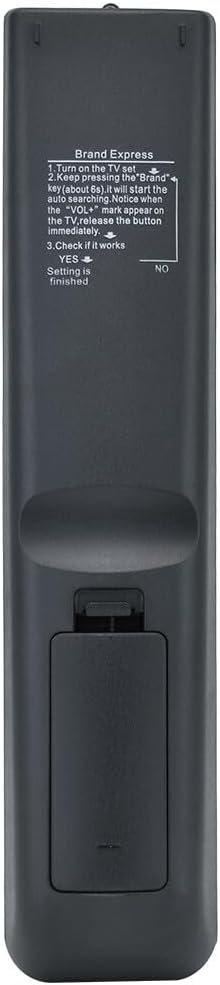
Image: An angled view of the remote control, providing a clear perspective of the button arrangement and labels.
Maintenance
- Cleaning: Use a soft, dry cloth to clean the remote control. Do not use liquid cleaners or abrasive materials.
- Battery Replacement: Replace batteries when the remote's performance degrades or it stops responding. Always replace both batteries at the same time with new ones of the same type (AAA).
- Storage: If the remote will not be used for an extended period, remove the batteries to prevent leakage and potential damage.
- Avoid Exposure: Keep the remote away from direct sunlight, high temperatures, and moisture.
Troubleshooting
- Remote is not working after programming:
- Ensure the TV is turned on manually before programming.
- Repeat the "Brand Express" programming steps carefully. Ensure you release the brand button immediately when "VOL+" appears on the TV.
- Check if the batteries are inserted correctly with the correct polarity (+/-).
- Replace old batteries with new ones.
- Ensure there are no obstructions between the remote and the TV's infrared receiver.
- Some buttons do not work:
- Not all functions on a universal remote may be compatible with every TV model. This is normal for universal remotes.
- Try reprogramming the remote using the "Brand Express" method again.
- Remote LED indicator does not light up:
- Check battery installation and replace batteries if necessary.
Specifications
| Model Number | RM-L1098+12 |
| Brand | XINFUTE |
| Compatible Devices | Television (Universal compatibility for most models including Sony, Samsung, LG, TCL, Sharp, etc.) |
| Power Source | 2 x AAA Batteries (not included) |
| Material | ABS Material |
| Product Dimensions | 6 x 3 x 1 inches |
| Item Weight | 2.82 ounces |
| Special Feature | Ergonomic design |
Warranty and Support
This product comes with a one-year warranty from the date of purchase. If you encounter any issues or are not satisfied with your purchase, please contact the seller within 24 hours of receipt. All goods are inspected before shipment to ensure quality.
For further assistance, please refer to the seller's contact information provided at the point of purchase or visit the XINFUTE Store on Amazon.
Ask a question about this manual
Ask about setup, troubleshooting, compatibility, parts, safety, or missing instructions. Manuals+ will review the question and use this page’s manual context to help answer it.