
1. Introduction
This manual provides essential information for the proper use and maintenance of your TAOPON Smartwatch. Please read it thoroughly before using the device to ensure optimal performance and longevity.

Figure 1: TAOPON Smartwatch displaying various health metrics and time on its screen.
2. What's in the Box
- 1 x TAOPON Smartwatch
- 1 x Watch Strap
- 1 x Charging Cable
- 1 x User Manual (including French language section)

Figure 2: Package contents of the TAOPON Smartwatch, showing the watch, strap, magnetic charging cable, and user manual.
3. Setup
3.1 Initial Charging
Before first use, fully charge your smartwatch. Connect the magnetic charging cable to the charging points on the back of the watch and plug the USB end into a standard USB power adapter (not included).
3.2 App Installation and Pairing
- Scan the QR code in the manual or search for the companion app (e.g., 'H Band' as mentioned in reviews) on your smartphone's app store (Android 5.0+ or iOS 10.0+ required).
- Install and open the app.
- Enable Bluetooth on your smartphone.
- Follow the in-app instructions to pair your smartwatch. Ensure the watch is sufficiently charged and within Bluetooth range.
3.3 Basic Settings
After pairing, you can customize settings such as time format, units of measurement, and personal profile information within the app.

Figure 3: The smartwatch is compatible with Android 5.0 and above, and iOS 10.0 and above, supporting Bluetooth 5.3.
4. Operating Instructions
4.1 Navigation
- Touchscreen: Swipe left, right, up, or down to navigate through menus and functions. Tap to select.
- Rotary Crown: Rotate the crown to scroll through interfaces. Press once to return to the home page or function page.
- Side Button: Long press to power on/off the device. A dedicated button is available for ECG measurements.

Figure 4: The rotary crown allows for quick scrolling through the watch interface.

Figure 5: Place your finger on the dedicated side button to initiate an ECG measurement.
4.2 Health Monitoring Features
The smartwatch supports various health monitoring functions. For accurate readings, ensure the watch is worn snugly on your wrist.
- ECG, PPG, HRV: Monitor heart electrical activity, pulse, and heart rate variability.
- Blood Components & Uric Acid: Provides indicative measurements of certain blood parameters.
- Heart Rate & Blood Oxygen (SpO2): Continuous or on-demand measurement of heart rate and blood oxygen saturation.
- Blood Pressure: Provides an estimate of blood pressure.
- Stress & Sleep Tracking: Monitors stress levels and analyzes sleep patterns (deep sleep, light sleep, wake time).
- Body Temperature: Measures skin temperature.
- Breathing Training: Guided breathing exercises to help reduce stress.
Note: Health data provided by this device is for reference only and should not be used for medical diagnosis or treatment. Consult a medical professional for any health concerns.

Figure 6: The smartwatch offers a comprehensive suite of health tracking features.

Figure 7: ECG and HRV measurements can be taken easily, providing insights into heart health.

Figure 8: Monitor your heart rate and blood pressure to stay informed about your physical condition.

Figure 9: Track blood composition and blood oxygen levels for general health awareness.

Figure 10: The app analyzes sleep cycles and provides stress monitoring and breathing training to improve rest and reduce anxiety.

Figure 11: New functionalities include temperature and Micro-PE measurements. These data are for indicative purposes only and not for medical use.
4.3 Communication Features
- Bluetooth Calls: Make and receive calls directly from your watch using the built-in speaker and microphone. Access frequent contacts, call logs, and a dial pad.
- Notifications: Receive real-time alerts for SMS, Facebook, Twitter, WhatsApp, and other apps. Note: Message content is not displayed, and replies are not supported directly from the watch.
- Voice Assistant: Connect to your smartphone's voice assistant (e.g., Siri) to ask questions, check weather, set alarms, etc.
- SOS Alert Mode: After adding emergency contacts in the mobile application, long-press the circular button and slide to activate the SOS function.

Figure 12: Make and receive Bluetooth calls directly from your smartwatch.

Figure 13: Receive real-time notifications from your favorite messaging and social media applications.

Figure 14: Access your smartphone's voice assistant for hands-free commands.

Figure 15: Activate SOS alert mode to quickly contact emergency numbers.
4.4 Sports Modes
The smartwatch features over 130 sports modes to track various activities, including walking, running, cycling, and more. It records real-time exercise data such as calories burned, steps, and distance.

Figure 16: Choose from over 130 sports modes to track your workouts and monitor progress.
4.5 Customization
- Watch Faces: Select from over 160 pre-installed watch faces or create custom watch faces using your own photos via the app.

Figure 17: Personalize your smartwatch with over 160 watch faces or create your own.
4.6 Other Features
The smartwatch includes additional functionalities for daily convenience:
- Music Control: Play, pause, skip tracks, and adjust volume for music playing on your connected smartphone.
- Camera Control: Remotely trigger your smartphone's camera shutter.
- Alarm Clock: Set multiple alarms.
- Weather Forecast: View current weather conditions.
- Timer & Stopwatch: Use for various timing needs.
- Find Phone: Locate your paired smartphone.
- Flashlight: Use the screen as a light source.
- Calculator & Games: Basic utility and entertainment functions.
- Sedentary Reminder & Drinking Water Reminder: Prompts to encourage activity and hydration.

Figure 18: Control music playback on your smartphone directly from the watch.

Figure 19: Remotely control your smartphone's camera for easy photo capture.

Figure 20: A visual representation of the diverse functions available on the smartwatch.
5. Maintenance
5.1 Cleaning
Regularly clean your smartwatch and strap with a soft, dry cloth. If necessary, use a slightly damp cloth and mild soap, then rinse and dry thoroughly. Avoid harsh chemicals or abrasive materials.
5.2 Water Resistance (IP67)
The smartwatch is IP67 waterproof, meaning it is resistant to daily water exposure such as hand washing, rain, and sweating during exercise. It is not suitable for swimming, showering, or prolonged submersion in water.

Figure 21: The smartwatch features IP67 water resistance, suitable for daily use like hand washing and rain, but not for swimming or prolonged water immersion.
5.3 Battery Care
To prolong battery life, avoid extreme temperatures and do not allow the battery to fully discharge frequently. Charge the device regularly.
6. Troubleshooting
- Device not turning on: Ensure the watch is fully charged.
- Cannot pair with smartphone: Make sure Bluetooth is enabled on your phone, the app is open, and the watch is within range. Restart both devices if necessary.
- Inaccurate health readings: Ensure the watch is worn snugly on your wrist, not too tight or too loose. Avoid excessive movement during measurements.
- Notifications not received: Check app permissions on your smartphone to ensure the app has access to notifications. Verify Bluetooth connection.
- Touchscreen unresponsive: Try restarting the watch. If the issue persists, contact customer support.
7. Specifications
| Feature | Specification |
|---|---|
| Brand | TAOPON |
| Model Number | Montre Connectée Homme |
| Color | Black |
| Operating System | Proprietary (compatible with iOS, Android) |
| Screen Size | 1.97 Inches |
| Screen Type | AMOLED Touchscreen |
| Resolution | 390 * 450 HD |
| Connectivity | Bluetooth 5.3 |
| Compatible Devices | Android 5.0+ / iOS 10.0+ |
| Battery Type | Lithium-ion |
| Battery Capacity | 325mAh |
| Water Resistance Level | IP67 (Daily waterproof, not for swimming) |
| Special Features | Health monitoring (ECG, PPG, HRV, blood components, BMI, micro physical exam, heart rate, blood oxygen, blood pressure, stress, sleep, body temperature), breathing training, Bluetooth calls, message reminders, voice assistant, 130+ sports modes, 160+ watch faces, DIY watch faces, music control, camera control, timer, stopwatch, alarm, flashlight, calculator, games, weather forecast, sedentary reminder, drinking water reminder. |

Figure 22: The 1.97-inch AMOLED display offers a broad view and high resolution for clear visuals.
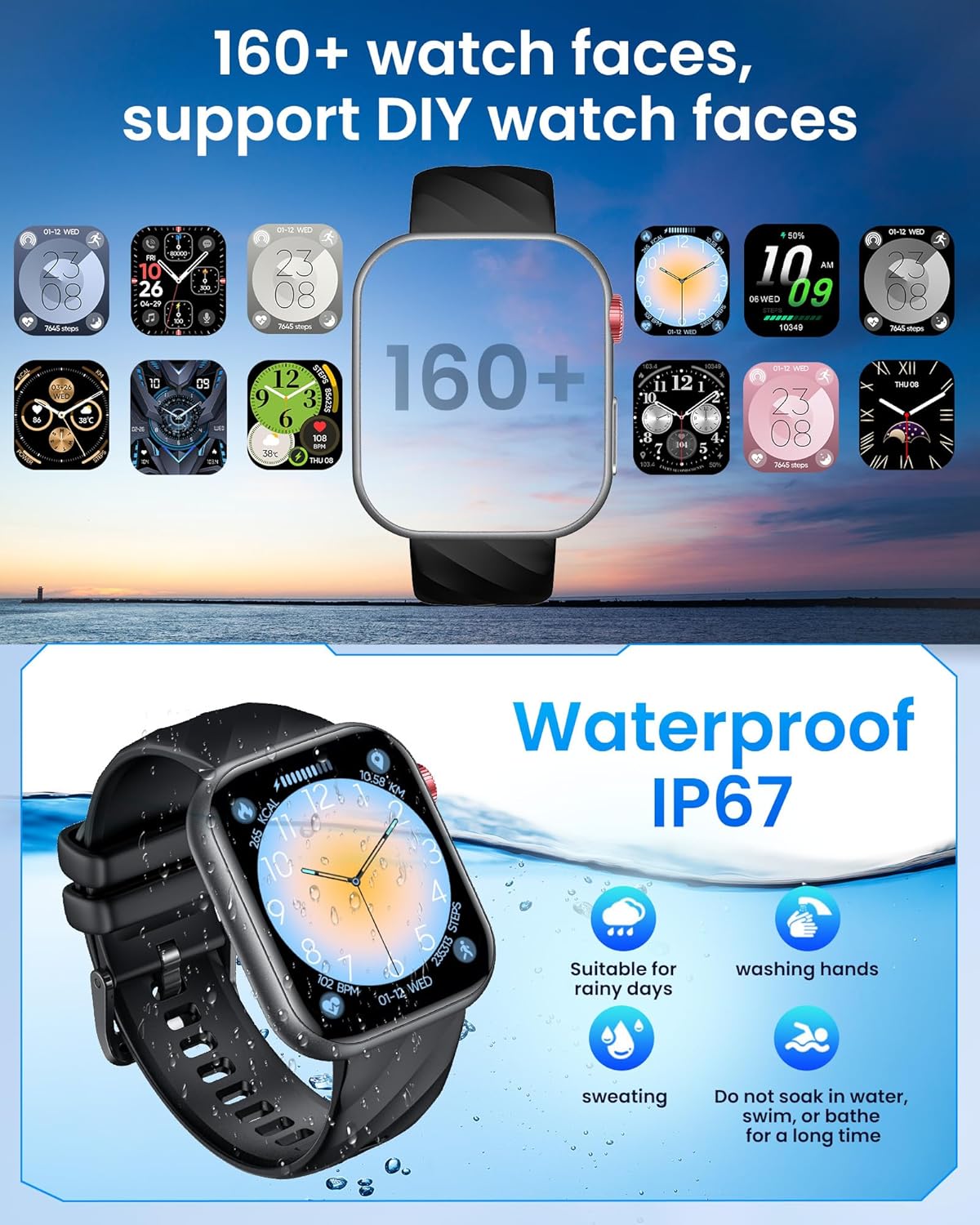
Figure 23: The watch supports over 160 watch faces and is IP67 waterproof.
8. Warranty and Support
8.1 Manufacturer's Warranty
This product comes with a 1-year manufacturer's warranty. Please retain your proof of purchase for warranty claims.
8.2 Customer Support
For technical assistance, troubleshooting, or warranty inquiries, please refer to the contact information provided on the TAOPON official website or the retailer's support channels.


