
1. Introduction
The TIMMKOO SR1 AI Voice Recorder is a versatile digital recording device designed for high-quality audio capture and advanced AI-powered text processing. It offers features such as offline transcription, online summarization, mind mapping, and translation, all without subscription requirements. With its dual high-precision microphones, noise reduction algorithms, and extensive storage capacity, the SR1 is suitable for various applications including lectures, meetings, and personal notes. This manual provides detailed instructions for setting up, operating, and maintaining your device.
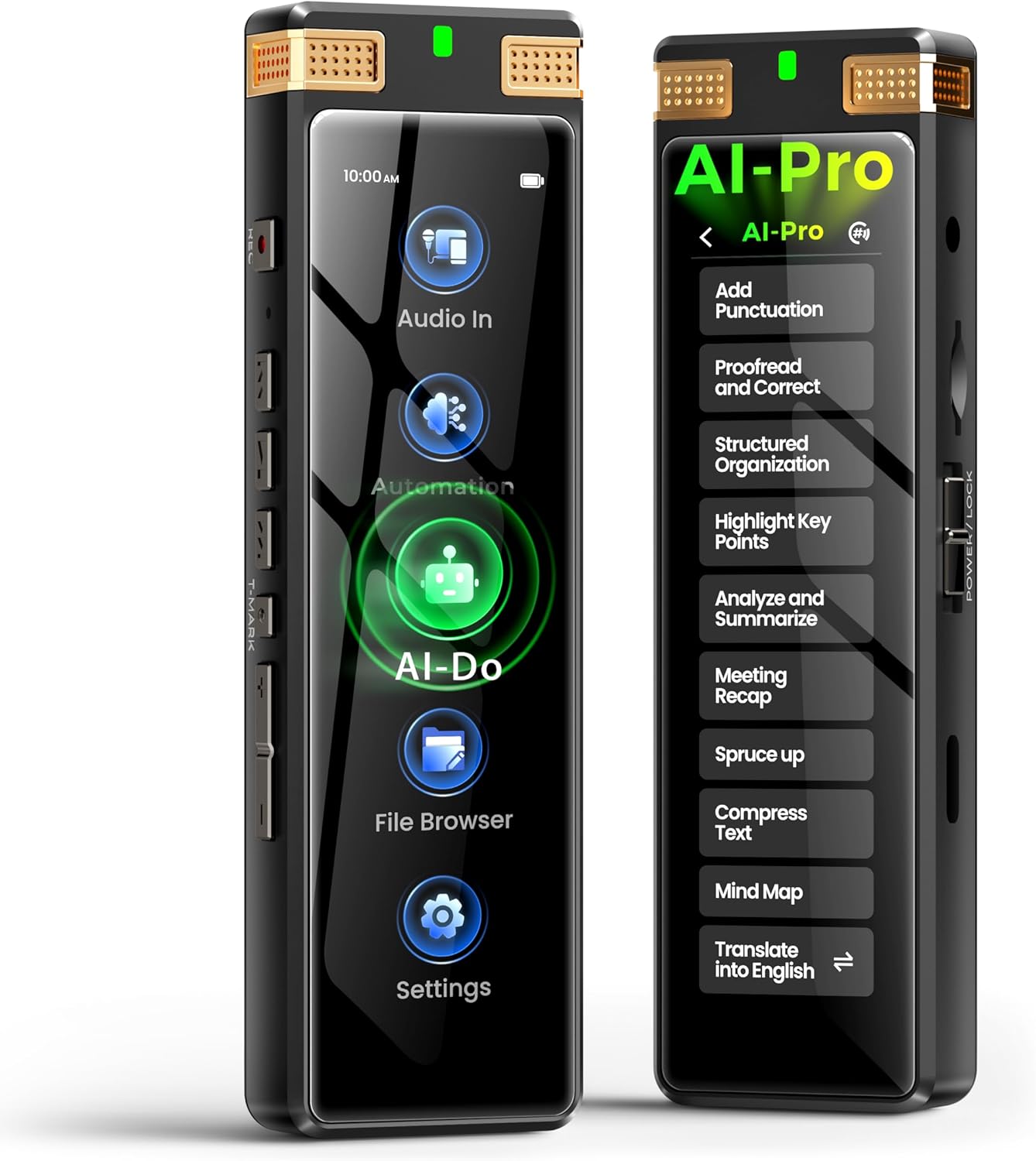
Figure 1: Front view of the TIMMKOO SR1 AI Voice Recorder.
2. Product Overview
2.1 Device Layout and Controls
The SR1 features a 3.7-inch high-definition touchscreen for intuitive navigation, complemented by traditional physical buttons for quick access to essential functions. The device includes dual high-precision microphones for superior audio input.

Figure 2: TIMMKOO SR1 with both touchscreen and physical button controls highlighted.
2.2 Connectivity
The SR1 supports external microphones and Line-in audio input via standard ports, enhancing recording flexibility. It connects to a personal computer via USB Type-C for data transfer.

Figure 3: Multi-source audio input options for the SR1, including external microphone and AUX cable line-in.
3. Setup
3.1 Initial Charging
Before first use, fully charge the TIMMKOO SR1 using the provided USB Type-C cable. Connect the cable to the device and a compatible power source (e.g., computer USB port or USB wall adapter). The device features a built-in 1100mAh lithium-ion battery, providing up to 30 hours of continuous recording on a full charge.
3.2 Power On/Off
- To Power On: Press and hold the Power button until the screen illuminates.
- To Power Off: Press and hold the Power button, then follow the on-screen prompts to shut down the device.
4. Operating Instructions
4.1 Recording Modes
The SR1 offers several preset recording modes optimized for different environments:
- STT Boost: Optimized for speech-to-text conversion, reducing ambient noise and enhancing speech clarity for accurate AI transcription. Recommended for lectures, meetings, and interviews.
- Vocal Boost: Provides professional voice isolation by aggressively suppressing environmental noise (up to 30dB reduction) and focusing on human voice frequencies. Recommended for podcasts, voice memos, and noisy environments.
- Hi-Fi: Captures full-spectrum sound (20Hz-40KHz) without filtering, preserving true-to-source audio. Ideal for music recording, ambient sampling, and ASMR.

Figure 4: Visual representation of different recording modes and their typical use cases.
4.2 Automated Recording
The device supports two automated recording modes for hands-free operation:
- Scheduled Recording: Set a specific time for the recorder to start and stop recording automatically.
- Voice-Activated Auto Recording: The device begins recording when sound is detected and pauses when silence occurs, conserving storage and battery.
Figure 5: The SR1 demonstrating unattended and voice-activated capture.
4.3 AI-Powered Features
The TIMMKOO SR1 integrates advanced AI technology for various text processing tasks:
- Offline Transcription: Convert speech to text directly on the device. Choose between Real-Time Trans (faster, lower power) or Post-Recording Trans (higher accuracy, broader language support).
- Online AI Services: Connect to Wi-Fi to access online AI models for advanced functions such as proofreading, correction, structured organization, analysis, summarization, mind mapping, meeting recaps, and translation into 92 languages. These services do not require audio file uploads, ensuring privacy.

Figure 6: The SR1 displaying options for offline transcription.
How to achieve the most accurate STT transcription:
Video 1: This video demonstrates the steps to achieve the most accurate speech-to-text (STT) transcription on the TIMMKOO SR1 AI Voice Recorder. It shows how to select the STT Boost mode, disable real-time transcription during recording, save the recording, and then long-press the saved recording to select "Accurate Re-STT" for post-processing. The video also illustrates selecting the correct language for transcription and waiting for the process to complete.
4.4 File Management and Export
The SR1 allows you to view and export your recordings and generated documents. The exclusive backup function automatically creates a duplicate of your recordings during saving, protecting important audio files.
How to view and export documents generated by STT and AI-Do:
Video 2: This video illustrates how to view and export documents generated by the Speech-to-Text (STT) and AI-Do functions on the TIMMKOO SR1 AI Voice Recorder. It guides the user through navigating the file browser on the device to locate saved recordings and their associated text files. The video then demonstrates connecting the device to a computer via USB and selecting MTP mode to transfer these files for external viewing and storage.
5. Maintenance
- Cleaning: Use a soft, dry cloth to clean the device. Avoid abrasive materials or harsh chemicals.
- Storage: Store the device in a cool, dry place away from direct sunlight, extreme temperatures, and high humidity.
- Battery Care: To prolong battery life, avoid fully discharging the device frequently. Charge it regularly, even if not in use for extended periods.
- Software Updates: Periodically check the manufacturer's website for firmware updates to ensure optimal performance and access to new features.
6. Troubleshooting
- Device not powering on: Ensure the device is fully charged. If the issue persists, try a different charging cable or adapter.
- Poor recording quality: Check the selected recording mode (e.g., use STT Boost for speech, Hi-Fi for music). Ensure microphones are not obstructed. Consider using an external microphone in noisy environments.
- Inaccurate transcription: For offline transcription, ensure clear speech and minimal background noise. For post-recording transcription, select the correct audio language. Online AI services generally offer higher accuracy.
- Cannot connect to computer: Ensure the USB cable is securely connected. On the device, select 'MTP mode' when prompted for USB connection type.
- Screen unresponsive: Try restarting the device. If unresponsive, press and hold the power button for an extended period (e.g., 10-15 seconds) for a forced restart.
7. Specifications
| Feature | Specification |
|---|---|
| Brand | TIMMKOO |
| Model | SR1 |
| Memory Storage Capacity | 136 GB (8GB internal + 128GB SD card) |
| Hardware Interface | USB Type C |
| Compatible Devices | Personal Computer |
| Screen Size | 3.7 Inches |
| Microphone Format | Built-In |
| Battery Average Life | 30 Hours |
| Battery Cell Composition | Lithium Ion |
| Headphones Jack | 3.5 millimeters |
8. Warranty and Support
For warranty information, technical support, or service inquiries, please refer to the official TIMMKOO website or contact their customer service department. Keep your purchase receipt as proof of purchase for warranty claims.
