
Introduction
This manual provides detailed instructions for the installation, operation, and maintenance of your SIXWIN 1 DIN Android 15 Car Radio. Please read this manual thoroughly before using the product to ensure proper function and safety. Keep this manual for future reference.
Product Overview
The SIXWIN 1 DIN Android 15 Car Radio features a 7-inch manual retractable touchscreen, 4GB RAM, and 64GB ROM for smooth operation and ample storage. It supports Wireless CarPlay, Android Auto, and Mirror Link for seamless smartphone integration. Key features include built-in WiFi, GPS navigation, Bluetooth 5.0, FM/RDS radio, a 32-band equalizer, and various input/output options.
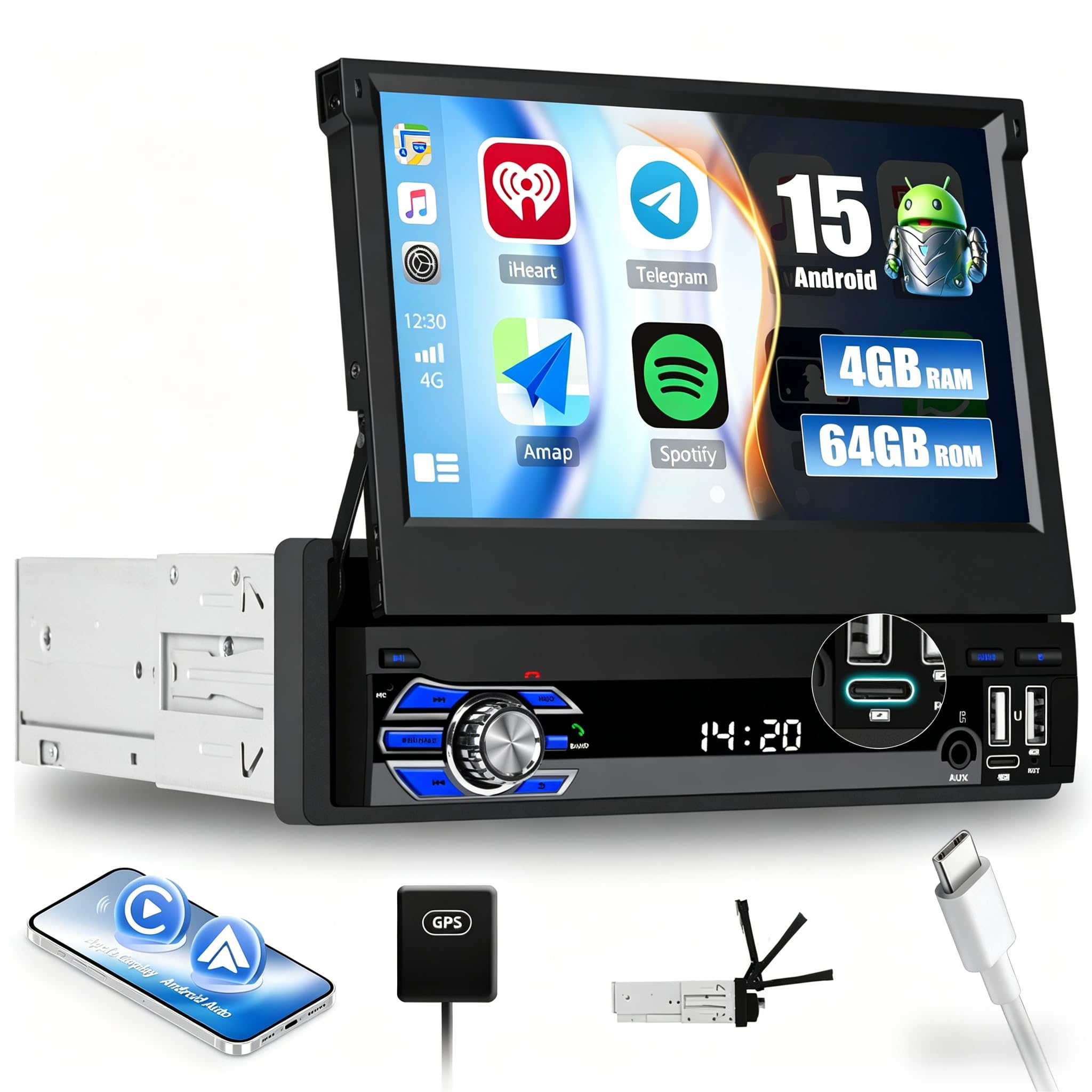
Image: Front view of the SIXWIN 1 DIN Android 15 Car Radio with its 7-inch retractable touchscreen extended, displaying a user interface.
What's in the Box
Verify that all components are present in the package:
- 1 x SIXWIN Car Radio Unit
- 1 x Power Cable + 1 x USB Cable
- 1 x GPS Antenna + 1 x Rear Camera Cable
- 1 x Radio Antenna + 1 x RCA Cable
- 1 x User Manual

Image: A diagram showing the dimensions of the car radio and a layout of all included accessories: power cable, GPS antenna, mounting bracket, antenna head, and user manual.
Setup and Installation
Professional installation is recommended for car audio systems. Ensure the vehicle's power is disconnected before beginning installation. Refer to the wiring diagram provided in the included manual for specific connections.
Manual Retractable Screen
The 7-inch screen is manually retractable. Gently pull or push the screen to extend or retract it. Note that the screen angle is not adjustable.

Image: A visual representation of the car radio installed in a dashboard, showing the screen extended. Below, a diagram illustrates the manual retraction mechanism of the screen.
Operating Instructions
Wireless CarPlay & Android Auto
Connect your smartphone wirelessly to access navigation, make calls, send messages, and enjoy music through the car radio's interface. Use voice commands for a safer driving experience.
Mirror Link Function
Connect your iOS or Android smartphone via USB cable or WiFi to mirror its screen content onto the car radio display. This allows access to apps like Google Maps, Spotify, YouTube, and more directly from the car radio. Supports Google Assistant voice control.

Image: Illustrations demonstrating wireless CarPlay and Android Auto interfaces, along with the Mirror Link function showing a smartphone screen mirrored on the car radio.
Navigation (GPS)
The built-in GPS module supports both online and offline maps. Connect to WiFi for real-time traffic information and voice guidance. Pre-installed maps are available for your region.
Connectivity
WiFi Connection
Connect to the internet via a WiFi hotspot or tethering from your smartphone. This enables online browsing, streaming, and downloading applications directly on the device.
Bluetooth 5.0
Pair your Android or iOS device for hands-free calling, music streaming, and voice commands. Bluetooth 5.0 ensures stable and clear audio connections.
FM/RDS Radio
Enjoy clear reception of FM radio stations. RDS (Radio Data System) provides real-time traffic, news, and weather reports. The unit supports 18 preset stations.

Image: Screenshots showing GPS navigation with map details and icons representing various online applications accessible via WiFi.

Image: Displays of the 32-band equalizer settings, FM radio interface with RDS information, and the Bluetooth phone dialer and music playback screens.
Audio Settings (Equalizer)
Customize your audio experience with the integrated 32-band equalizer. Adjust sound settings to match your music preferences and vehicle acoustics. Various sound styles like Flat, Rock, Pop, Jazz, and Classic are available.
Display Features
Colorful Lights
The power button is surrounded by soft, customizable lighting, ensuring visibility in various lighting conditions.
Split-Screen Functionality
Run navigation and music applications simultaneously with customizable window sizes and positions. Swipe to switch between applications for convenient multitasking.
Reversing Camera Function
The unit supports an external AHD rear view camera (optional) for clear images, aiding in safe parking and reversing maneuvers.

Image: The car radio displaying a customizable 7-color light feature. Below, a diagram highlights the AUX, USB, and Type-C input ports for various connections and phone charging.
Input/Output Ports
The car radio includes multiple connectivity options:
- USB Ports: Two USB ports for media playback, data transfer, and charging.
- AUX Input: For connecting external audio devices.
- Type-C Port: For charging compatible devices.
- RCA Outputs: For connecting external amplifiers or subwoofers.
Maintenance
To ensure the longevity and optimal performance of your car radio, follow these maintenance guidelines:
- Cleaning: Use a soft, dry cloth to clean the screen and unit. Avoid abrasive cleaners or solvents.
- Screen Care: Do not press hard on the touchscreen. Keep the screen free from dust and debris.
- Temperature: Avoid exposing the unit to extreme temperatures or direct sunlight for prolonged periods.
- Connections: Periodically check all cable connections to ensure they are secure.
Troubleshooting
If you encounter issues with your SIXWIN car radio, refer to the following common problems and solutions:
| Problem | Possible Cause | Solution |
|---|---|---|
| Unit does not power on. | Incorrect wiring, blown fuse, or power supply issue. | Check power cable connections, inspect vehicle fuses, and ensure proper power supply. Consult a professional if needed. |
| No sound output. | Volume too low, mute activated, incorrect speaker wiring, or amplifier issue. | Increase volume, check mute settings, verify speaker connections, and ensure external amplifiers are powered on. |
| Bluetooth connection issues. | Device not in pairing mode, interference, or incorrect pairing procedure. | Ensure your phone's Bluetooth is on and discoverable. Delete previous pairings and try re-pairing. Move closer to the unit. |
| GPS signal lost or inaccurate. | GPS antenna obstructed or improperly installed. | Ensure the GPS antenna has a clear view of the sky and is securely connected. Avoid placing it under metal objects. |
| Touchscreen unresponsive. | Software glitch or temporary malfunction. | Restart the unit by turning off the vehicle ignition and restarting. If the issue persists, perform a factory reset (refer to the full manual for instructions). |
Specifications
| Feature | Specification |
|---|---|
| Operating System | Android 15 |
| RAM | 4GB |
| ROM | 64GB |
| Screen Size | 7 inches |
| Screen Type | HD 1080P Manual Retractable Touchscreen |
| Connectivity | Bluetooth 5.0, USB, WiFi, AUX, Type-C |
| Special Functions | Wireless CarPlay, Android Auto, Mirror Link, GPS Navigation, FM/RDS Radio, 32-band EQ, Split-Screen, 7-Color Button Lights |
| Output Power | 45 Watts |
| Audio Output Mode | Stereo |
| Surround Sound Channels | 5.1, 7.1 |
| Product Weight | 1.61 kg |
| Package Dimensions | 29.5 x 26 x 9.9 cm |
| Origin | China |
Warranty and Support
Your SIXWIN car radio comes with a 2-year warranty. We offer a 30-day return policy. For any technical assistance, questions, or warranty claims, please contact our customer support team. We provide 24-hour service.
For user manual and further assistance, please visit: SIXWINVIP@126.com

Image: A customer service representative wearing a headset, with text indicating support availability and the email address for user manual and help: SIXWINVIP@126.com.
