
Introduction
Thank you for choosing the Greenworks 24V Cordless Drill Driver DD345. This manual provides essential information for the safe operation, maintenance, and troubleshooting of your new tool. Please read this manual thoroughly before first use and keep it for future reference.
Safety Information
Always follow basic safety precautions to reduce the risk of fire, electric shock, and personal injury.
- Wear Eye Protection: Always wear safety goggles or safety glasses with side shields when operating power tools.
- Wear Hearing Protection: Use hearing protection during extended operation.
- Secure Workpiece: Always secure the workpiece with clamps or a vise.
- Keep Work Area Clean: Cluttered areas invite accidents.
- Avoid Dangerous Environments: Do not use power tools in damp or wet locations, or expose them to rain.
- Store Idle Tools: When not in use, tools should be stored in a dry, high, or locked-up place, out of reach of children.
- Do Not Force Tool: The tool will do the job better and more safely at the rate for which it was designed.
- Use Correct Tool: Do not force a small tool or attachment to do the job of a heavy-duty tool.
- Dress Properly: Do not wear loose clothing or jewelry. Contain long hair.
- Maintain Tools With Care: Keep cutting tools sharp and clean for better and safer performance.
- Disconnect Tools: Disconnect the battery pack from the tool when not in use, before servicing, or when changing accessories.
- Check for Damaged Parts: Before further use of the tool, a guard or other part that is damaged should be carefully checked to determine that it will operate properly and perform its intended function.
- Battery Safety: Only use Greenworks 24V batteries and chargers. Do not expose batteries to water or extreme temperatures.
Product Overview
The Greenworks 24V Cordless Drill Driver DD345 is a versatile tool designed for drilling and driving tasks. It features a brushless motor for enhanced efficiency and durability, a 2-speed transmission, and an 18+1 position clutch for precise control.
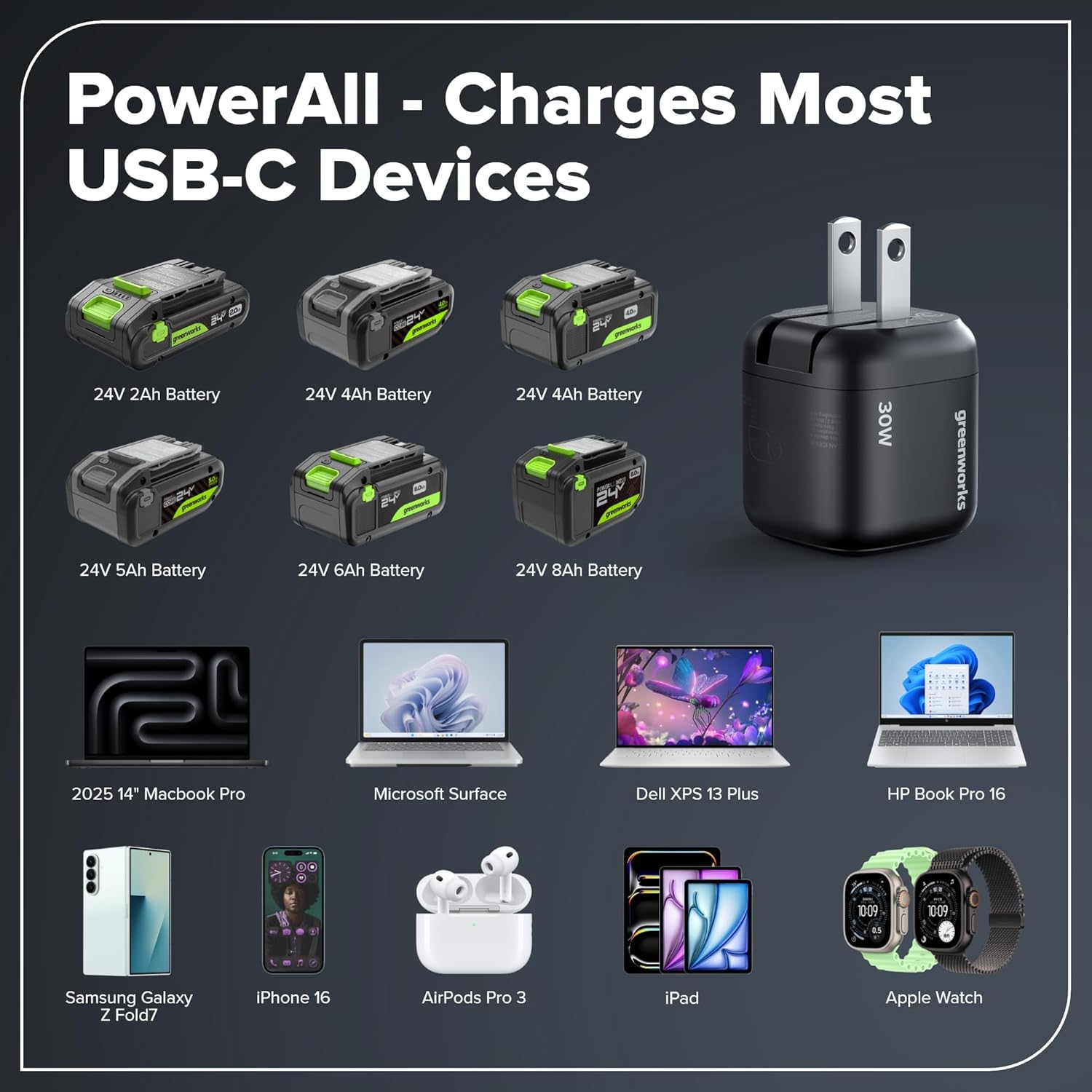
Image: Greenworks 24V Cordless Drill Driver DD345. This image highlights key components such as the 1/2" keyless chuck, 18-position clutch, variable speed trigger, cushioned overmold grip, LED worklight, 2 speeds, high-efficiency brushless motor, and belt clip.
Key Features:
- Brushless Motor: Provides increased torque, longer runtime, and extended tool life compared to brushed motors.
- 2-Speed Transmission: Offers speeds of 0-450 RPM for driving and 0-2000 RPM for drilling.
- 45 Nm Torque: Delivers ample power for various applications.
- 18+1 Position Clutch: Allows for precise torque adjustment to prevent over-driving screws or damaging materials.
- 1.27 cm Keyless Chuck: Enables quick and easy bit changes.
- Integrated LED Worklight: Illuminates dark work areas for improved visibility.
- Lightweight and Ergonomic Design: The 24V brushless drill set weighs only 1.92 kg and can be effortlessly controlled even during prolonged use. The ergonomic, non-slip grip zone ensures high comfort and safe handling.
- 2.0Ah USB-C Battery: Offers 20% more power and up to 35% longer runtime than 20V batteries. Supports 65W fast charging and serves as a 12,000 mAh power bank (approx. 2× iPhone 15). With USB-C bidirectional charging for fast charging and recharging.
- 30W USB-C Charger: Included for fast charging of the battery.
Setup
1. Charging the Battery
The 2.0Ah USB-C battery can be charged using the included 30W USB-C charger. Ensure the battery is fully charged before first use.
- Connect the 30W USB-C charger to a power outlet.
- Connect the USB-C cable to the charging port on the battery.
- The battery indicator lights will show the charging status. A full charge is indicated when all lights are solid.

Image: A Greenworks 24V battery connected to a 30W USB-C charger, illustrating the fast charging capability. Charging a 2.0Ah battery takes approximately 110 minutes with the 30W charger.
2. Installing/Removing the Battery Pack
- To Install: Align the battery pack with the tool's battery port and slide it in until it clicks securely into place.
- To Remove: Press the battery release button and slide the battery pack out of the tool.
3. Installing Drill Bits/Driver Bits
- Ensure the tool is off and the battery pack is removed.
- Twist the chuck counter-clockwise to open the jaws.
- Insert the desired drill bit or driver bit into the chuck.
- Twist the chuck clockwise to tighten the jaws securely around the bit. Ensure the bit is centered and firmly held.
Operating Instructions
1. Selecting Speed
The drill driver has a 2-speed transmission. Use the speed selector switch located on top of the tool:
- Speed 1 (Low): 0-450 RPM, ideal for driving screws and applications requiring high torque.
- Speed 2 (High): 0-2000 RPM, suitable for drilling holes and applications requiring faster speed.
2. Adjusting Torque (Clutch Setting)
The 18+1 position clutch allows you to adjust the torque output. Rotate the torque adjustment collar to the desired setting:
- Settings 1-18: For driving screws. Lower numbers for smaller screws and softer materials, higher numbers for larger screws and harder materials.
- Drill Symbol: For drilling applications, providing maximum torque.
3. Forward/Reverse Rotation
The forward/reverse selector switch is located above the trigger. Push it to the left for forward rotation (drilling/driving) and to the right for reverse rotation (removing screws/bits).
4. Operating the Drill Driver
- Ensure the battery is installed and the bit is secured.
- Select the appropriate speed and torque setting for your task.
- Position the bit on the workpiece.
- Squeeze the variable speed trigger to start the tool. The LED worklight will illuminate.
- Apply steady, even pressure. Do not force the tool.
- Release the trigger to stop the tool.

Image: A person operating the Greenworks 24V Cordless Drill Driver to drive a screw into a wooden workpiece, demonstrating its power and ease of use.
5. Using the Battery as a Power Bank
The 2.0Ah USB-C battery can also function as a 12,000 mAh power bank to charge other USB-C compatible devices.
- Ensure the battery is charged.
- Connect your USB-C device (e.g., smartphone, tablet) to the USB-C port on the battery using a compatible cable.
- The battery will begin charging your device.

Image: The Greenworks 24V battery acting as a PowerAll device, capable of charging various USB-C compatible electronics such as laptops, smartphones, and headphones.
Maintenance
General Maintenance
- Cleaning: Keep the tool's air vents clean and free of debris to prevent overheating. Use a soft, damp cloth to clean the exterior. Do not use harsh chemicals.
- Lubrication: This tool is designed for a long life without additional lubrication.
- Bit Storage: Store drill bits and driver bits in a dry place to prevent rust.
Battery Care
- Storage: Store batteries in a cool, dry place away from direct sunlight and extreme temperatures.
- Charging: Do not charge batteries in temperatures below 0°C (32°F) or above 45°C (113°F).
- Disposal: Dispose of old batteries responsibly according to local regulations. Do not incinerate.
Troubleshooting
| Problem | Possible Cause | Solution |
|---|---|---|
| Tool does not start. | Battery not installed correctly or discharged. | Ensure battery is fully inserted. Charge the battery. |
| Loss of power during operation. | Battery charge is low. Overload. | Recharge the battery. Reduce pressure on the tool. |
| Bit slips in chuck. | Chuck not tightened sufficiently. Bit shank is dirty or damaged. | Retighten chuck firmly. Clean or replace the bit. |
| Excessive vibration. | Bent or damaged bit. Loose chuck. | Replace the bit. Ensure chuck is tightened correctly. |
| Battery not charging. | Charger not connected properly. Faulty charger or battery. | Check connections. Try a different outlet. Contact customer support if problem persists. |
Specifications
| Feature | Detail |
|---|---|
| Model Number | DD345 |
| Brand | Greenworks |
| Voltage | 24V |
| Motor Type | Brushless |
| Max Torque | 45 Nm |
| Speed Settings | 2 (0-450 RPM / 0-2000 RPM) |
| Clutch Positions | 18+1 |
| Chuck Size | 1.27 cm Keyless |
| Battery Type | 2.0Ah USB-C (12,000 mAh Powerbank) |
| Charger Type | 30W USB-C |
| Weight (with battery) | 1.92 kg |
| Dimensions (L x W x H) | 22.3L x 10.3W x 22.8H cm |
| Included Components | Cordless Drill Kit, 2Ah battery, charger, bag |
Warranty and Support
Greenworks offers a warranty for this product. Please refer to the official Greenworks website or your purchase documentation for detailed warranty terms and conditions. The availability duration for EU spare parts is 3 years.
For technical support, replacement parts, or warranty claims, please contact Greenworks customer service. Contact information can typically be found on the Greenworks website or in your product packaging.
- Official Website: www.greenworkstools.eu (or relevant regional site)
- Customer Service: Refer to your product packaging or the official website for contact details.