
1. Introduction
Thank you for choosing the Doublepow AI Translation Earphones Model A39. These true wireless, open-ear headphones are designed to provide seamless real-time language translation across 142 languages, alongside high-fidelity audio for music and calls. Featuring a smart HD touch charging box with an LED display, ergonomic design for comfortable wear, and advanced Bluetooth 5.3 technology, the A39 is an ideal companion for travel, business, and daily communication.
2. Setup Guide
2.1. Unboxing and Initial Inspection
Carefully open the product packaging. Inside, you will find the Doublepow AI Translation Earphones (Model A39) within their charging case, a USB charging cable, and this user manual. Inspect all components for any signs of damage.

Figure 1: Doublepow AI Translation Earphones A39 and Charging Case.
2.2. Charging the Earphones and Case
Before first use, fully charge the earphones and the charging case. Connect the provided USB cable to the charging port on the case and to a compatible USB power source. The LED display on the charging case will indicate the battery level. A full charge for the case takes approximately two hours.

Figure 2: Charging case displaying battery percentage.
2.3. Bluetooth Pairing
- Ensure your earphones are charged and placed in the charging case.
- Open the charging case. The earphones will automatically enter pairing mode.
- On your smartphone or Bluetooth-enabled device, go to Bluetooth settings and turn on Bluetooth.
- Search for available devices and select "YYK-Q16" (or similar model name) to connect.
- Once connected, you will hear an audio prompt, and the device will show as paired.
2.4. App Installation (BitDynamic)
To utilize the full translation capabilities, download the BitDynamic app on your smartphone. Scan the QR code provided in the product manual or search for "BitDynamic" in your device's app store (App Store for iOS, Google Play for Android).
Video 1: Instructions for Translation Earbud (via Bit app). This video demonstrates the unboxing, initial setup, Bluetooth pairing, and app usage for the translation features.
3. Operating the Earphones
3.1. Wearing the Earphones
The A39 earphones feature an ergonomic open-ear hook design for comfortable and secure fit. Place the earbud over your ear, ensuring the speaker is positioned correctly for optimal sound. This design reduces discomfort from prolonged wear and allows for environmental awareness.

Figure 3: Proper wearing technique for the open-ear earphones.
3.2. Basic Touch Controls
The earphones feature intuitive touch controls for managing audio and calls:
- Single Click (L/R): Play/Pause music, Answer/End call.
- Double Click (L): Volume Down.
- Double Click (R): Volume Up.
- Triple Click (L): Previous Song.
- Triple Click (R): Next Song.
- Long Press (L/R): Activate Voice Assistant.

Figure 4: Overview of earphone touch controls.
3.3. Translation Modes (via BitDynamic App)
The BitDynamic app offers several translation modes:
- Face-to-Face Translation: Both parties can use the device simultaneously to have a conversation. One person wears the left earphone, the other wears the right, and each speaks their respective language.
- Continuous Translation: Real-time translation and playback for foreign-language conferences, courses, or lectures. Place your phone at the sound pickup location and wear earphones to listen to the translation.
- Audio/Video Call Translation: Real-time translation during audio and video calls.
- Meeting Assistant: Record meetings and summarize them.

Figure 5: Real-time multilingual translation in action.
3.4. Smart HD Touch Charging Box Functions
The charging box features a 2.62-inch smart touch screen for easy control and information display:
- Control music and calls.
- Display lyrics.
- Remotely control camera to take pictures.
- Adjust volume and other settings.
- Displays battery life of earphones and charging case.
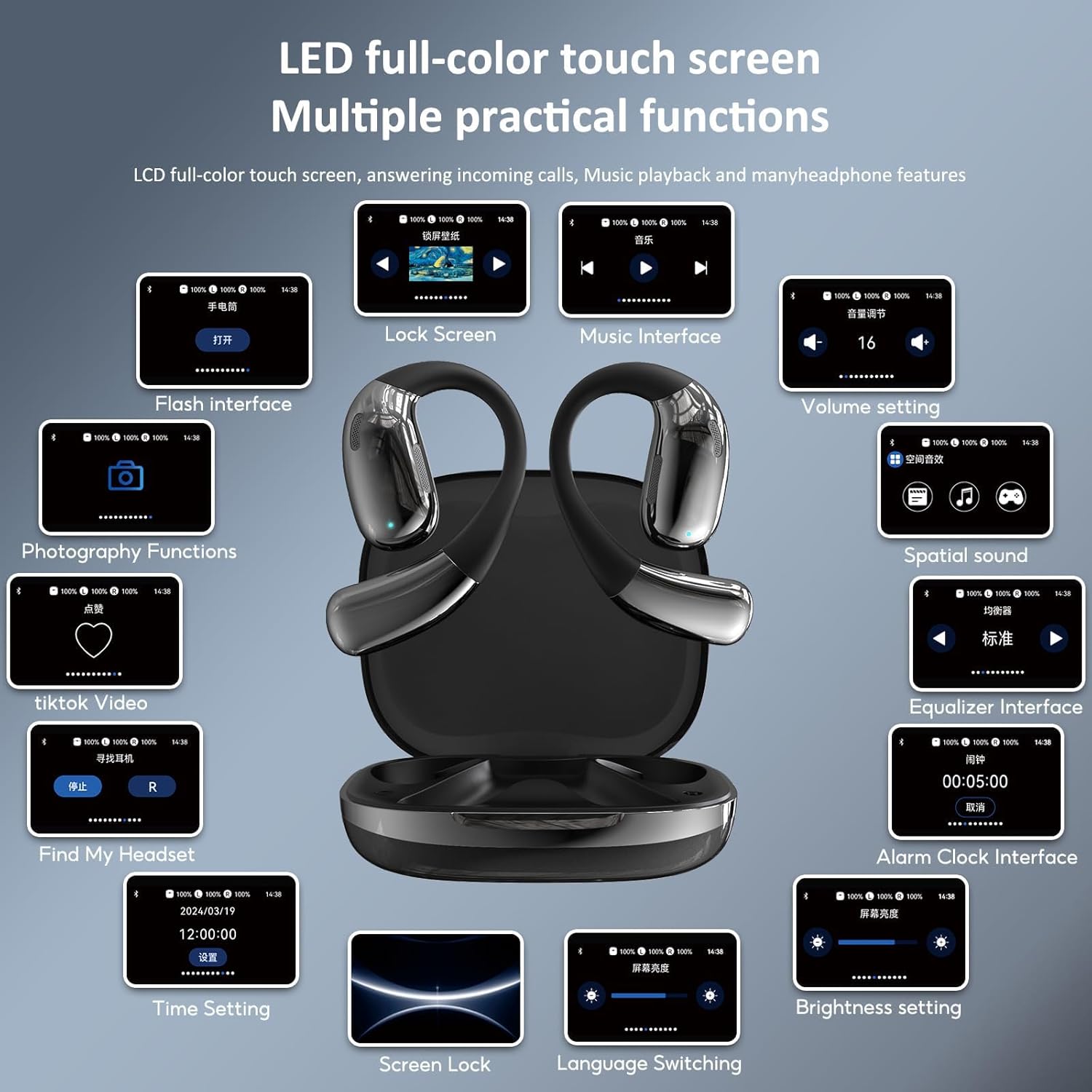
Figure 6: LED full-color touch screen with multiple practical functions.
4. Maintenance
To ensure the longevity and optimal performance of your Doublepow AI Translation Earphones A39, follow these maintenance guidelines:
- Cleaning: Use a soft, dry, lint-free cloth to clean the earphones and charging case. Do not use harsh chemicals, cleaning solvents, or strong detergents.
- Storage: When not in use, store the earphones in their charging case to protect them from dust and damage. Keep them in a cool, dry place away from extreme temperatures.
- Water Resistance: The earphones are not waterproof. Avoid exposure to water, moisture, or sweat.
- Charging: Only use the provided charging cable or a certified equivalent. Avoid overcharging.
5. Troubleshooting
If you encounter any issues with your Doublepow AI Translation Earphones A39, please refer to the following common solutions:
- No Power: Ensure the charging case and earphones are fully charged.
- Cannot Pair: Make sure Bluetooth is enabled on your device and the earphones are in pairing mode. Try restarting both the earphones (by placing them back in the case and closing/opening) and your device. Ensure no other devices are connected to the earphones.
- Translation Issues: Verify that the earphones are properly connected to the BitDynamic app and that you have selected the correct source and target languages. Check your internet connection, as online translation requires data.
- Poor Sound Quality: Ensure the earphones are worn correctly and are clean. Check the volume levels on both the earphones and your connected device.
- App Not Responding: Close and reopen the BitDynamic app. If the issue persists, try reinstalling the app.
For further assistance, please contact customer support.
6. Specifications
| Feature | Detail |
|---|---|
| Model Number | A39 |
| Brand | Doublepow |
| Colour | Black |
| Ear Placement | Open Ear |
| Form Factor | True Wireless |
| Headphones Jack | No Jack |
| Connectivity Technology | Wireless |
| Wireless Technology | Bluetooth |
| Bluetooth Version | 5.3 |
| Audio Driver Type | Balanced Armature Driver |
| Frequency Range | 20 Hz - 20,000 Hz |
| Compatible Devices | Smartphones, Bluetooth-enabled devices |
| Additional Features | AI Language Translation, Real-Time Translator |
| Battery Charge Time | 2 Hours |
| Battery Average Life (Earbuds) | 7 Hours (with charging box: 24 Hours) |
| Control Method | Touch |
| Parcel Dimensions | 12.1 x 10.7 x 4.4 cm; 200 g |
7. Warranty and Support
Warranty Description: The product comes with a 1-year warranty. Please refer to the warranty card included in the packaging for detailed terms and conditions.
Manufacturer Contact Information: For any operational questions or support needs, please contact Doublepow customer service. Contact details can be found on the official Doublepow website or in the product packaging.