
1. Introduction
This manual provides detailed instructions for the proper use, setup, and maintenance of your SJCAM SJ20 Ultra 4K Dual Lens Action Camera. Please read this manual thoroughly before operating the device to ensure optimal performance and longevity.
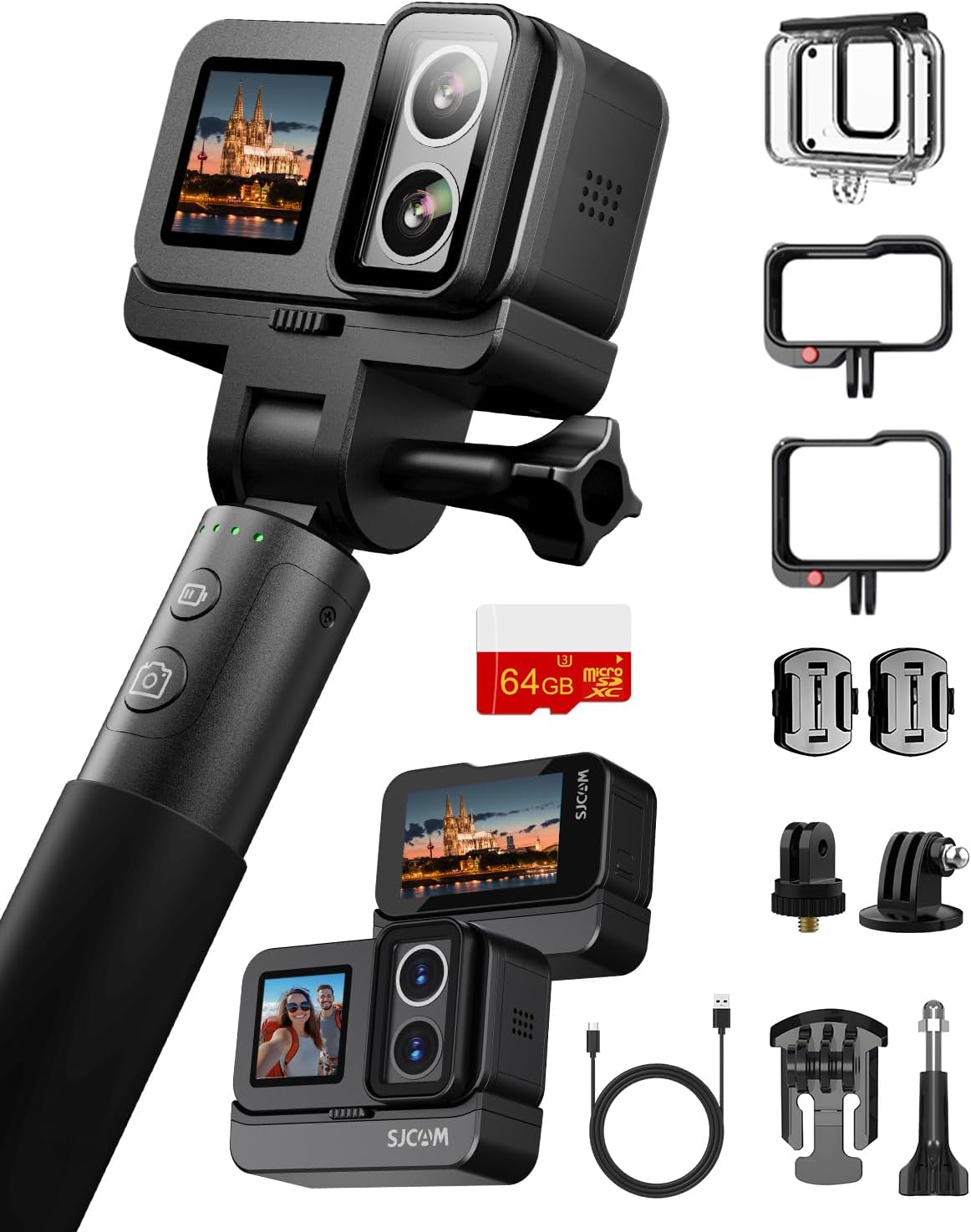
Figure 1: SJCAM SJ20 Ultra 4K Dual Lens Action Camera
2. Package Contents
Verify that all items listed below are included in your package. If any items are missing or damaged, please contact customer support.
- SJCAM SJ20 Camera
- Charging Selfie Stick
- Battery (1100mAh built-in, plus additional 1050mAh detachable)
- Frame Bracket (x2)
- Waterproof Case
- USB Cable
- Helmet Base (x2)
- 3M Glue (x2)
- Screw (x2)
- Adapter (x2)
- Wipe Cloth
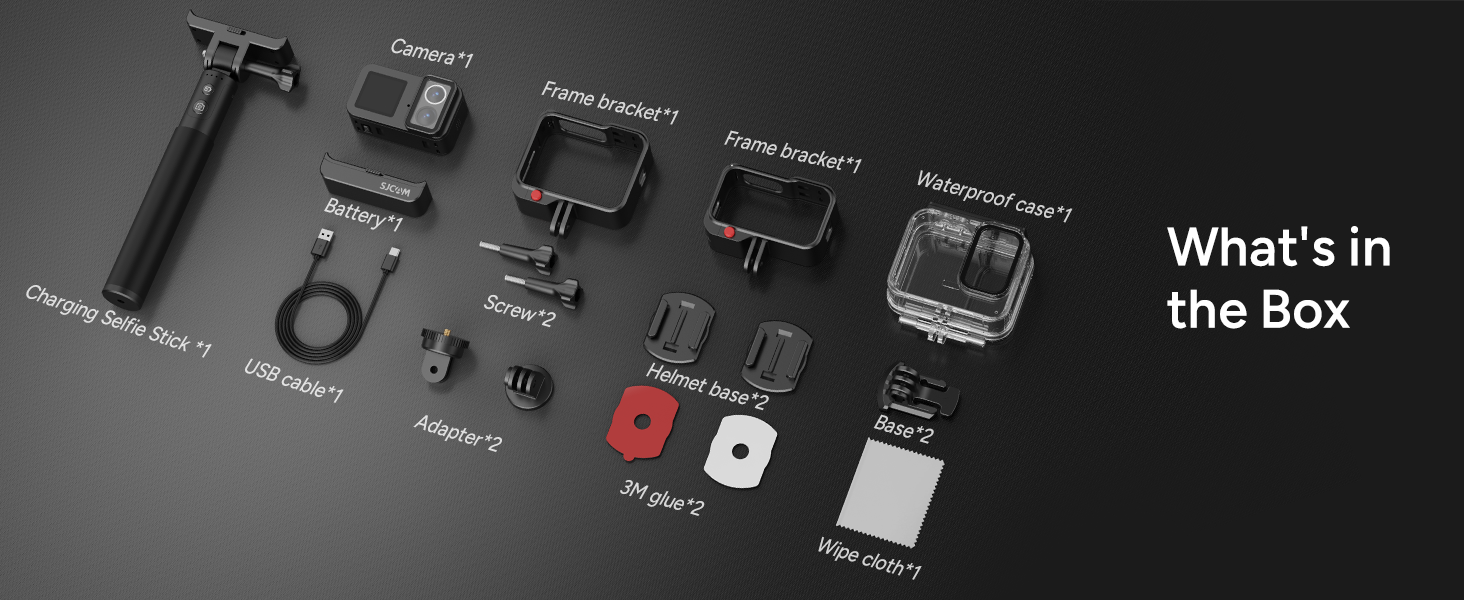
Figure 2: Included accessories in the SJ20-Travel Combo package.
3. Product Overview
The SJCAM SJ20 is a compact action camera featuring a dual-lens system for versatile shooting in various lighting conditions. It includes a 2.29-inch rear touchscreen and a 1.3-inch front display for easy operation and monitoring.

Figure 3: Overview of the SJCAM SJ20's dual lens system, 6-axis stabilization, night imaging, 30m waterproofing, and 8-hour operating power.
Key Features:
- Dual Lens System: Features a dedicated F/2.0 Day Lens and an F/1.3 Low Light Lens for optimized performance in different environments.
- 4K Video & 15MP Photos: Captures authentic 4K 30fps video and high-resolution still images.
- Ultra Night Vision: Enhanced low-light performance for clear footage in challenging conditions.
- 6-Axis Gyro Stabilization: Minimizes shaking for smooth and stable video recording.
- Waterproof Design: Body is waterproof up to 5 meters, and up to 30 meters with the included waterproof case.
- Extended Battery Life: Up to 8 hours of power with the additional detachable battery.
- Dual Screens: 2.29-inch touch screen on the rear and a 1.3-inch front display.
- Magnetic Mounting: Built-in magnet for secure attachment and versatile positioning.
- Creative Shooting Modes: Includes Burst Photo, Self-Timer, Time-Lapse, Loop Recording, and Vertical/Horizontal Shooting.
4. Setup
4.1. Charging the Battery
The SJ20 camera has an 1100mAh built-in battery and comes with an additional 1050mAh detachable battery. To charge, connect the camera to a USB power source using the provided USB cable. The camera supports recording while charging.

Figure 4: The SJCAM SJ20 offers extended battery life, up to 8 hours with the additional battery.
4.2. Inserting a MicroSD Card
Locate the MicroSD card slot on the camera. Insert a compatible MicroSD card (Class 10 or higher, up to 128GB recommended) with the gold contacts facing down until it clicks into place. To remove, press the card gently until it springs out.
4.3. Mounting the Camera
The SJ20 can be mounted using various accessories:
- Frame Bracket: Use the frame bracket for general protection and mounting to standard action camera accessories.
- Waterproof Case: For underwater activities up to 30 meters, enclose the camera in the waterproof case.
- Magnetic Lanyard: Attach the magnetic lanyard for dynamic first-person view (POV) shots.
- Helmet/Bike Mounts: Utilize the helmet base or other mounts for specific activities.

Figure 5: The SJCAM SJ20 mounted on a selfie stick.
4.4. Connecting to the SJCAM Zone App (Wi-Fi)
The SJCAM Zone app allows for remote control, live preview, and file transfer. Follow these steps to connect:
- Press the power button on the camera to turn it on.
- Swipe down from the top of the touchscreen to access the shortcut menu.
- Click on the Wi-Fi icon to enable Wi-Fi. A QR code will appear on the camera screen.
- Open the SJCAM Zone app on your smartphone.
- In the app, click 'Connect Camera', then 'Scan code connection'.
- Scan the QR code displayed on the camera screen with your phone.
Troubleshooting Wi-Fi Connection:
- Open your phone's Wi-Fi settings to check if the camera's Wi-Fi network is visible.
- Ensure the following permissions are enabled for the SJCAM APP: Network permission, local network permission, location permission, and GPS.
- Remove the camera's Wi-Fi network from your phone's Wi-Fi settings and scan the QR code again to reconnect.
Video 1: Instructions on how to connect the SJCAM SJ20 to the SJCAM Zone App via Wi-Fi.
5. Operating Instructions
5.1. Power On/Off
Press and hold the Power button (usually located on the top or side) for a few seconds to turn the camera on or off.
5.2. Mode Selection
Swipe left or right on the rear touchscreen to cycle through different shooting modes such as Video, Photo, Time-Lapse, Slow Motion, and Burst Photo. You can also swipe down from the top edge to access quick settings and swipe from the middle to the left to enter shortcut mode.
5.3. Switching Lenses (Day/Night)
The SJ20 features a dual-lens system. To switch between the Day Lens (F/2.0) and the Low Light Lens (F/1.3), press the dedicated lens switch button on the camera. An on-screen indicator will confirm the active lens.
5.4. Recording Video / Taking Photos
Once the desired mode is selected, press the Shutter/Record button (usually on the top) to start or stop recording video, or to capture a photo.
5.5. Playback
Enter playback mode via the touchscreen interface to review your recorded videos and photos. You can swipe through files and select them for full-screen viewing.
5.6. Settings
Access the camera settings via the touchscreen to adjust parameters such as video resolution, frame rate, stabilization, white balance, exposure, and other advanced options. The SJCAM Zone app also provides comprehensive control over these settings.
6. Features & Modes
6.1. 4K Video and Ultra Night Vision
The SJ20 captures video in true 4K resolution at 30 frames per second. Its Ultra Night Vision capability, utilizing the F/1.3 low-light lens, allows for clearer and more detailed footage in extremely dark conditions.
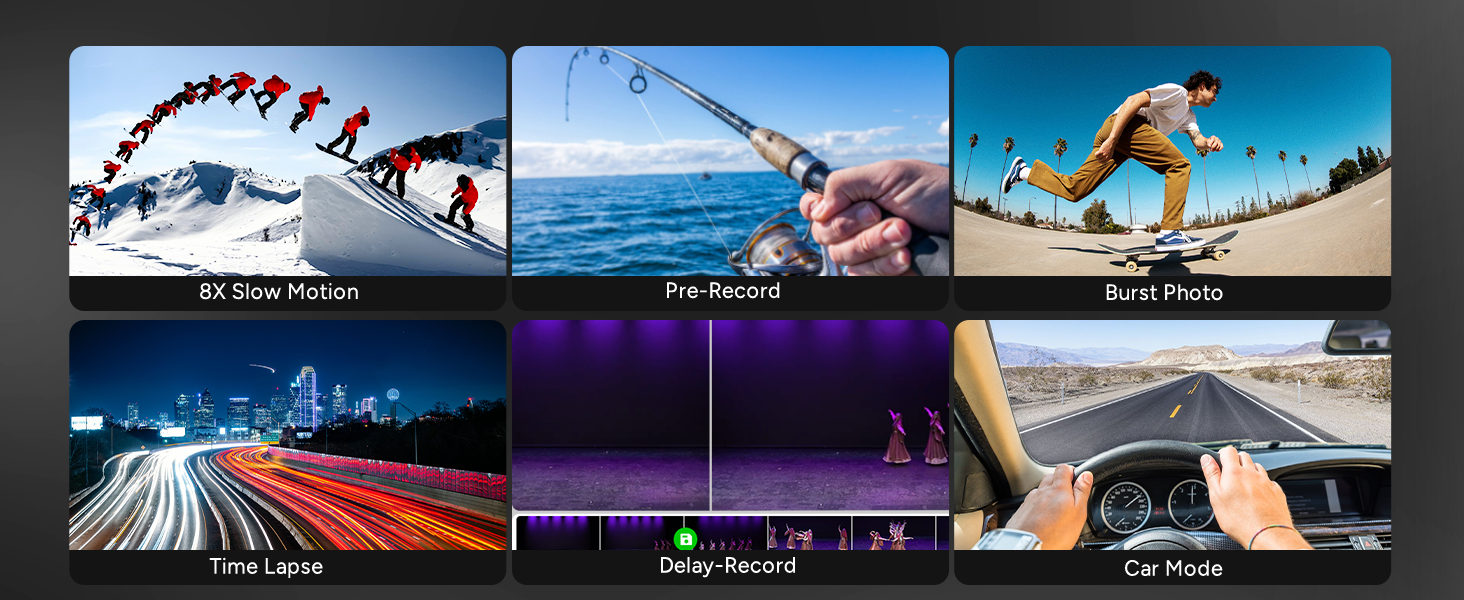
Figure 6: Comparison of night imaging with and without Ultra Night Mode, demonstrating improved clarity.
6.2. 6-Axis Gyro Stabilization
Equipped with advanced 6-axis gyro stabilization technology, the camera effectively minimizes shaking and vibrations, ensuring smooth and steady shots even during intense activities like cycling or skiing.

Figure 7: Visual representation of the 6-axis gyro stabilization in action, providing steadier shots.
6.3. Waterproofing
The SJ20 camera is inherently waterproof up to 5 meters. For deeper underwater exploration, the included waterproof case extends its capability to 30 meters, making it suitable for snorkeling, surfing, and diving.

Figure 8: The SJCAM SJ20 being used underwater with its waterproof case.
6.4. Creative Shooting Modes
The camera offers a variety of modes to enhance your creative output:
- Burst Photo: Captures multiple photos in quick succession.
- Self-Timer: Delays photo capture for group shots or self-portraits.
- Time-Lapse: Records a series of photos over time and stitches them into a video.
- Loop Recording: Continuously records video, overwriting the oldest footage when the memory card is full.
- Vertical/Horizontal Shooting: Adapts to different orientations for diverse content creation.
- 8X Slow Motion: Captures fast-paced action in slow motion.
- Pre-Record: Records a few seconds before you press the shutter button.
- Car Mode: Optimizes settings for use as a dashcam.

Figure 9: Examples of various creative shooting modes available on the SJCAM SJ20.
6.5. Multi-Scenario Use
The compact and robust design, combined with versatile mounting options, makes the SJ20 suitable for a wide range of activities, from daily vlogging to extreme sports and underwater adventures.

Figure 10: The SJCAM SJ20 is designed for use in various scenarios, including outdoor activities and daily recording.
Video 2: An overview of the SJCAM SJ20 action camera's features, including dual lens, night vision, 8-hour power, stabilization, and waterproofing.
7. Maintenance
7.1. Cleaning
- Use the provided wipe cloth or a soft, lint-free cloth to clean the camera body and screens.
- For lenses, use a specialized lens cleaning solution and cloth to avoid scratches.
- Ensure the camera is dry before closing any ports or using it in wet conditions.
7.2. Storage
- Store the camera in a cool, dry place away from direct sunlight and extreme temperatures.
- Remove the MicroSD card if storing for extended periods.
- Charge the battery periodically (every 3-6 months) to maintain battery health if not in regular use.
8. Troubleshooting
8.1. Camera Not Turning On
- Ensure the battery is sufficiently charged. Connect the camera to a power source and try again.
- Check if the detachable battery is properly connected.
8.2. Poor Image/Video Quality
- Clean the camera lenses.
- Ensure you are using the appropriate lens (Day or Low Light) for the current lighting conditions.
- Check your resolution and frame rate settings. Higher settings generally yield better quality.
- Verify that the 6-axis stabilization is enabled for smoother footage.
8.3. Wi-Fi Connection Issues
Refer to section 4.4 for detailed troubleshooting steps for Wi-Fi connectivity.
8.4. Short Battery Life
- Ensure both the built-in and detachable batteries are fully charged.
- Using higher resolutions (e.g., 4K) and features like Wi-Fi will consume more power.
- Consider carrying a portable power bank for extended recording sessions, as the camera supports recording while charging.
9. Specifications
| Feature | Specification |
|---|---|
| Brand | SJCAM |
| Model | SJ20 |
| Video Capture Resolution | 4K |
| Photo Sensor Technology | CMOS |
| Built-in Battery | 1100mAh (non-removable) |
| Additional Battery | 1050mAh (detachable) |
| Screen Size (Rear) | 2.29 inches (Touchscreen) |
| Screen Size (Front) | 1.3 inches |
| Water Resistance | 5m (body), 30m (with waterproof case) |
| Stabilization | 6-Axis Gyro Stabilization |
| Connectivity | USB, Dual-band Wi-Fi |
| Flash Memory Type | Micro SD |
| Item Weight | 2.05 pounds |
| Package Dimensions | 12.17 x 8.07 x 2.2 inches |
10. Warranty and Support
SJCAM products come with an official manufacturer warranty. For specific warranty details, technical support, or service inquiries, please refer to the warranty card included in your package or visit the official SJCAM website. Keep your proof of purchase for warranty claims.


