
Introduction
This manual provides essential information for the safe and effective use of your FUJIFILM X Half Premium Compact Camera. Please read this manual thoroughly before use and keep it in a safe place for future reference. The FUJIFILM X Half is a lightweight digital camera designed for ease of use and creative expression, featuring a one-inch sensor and a fixed wide-angle lens.
Setup
1. Unpacking and Initial Inspection
Carefully remove all components from the packaging. Ensure the camera body and accessories are present and undamaged. The package includes the camera body and necessary accessories.
2. Battery Installation
The camera requires one 12V battery (included). Locate the battery compartment on the bottom of the camera. Open the cover, insert the battery according to the polarity indicators, and close the cover securely.
3. Memory Card Insertion
The FUJIFILM X Half uses a memory card (not included) to store images and videos. Locate the memory card slot, typically near the battery compartment. Insert the memory card with the correct orientation until it clicks into place. Ensure the camera is powered off before inserting or removing the memory card.
4. Initial Power On and Basic Settings
Turn the camera on using the power switch. Upon first use, you may be prompted to set the date, time, and language. Follow the on-screen instructions to configure these basic settings.

Operating the Camera
1. Basic Controls
Familiarize yourself with the camera's physical controls:
- Shutter Button: Press halfway to focus, fully to capture an image or start/stop video recording.
- Mode Dial: Located on the top plate, this dial allows selection of various shooting modes.
- Frame Advance Lever: Mimics traditional film cameras for certain modes and functions.
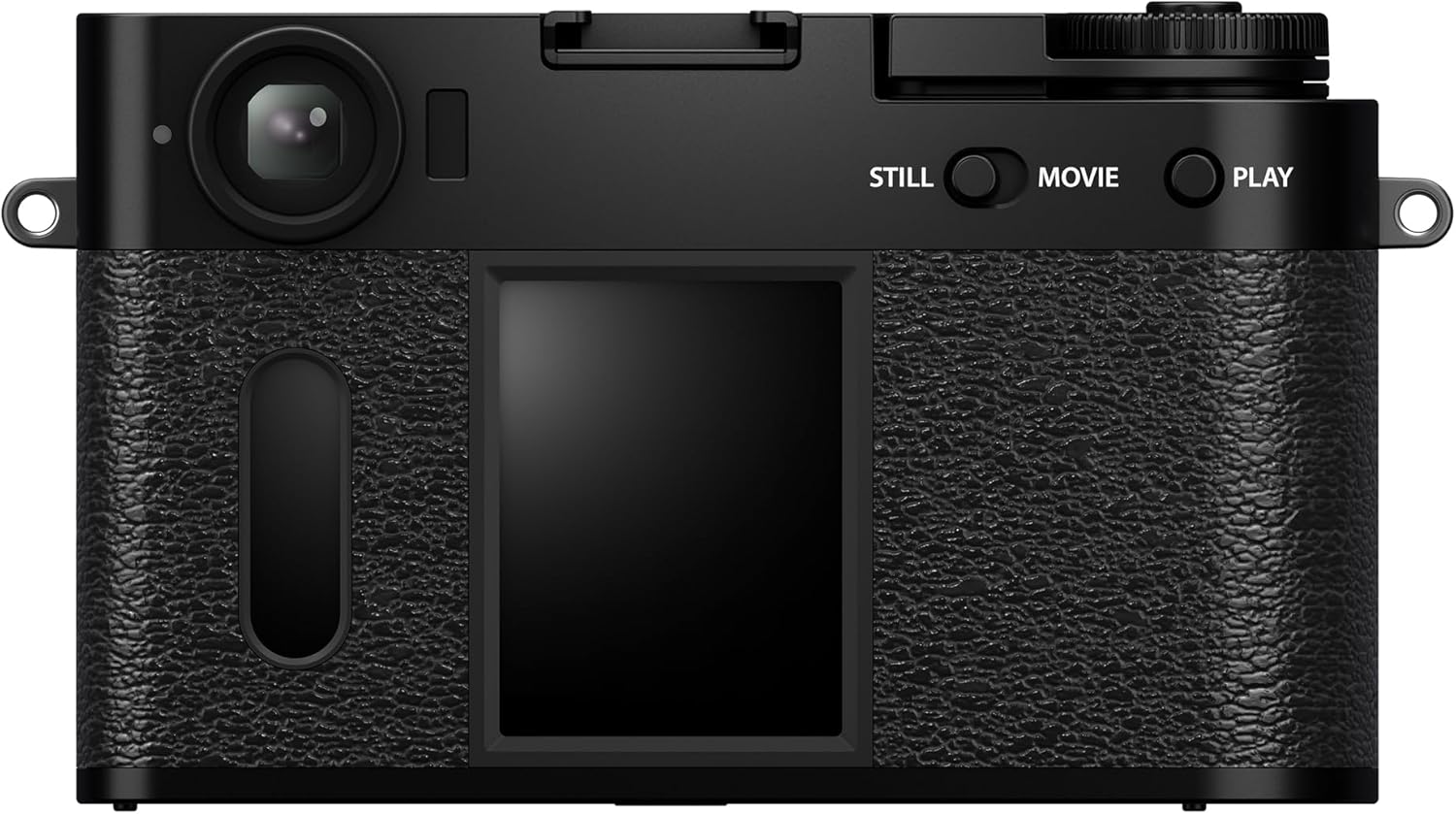
- Rear LCD Screen: Displays live view, menus, and playback.
- Still/Movie/Play Buttons: Dedicated buttons for switching between still photo mode, video recording mode, and image playback.

2. Capturing Images and Videos
To take a photo, ensure the camera is in 'Still' mode. Frame your shot using the rear LCD or optical viewfinder, then press the shutter button. For video, switch to 'Movie' mode and press the shutter button to start and stop recording.
3. Film Simulation Modes
The camera features 13 Film Simulation modes, inspired by Fujifilm's film heritage. These modes apply unique color and tonal characteristics to your images. Access and select these modes via the dedicated vertical sub-menu on the back of the camera, mimicking a film window.
4. Creative Filters
Enhance your images with 26 built-in creative filters, offering various artistic effects such as LIGHT LEAK, EXPIRED FILM, and DOUBLE EX. These can be applied before or after capturing an image, depending on the camera settings.
5. 2-in-1 Mode
The unique 2-in-1 mode allows combining two visuals (two images, two videos, or one of each) into a single file. Capture the first visual, pull the Frame Advance Lever, then capture the second. The camera will automatically combine them.
6. Film Camera Mode
For a nostalgic experience, activate Film Camera mode. Select a Film Simulation and the desired number of frames (36, 54, or 72). In this mode, the rear LCD disables live view, encouraging a distraction-free shooting experience. Images can be reviewed and developed via the dedicated X Half app once the 'roll' is complete.
7. Sharing and Printing
The FUJIFILM X Half is designed for easy sharing. Connect directly to compatible instax™ printers (sold separately) for instant physical prints. Alternatively, use the dedicated X Half app to transfer images and videos to your smartphone for sharing on social media or with friends and family.
Maintenance
1. Cleaning the Camera
- Camera Body: Wipe with a soft, dry cloth. For stubborn dirt, use a slightly damp cloth and then dry thoroughly. Avoid harsh chemicals.
- Lens: Use a lens brush to remove dust, then gently wipe with a microfiber lens cloth. For smudges, use a specialized lens cleaning solution applied to the cloth, not directly to the lens.
- Screen: Use a soft, dry microfiber cloth.
2. Battery Care
- Charge batteries fully before use.
- Store batteries in a cool, dry place when not in use.
- Remove batteries from the camera if it will not be used for an extended period.
3. Storage
Store the camera in a dry, well-ventilated area, away from direct sunlight, high temperatures, and humidity. Use a camera bag or case for protection during transport.
Troubleshooting
Common Issues and Solutions
- Camera does not power on: Ensure the battery is correctly inserted and fully charged.
- "No Card" error: Verify that a compatible memory card is inserted correctly. If the issue persists, try a different memory card.
- Images appear blurry: Check that the lens is clean and that the camera has successfully focused before capturing the image.
- Slow performance/lag: Ensure the memory card has sufficient free space and is not corrupted. Restarting the camera may also resolve temporary performance issues.
- Flash not working as expected: Confirm flash settings are appropriate for the lighting conditions. The camera uses an LED flash, which has specific range and intensity characteristics.
If problems persist, consult the official Fujifilm support resources or contact customer service.
Specifications
| Feature | Detail |
|---|---|
| Product Dimensions | 8.1 x 6.5 x 4.8 inches |
| Item Weight | 15.7 ounces (15.68 ounces) |
| Model Number | 16954071 |
| Batteries | 1 12V battery (included) |
| Film Format Type | 35mm (simulated) |
| Max Shutter Speed | 60 seconds |
| Included Components | Camera Body & Accessories |
| Brand | Fujifilm |
| Manufacturer | Fujifilm |
Warranty and Support
For information regarding product warranty, please refer to the warranty card included with your camera or visit the official Fujifilm website. For technical support, frequently asked questions, or service inquiries, please contact Fujifilm customer support directly. Keep your purchase receipt as proof of purchase for warranty claims.
Official Fujifilm Website: Visit the Fujifilm Store on Amazon


