Introduction
This manual provides essential instructions for the proper use and maintenance of your Casio Edifice EQS-960PB-1AVCR solar-powered chronograph watch. Please read this manual thoroughly to ensure optimal performance and longevity of your timepiece. The EQS-960PB-1AVCR combines solar power technology with chronograph functionality and a durable carbon-reinforced resin case, designed for reliability and precision.
Watch Components
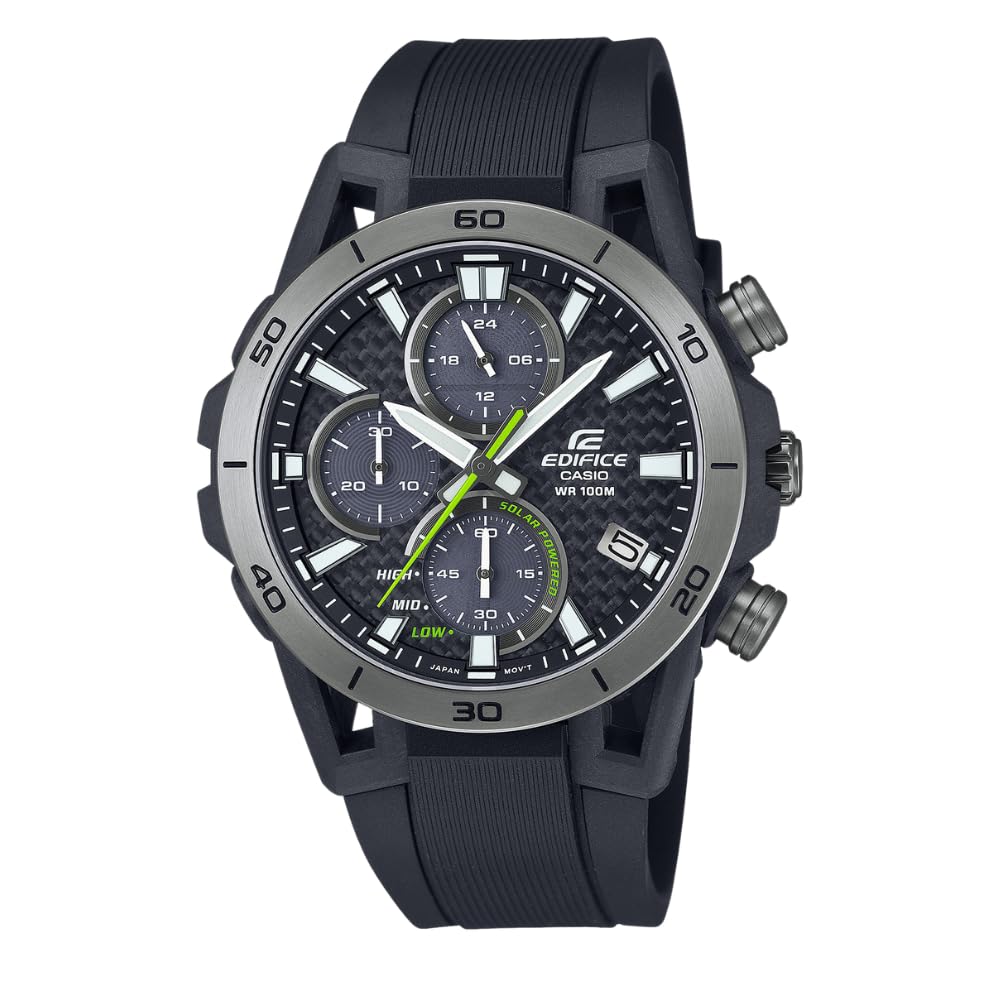
Figure 1: Front view of the Casio Edifice EQS-960PB-1AVCR watch. This image displays the main timekeeping hands, three sub-dials (24-hour indicator, stopwatch minutes, and battery level/mode indicator), the date display at 4 o'clock, and the two pushers on the right side of the case.
Your Casio Edifice EQS-960PB-1AVCR watch features a main dial with hour, minute, and second hands, along with three sub-dials and a date display. The watch case includes a crown for time/date adjustment and two pushers for chronograph operation.
- Crown: Used for setting the time and date.
- Pusher A (Top Right): Primarily used for starting/stopping the stopwatch.
- Pusher B (Bottom Right): Primarily used for resetting the stopwatch and switching modes.
- Upper Sub-dial: 24-hour indicator.
- Left Sub-dial: Stopwatch minute hand (up to 30 minutes).
- Lower Sub-dial: Battery level indicator (HIGH, MID, LOW) and mode indicator.
- Date Display: Located at the 4 o'clock position.
Setup
1. Initial Charging
The EQS-960PB-1AVCR is a solar-powered watch. Before initial use, or if the watch has been stored in darkness, expose the watch face to light for several hours to ensure a full charge. The lower sub-dial indicates the battery level (HIGH, MID, LOW). Aim for a HIGH charge level for optimal performance.
- Direct Sunlight: Approximately 5 minutes for 1 day of operation, 24 hours for a full charge.
- Window Sunlight: Approximately 8 minutes for 1 day of operation, 80 hours for a full charge.
- Fluorescent Light (30W, 30cm): Approximately 48 minutes for 1 day of operation, 300 hours for a full charge.
Avoid exposing the watch to extremely high temperatures during charging, as this may damage the watch.
2. Setting the Time
- Pull the crown out to the second click. The second hand will move to the 12 o'clock position.
- Rotate the crown to set the hour and minute hands. Ensure the 24-hour sub-dial is also correctly aligned for AM/PM.
- Push the crown back in to the normal position. The second hand will resume movement.
3. Setting the Date
- Pull the crown out to the first click.
- Rotate the crown to adjust the date display.
- Push the crown back in to the normal position.
Note: Adjust the date when the time is between 9:00 PM and 1:00 AM to avoid incorrect date changes at midnight.
Operating the Watch
1. Timekeeping Mode
In normal timekeeping mode, the watch displays the current hour, minute, second, and date. The upper sub-dial indicates the current time in a 24-hour format. The lower sub-dial shows the battery charge level.
2. Using the Chronograph (Stopwatch)
The watch features a 1-second stopwatch with a measuring capacity of up to 30 minutes. The left sub-dial indicates stopwatch minutes, and the main second hand acts as the stopwatch second hand.
- To start the stopwatch, press Pusher A.
- To stop the stopwatch, press Pusher A again.
- To resume timing after stopping, press Pusher A.
- To reset the stopwatch to zero, press Pusher B while the stopwatch is stopped.
Note: The stopwatch can measure split times. While the stopwatch is running, press Pusher B to record a split time. Press Pusher B again to return to normal stopwatch timing. Press Pusher A to stop, then Pusher B to reset.
3. Water Resistance (100M)
The EQS-960PB-1AVCR is water resistant up to 100 meters (10 bar). This means it is suitable for everyday use, swimming, and snorkeling. It is not suitable for scuba diving. Ensure the crown is fully pushed in before any contact with water.
- Do not operate the crown or pushers while the watch is wet or submerged.
- Avoid exposing the watch to hot water or steam, as this can compromise the water resistance seals.
Maintenance
1. Charging Guidelines
To maintain consistent operation, regularly expose the watch face to light. Avoid prolonged storage in dark places. If the battery level drops to LOW, the watch may stop or certain functions may become unavailable.
- For daily wear, ensure the watch is exposed to light whenever possible.
- If storing the watch, place it in a location where it can receive light, or periodically expose it to light to prevent the battery from fully discharging.
2. Cleaning
Wipe the watch case and band with a soft, dry cloth. For stubborn dirt, use a soft cloth dampened with water and a mild soap, then wipe dry. Do not use volatile agents like thinner or benzine.
3. Periodic Inspection
It is recommended to have your watch inspected by an authorized Casio service center every 2-3 years to check the water resistance seals and overall condition.
Troubleshooting
- Watch is not running or hands are stopped: The watch may be low on charge. Expose the watch face to bright light for several hours. Check the battery level indicator.
- Hands are not aligned correctly (e.g., stopwatch hands not resetting to zero): This may require a hand home position correction. Refer to the full Casio module manual for detailed instructions on performing a hand home position correction. This typically involves pulling the crown out to a specific click and using the pushers to adjust the hand positions.
- Stopwatch defaults to an incorrect time (e.g., 54 seconds): This indicates a misaligned stopwatch hand home position. Perform a hand home position correction as described in the full module manual. If the issue persists after correction, contact Casio customer support.
- Date changes at an incorrect time: Adjust the date during the daytime (e.g., between 9 AM and 9 PM) to ensure it changes at midnight. If the date is changing at noon, advance the time by 12 hours.
For more complex issues, consult the comprehensive module manual available on the official Casio website or contact Casio customer support.
Specifications
| Feature | Description |
|---|---|
| Model Number | EQS-960PB-1AVCR |
| Power Source | Solar Powered (Tough Solar) |
| Case Material | Carbon-Reinforced Resin |
| Water Resistance | 100 meters (10 Bar) |
| Chronograph | 1-second stopwatch, measuring capacity 30 minutes, split time |
| Battery Life | Approx. 5 months on full charge without further light exposure |
| Other Functions | Date display, 24-hour indicator, battery level indicator |
| Dimensions | 4.4 x 3.9 x 3.8 inches (Package Dimensions) |
| Weight | 1.98 ounces (Package Weight) |
Warranty and Support
Your Casio Edifice watch is covered by a manufacturer's warranty. Please refer to the warranty card included with your purchase for specific terms and conditions, including warranty period and coverage details. Keep your proof of purchase for warranty claims.
For product support, service, or to find an authorized service center, please visit the official Casio website or contact Casio customer service in your region. You can often find detailed module manuals and FAQs on their support pages.
Note: Unauthorized repairs or modifications may void your warranty.


