
Introduction
These ZYHKON Open Ear Headphones Model G219 are designed for users who prioritize situational awareness while enjoying audio. The open-ear design ensures you remain connected to your surroundings, making them ideal for outdoor activities, commuting, or office environments. Experience powerful sound and ultra-comfort with adjustable ear hooks for a secure fit.
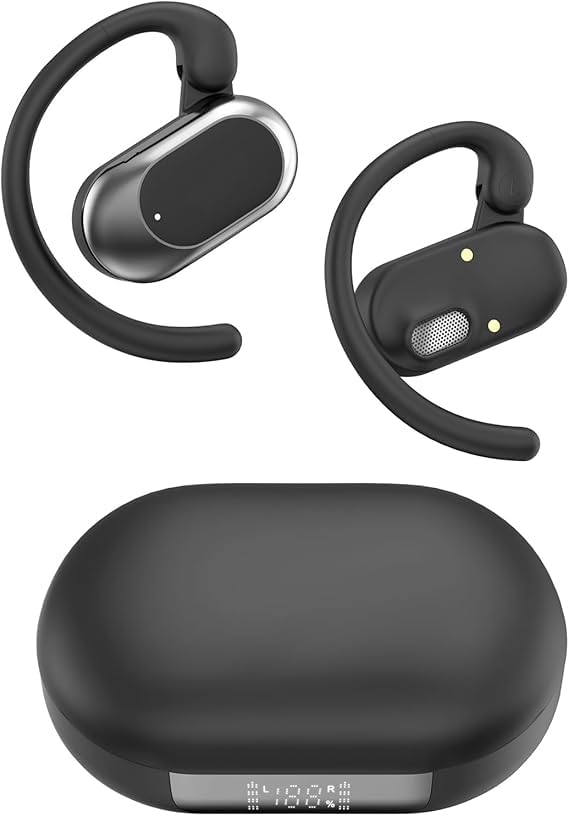
Image: ZYHKON Open Ear Headphones G219 in their compact black charging case, with the lid open revealing the two earbuds.
What's in the Box
- ZYHKON Open Ear Headphones (Left and Right earbuds)
- Charging Case
- USB-C Charging Cable
- User Manual
Setup
1. Initial Charging
Before first use, ensure the headphones and charging case are fully charged. Connect the provided USB-C cable to the charging port on the case and to a compatible USB power source. The LED indicator on the case will show charging status. A full charge typically takes approximately 1 hour.
2. Removing Protective Film
Upon unboxing, remove any protective film covering the charging contacts on the earbuds. This ensures proper charging and connectivity.
3. Pairing with Your Device
- Open the charging case. The earbuds will automatically enter pairing mode.
- On your smartphone, tablet, or other Bluetooth-enabled device, go to the Bluetooth settings.
- Search for available devices and select "G219" (or similar model name) from the list.
- Once connected, you will hear an audio prompt, and the LED indicator on the earbuds will change.
Operating Instructions
1. Wearing the Headphones
The ZYHKON G219 headphones feature adjustable ear hooks for a secure and comfortable fit. Gently place the ear hook over your ear, positioning the speaker element just outside your ear canal. Adjust the angle of the ear hook to direct the sound optimally into your ear. The lightweight design ensures comfort during extended wear and physical activity.
2. Touch Controls
The earbuds are equipped with touch-sensitive controls for easy management of audio and calls. Refer to the detailed user manual included in the box for specific tap functions (e.g., single tap for play/pause, double tap for next track, triple tap for previous track, long press for volume control or voice assistant).
3. Power On/Off
- Power On: Open the charging case, and the earbuds will automatically power on.
- Power Off: Place the earbuds back into the charging case and close the lid. They will automatically power off and begin charging.
Maintenance
- Cleaning: Regularly wipe the earbuds and charging case with a soft, dry cloth. Avoid using harsh chemicals or abrasive materials.
- Storage: When not in use, store the earbuds in their charging case to protect them and ensure they remain charged.
- Charging: Charge the case regularly to maintain battery health. Avoid prolonged exposure to extreme temperatures.
Troubleshooting
- No Sound: Ensure earbuds are paired correctly and volume is up on both the earbuds and your device.
- Pairing Issues: Try resetting the earbuds (refer to the included user manual for specific reset instructions) and re-pairing them with your device. Ensure Bluetooth is enabled on your device.
- Charging Issues: Check that the charging cable is securely connected and the charging contacts on the earbuds and case are clean and free of debris.
- Sound Leakage: While designed for open-ear listening, ZYHKON G219 minimizes sound leakage. If excessive leakage occurs, ensure the earbuds are positioned correctly on your ears.
Specifications
| Model Name | G219 |
| Connectivity Technology | Wireless |
| Wireless Communication Technology | Bluetooth |
| Bluetooth Version | 5.0 |
| Ear Placement | Open Ear |
| Form Factor | Open Ear |
| Special Feature | Open-Ear Design |
| Included Components | Wireless Earbuds |
| Color | Black |
| Item Weight | 3.53 ounces |
| Manufacturer | ZYHKON |
Warranty and Support
For warranty information, technical support, or customer service inquiries, please refer to the contact details provided in the original product packaging or visit the official ZYHKON website. Keep your purchase receipt for warranty claims.