
1. Important Safety Instructions
Please read all instructions carefully before using this appliance and retain for future reference. Failure to follow these instructions may result in electric shock, fire, or serious injury.
- Always use the appliance on a stable, flat surface to prevent tipping.
- Do not immerse the appliance, cord, or plug in water or other liquids.
- Keep the appliance away from heat sources, direct sunlight, and flammable materials.
- Ensure the power supply voltage matches the rating label on the appliance.
- Unplug the appliance from the power outlet when not in use, before cleaning, or before moving.
- Do not operate the appliance with a damaged cord or plug, or after the appliance malfunctions or has been damaged in any manner.
- Do not insert fingers or foreign objects into the air inlets or outlets.
- This appliance is not intended for use by persons (including children) with reduced physical, sensory, or mental capabilities, or lack of experience and knowledge, unless they have been given supervision or instruction concerning use of the appliance by a person responsible for their safety.
- Children should be supervised to ensure that they do not play with the appliance.
- Only use attachments/accessories specified by the manufacturer.
2. Product Overview
The YIJU Portable Air Conditioner (Model 030522) is a versatile 3-in-1 unit designed for cooling, fan operation, and humidification. It features advanced cooling technology, a 2.5-gallon dual water tank for extended operation, and multiple control options for user convenience.
Package Contents:
- 1 × YIJU Portable AC Unit
- 4 × 360° Rotate Wheels
- 1 × Remote Control
- 3 × Ice Packs
- 1 × User Manual
Key Features:
- 3-in-1 Functionality: Air Conditioner, Fan, and Humidifier.
- Advanced Cooling Technology: Delivers up to 2500 CFM airflow.
- 3 Wind Speeds: Low, Medium, High for personalized comfort.
- Windowless Design: No hoses or window kits required for installation.
- 7-Hour Timer: Programmable auto-off function.
- Smart Remote Control: Operates up to 26 feet away.
- 60° Oscillation: Automatic swing for wide-range cooling.
- Ultra-Quiet Operation: Operates at approximately 40dB.
- 2.5 Gallon (9.5L) Dual Water Tank: Provides up to 24 hours of continuous cooling.

Figure 2.1: 3-in-1 Functionality Overview
This image illustrates the three operational modes of the YIJU Portable Air Conditioner. Without water, it functions as a tower fan. By adding water, it acts as a fan and humidifier. For optimal cooling, add both water and the provided ice packs to activate its air conditioning capabilities.
3. Setup Instructions
Follow these steps to set up your YIJU Portable Air Conditioner for first use.
3.1 Unpacking and Placement
- Carefully remove the appliance from its packaging. Retain packaging for future storage or transport.
- Place the unit on a firm, level surface. Ensure there is at least 12 inches (30 cm) of clear space around the unit for proper airflow.
- This unit is designed to be windowless and does not require external venting.

Figure 3.1: Windowless Design
This image highlights the YIJU Portable Air Conditioner's design, which allows it to be floor-standing and operate without the need for window installation or exhaust hoses, unlike conventional portable or wall-mounted air conditioners.
3.2 Attaching Wheels (if not pre-attached)
The unit comes with four 360° rotating wheels for easy mobility. If not already attached:
- Carefully tilt the unit to access the bottom.
- Insert the stem of each wheel into the designated holes on the base of the unit until securely fitted.
- Return the unit to an upright position.
3.3 Filling the Water Tank and Adding Ice Packs
For cooling and humidification functions, the water tank must be filled. For enhanced cooling, use the provided ice packs.
- The unit features a detachable dual water tank design. Gently pull out the bottom water tank from the main unit.
- Fill the water tank with clean, cool water up to the 'MAX' line indicated on the tank. Do not overfill. The tank capacity is 2.5 gallons (9.5 liters).
- For optimal cooling, place the frozen ice packs into the designated compartments within the water tank.
- Carefully slide the water tank back into the unit until it clicks securely into place.

Figure 3.2: Detachable Water Tank
This image illustrates the process of detaching the water tank from the main unit and refilling it. The tank has a 9.5L capacity, designed for easy top-filling and continuous operation.
4. Operating Instructions
Your YIJU Portable Air Conditioner can be controlled via the touch panel on the top of the unit or the included remote control.

Figure 4.1: Control Panel and Remote Control
This image displays both the touch control panel located on the top of the unit and the handheld remote control. The remote allows operation from up to 26 feet away, offering convenient control over all functions.
4.1 Power On/Off
- Plug the power cord into a standard 110V electrical outlet.
- Press the POWER button (
 ) on the control panel or remote to turn the unit on or off.
4.2 Adjusting Wind Speed
- Press the SPEED button (
 ) repeatedly to cycle through Low, Mid, and High wind speeds.

Figure 4.2: Wind Speed Settings
This image demonstrates the three available wind speed settings: Low, Medium, and High, allowing users to select their preferred airflow intensity for optimal comfort.
4.3 Cooler Function (Evaporative Cooling)
- Ensure the water tank is filled and ice packs are in place for maximum cooling effect.
- Press the COOLER button (
 ) to activate the evaporative cooling function. The unit will draw water from the tank to cool the air.

Figure 4.3: Cooling Technology
This image visually explains the cooling mechanism, depicting how hot air is drawn into the unit and transformed into cool air. It also highlights key performance metrics such as maximum room size (300 sq.ft), air volume (2500 CFM), and powerful air throw (26 FT).
4.4 Oscillation Function
- Press the SWING button (
 ) to activate the automatic 60° oscillation, distributing cool air across a wider area.
 - The horizontal louvers can be manually adjusted up to 120° for directional airflow.
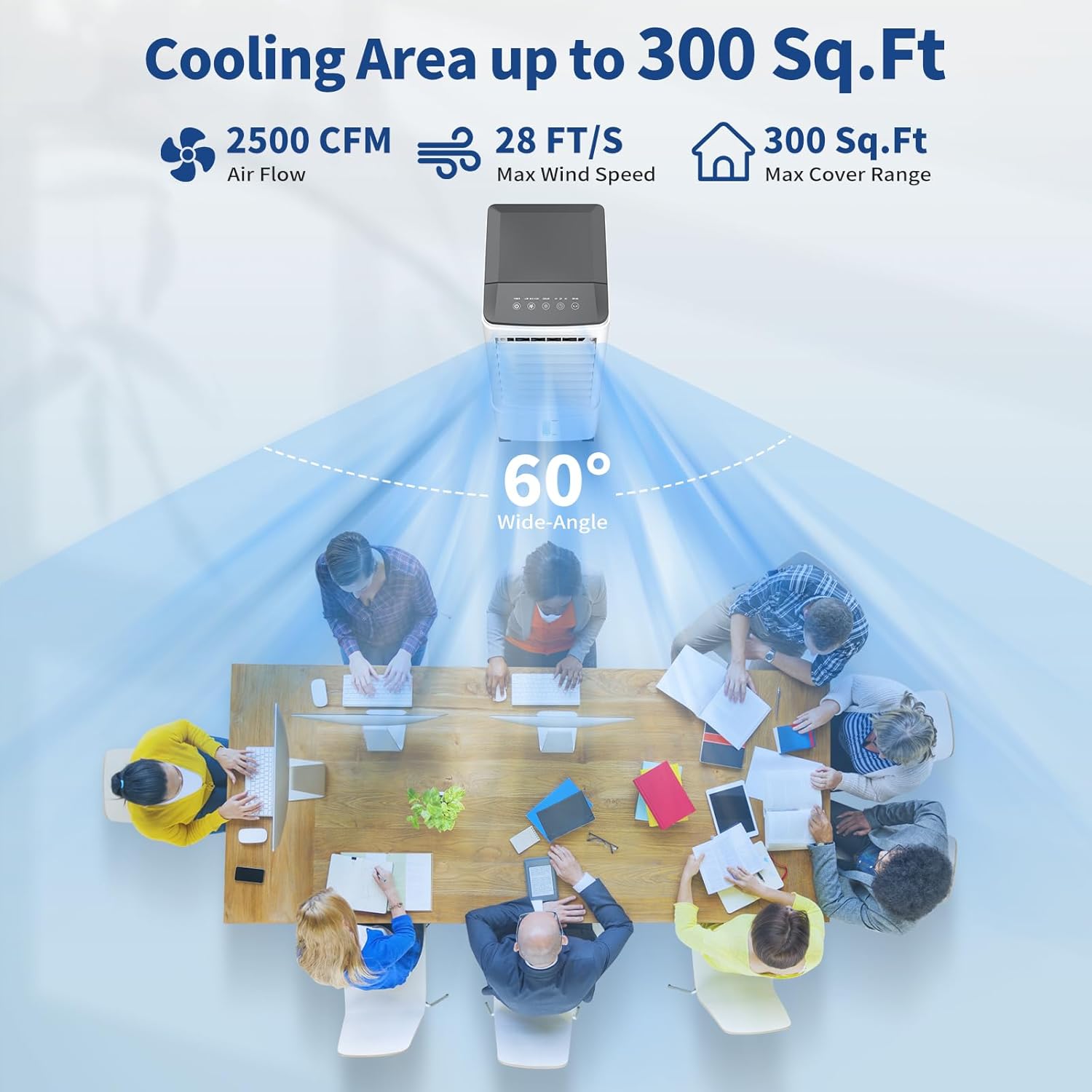
Figure 4.4: Wide-Angle Cooling Coverage
This image illustrates the unit's ability to provide 60-degree wide-angle cooling, effectively covering an area of up to 300 sq.ft. It also reiterates the 2500 CFM air flow and 28 FT/S max wind speed.
4.5 Timer Function
- Press the TIMER button (
 ) repeatedly to set the auto-off timer for 1, 2, 4, or 7 hours. The corresponding indicator light will illuminate.
 - To cancel the timer, press the TIMER button until no timer indicator lights are on.
4.6 Smart Sleep Mode
- The unit operates at an ultra-quiet 40dB in Smart Sleep Mode, ensuring minimal disturbance.
- The screen display will automatically turn off after a period of inactivity to prevent light disturbance during sleep.

Figure 4.5: Smart Sleep Mode
This image illustrates the unit's Smart Sleep Mode, emphasizing its quiet operation at 40dB and the convenience of the 7-hour smart timer, ideal for use in a bedroom environment.
5. Maintenance
Regular maintenance ensures optimal performance and extends the lifespan of your appliance.
5.1 Cleaning the Cooling Pad
The cooling pad is removable for easy cleaning.
- Unplug the unit from the power outlet.
- Carefully remove the cooling pad from its compartment.
- Rinse the cooling pad under running water to remove dust and mineral deposits. For stubborn dirt, use a soft brush and mild detergent.
- Allow the cooling pad to air dry completely before reinserting it into the unit.
5.2 Draining and Cleaning the Water Tank
To prevent mold and mildew, regularly drain and clean the water tank.
- Unplug the unit from the power outlet.
- Remove the water tank as described in Section 3.3.
- Empty any remaining water from the tank.
- Clean the inside of the tank with a soft cloth and mild detergent. Rinse thoroughly with clean water.
- Allow the tank to air dry completely before reinserting it.
5.3 Exterior Cleaning
- Unplug the unit before cleaning.
- Wipe the exterior surfaces with a soft, damp cloth. Do not use abrasive cleaners or solvents.
- Ensure no water enters the control panel or other electrical components.
5.4 Storage
- If storing the unit for an extended period, ensure the water tank is completely empty and dry, and the cooling pad is clean and dry.
- Store the unit in a cool, dry place, preferably in its original packaging.
6. Troubleshooting
Before contacting customer service, please refer to the following troubleshooting guide for common issues.
| Problem | Possible Cause | Solution |
|---|---|---|
| Unit does not power on. | No power supply. Power cord not securely plugged in. | Check if the power outlet is working. Ensure the power cord is firmly plugged into the unit and the outlet. |
| No cool air / Weak cooling. | Water tank is empty. Cooling pad is dirty. Room temperature is too high or humidity is too low for evaporative cooling. | Fill the water tank. Clean the cooling pad (refer to Section 5.1). Add ice packs to the water tank for enhanced cooling. Note that evaporative coolers are most effective in dry climates. |
| Unusual noise. | Unit not on a level surface. Foreign object inside. | Place the unit on a flat, stable surface. Unplug and inspect for any obstructions in the air inlets/outlets. |
| Water leakage. | Water tank not properly installed. Water tank overfilled. | Ensure the water tank is securely pushed into place. Do not fill water above the 'MAX' line. |
| Remote control not working. | Batteries are dead or incorrectly inserted. Obstruction between remote and unit. | Replace batteries and ensure correct polarity. Remove any objects blocking the signal path. |
7. Specifications
| Model Number | 030522 |
| Brand | YIJU |
| Product Dimensions (L x W x H) | 27.94 x 25.4 x 43.18 cm (11 x 10 x 17 inches) |
| Item Weight | 4.5 kg (9.9 lbs) |
| Wattage | 60 Watts |
| Voltage | 110 Volts |
| Noise Level | Approximately 40 dB |
| Air Flow Capacity | 2500 Cubic Feet Per Minute (CFM) |
| Recommended Coverage Area | Up to 300 Sq. Ft. |
| Water Tank Capacity | 2.5 Gallons (9.5 Liters) |
| Control Type | Remote & Touch Panel |
| Material | Acrylonitrile Butadiene Styrene (ABS) |
8. Warranty and Customer Support
YIJU provides a 1-year warranty for this product. For any questions, concerns, or warranty claims, please contact our customer service team.
Customer Service:
- Email: support@yiju.com (Example)
- Phone: 1-800-XXX-XXXX (Example)
- Available 7 days a week, 24 hours a day.
Please have your model number (030522) and purchase information ready when contacting support.