1. Introduction
Thank you for choosing the HOMCOM 921-807V00BK Executive Office Chair. This manual provides essential information for the safe and efficient use of your new office chair. Please read these instructions carefully before assembly and use, and retain them for future reference.
2. Safety Information
- Ensure all components are present and undamaged before assembly.
- Do not use the chair if any parts are missing or damaged.
- Keep children and pets away during assembly.
- Maximum weight recommendation for this chair is 265 pounds (120 kg). Do not exceed this limit.
- Use the chair on a flat, stable surface.
- Avoid standing on the chair or using it as a step stool.
- Regularly check all bolts and screws for tightness. Retighten as necessary.
3. Product Features
The HOMCOM 921-807V00BK Executive Office Chair is designed for comfort and functionality in an office environment. Key features include:
- Enhanced Support: High back design with ergonomic lumbar and upper back support to promote better posture.
- Adjustable Features: Adjustable seat height, tilt function (95 to 110 degrees), and 360-degree swivel.
- Improved Comfort: Padded cushion and breathable PU leather for extended sitting comfort.
- Durable Construction: Features a heavy-duty gas lift and a sturdy metal chrome base with smooth-rolling casters.

Figure 1: Ergonomic lumbar and upper back support for improved posture.
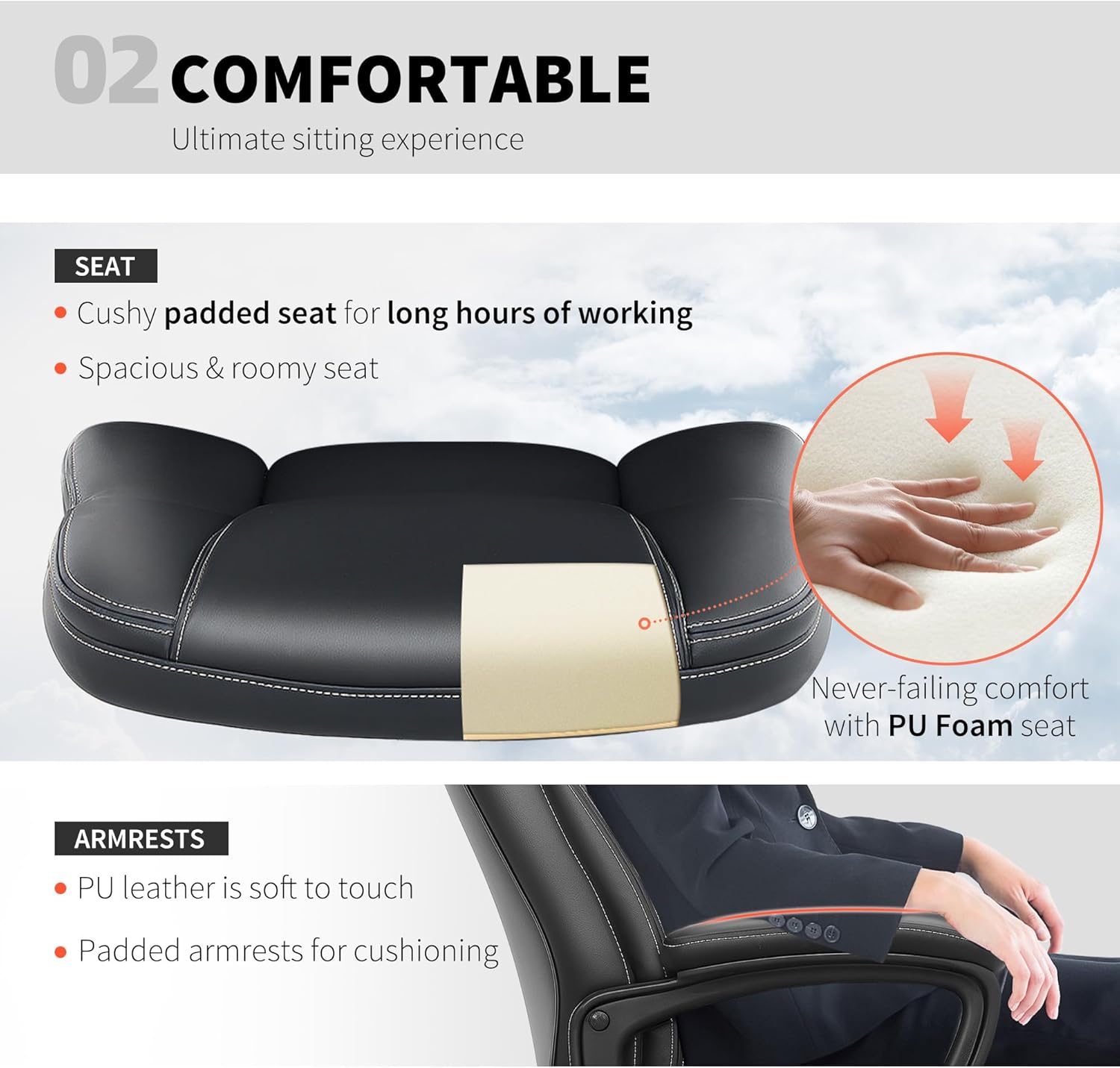
Figure 2: Cushioned seat and padded armrests for comfort.

Figure 3: High-quality PU leather and robust gas lift for durability.
4. Setup and Assembly
The HOMCOM 921-807V00BK Executive Office Chair requires assembly. Please refer to the detailed assembly instructions included in your product packaging for step-by-step guidance. Ensure all parts are accounted for before beginning assembly.
General Assembly Steps (Refer to included manual for specifics):
- Unpack all components and lay them out on a clean, soft surface to prevent scratches.
- Attach the casters to the chair base.
- Insert the gas lift into the center of the chair base.
- Assemble the seat and backrest components according to the diagrams.
- Attach the assembled seat and backrest to the gas lift.
- Ensure all screws are tightened securely.

Figure 4: Illustration of chair components for assembly.
5. Operating Instructions
Your HOMCOM office chair offers several adjustments to customize your seating experience:
5.1. Seat Height Adjustment
To adjust the seat height:
- To raise the seat: While standing, pull the lever located under the seat upwards. The seat will rise automatically. Release the lever at the desired height.
- To lower the seat: While seated, pull the lever located under the seat upwards. The seat will lower. Release the lever at the desired height.
Video 1: Demonstration of seat height adjustment and tilt function.
5.2. Tilt Function
The chair features a tilt function allowing the backrest to recline between 95 and 110 degrees.
- To unlock tilt: Pull the lever (same as height adjustment lever) outwards. The chair will now allow rocking motion.
- To lock tilt: Push the lever inwards to lock the chair in an upright position.
- Tilt Tension Adjustment: Rotate the round knob located under the seat, at the front, to adjust the tension of the tilt mechanism. Turn clockwise to increase tension (harder to recline), and counter-clockwise to decrease tension (easier to recline).

Figure 5: Tilt function lever and tension adjustment knob.
5.3. Swivel Function
The chair offers a full 360-degree swivel, allowing for easy movement and access to different areas of your workspace without needing to reposition the entire chair.
6. Maintenance and Care
Proper care will extend the life of your HOMCOM office chair:
- Cleaning: Wipe clean with a damp cloth. Avoid harsh chemicals or abrasive cleaners that may damage the PU leather.
- Inspection: Periodically check all screws, bolts, and moving parts (casters, gas lift) to ensure they are secure and functioning correctly. Tighten any loose fasteners.
- Avoid Overloading: Do not exceed the maximum weight capacity of 265 pounds.
- Environmental Conditions: Keep the chair away from direct sunlight and extreme temperatures to prevent material degradation.
7. Troubleshooting
If you encounter any issues with your HOMCOM office chair, please refer to the following common problems and solutions:
- Chair is wobbly: Ensure all assembly screws are fully tightened. Check that the chair is on a flat surface.
- Seat height adjustment not working: Verify that the gas lift lever is correctly engaged. If the gas lift is faulty, it may need replacement.
- Chair does not tilt or tilts too easily/hard: Check the tilt lock lever and the tilt tension knob. Adjust the tension knob as described in section 5.2.
- Casters not rolling smoothly: Clean any debris from the casters. Ensure they are properly inserted into the base.
If these steps do not resolve the issue, please contact HOMCOM customer support for further assistance.
8. Specifications
| Model Name | Executive Office Chair |
| Model Number | 921-807V00BK |
| Brand | HOMCOM |
| Color | Black |
| Material | Faux Leather (60% Polyurethane, 40% Polyester), Foam Fill |
| Overall Dimensions | 25.6" W x 28.3" D x 41.3" - 45.3" H |
| Seat Dimensions | 19.7" W x 17.7" D |
| Seat Height (Adjustable) | 17.7" - 21.7" |
| Backrest Dimensions | 25.6" L x 20.5" W |
| Arm Height | 28.7" (from floor) |
| Maximum Weight Capacity | 265 lbs (120 kg) |
| Special Features | Adjustable Height, Arm Rest, Back Support, Ergonomic, High Back, Swivel, Tilt Function |
| Item Weight | 33.4 lbs |

Figure 6: Detailed dimensions of the office chair.
9. Warranty and Support
For warranty information or technical support, please contact the manufacturer, Aosom LLC, or your retailer. Keep your purchase receipt and model number (921-807V00BK) readily available when contacting support.


