
Introduction
The LMBGM AR2090 Wireless In-Ear Monitor System is designed to provide professional-grade audio monitoring for various applications, including recording studios, churches, and live band performances. This system offers real-time stage monitoring with ultra-low latency audio, ensuring accurate pitch and rhythm, especially in noisy environments. It utilizes a phase-locked loop (PLL) UHF band to enhance overall performance, prevent frequency degradation, and eliminate crosstalk. With a robust wireless transmission range and durable construction, the AR2090 is built for reliable performance.

Image: The LMBGM AR2090 system enhances performance quality by allowing performers to move freely on stage without cable restraints.
Package Contents
Please verify that all items listed below are included in your package:
- 1 x Transmitter Unit
- 6 x Bodypack Receivers (each with earphones)
- 2 x Antennas
- 2 x Audio Cables (6.35mm Jack)
- 1 x Power Adapter (DC12V)
- 1 x User Manual
Product Overview
Familiarize yourself with the components and controls of the LMBGM AR2090 system.
Transmitter and Bodypack Receiver Panels
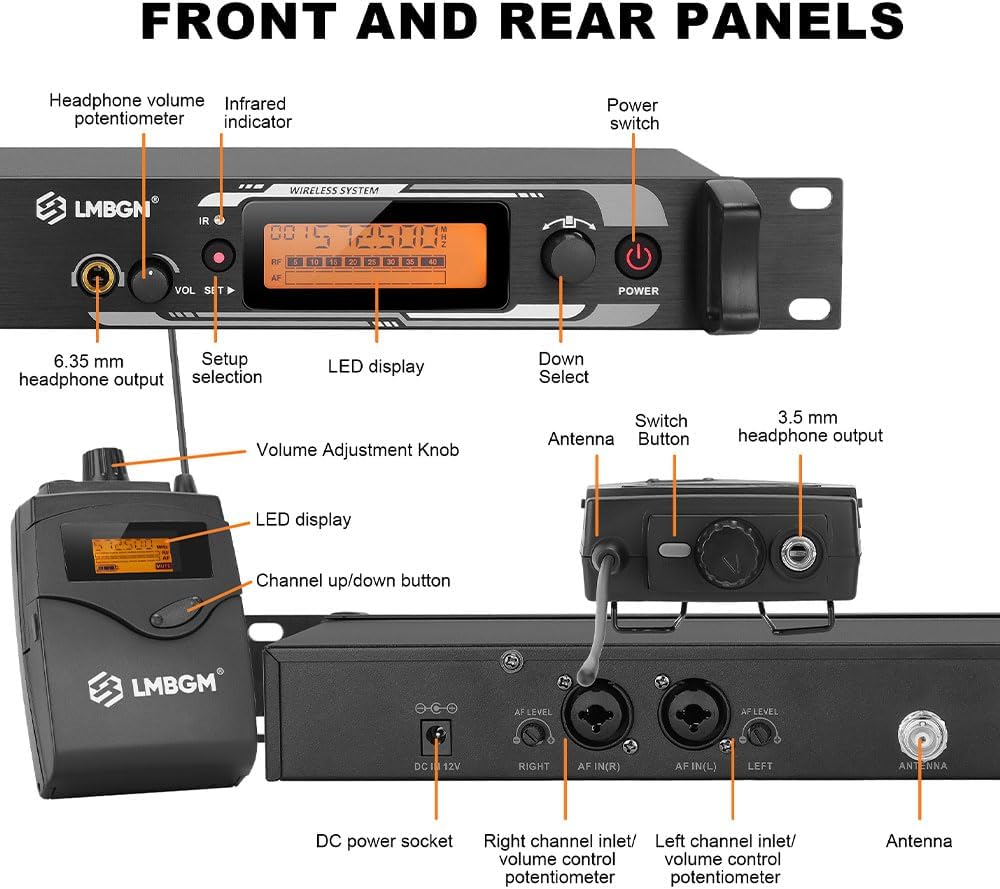
Image: Detailed view of the front and rear panels of the transmitter and the bodypack receiver, highlighting all controls and connection points.
- Transmitter Front Panel: Headphone volume potentiometer, Infrared indicator, Power switch, 6.35 mm headphone output, Setup selection button, LED display, Down Select button.
- Transmitter Rear Panel: DC power socket, Right channel input/volume control potentiometer, Left channel input/volume control potentiometer, Antenna ports.
- Bodypack Receiver: Antenna, Switch button, 3.5 mm headphone output, Volume Adjustment Knob, LED display, Channel up/down button.
Setup
1. Transmitter Connection
- Connect the provided power adapter to the DC power socket on the rear panel of the transmitter and plug it into a power outlet.
- Attach the two antennas to the antenna ports on the rear panel.
- Connect your audio source (e.g., mixing console) to the Left and Right channel inputs (XLR or 6.35mm) on the rear panel using the supplied audio cables. Adjust input levels as needed using the corresponding potentiometers.
2. Bodypack Receiver Preparation
- Open the battery compartment on the bodypack receiver. Insert two AA batteries (user supplied), ensuring correct polarity.
- Connect the earphones to the 3.5 mm headphone output on the bodypack receiver.

Image: The bodypack receiver requires two AA batteries for operation, providing approximately 4-5 hours of working time.
3. Infrared Frequency Pairing
To establish a wireless connection, the transmitter and bodypack receivers must be paired to the same frequency channel.
- Power on the transmitter and select your desired frequency channel using the "Setup selection" and "Down Select" buttons. The chosen frequency will be displayed on the LED screen.
- Power on the bodypack receiver.
- Aim the infrared window on the transmitter towards the infrared window on the bodypack receiver. Ensure they are within close proximity (a few centimeters).
- Press the "Switch Button" or "Channel up/down button" on the bodypack receiver to initiate pairing. The LED display on the bodypack will show the synchronized frequency.
- Repeat this process for all bodypack receivers.

Image: Infrared frequency pairing allows for easy and quick alignment of frequencies between the transmitter and bodypack receivers.
Operating Instructions
Power On/Off
- To power on the transmitter, press the "Power switch" on the front panel.
- To power on a bodypack receiver, press and hold the "Switch Button" until the LED display illuminates.
- To power off, repeat the respective steps.
Channel Selection
The system supports 16 switchable frequencies within the 550 MHz - 580 MHz range.
- On the transmitter, use the "Setup selection" and "Down Select" buttons to cycle through available frequencies.
- On the bodypack receiver, use the "Channel up/down button" to change channels. Ensure the receiver is paired with the transmitter's selected channel via infrared pairing if changing channels after initial setup.
Volume Control
- Transmitter: Adjust the "Headphone volume potentiometer" for monitoring directly from the transmitter. Adjust "Left channel input/volume control potentiometer" and "Right channel input/volume control potentiometer" for input levels.
- Bodypack Receiver: Use the "Volume Adjustment Knob" to control the earphone volume.

Image: The system features comfortable in-ear headphones, adjustable frequency, precise volume control, and robust construction to prevent crosstalk.
Real-Time Monitoring and Range
The AR2090 system provides real-time audio monitoring with ultra-low latency (less than 5 milliseconds), crucial for live performances.

Image: Real-time monitoring ensures accurate pitch and rhythm, particularly beneficial in noisy environments like studios or stages.
The wireless transmission distance can reach up to 300 meters (approximately 984 feet) under optimal conditions, with a typical operating range of 250-350 feet (76-106 meters).

Image: The system utilizes UHF wireless technology for remote reception, offering a significant transmission distance.
Maintenance
- Cleaning: Use a soft, dry cloth to clean the surfaces of the transmitter and bodypack receivers. Avoid using liquid cleaners or solvents.
- Battery Replacement: Replace AA batteries in the bodypack receivers when the low battery indicator appears on the LED display. Always use fresh batteries for optimal performance.
- Storage: When not in use for extended periods, store the system in a dry, cool place, away from direct sunlight and extreme temperatures. Remove batteries from bodypack receivers before long-term storage.
Troubleshooting
| Problem | Possible Cause | Solution |
|---|---|---|
| No sound from earphones |
|
|
| Interference or poor sound quality |
|
|
| Short wireless range |
|
|
Specifications

Image: Product dimensions and key technical parameters for the LMBGM AR2090 system.
| Feature | Detail |
|---|---|
| Model Number | AR2090 |
| Frequency Range | 550 MHz - 580 MHz (16 switchable frequencies) |
| Bandwidth Response | 50 Hz - 20 kHz |
| Latency | Less than 5 milliseconds |
| Wireless Transmission Range | Up to 300 meters (approx. 984 feet); Normal range: 250-350 feet (76-106 meters) |
| Transmitter Chassis Material | Metal Panel |
| Bodypack Material | Durable ABS plastic |
| Audio Input (Transmitter) | XLR and 6.5mm Composite Socket |
| Headphone Output (Transmitter) | 6.5mm Stereo Jack |
| Headphone Output (Bodypack) | 3.5mm Jack |
| Transmitter Power Supply | DC12V/250mA |
| Bodypack Battery | 2 x AA batteries (user supplied) |
| Bodypack Working Time | Approximately 4-5 hours |
| Control Method | Push Button |
| Features | UHF PLL, Anti-frequency loss, Anti-crosstalk, Ultra-low latency, Blind spot compensation |
Warranty and Support
Information regarding warranty coverage and customer support for the LMBGM AR2090 Wireless In-Ear Monitor System is not available in the provided product data. Please refer to the product packaging or contact LMBGM customer service directly for details on warranty terms and technical support.