
1. Introduction
This manual provides essential information for the safe and effective use of your Bluelog Rollator Walker FST912. Please read all instructions carefully before assembly and operation. Retain this manual for future reference.

Figure 1: Bluelog Rollator Walker FST912.
2. Safety Information
Always prioritize safety when using the rollator walker. Failure to follow these guidelines may result in injury or damage to the product.
- Weight Capacity: Do not exceed the maximum weight capacity of 300 lbs (136 kg).
- Braking System: Always engage the parking brakes before sitting on the seat. Ensure brakes are functioning correctly before each use.
- Stability: Ensure all four wheels are on a stable, level surface before applying weight or sitting.
- Adjustments: Verify that all adjustable components (handles, seat) are securely locked in place after adjustment.
- Folding Joints: Be aware of anti-pinch folding joints during folding and unfolding to prevent injury.
- Nighttime Visibility: Utilize the reflective strips for increased visibility in low-light conditions.
- Obstacles: Exercise caution when navigating uneven surfaces, thresholds, or inclines.
3. Assembly Instructions
The Bluelog Rollator Walker FST912 is designed for easy, tool-free assembly. Follow these steps to set up your walker.
3.1 Unfolding the Rollator
- Carefully remove the rollator from its packaging.
- Place the rollator on a flat, stable surface.
- Gently pull the sides of the frame apart until the rollator is fully open and the locking mechanism engages. Ensure the seat is flat and secure.
3.2 Attaching the Backrest
The backrest provides support when using the seat. Refer to the video for visual guidance.
Video 1: Backrest Assembly Guide. This video demonstrates the steps for attaching the backrest to the rollator frame.
- Insert the four screws into the backrest, starting from the side without the logo so the logo faces outward.
- Align the backrest with the frame holes.
- Secure the backrest by tightening the nuts onto the screws. Ensure they are firmly attached.
3.3 General Assembly Overview
For a complete assembly overview, including initial setup and component attachment, watch the full assembly video.
Video 2: Rollator Walker with Seat Assembly Video. This video provides a comprehensive guide to assembling the rollator walker.

Figure 2: The rollator features a stable tower structure for enhanced support.

Figure 3: The frame includes a sturdy triangular reinforcement for durability.

Figure 4: A high-strength double H-crossbar contributes to the rollator's stability.

Figure 5: The rollator frame is constructed from thickened high carbon steel for durability.
4. Operating Instructions
Understand how to properly operate your Bluelog Rollator Walker FST912 for safe and comfortable mobility.
4.1 Braking System
The rollator features a triple-mode braking system for secure control.

Figure 6: The braking system offers Park, Slow, and Free modes for varied control.
- Free Rolling: Squeeze the brake levers gently for normal movement.
- Deceleration (Slow): Apply slight pressure to the brake levers to reduce speed.
- Full Stop (Park): Push the brake levers down until they lock into place. This engages the parking brake, preventing the rollator from moving. Always engage the parking brake before sitting.

Figure 7: The rollator is equipped with wear-resistant metal brake pads for reliable stopping power.

Figure 8: Brake tension can be adjusted for optimal performance.
4.2 Handle and Seat Height Adjustment
The rollator offers adjustable handle and seat heights to accommodate users from 4'7" to 6'6".

Figure 9: The rollator features 13 levels of height adjustment for handles and seat.
- To adjust handle height, locate the adjustment pins on the handle tubes. Press the pins and slide the handles up or down to the desired height. Ensure the pins snap securely into place.
- To adjust seat height, locate the adjustment points on the seat frame. Adjust to one of the three available positions, ensuring it locks securely.
4.3 Wheels and Maneuverability
The 8-inch all-terrain PVC solid wheels provide smooth movement across various surfaces.

Figure 10: The 8-inch PVC solid wheels are designed for stability on wood floors, carpet, grass, and gravel.

Figure 11: The rollator is suitable for both indoor and outdoor use.
4.4 Seat and Backrest Comfort
The rollator features a comfortable seat and backrest for resting.
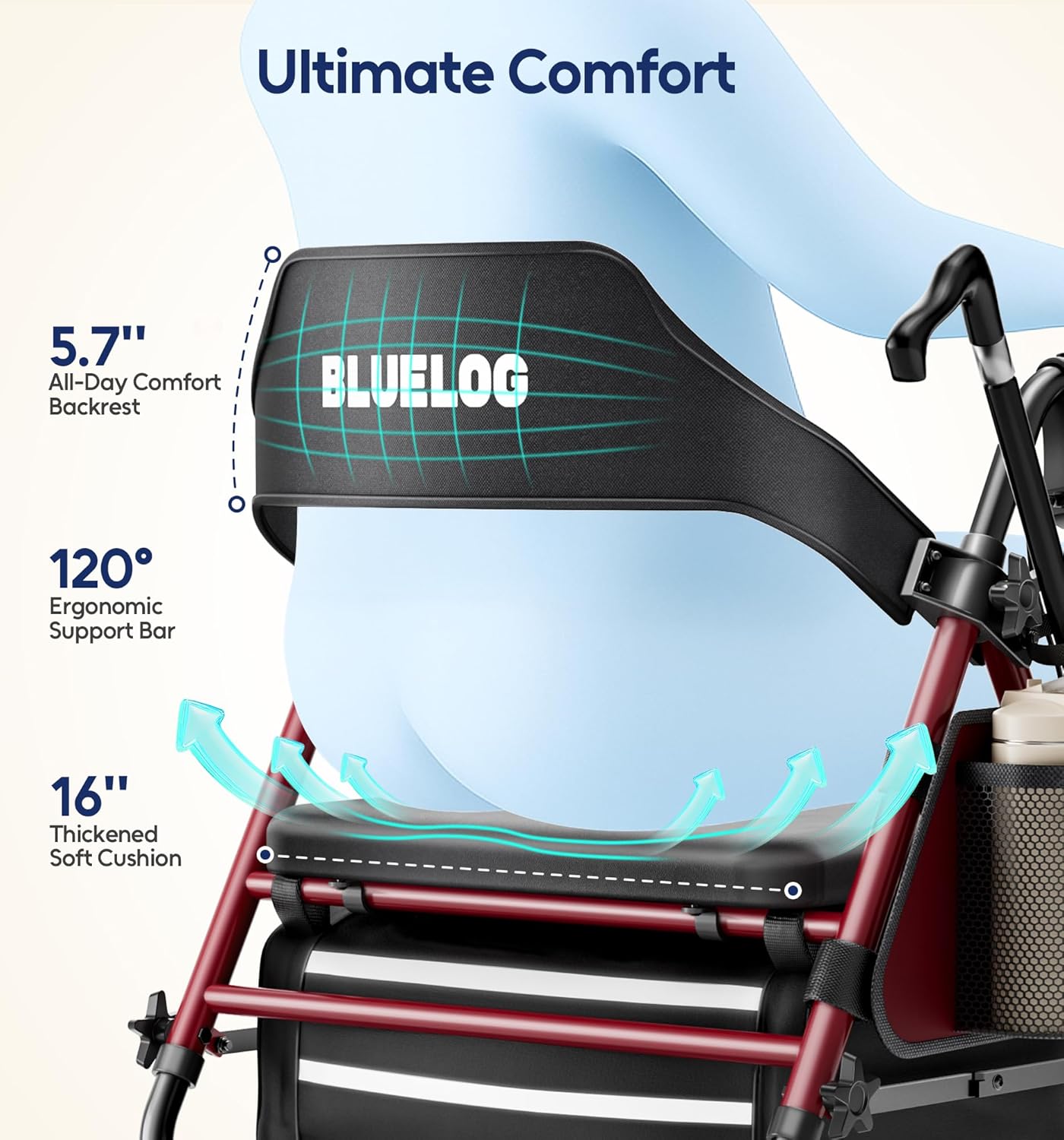
Figure 12: The design emphasizes ultimate comfort with a supportive backrest and thickened soft cushion.

Figure 13: The 16-inch wider, thickened soft cushion provides extended sitting comfort.

Figure 14: The 5.7-inch wider backrest with a 120-degree ergonomic support bar offers superior comfort.
4.5 Accessories and Modes
The rollator includes practical accessories and supports various modes of use.
- Storage Bag: A 21.6L deep, waterproof storage bag is located under the seat for personal items.
- Cup Holder: A removable cup holder is included for beverages.
- Cane/Umbrella Holder: A holder is provided for canes or long-handled umbrellas.

Figure 15: The rollator can be used in Walking Mode, Rest Mode (using the seat), and Shopping Mode (utilizing storage).
5. Folding and Storage
The rollator features a 3-second folding mechanism for easy transport and storage.

Figure 16: The rollator folds compactly for convenient storage and transport.
- Ensure the parking brakes are engaged.
- Lift the strap located under the seat. The rollator will begin to fold inward.
- Continue lifting until the rollator is fully folded.
- The ergonomic handle allows for easy lifting and transport.

Figure 17: The lightweight and foldable design makes it easy to store in a car trunk.
6. Maintenance and Care
Regular maintenance ensures the longevity and safe operation of your rollator walker.
- Cleaning: Wipe down the frame and seat with a damp cloth and mild detergent. Avoid abrasive cleaners.
- Inspection: Periodically check all screws, bolts, and locking mechanisms to ensure they are tight and secure.
- Brakes: Test the brakes regularly. If they feel loose or ineffective, adjust the tension as shown in Figure 8 or contact customer support.
- Wheels: Ensure wheels are free of debris and rotate smoothly.
- Storage: Store the rollator in a dry place away from extreme temperatures.
7. Troubleshooting
This section addresses common issues you might encounter with your rollator walker.
| Problem | Possible Cause | Solution |
|---|---|---|
| Rollator does not roll smoothly. | Debris in wheels; loose wheel axle. | Clean wheels; check and tighten axle bolts. |
| Brakes are not engaging or are too loose. | Brake cable tension needs adjustment. | Adjust brake cable tension (refer to Figure 8). |
| Rollator feels unstable. | Locking mechanisms not fully engaged; uneven surface. | Ensure all frame locks are secure; move to a level surface. |
| Handles or seat slide down after adjustment. | Adjustment pins not fully engaged. | Re-adjust and ensure pins snap securely into place. |
8. Specifications
Detailed specifications for the Bluelog Rollator Walker FST912.

Figure 18: Key product specifications at a glance.
| Feature | Detail |
|---|---|
| Model Name | FST912 |
| Product Dimensions (D x W x H) | 27.5" x 21.7" x 33"-41" (adjustable) |
| Product Weight | 21 pounds (9.53 kg) |
| Maximum Weight Capacity | 300 pounds (136 kg) |
| Material Type | Thickened High Carbon Steel (frame) |
| Wheel Type | 8-inch PVC Solid Wheels |
| User Height Recommendation | 4'7" to 6'6" |
| Seat Dimensions | 16" x 12" |
| Seat Height | 20"-23" (adjustable) |
| Handle Height | 33"-41" (adjustable) |
| Storage Bag Capacity | 21.6 Liters |
| Accessories Included | Removable Cup Holder, Cane Holder |
| Color | Burgundy |
9. Warranty and Support
Bluelog is committed to providing quality products and customer satisfaction.
9.1 Customer Support
For any questions, assistance with installation, or to report issues, please contact our USA-based customer support team.
- Phone Support: Monday to Friday, 9 AM - 5 PM (PST)
- Email Support: Available 24/7 for fast assistance.

Figure 19: Bluelog offers dedicated USA-based customer support.
9.2 Warranty Information
Your Bluelog Rollator Walker FST912 comes with lifetime support. Please refer to the product packaging or contact customer support for specific warranty details regarding defects or malfunctions.
