
TaskStar PS044
TaskStar PS044 Cordless Pruning Shears with Telescopic Pole User Manual
Model: PS044 | Brand: TaskStar
1. Introduction
Thank you for choosing the TaskStar PS044 Cordless Pruning Shears. This 2-in-1 electric pruner is designed for efficient and versatile gardening tasks, allowing you to switch between handheld operation and extended reach with the telescopic pole. Featuring a powerful brushless motor, durable SK5 blades, and two 4.0Ah batteries, this tool provides precise cutting for branches up to 40mm in diameter. Please read this manual carefully before use to ensure safe and optimal performance.

Image 1.1: The TaskStar PS044 pruning shears, demonstrating its 2-in-1 functionality for both handheld and pole use.
2. Important Safety Instructions
Always follow basic safety precautions when using electric tools to reduce the risk of fire, electric shock, and personal injury.
- Read All Instructions: Familiarize yourself with the tool's operation and safety guidelines before use.
- Wear Personal Protective Equipment (PPE): Always wear safety glasses, gloves, and sturdy footwear. Consider hearing protection if operating for extended periods.
- Keep Work Area Clear: Ensure the area around you is free from obstructions and bystanders, especially children and pets.
- Avoid Accidental Starting: Ensure the power switch is off before connecting the battery, picking up, or carrying the tool.
- Do Not Place Fingers on Blades: The blades are extremely sharp and can cause severe injury. Always keep hands clear of the cutting area.
- Maintain Firm Grip: Hold the tool firmly with both hands when operating, especially when using the telescopic pole.
- Use Correct Tool: Do not force the tool or use it for purposes other than its intended use (pruning branches).
- Battery Safety: Use only the specified charger and batteries. Do not expose batteries to water, heat, or direct sunlight.
- Inspect Before Use: Check for damaged parts, loose connections, or any other condition that may affect operation.
- Stay Alert: Pay attention to what you are doing and use common sense when operating power tools. Do not use while tired or under the influence of drugs, alcohol, or medication.
3. Package Contents
Verify that all items are present in your package. If any parts are missing or damaged, please contact TaskStar customer support.
- 1 x TaskStar Electric Pruner
- 1 x Telescopic Pole
- 2 x 4.0Ah Batteries
- 1 x Fast Charger
- 1 x Spare SK5 Blade
- 1 x Shoulder Strap
- 1 x Hex Screwdriver
- 1 x Allen Wrench
- 1 x Glove
- 1 x Instruction Manual

Image 3.1: All components included in the TaskStar PS044 pruning kit.
4. Components Overview
Familiarize yourself with the main parts of your TaskStar PS044 pruning shears:
- Electric Pruner Unit: The main body containing the motor, blades, and control handle.
- Telescopic Pole: Extends the reach of the pruner for high branches.
- 4.0Ah Batteries: Rechargeable power source for the pruner.
- SK5 Blades: Sharp, durable steel blades for cutting.
- LED Display: Shows battery level and cut count.
- Trigger/Power Switch: Activates the cutting action.
- Safety Lock: Prevents accidental operation.
- Shoulder Strap Attachment Points: For securing the shoulder strap when using the pole.

Image 4.1: An overview of the main components of the TaskStar PS044 kit.
5. Setup
5.1. Charging the Batteries
Before first use, fully charge both 4.0Ah batteries.
- Connect the fast charger to a power outlet.
- Insert a 4.0Ah battery into the charger. The charger's indicator light will show the charging status.
- Once fully charged, remove the battery from the charger. Repeat for the second battery.
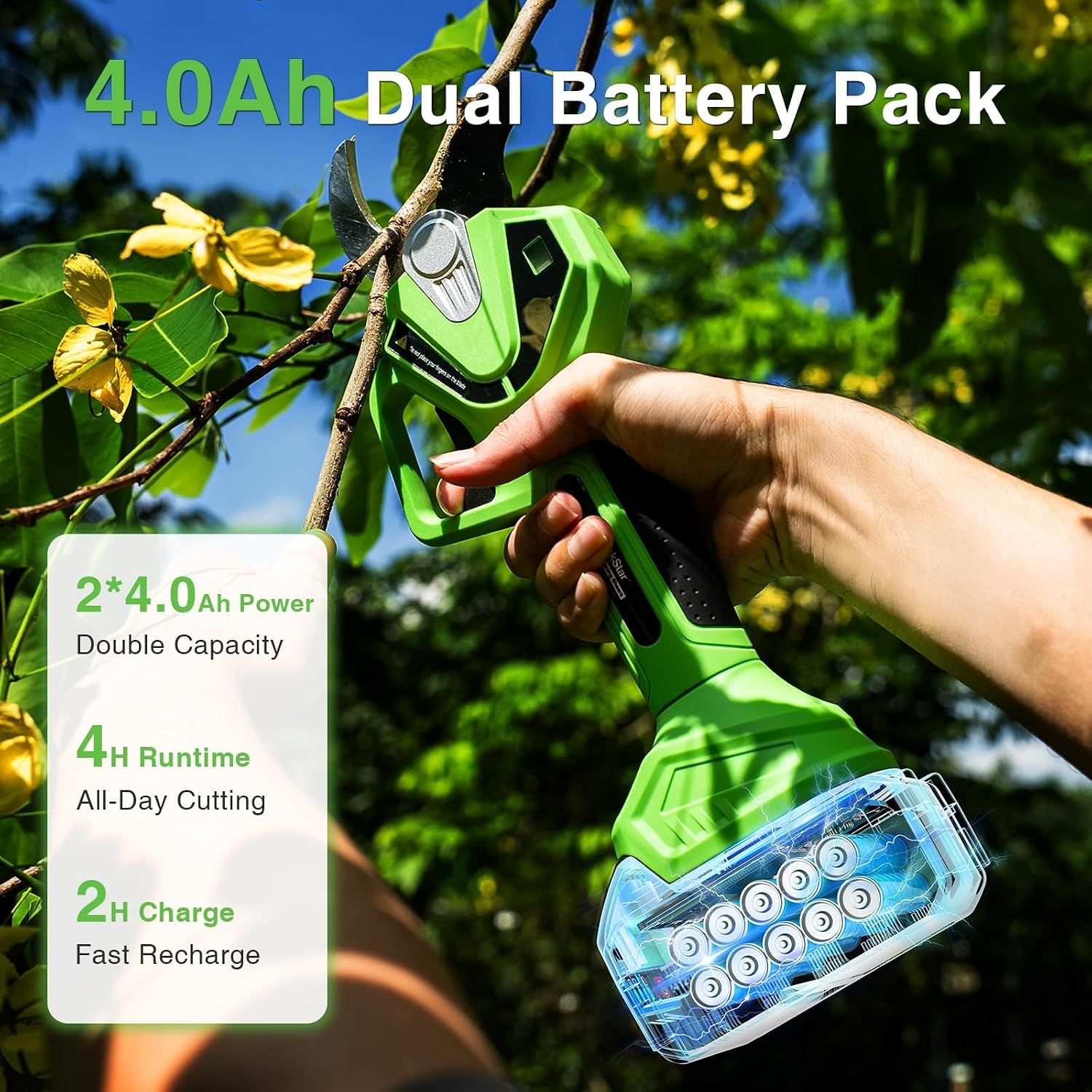
Image 5.1: The 4.0Ah dual battery pack, highlighting its capacity and quick recharge time.
5.2. Assembling the Pruner
- Attach Battery: Slide a charged 4.0Ah battery into the battery slot on the bottom of the electric pruner unit until it clicks into place.
- Attach to Telescopic Pole (Optional): If using the telescopic pole, align the pruner unit with the pole's attachment point and secure it according to the pole's locking mechanism. Ensure it is firmly attached.
- Attach Shoulder Strap (Optional): For extended use with the telescopic pole, attach the shoulder strap to the designated attachment points on the pole for improved balance and reduced fatigue.

Image 5.2: Proper insertion of the battery into the pruner unit.

Image 5.3: Demonstrating the use of the shoulder strap with the telescopic pole.
6. Operating Instructions
6.1. Powering On and Off
- To Power On: Press and hold the power button until the LED display illuminates. The blades will cycle once to indicate readiness.
- To Power Off: Press and hold the power button until the LED display turns off. The blades will close completely.
6.2. Selecting Cutting Modes
The TaskStar PS044 offers two cutting modes for different branch sizes:
- Small Cut Mode (1.26"/32mm): Ideal for trimming smaller branches and delicate plants.
- Large Cut Mode (1.6"/40mm): Suitable for thicker branches and more demanding pruning tasks.
Refer to the instruction manual for specific steps on how to switch between these modes, usually involving a quick press of the power button or a dedicated mode button.

Image 6.1: The two cutting modes: 1.26"/32mm for small trims and 1.6"/40mm for larger cuts.
6.3. Handheld Operation
For pruning low-lying shrubs, bushes, and accessible branches:
- Ensure a firm grip on the pruner handle.
- Position the blades around the branch to be cut, ensuring no fingers are near the blades.
- Press the trigger to activate the cutting action. Release the trigger to stop.
6.4. Telescopic Pole Operation
For reaching high branches without a ladder:
- Attach the pruner unit to the telescopic pole and secure it.
- Adjust the pole length up to 9 feet (approximately 2.7 meters) by unlocking, extending, and re-locking the sections.
- Attach and adjust the shoulder strap for comfort and stability.
- Carefully position the pruner blades around the target branch.
- Activate the cutting action using the pole's trigger mechanism.
- Ensure stable footing and maintain awareness of falling branches.

Image 6.2: The telescopic pole extends up to 9 feet, allowing access to higher branches.
6.5. LED Display
The integrated LED display provides real-time information:
- Battery Level: Indicates the remaining charge of the inserted battery.
- Cut Count: Displays the number of cuts performed, useful for tracking usage.
7. Maintenance
Regular maintenance ensures the longevity and optimal performance of your TaskStar PS044 pruning shears.
7.1. Blade Care
- Cleaning: After each use, clean the SK5 blades with a damp cloth to remove sap and debris. Apply a light coat of oil to prevent rust.
- Sharpening: The SK5 blades are designed to stay sharp longer. If they become dull, they can be professionally sharpened or replaced.
- Replacement: Use the included spare SK5 blade when the primary blade is no longer effective. Follow the instructions in the manual for safe blade replacement.

Image 7.1: The sharp SK5 primary and backup blades ensure clean and precise cuts.
7.2. Battery Care
- Store batteries in a cool, dry place away from direct sunlight and extreme temperatures.
- Do not store fully discharged batteries for long periods. Charge them periodically if not in use.
- Only use the provided TaskStar charger for charging.
7.3. General Cleaning and Storage
- Wipe down the entire tool with a clean, dry cloth after each use.
- Store the pruner and its components in a secure, dry location, out of reach of children.
8. Troubleshooting
If you encounter issues with your TaskStar PS044, refer to the following common problems and solutions:
| Problem | Possible Cause | Solution |
|---|---|---|
| Pruner does not turn on. | Battery not charged or improperly inserted. | Ensure battery is fully charged and correctly inserted. |
| Blades are stuck open or closed. | Debris caught in blades; mechanical issue. | Power off, remove battery, carefully clear debris. If issue persists, contact support. |
| Reduced cutting performance. | Dull or dirty blades; low battery. | Clean and lubricate blades. Replace or sharpen blades if necessary. Charge battery. |
| Telescopic pole feels unstable. | Sections not fully locked. | Ensure all pole sections are securely locked before use. |
| Battery not charging. | Charger malfunction; battery issue. | Check charger connection and power outlet. Try charging the other battery. If problem persists, contact support. |
9. Specifications
| Feature | Detail |
|---|---|
| Brand | TaskStar |
| Model Number | PS044 |
| Color | Green |
| Item Weight | 6 Pounds (approx. 2.7 kg) |
| Style | Bypass |
| Product Dimensions (L x W) | 76.2L x 22.6W cm (approx. 30L x 8.9W inches) |
| Blade Length | 40 Millimeters (1.6 inches) |
| Cutting Width | 1.6 Inches (40 mm) |
| Blade Type | Shear / Serrated |
| Handedness | Ambidextrous |
| Blade Material | Alloy Steel (SK5) |
| Handle Material | Plastic |
| Manufacturer | TaskStar |
| Country of Origin | China |
| Included Components | Electric Pruner, Telescopic Pole, 2x 4.0Ah Batteries, Fast Charger, Spare SK5 Blade, Shoulder Strap, Hex Screwdriver, Allen Wrench, Glove, Instruction Manual |
10. Warranty and Support
The TaskStar PS044 comes with a commitment to quality. For any questions, technical assistance, or warranty claims, please contact TaskStar customer support.
- EU Spare Parts Availability: 5 Years
Please retain your proof of purchase for warranty purposes.
Ask a question about this manual
Ask about setup, troubleshooting, compatibility, parts, safety, or missing instructions. Manuals+ will review the question and use this page’s manual context to help answer it.