
1. Introduction
Thank you for choosing the Poedagar Men's Quartz Chronograph Wristwatch Model 866. This manual provides essential information for the proper setup, operation, and maintenance of your watch. Please read it carefully to ensure optimal performance and longevity of your timepiece.
This watch features a durable stainless steel construction, a precise quartz movement, chronograph functionality, luminous display, and water resistance suitable for daily use.
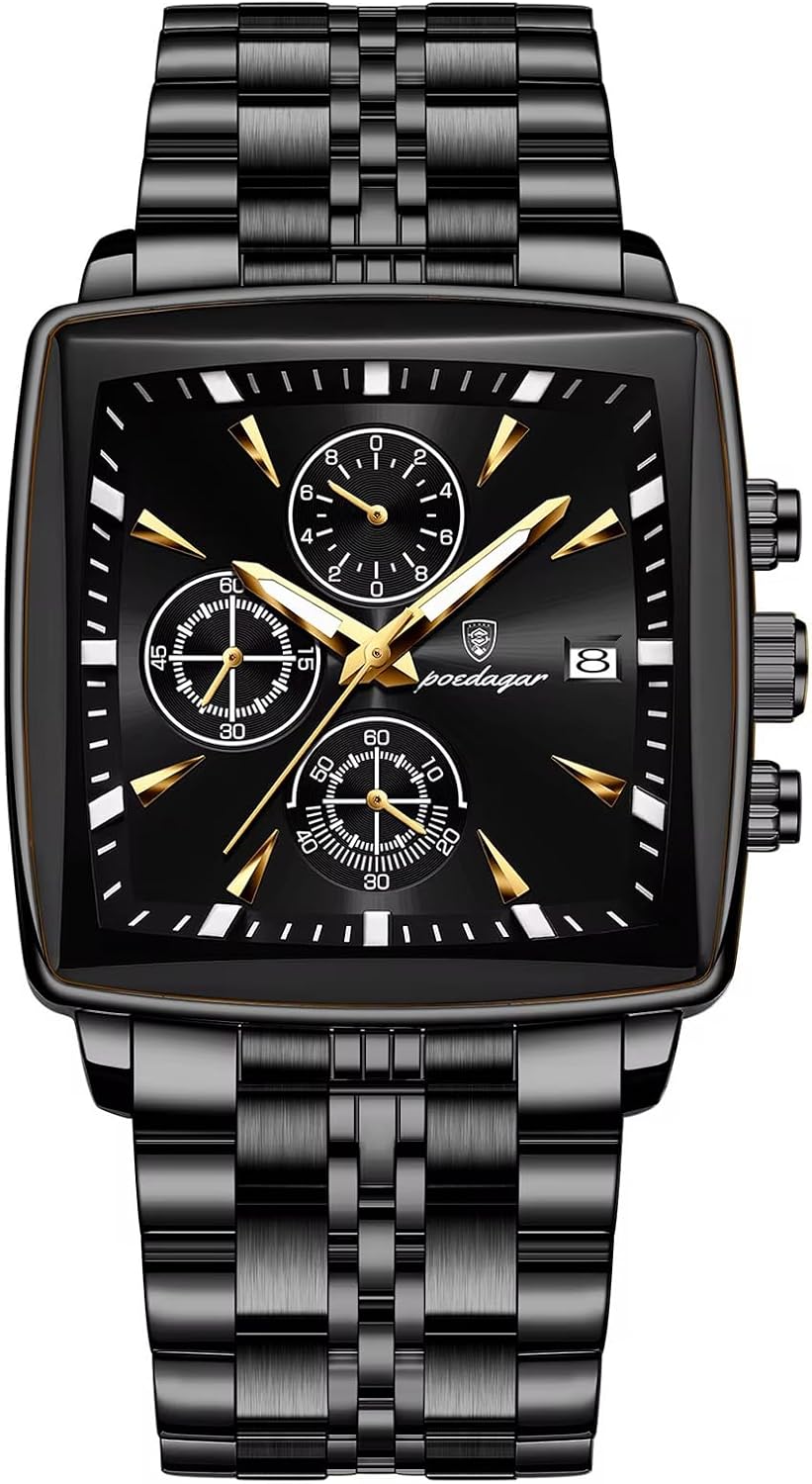
Image 1.1: Front view of the Poedagar Model 866 Chronograph Watch.
2. Safety Information
- Avoid exposing the watch to extreme temperatures (above 60°C / 140°F or below 0°C / 32°F) or sudden temperature changes.
- Do not operate the crown or pushers while the watch is submerged in water to maintain water resistance.
- Keep the watch away from strong magnetic fields, as this can affect the accuracy of the quartz movement.
- Clean the watch regularly with a soft, dry cloth. For water-resistant models, a slightly damp cloth can be used, followed by drying.
- Battery replacement should ideally be performed by a qualified watch technician to ensure proper sealing and water resistance.
3. Setup
3.1 Unboxing and Initial Inspection
Upon opening the package, verify that all components are present:
- Poedagar Model 866 Wristwatch
- Instruction Manual (this document)
- Stainless steel band adjustment tool

Image 3.1: Watch, box, and strap adjustment tool.
3.2 Time and Date Setting
The watch features a crown and two pushers on the right side of the case. Refer to Image 3.2 for button identification.
- Setting the Time: Pull the crown out to position 2. Rotate the crown to set the hour and minute hands. Push the crown back to position 0 to start the watch.
- Setting the Date: Pull the crown out to position 1. Rotate the crown clockwise or counter-clockwise (depending on the movement) to adjust the date. Push the crown back to position 0. Avoid setting the date between 9 PM and 3 AM, as this can interfere with the automatic date change mechanism.

Image 3.2: Multi-function sub-dials and side button functions.
3.3 Strap Adjustment
The stainless steel strap can be adjusted using the included tool. This process involves removing links to achieve a comfortable fit. If you are unsure, it is recommended to seek assistance from a professional jeweler or watch repair service.
4. Operating Instructions
4.1 Basic Timekeeping
Once the time and date are set, the watch will continuously display the current time. The main hands indicate hours and minutes, while a smaller sub-dial may indicate seconds or a 24-hour format, depending on the specific model configuration.
4.2 Chronograph Function
The chronograph allows for precise timing of events. Refer to Image 3.2 for button identification.
- Start/Stop: Press the top pusher (A) to start the chronograph. Press it again to stop.
- Reset: While the chronograph is stopped, press the bottom pusher (B) to reset all chronograph hands to their zero positions.
4.3 Luminous Display
The watch hands and hour markers are coated with a luminous material. After exposure to light, these elements will glow in the dark, allowing for readability in low-light conditions. The intensity and duration of the glow depend on the exposure time and intensity of light.

Image 4.1: Luminous display in low light.
4.4 Water Resistance
This watch is rated for 30 meters (3 ATM) of water resistance. This means it is suitable for daily use and can withstand splashes, rain, and brief immersion in water. It is not suitable for swimming, diving, or showering with hot water, as steam and pressure changes can compromise the seals.
5. Maintenance
5.1 Cleaning
Regular cleaning helps maintain the appearance and hygiene of your watch. Use a soft, lint-free cloth to wipe the case and strap. For stainless steel straps, a soft brush can be used to remove dirt from crevices. Ensure the watch is dry after any cleaning involving moisture.
5.2 Battery Replacement
The watch is powered by a quartz battery (CR2032, 2 required). When the watch stops or the chronograph functions become erratic, it may be time for a battery replacement. It is recommended to have the battery replaced by a professional watchmaker to ensure the watch's water resistance is maintained after opening the case back.
5.3 Storage
When not wearing your watch, store it in a cool, dry place away from direct sunlight and extreme temperatures. The original watch box is ideal for storage.
6. Troubleshooting
- Watch not running: Check if the crown is pushed fully into position 0. If it is, the battery may need replacement.
- Chronograph hands not resetting to zero: This may indicate a need for calibration or service. Try pressing the reset button firmly. If the issue persists, professional service may be required.
- Date not changing: Ensure the time is set correctly, especially the AM/PM cycle. Avoid setting the date during the automatic change period (9 PM - 3 AM).
7. Specifications
| Feature | Specification |
|---|---|
| Model Number | 866 |
| Movement Type | Quartz |
| Case Material | Stainless Steel |
| Band Material | Stainless Steel |
| Dial Window Material | Hardlex Glass |
| Water Resistance | 30M (3 ATM) |
| Clasp Type | Push Button Hidden Clasp |
| Batteries | 2 x CR2032 (included) |
| Manufacturer | DAXIAOYU |
| Item Weight | 7.05 ounces |
| Package Dimensions | 5.91 x 3.15 x 1.18 inches |

Image 7.1: Hardlex Dial Window Material.
8. Warranty and Support
For warranty information or technical support, please refer to the documentation provided with your purchase or contact the seller directly. Keep your proof of purchase for any warranty claims.