
Introduction
This manual provides detailed instructions for the setup, operation, maintenance, and troubleshooting of your OLEVS G2942-black-all black Multifunctional Chronograph Men's Watch. Please read this manual thoroughly to ensure proper use and longevity of your timepiece.

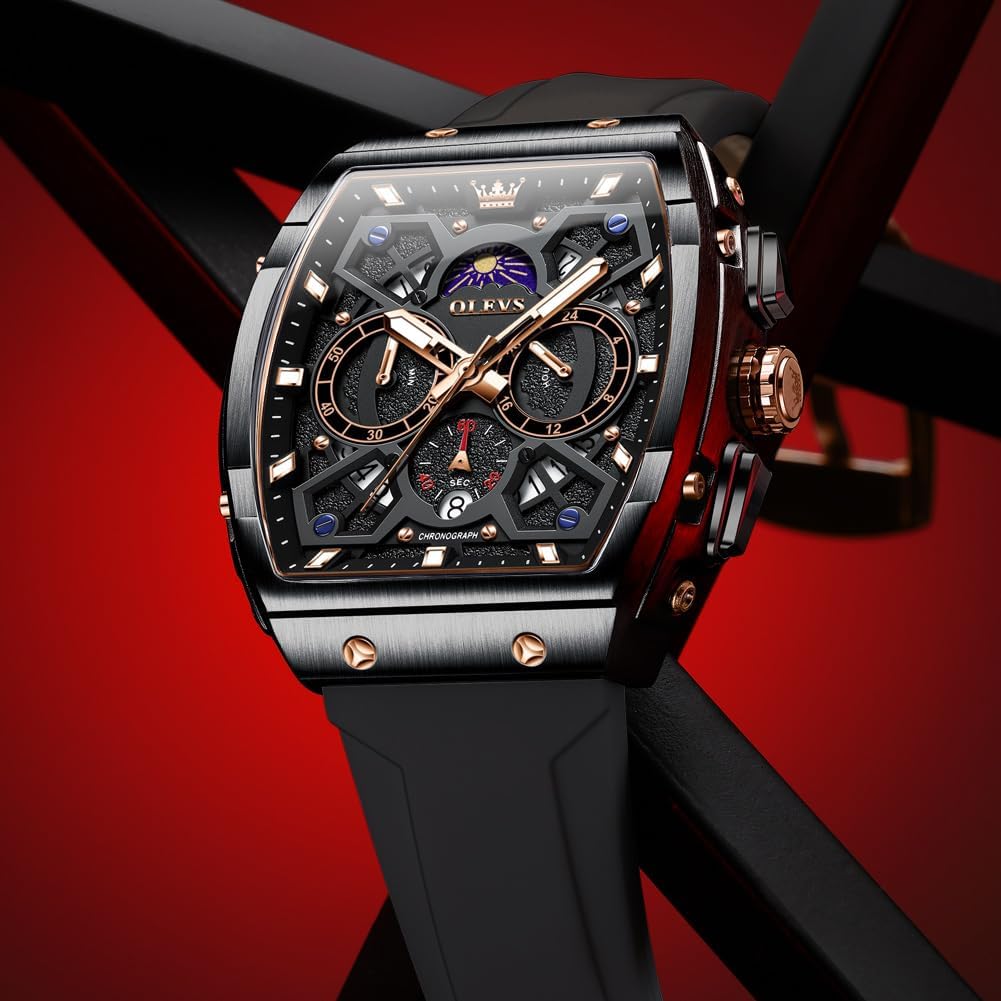
Front view of the OLEVS G2942-black-all black watch, showcasing its tonneau shape, large face, and chronograph subdials.
Setup
1. Initial Inspection and Strap Adjustment
Upon unboxing, inspect the watch for any visible damage. The watch features an adjustable silicone strap designed for comfort. To adjust the strap, locate the buckle and adjust the pin to the desired hole for a secure yet comfortable fit on your wrist.

The OLEVS watch comfortably worn on a wrist, demonstrating its fit and design.
2. Setting Time and Date
The watch is equipped with a quartz movement for precise timekeeping. To set the time and date:
- Time Setting: Pull the crown (main knob on the side) out to the second position. Rotate the crown to adjust the hour and minute hands to the correct time. Push the crown back in to the normal position.
- Date Setting: Pull the crown out to the first position. Rotate the crown to adjust the date. Push the crown back in to the normal position.

This diagram illustrates the crown positions for adjusting the calendar (first gear) and time/moon phase dials (second gear). The timing reset button is also indicated.
Operating Instructions
1. Chronograph Function
The watch features a six-hand multifunction chronograph with three subdials:
- Moon Phase Dial: Displays the current moon phase.
- 60-Minute Counter: Measures elapsed time up to 60 minutes.
- 60-Seconds Disc / Single Calendar: Functions as a 60-second counter and displays the date.
- Second Time Zone Dial: Allows tracking of a second time zone.
To operate the chronograph, use the pushers located on the side of the watch, typically above and below the crown. The top pusher usually starts and stops the chronograph, while the bottom pusher resets it.

Detailed view of the watch face, highlighting the moon phase dial, 60-minute counter, 60-seconds disc/single calendar, and second time zone dial.
2. Second Time Zone Adjustment
To adjust the second time zone dial (e.g., for Tokyo time when main time is Beijing time):
- Ensure the tuning handle (crown) is not pulled out.
- Long press the crown to adjust the second time zone.
- The subdial at 3 o'clock will rotate to the corresponding time.
- Push the crown back in to complete the adjustment.
3. Luminous Function
The watch features a luminescent function on its hands and hour markers, allowing for easy time reading in low-light conditions. Exposure to light will charge the luminous material.
The watch face illuminated in the dark, demonstrating the luminescent hands and hour markers for visibility.
Maintenance
1. Water Resistance
This watch is 3ATM (30 meters) water-resistant. This means it is suitable for daily use, such as hand washing, sweat, and rain exposure. However, it is not suitable for swimming, bathing, diving, or any contact with hot water, as this can compromise the seals and damage the internal components.

The watch shown with water splashes, indicating its 3ATM water resistance for daily activities.
2. Cleaning and Care
- To clean the watch case and strap, wipe gently with a soft, damp cloth. Avoid using harsh chemicals or abrasive materials.
- Keep the watch away from extreme temperatures, strong magnetic fields, and direct sunlight for prolonged periods.
- When not in use, store the watch in a dry, cool place, preferably in its original box or a watch case to protect it from dust and scratches.
3. Battery Replacement
As a quartz watch, it is powered by a battery. When the watch stops or the second hand begins to jump erratically (indicating low battery), it is recommended to have the battery replaced by a qualified watch technician to ensure the water resistance seal is properly maintained.

The reverse side of the OLEVS watch, displaying the stainless steel case back and the durable silicone strap with its rose gold-toned buckle.
Troubleshooting
If you encounter any issues with your OLEVS watch, please refer to the following common problems and solutions:
| Problem | Possible Cause / Solution |
|---|---|
| Watch not keeping time / stopped | Battery may need replacement. Consult a professional watch technician. |
| Chronograph hands not resetting to zero | This may indicate a need for adjustment or service. Contact the seller for assistance. |
| Condensation inside the crystal | Indicates moisture ingress. Avoid further contact with water and seek professional service immediately to prevent damage. |
| Strap discomfort or irritation | Ensure the strap is not too tight. Clean the strap regularly to prevent buildup of sweat or dirt. |
For any persistent issues or problems not listed above, please contact the seller directly for support.
Specifications
Key specifications for the OLEVS G2942-black-all black watch:
- Model Number: SC-G2942+3630 (G2942-black-all black variant)
- Movement Type: Original Quartz Movement
- Mirror Material: High hardness coated mirror
- Case Material: Alloy Case
- Strap Material: Silicone (Textured Tape)
- Dial Diameter: 44mm
- Case Thickness: 14mm
- Strap Width: 24mm
- Band Length: 200mm
- Water Resistance: 30 meters (3ATM)
- Weight: Approximately 98 grams
- Functions: Multifunction Chronograph, Luminous, Calendar, Moon Phase, Second Time Zone

This image provides a visual representation of the watch's dimensions, including dial diameter, case thickness, strap width, and band length, along with other key parameters.
Warranty and Support
For any product-related issues, warranty claims, or technical support, please contact the seller directly. They are best equipped to provide assistance and resolve any concerns you may have regarding your OLEVS watch.
Seller Contact Information: Please refer to your purchase documentation or the platform where you purchased the watch for specific seller contact details.


