
1. Product Overview
The U`King RGBW 4-in-1 80W LED Par Stage Light is a versatile lighting fixture designed for various event applications. It features 14 high-brightness RGBW LEDs, offering a wide spectrum of colors and control options. This manual provides essential information for safe and effective operation of the device.
Key Features:
- RGBW 4-in-1 LED Technology: Provides a broad range of color mixing capabilities, including true white.
- Multiple Control Modes: Supports DMX512, Remote Control, Sound Activated, Automatic, and Master-Slave modes.
- Adjustable Dimming: 0-100% smooth electronic dimming for precise light intensity control.
- Strobe and Gradient Effects: Built-in programs for dynamic lighting effects.
- Durable Construction: Designed for reliable performance with a long LED lifespan.
- Flexible Mounting: Can be mounted on trusses, walls, or placed on floors.
2. Package Contents
Verify that all items listed below are included in your package. If any items are missing or damaged, please contact customer support.
- RGBW Stage Light (1 unit)
- Remote Control (1 unit)
- Power Cord (1 unit)
- Bracket (2 units)
- Screws (2 units)
- User Manual (1 unit)

Image: Contents of the U`King RGBW 4-in-1 80W LED Par Stage Light package.
3. Setup Instructions
3.1 Mounting Options
The U`King LED Par Light can be positioned in various ways:
- Floor Mount: Use the included bracket as a stand to place the light on a flat surface.
- Wall Mount: Secure the bracket to a wall using appropriate hardware (not included) and adjust the light's angle.
- Truss Mount: Attach the bracket to a lighting truss using a suitable clamp (not included). Ensure the clamp is rated for the weight of the fixture.
Always ensure the fixture is securely mounted to prevent accidental falls.
3.2 Power Connection
Connect the provided power cord to the 'POWER IN' socket on the rear of the fixture. Plug the other end into a standard 110V AC power outlet. Multiple units can be daisy-chained using the 'POWER OUT' socket to simplify power distribution.
3.3 DMX Connection
For DMX control, connect a DMX cable from your DMX controller's output to the 'DMX IN' socket of the first fixture. To connect multiple fixtures, use DMX cables to link the 'DMX OUT' of one fixture to the 'DMX IN' of the next. Ensure the last fixture in the chain has a DMX terminator (not included) for stable signal transmission.

Image: Rear panel connections for power and DMX.
4. Operating Modes
The U`King LED Par Light offers several operating modes to suit different needs. Use the onboard 4-button DMX menu with digital display or the included remote control to select and adjust modes.
Video: Demonstration of various operating modes including remote control, automatic, voice control, and DMX control.
4.1 Remote Control Operation
The included remote control allows for convenient adjustment of light effects and working modes. Point the remote towards the front of the fixture for optimal response.

Image: Remote control layout and functions.
- ON/OFF: Power on or off the light.
- Auto Mode: Cycles through various pre-programmed light shows.
- Jump Change: Activates a mode where colors change abruptly.
- RGB Monochrome Choice: Selects solid Red, Green, or Blue colors.
- White/Amber/Cyan/Purple Monochrome Choice: Selects solid White, Amber, Cyan, or Purple colors.
- Strobe Mode: Creates a flashing light effect.
- DMX Mode: Switches the fixture to DMX control.
- Function Select (MENU): Navigates through menu options on the LCD display.
- Flash Mode: Activates a rapid flashing effect.
- Sound Active: Light reacts to ambient sound.
- Up/Down Arrows: Adjust speed for jump/flash modes or sensitivity for sound active mode.
4.2 DMX Control
The fixture supports 2 DMX modes (4-channel and 8-channel). Refer to the DMX channel chart in the full user manual for specific functions and values. Use the onboard LCD display and buttons (MENU, UP, DOWN, ENTER) to set the DMX address and select the desired channel mode.
4.3 Sound Activated Mode
In Sound Activated mode, the light's patterns and colors respond to the beat of music or other audio input detected by its built-in microphone. Adjust sensitivity using the remote or onboard controls.
4.4 Automatic Mode
The Automatic mode features pre-programmed light sequences that run continuously without external input. This mode is ideal for background lighting or when a DMX controller is not in use.
4.5 Master-Slave Mode
Connect multiple fixtures via DMX cables. Set one fixture as the 'Master' and the others as 'Slaves'. The slave units will then mirror the master's operation, allowing for synchronized lighting effects across multiple lights without a DMX controller.
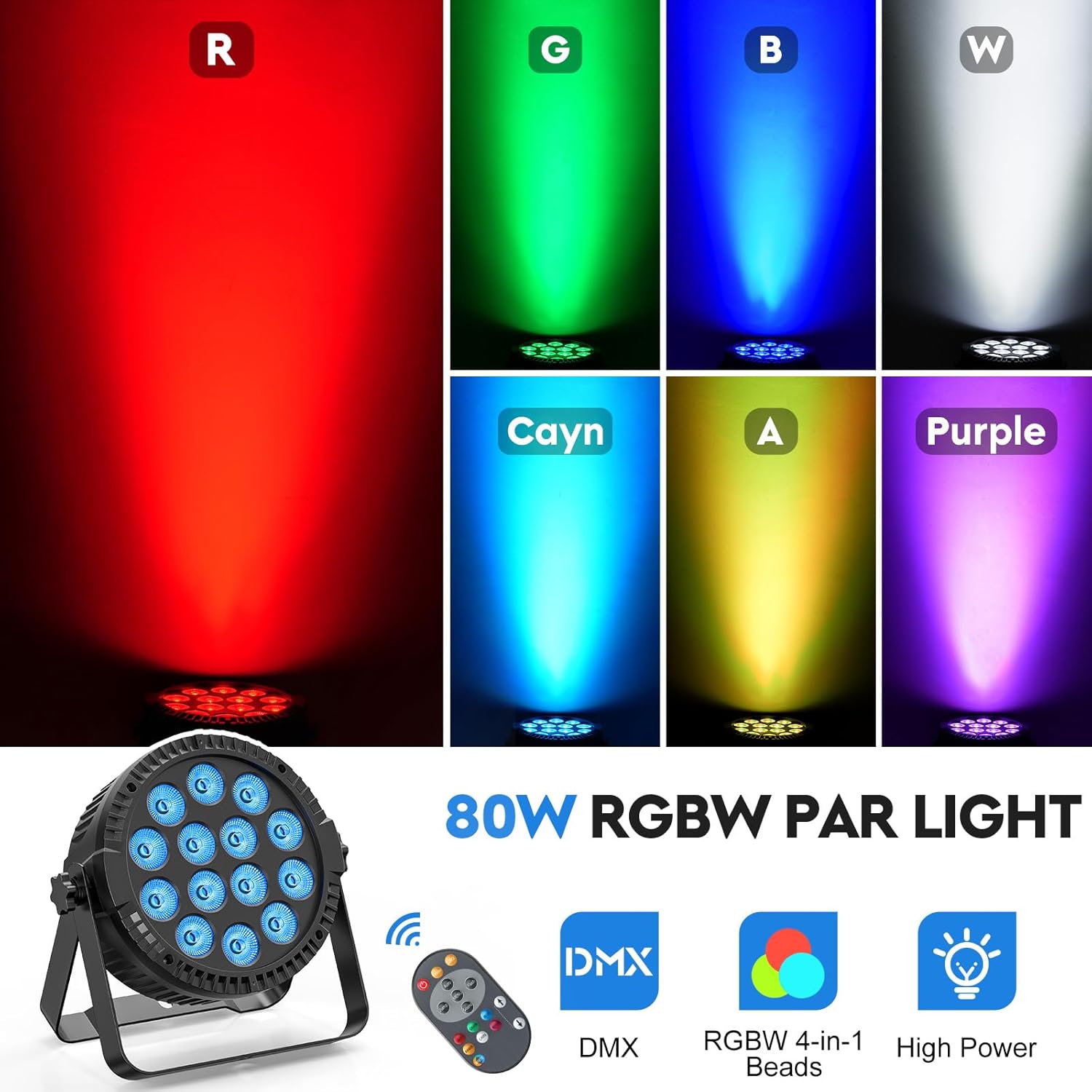
Image: Examples of various color outputs from the LED Par Light.
5. Maintenance
Regular maintenance ensures optimal performance and extends the lifespan of your U`King LED Par Light.
- Cleaning: Periodically clean the lens and exterior casing with a soft, dry cloth. Do not use abrasive cleaners or solvents.
- Inspection: Regularly check power cords and DMX cables for any signs of damage. Replace damaged cables immediately.
- Ventilation: Ensure the cooling fan and ventilation openings are free from dust and obstructions to prevent overheating.
- Storage: When not in use, store the fixture in a dry, dust-free environment.
6. Troubleshooting
If you encounter issues with your U`King LED Par Light, refer to the following common problems and solutions:
| Problem | Possible Cause | Solution |
|---|---|---|
| Light does not power on. | No power supply; faulty power cord. | Check power connection and outlet. Test with a different power cord. |
| No DMX control. | Incorrect DMX address; faulty DMX cable; no DMX terminator. | Verify DMX address setting. Check DMX cable connections. Ensure DMX terminator is used on the last fixture. |
| Remote control not working. | Remote battery low; obstruction between remote and sensor. | Replace remote battery. Ensure clear line of sight to the fixture's sensor. |
| Sound Activated mode not responding. | Low audio input; low sensitivity setting. | Increase audio volume or adjust sound sensitivity setting on the fixture/remote. |
If the problem persists after trying these solutions, please contact U`King customer support.
7. Technical Specifications
Detailed specifications for the U`King RGBW 4-in-1 80W LED Par Stage Light (Model ZQ01424).

Image: Product dimensions and cord length.
- Model Number: ZQ01424
- Light Source: 14 x RGBW 4-in-1 LEDs
- Wattage: 80 Watts
- Voltage: 110 Volts (AC)
- Material: Acrylonitrile Butadiene Styrene (ABS)
- Finish Type: Polished
- Product Dimensions: 8.18"L x 3.78"W x 8.66"H
- Mounting Type: Floor Mount, Wall Mount, Truss Mount
- Bulb Features: Dimmable (0-100%)
- Control Modes: DMX512 (4/8 channel), Remote, Sound Activated, Automatic, Master-Slave
- Lifespan: Approximately 50,000 hours
8. Warranty and Support
U`King products are manufactured to high-quality standards. This product comes with a standard manufacturer's warranty. For specific warranty details, please refer to the warranty card included with your purchase or visit the official U`King website.
For technical support, troubleshooting assistance, or inquiries regarding your product, please contact U`King customer service through the contact information provided on the official U`King website or your purchase platform. Please have your model number (ZQ01424) and purchase date ready when contacting support.


