
Moondrop Pill
Moondrop Pill Open Ear Headphones User Manual
Model: Moondrop Pill (MD-0WS-003)
Brand: Moondrop
1. Introduction
This manual provides detailed instructions for the Moondrop Pill Open Ear Headphones. Please read this manual carefully before using the product to ensure proper operation and maintenance.
What's in the Box
- Pill Open Ear Headphones
- Charging Cable
- User Manual
- Certificate
- Service Card
2. Product Overview
Design and Aesthetics
The Moondrop Pill headphones feature a unique conceptual design, with earbuds retracting smoothly into a transparent capsule-shaped charging case. This design emphasizes mechanical aesthetics and futurism.

Image: Moondrop Pill Open Ear Headphones in their transparent, pill-shaped charging case, showcasing the red and white color scheme.

Image: Moondrop Pill branding with "AI ENC HiFi Sound OWS" and recognition for design awards.
Key Features
- Futurism: Conceptual Design of the Pill Series: The earbuds retract smoothly into the charging case with a simple push. A twist resets them flawlessly. Encased within a transparent capsule shell, it's full of mechanical aesthetics and futurism.
- 13mm Circular Low-distortion Dynamic Driver: Features a 13mm circular dynamic driver for linear sound and significantly lower distortion compared to conventional designs. Provides superior bass and dynamic performance.
- VDSF for OWS (B&K5128) Reference High-quality Tuning: Utilizes Danish B&K 5128 HATS for precise acoustic tuning, aiming for natural sound reproduction.
- Dipole Directional Sound Transmission Technology: Reduces sound leakage by up to 97% at 15 cm from the ear, based on dipole sound source principles.
- Built-in NPU Hardware-level AI Noise Canceling: Equipped with a Neuron Processor Unit (NPU) and AI ENC algorithm for effective noise elimination and vocal clarity.
- Seamless Switching Between Two Devices: Supports simultaneous connection to two devices, with easy switching via the app.
- 55ms Low Latency Game Mode: Offers a dedicated low-latency mode for gaming and a high-fidelity mode for music, switchable via touch controls.
Product Video
Video: An overview of the Moondrop Pill Open Ear Headphones, demonstrating their design, portability, and use in various daily scenarios, including commuting and working.
3. Setup Guide
Charging the Headphones
Before first use, fully charge the Moondrop Pill headphones and their charging case. Connect the provided charging cable to the USB-C port on the case and a power source. The indicator lights on the case will show charging status.

Image: The Moondrop Pill charging case, highlighting the USB-C charging port on the side.
Pairing with a Device
- Ensure the headphones are charged and inside the charging case.
- Open the charging case. The headphones will automatically enter pairing mode.
- On your device (smartphone, tablet, computer), go to Bluetooth settings.
- Select "Moondrop Pill" from the list of available devices.
- Once connected, a confirmation sound will play, and the indicator light on the headphones will change.
Moondrop Link App
For enhanced features and customization, download the Moondrop Link app. The app allows for seamless switching between two connected devices and offers various sound customization options.
4. Operating Instructions
Wearing the Headphones
The Moondrop Pill headphones are designed for open-ear wear. Gently clip them onto your ear, ensuring a comfortable and secure fit. The flexible ear clip adapts to various ear shapes.
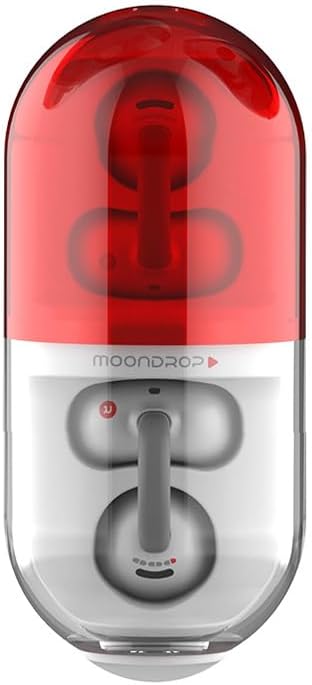
Image: A person wearing the Moondrop Pill Open Ear Headphones, demonstrating their fit and discreet appearance.
Touch Controls
The Moondrop Pill headphones feature intuitive touch controls for various functions:
- Play/Pause: Single tap on either earbud.
- Next Track: Double tap on the right earbud.
- Previous Track: Double tap on the left earbud.
- Answer/End Call: Single tap on either earbud.
- Reject Call: Press and hold on either earbud.
- Activate Voice Assistant: Triple tap on either earbud.
- Switch Game/Music Mode: Specific touch control (refer to app for customization).
Dual-Device Connectivity
The headphones can be connected to two devices simultaneously. Use the Moondrop Link app to manage and switch between connected devices seamlessly.
AI Environmental Noise Cancellation (ENC)
The built-in NPU and AI ENC algorithm work to reduce environmental noise during calls, enhancing vocal clarity for both you and the listener.
Low Latency Game Mode
Activate the 55ms low latency game mode via touch controls for a more synchronized audio experience during gaming. Switch back to high-fidelity music mode for optimal audio quality when not gaming.
5. Care and Maintenance
Cleaning
Regularly clean your Moondrop Pill headphones and charging case with a soft, dry cloth. Avoid using abrasive materials or harsh chemicals.
Water Resistance
The Moondrop Pill headphones are IPX4 rated, providing protection against splashes and sweat. This makes them suitable for light workouts and outdoor use. Do not submerge the headphones in water.

Image: Moondrop Pill headphones shown with water droplets, indicating their IPX4 waterproof protection against splashes and sweat.
Storage
When not in use, store the headphones in their charging case to protect them from dust and damage.
6. Troubleshooting
Common Issues and Solutions
| Issue | Possible Cause | Solution |
|---|---|---|
| Headphones not pairing | Low battery, out of range, not in pairing mode. | Ensure headphones are charged. Place them back in the case and open the lid to re-enter pairing mode. Move closer to the device. |
| No sound or low volume | Device volume too low, headphones not connected, dirty drivers. | Increase device volume. Reconnect headphones. Clean the earbud grilles gently. |
| Sound leakage | Improper fit, very high volume. | Adjust the fit of the ear clips. Lower the volume. The Dipole Directional Sound Transmission Technology minimizes leakage, but extreme volumes can still cause some. |
| Poor call quality (mic) | Environmental noise, poor connection. | Ensure AI ENC is active. Move to a quieter environment. Check Bluetooth connection stability. |
| Battery drains quickly | High volume usage, frequent game mode use. | Reduce volume. Limit continuous use of game mode. Ensure headphones are properly seated in the charging case when not in use. |
If the issue persists, please refer to the official Moondrop support resources.
7. Technical Specifications
| Feature | Detail |
|---|---|
| Connectivity Technology | Wireless (Bluetooth 6.0) |
| Driver Type | 13mm Circular Low-distortion Dynamic Driver |
| Noise Cancellation | Built-in NPU Hardware-level AI ENC |
| Water Resistance | IPX4 |
| Latency | 55ms (Game Mode) |
| Dual Device Connectivity | Yes |
| Model Name | Pill |
| Item Model Number | MD-0WS-003 |
| Color | RED |
| Ear Placement | Open Ear |
| Item Weight | 4.6 ounces |
| Manufacturer | MOONDROP |
| Date First Available | May 16, 2025 |
8. Warranty and Support
Warranty Information
For detailed warranty information, please refer to the certificate and service card included in your product packaging. Keep your proof of purchase for warranty claims.
Customer Support
If you encounter any issues or have questions not covered in this manual, please contact Moondrop customer support. Visit the official Moondrop website for contact details and further assistance.
You may also consider purchasing extended protection plans for additional coverage, if available.
Related documentsPill


Ask a question about this manual
Ask about setup, troubleshooting, compatibility, parts, safety, or missing instructions. Manuals+ will review the question and use this page’s manual context to help answer it.