
Introduction
This manual provides comprehensive instructions for the installation, operation, and maintenance of your Allesin Smart Motorized Blinds with Remote. These Zigbee blackout roller shades are designed for indoor windows, offering convenient control via remote, mobile app, and Alexa voice commands without the need for an additional hub.
Please read this manual thoroughly before installation and use to ensure proper function and longevity of your product.
Setup and Installation
1. Measuring for the Perfect Fit
Accurate measurements are crucial for proper installation. Determine whether you will be using an inside mount or an outside mount.
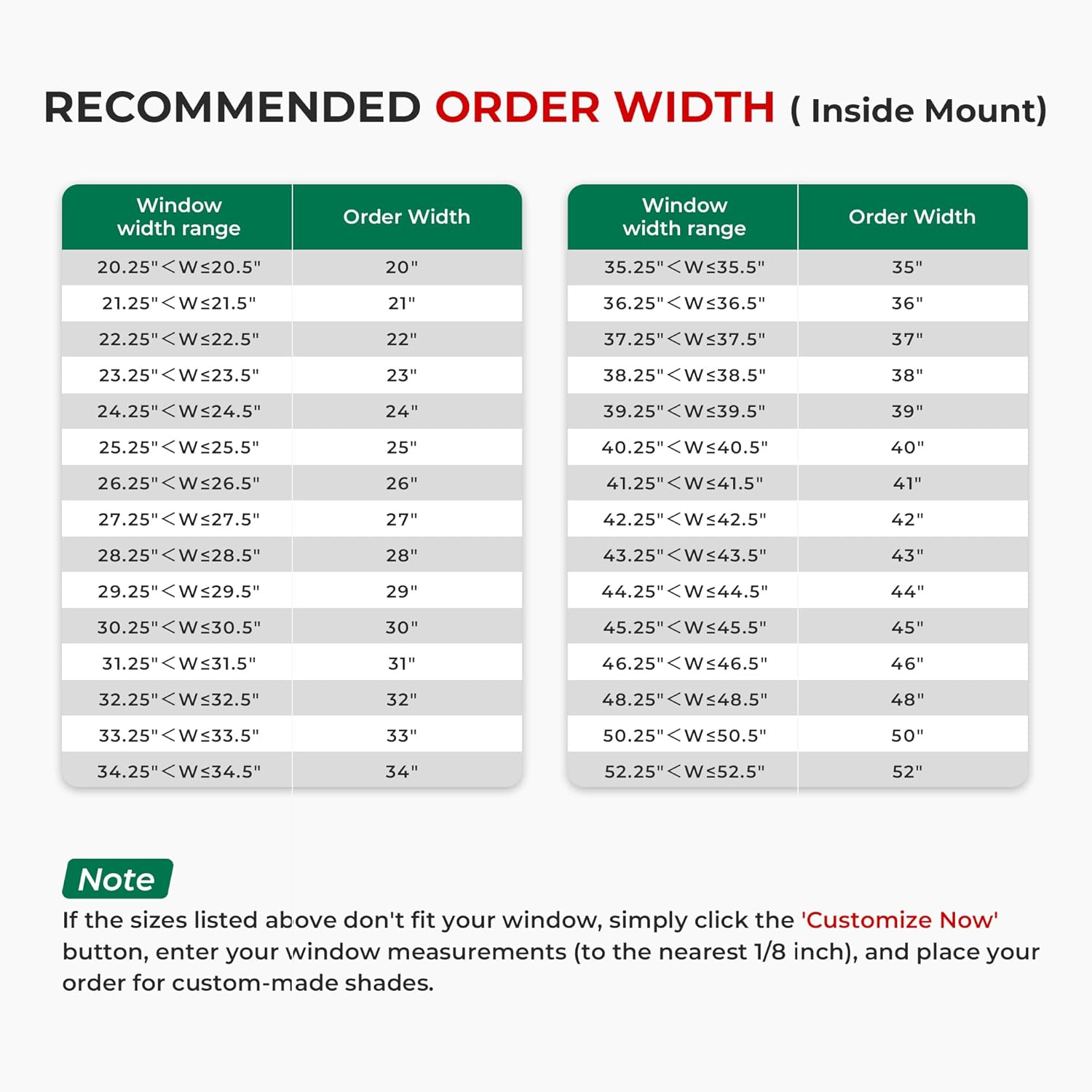
Image Description: A diagram illustrating measurement guidelines for both inside and outside mount installations. For inside mount, it shows measuring window depth (must be ≥2"), top width (W1), bottom width (W2), and window height (H). For outside mount, it shows adding 4" to 6" to both window width and height for the order size.
Inside Mount:
- Measure the window depth. Ensure it is greater than 2 inches.
- Measure the top width (W1) and the bottom width (W2). The order width should be the smaller value between W1 and W2.
- Measure the window height (H). The order height must be greater than H.
Outside Mount:
- Order Width: Window Width + 4" to 6"
- Order Height: Window Height + 4" to 6"
- Measuring Tip: Outside mount will cover your entire window opening along with the window frame. Adding 4 to 6 inches is recommended for optimal coverage.
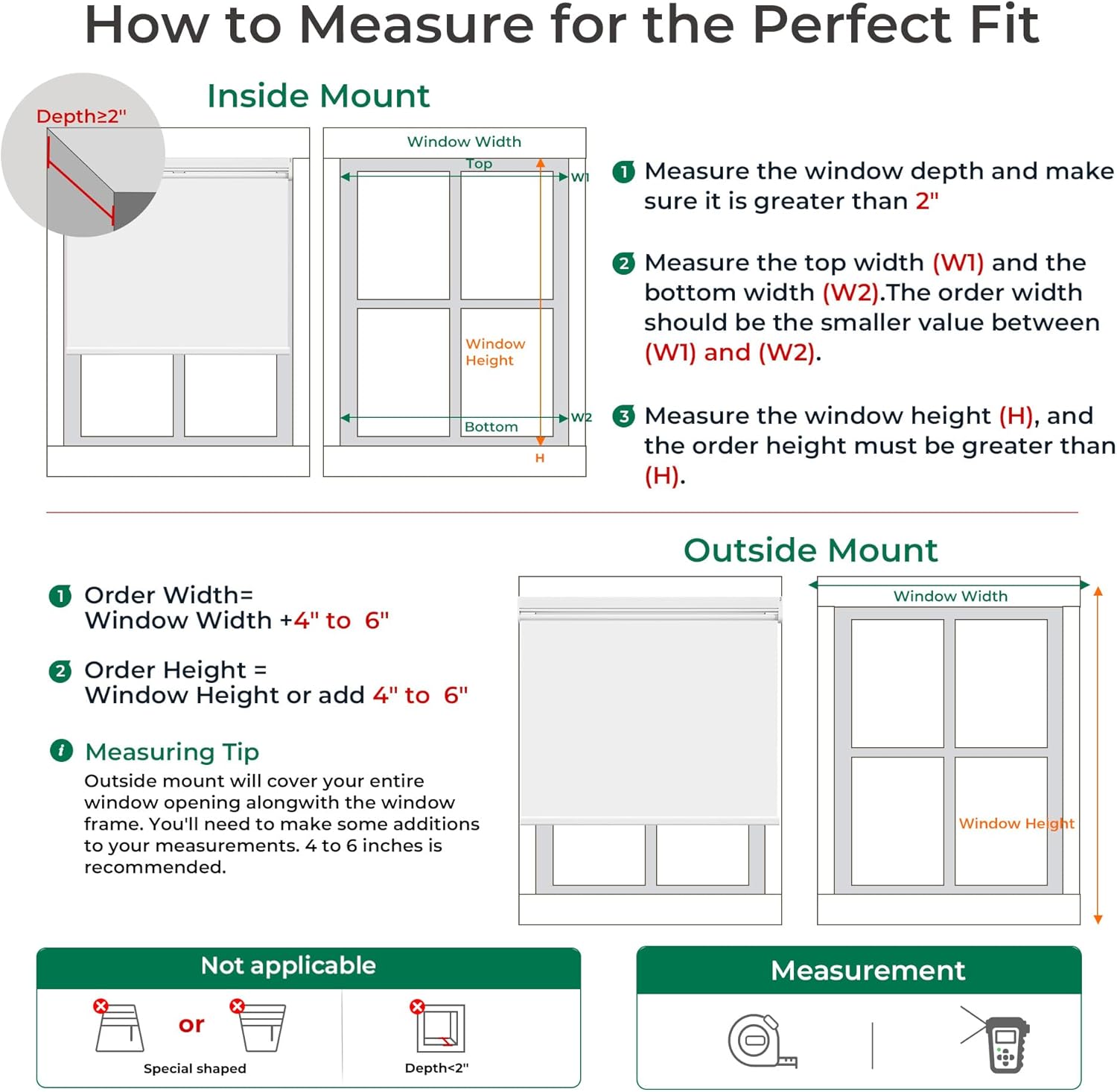
Image Description: A table titled "RECOMMENDED ORDER WIDTH (Inside Mount)" providing a guide for selecting the correct order width based on the measured window width range. For example, a window width range of 20.25" < W ≤ 20.5" corresponds to an order width of 20".
If the standard sizes do not fit your window, custom sizes may be available. Refer to the product listing for custom ordering options.
2. Secure Drill-Mount Installation
The blinds come with a complete drill-mount kit for a sturdy and permanent installation. This method ensures reliable stability on walls, windowsills, or ceilings.
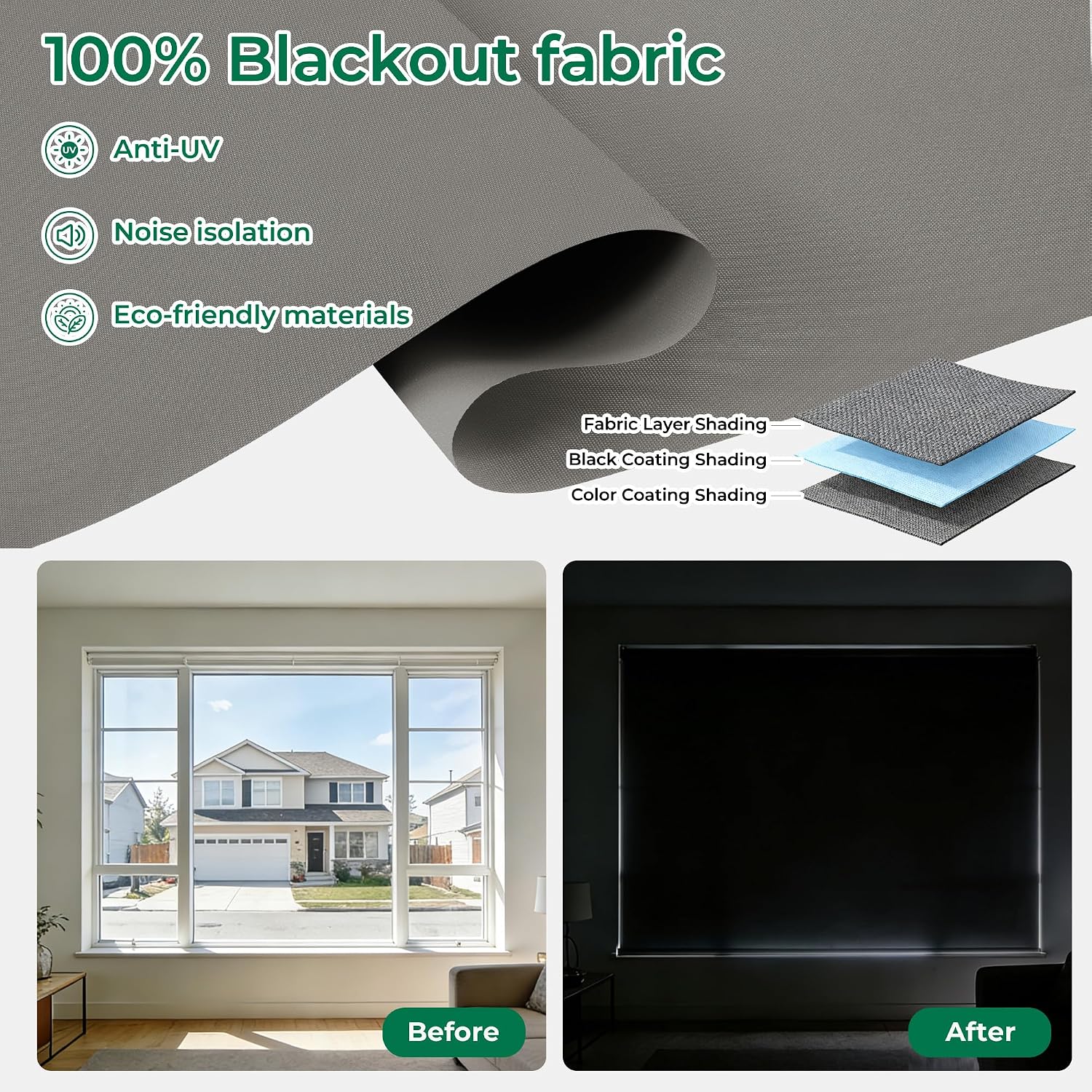
Image Description: A visual guide showing the three steps for secure installation. Step 1: Secure brackets with screws. Step 2: Align and snap the blind into place. Step 3: Pull down the shade to complete the installation.
- Step 1: Secure Brackets
Using the provided screws and alignment templates, securely attach the mounting brackets to your desired location (wall, windowsill, or ceiling).
- Step 2: Align and Snap
Carefully align the headrail of the blind with the installed brackets. Snap the blind firmly into place until it is securely seated.
- Step 3: Complete Installation
Once the blind is mounted, gently pull down the shade to ensure it operates smoothly and is fully installed.
3. Connectivity and Pairing
Your Allesin Smart Motorized Blinds feature a built-in Zigbee chip for direct pairing with compatible Amazon Echo devices. No additional hub is required for these specific Echo models.

Image Description: An illustration highlighting the Zigbee motor and its direct compatibility with four Amazon Alexa models: Echo 4th Gen, Echo Studio, Echo Plus 2nd Gen, and Echo Show 10. It emphasizes that no separate hub is needed.
Compatible Devices (No Hub Needed):
- Amazon Echo Plus
- Amazon Echo Studio
- Amazon Echo Show 10
- Amazon Echo (4th Gen)
For other Alexa-enabled devices or smart home systems, a compatible Zigbee hub may be required.
Operating Instructions
1. Remote Control Operation
Each shade includes a dedicated remote control for easy adjustment. The remote allows for one-touch control and customizable presets.

Image Description: A person using a white remote control to adjust multiple motorized blinds in a living room setting. The image highlights one-touch control and stable signal.
Setting Remote Limits and Speed:
Video Description: This video demonstrates how to use the remote control to operate the blinds, including setting upper and lower limits and adjusting the motor speed. It shows pressing and holding the Pause and DOWN buttons for 2 seconds to indicate the current speed setting.
2. App Control
Control your blinds from anywhere using the mobile app. The app allows for group control, remote access, and setting custom schedules and timers.

Image Description: A person relaxing on a couch, using a smartphone app to control multiple motorized blinds. The app interface shows options for group control, remote access, and scheduling.
Using the AUBOR App:
Video Description: This video demonstrates how to operate your blinds using the AUBOR mobile application and integrate them with Alexa. It shows the app interface for direction settings and setting highest/lowest positions.
3. Voice Control with Alexa
For compatible Echo devices, you can control your blinds hands-free using simple Alexa voice commands.

Image Description: A couple in a living room, with an Amazon Echo device on a coffee table. A speech bubble indicates the command "Alexa, Open the Shades," and another bubble confirms "OK!". This illustrates hands-free voice control.
4. Power Supply and Charging
The blinds are powered by a rechargeable 2200mAh lithium battery, offering long-lasting performance.

Image Description: An illustration detailing the power supply options: a rechargeable lithium battery with USB charging support, and an optional solar charging panel. It states that a 6-hour charge can provide power for 600 operations (approximately half a year).
- Battery Life: The 2200mAh battery typically lasts 3-6 months on a single charge.
- Charging Options:
- USB Charging: Use a standard USB cable to recharge the battery.
- Solar Charging: An optional solar charging panel (sold separately) can be used for continuous charging. A 6-hour charge can provide power for approximately 600 operations.
- Quiet Operation: The motor operates below 30 dB, ensuring minimal noise disruption.
Maintenance
Proper maintenance ensures the longevity and optimal performance of your Allesin Smart Motorized Blinds.
- Cleaning: Gently wipe the fabric with a soft, damp cloth to remove dust and light stains. Avoid harsh chemicals or abrasive cleaners, as these can damage the fabric.
- Battery Care: Recharge the battery when the indicator light suggests low power. Avoid completely draining the battery frequently to prolong its lifespan.
- Motor Care: The motor is designed for quiet and efficient operation. Do not attempt to lubricate or disassemble the motor unit.
- Fabric Protection: The triple-layer blackout fabric offers UV protection. Avoid prolonged exposure to direct sunlight when the blinds are fully open to prevent potential fading over many years.
Troubleshooting
If you encounter issues with your motorized blinds, refer to the following common solutions:
| Problem | Possible Cause | Solution |
|---|---|---|
| Blinds not responding to remote/app. | Low battery, remote not paired, signal interference. |
|
| Blinds not moving to desired position. | Limits not set or incorrectly set. |
|
| Blinds making unusual noise. | Obstruction, motor issue. |
|
| Alexa voice control not working. | Not paired with Alexa, incorrect commands, Echo device offline. |
|
If these solutions do not resolve the issue, please contact customer support for further assistance.
Product Specifications
| Feature | Detail |
|---|---|
| Brand | Allesin |
| Model Number | B0F8TQ2CP8 |
| Material | Polyester |
| Color | Cloud Gray |
| Product Dimensions | 72"L x 23"W |
| Size | 23"W x 72"H |
| Opacity | Blackout (blocks 99% of light) |
| Operation Mode | Automatic (Motorized) |
| Control Type | Remote, Alexa App, Voice, Smart Home Integration |
| Mounting Type | Inside Mount (Drill-mount kit included) |
| Connectivity | Built-in Zigbee chip (No hub needed for compatible Echo devices) |
| Battery | Rechargeable 2200mAh Lithium Battery |
| Charging | USB or optional Solar Charging |
| Noise Level | Below 30 dB |
| Additional Features | UV Protection, Thermal Insulation, Noise Isolation, Cord-free (Child-safe) |
Warranty Information
Allesin products are manufactured to high-quality standards. For specific warranty details regarding your motorized blinds, please refer to the warranty card included in your product packaging or visit the official Allesin website. Keep your proof of purchase for any warranty claims.
Customer Support
If you require further assistance, have questions about your product, or need to report an issue, please contact Allesin customer support. Contact information can typically be found on the product packaging, the official Allesin website, or through your purchase platform.
When contacting support, please have your product model number (B0F8TQ2CP8) and purchase date readily available.