
1. Introduction
The QCY MeloBuds N30 ANC Bluetooth Earbuds provide high-quality audio with Active Noise Cancellation (ANC) for an immersive listening experience. Designed for comfort and mobility, these earbuds are ideal for daily use. This manual will guide you through the setup, operation, and maintenance of your earbuds to ensure optimal performance.
Key features include:
- Active Noise Cancellation (ANC) up to 45dB
- Transparency Mode
- Crystal Clear Calls with 4 Microphones and Environmental Noise Cancellation (ENC)
- 10mm Bio-Diaphragm Dynamic Drivers for Rich Sound
- Bluetooth 5.4 for Stable Connectivity
- IPX4 Water Resistance
- Up to 28 Hours Total Playtime with Charging Case
- Dual Device Connection
- Low Latency Gaming Mode (0.068s)

Image: QCY MeloBuds N30 ANC Earbuds with charging case, highlighting features like 4 microphones, dual connection, 45dB ANC, wind noise reduction, transparency mode, 10mm driver, IPX4, and 28-hour battery life.
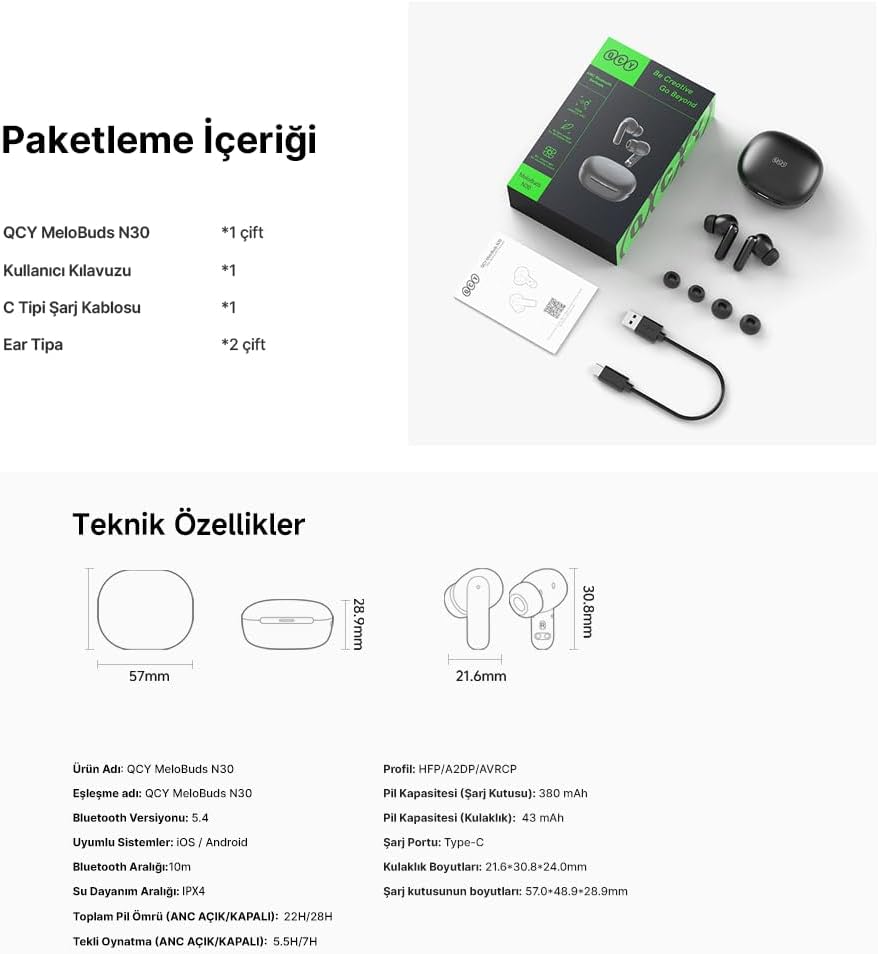
2. Package Contents
Please check the package for the following items:
- QCY MeloBuds N30 Earbuds (1 pair)
- Charging Case (1)
- USB Type-C Charging Cable (1)
- User Manual (1)
- Eartips (2 additional pairs, S/M/L sizes total)

Image: A visual representation of the QCY MeloBuds N30 package contents, showing the earbuds, charging case, USB-C cable, user manual, and various eartip sizes.
3. Product Overview
The QCY MeloBuds N30 earbuds feature an ergonomic in-ear design for a secure and comfortable fit. The compact charging case protects and recharges your earbuds on the go.

Front view of earbuds and case.
Earbuds inside the charging case.
4. QCY App Features
Enhance your experience by downloading the official QCY app. The app provides access to advanced features and customization options for your MeloBuds N30.
- Noise Cancellation Mode selection (ANC, Transparency, Off)
- Pre-set and Custom Equalizer (EQ) settings
- Customizable Touch Controls
- Find My Earbuds function
- Battery Level Indicator for earbuds
- Mode Switch (Gaming Mode, Sleep Mode)
- Firmware Upgrades

Image: The QCY app interface, illustrating features such as noise cancellation modes, EQ settings, touch control customization, and firmware updates.
5. Setup
5.1 First-Time Pairing
- Open the charging case. The earbuds will automatically enter pairing mode, indicated by a flashing LED on the earbuds.
- On your device (smartphone, tablet, etc.), enable Bluetooth.
- Search for "QCY MeloBuds N30" in the list of available Bluetooth devices.
- Select "QCY MeloBuds N30" to connect. Once connected, the LED indicator on the earbuds will turn off.
5.2 Reconnecting
The earbuds will automatically reconnect to the last paired device when taken out of the charging case and Bluetooth is enabled on the device.
6. Wearing the Earbuds
For optimal sound quality and effective noise cancellation, ensure the earbuds are worn correctly and fit snugly in your ears. Choose the appropriate eartip size from the included options (S, M, L) to achieve the best seal.
- Insert the earbud into your ear canal.
- Gently twist the earbud until it feels secure and comfortable.

Image: A person wearing a QCY MeloBuds N30 earbud, demonstrating the correct and comfortable fit in the ear.
7. Operating Instructions
7.1 Touch Controls
The QCY MeloBuds N30 feature intuitive touch controls on each earbud. The functions can be customized via the QCY app.
| Action | Function |
|---|---|
| Double Tap (R/L) | Play/Pause Music, Answer/Hang Up Call |
| Triple Tap (R) | Next Track, Activate Voice Assistant |
| Touch and Hold 1.5s (R/L) | Reject Call, Switch Noise Cancellation Mode (ANC / Transparency / Off) |

Image: A visual guide to the touch control gestures on the QCY MeloBuds N30 earbuds for various functions.
7.2 Active Noise Cancellation (ANC)
The MeloBuds N30 offer up to 45dB of active noise cancellation, effectively reducing ambient sounds for a more focused listening experience. The earbuds intelligently analyze environmental noise and how they are worn to automatically adjust the noise cancellation level for optimal performance.

Image: Illustration of the smart noise cancellation feature, showing noise reduction up to 45dB and adjustable levels (Strong, Medium, Light).
7.3 Transparency Mode
Stay aware of your surroundings with Transparency Mode. This mode allows ambient sounds to pass through, so you can hear important announcements or conversations without removing your earbuds.

Image: A person wearing QCY MeloBuds N30 earbuds, demonstrating the use of Transparency Mode to remain aware of their environment.
7.4 Call Management
The earbuds are equipped with 4 microphones and Environmental Noise Cancellation (ENC) technology to ensure crystal clear calls, even in noisy environments. The wind noise reduction feature further enhances call clarity.

Image: Diagram highlighting the 4-microphone ENC system for crystal clear call quality on the QCY MeloBuds N30.
7.5 Sound Customization (EQ)
Customize your audio experience with pre-set and custom equalizer settings available through the QCY app. Choose from various music genres or create your own sound profile.

Image: A smartphone screen displaying the QCY app's equalizer settings, offering various pre-set options like Pop, Rock, Heavy Bass, and a custom EQ.
7.6 Low Latency Mode (Gaming)
Activate the 0.068s Low Latency Mode via the QCY app for a synchronized audio-visual experience, perfect for gaming or watching videos.

Image: Illustration of the 0.068s low latency mode, emphasizing a smooth and synchronized experience for gaming.
7.7 Multi-point Connection
Connect your MeloBuds N30 to two devices simultaneously and switch seamlessly between them without re-pairing.

Image: A diagram illustrating the dual connection feature, where the earbuds are simultaneously paired with a smartphone and a tablet.
8. Charging
8.1 Charging the Earbuds
Place the earbuds into the charging case. They will automatically begin charging. The LED indicators on the earbuds will show their charging status.
8.2 Charging the Case
Connect the charging case to a power source using the provided USB Type-C cable. The LED indicator on the case will show the charging status. A full charge provides multiple recharges for the earbuds.
Battery Life:
- Single Playtime (ANC ON): Approximately 5.5 hours
- Single Playtime (ANC OFF): Approximately 7 hours
- Total Playtime with Charging Case: Up to 28 hours
- Quick Charge: 10 minutes of charging provides approximately 1 hour of playtime.

Image: An illustration detailing the battery life of the QCY MeloBuds N30, including single playtime with and without ANC, and total playtime with the charging case.
9. Maintenance
- Cleaning: Regularly clean the earbuds and charging case with a soft, dry cloth. Do not use harsh chemicals or abrasive materials.
- Eartips: Remove and clean the eartips periodically to prevent wax buildup, which can affect sound quality.
- Storage: When not in use, store the earbuds in their charging case to protect them from dust and damage.
- Water Resistance: The earbuds are IPX4 water-resistant, meaning they are protected against splashing water from any direction. Do not submerge them in water or expose them to heavy rain.
10. Troubleshooting
10.1 Earbuds Not Pairing
- Ensure the earbuds are charged.
- Make sure Bluetooth is enabled on your device.
- Place the earbuds back into the charging case, close the lid, then open it again to re-enter pairing mode.
- Try forgetting "QCY MeloBuds N30" from your device's Bluetooth list and re-pairing.
10.2 No Sound or Low Volume
- Check the volume level on both your device and the earbuds.
- Ensure the earbuds are properly connected to your device.
- Clean any debris from the earbud nozzles and eartips.
10.3 Charging Issues
- Ensure the charging cable is securely connected to both the case and the power source.
- Check if the charging port on the case is clean and free of debris.
- Verify that the power source is working correctly.
11. Specifications
| Feature | Detail |
|---|---|
| Brand | QCY |
| Model Name | MeloBuds N30 |
| Model Number | N30 (BH24HT16A) |
| Color | White |
| Ear Placement | In-Ear |
| Impedance | 4 Ohms |
| Connectivity Technology | Wireless (Bluetooth) |
| Bluetooth Version | 5.4 |
| Bluetooth Range | Up to 10 meters |
| Water Resistance | IPX4 |
| Noise Control | Active Noise Cancellation (ANC), Environmental Noise Cancellation (ENC) |
| Audio Driver Type | 10mm Dynamic Bio-Diaphragm Driver |
| Earbud Battery Capacity | 43 mAh (each earbud) |
| Charging Case Battery Capacity | 380 mAh |
| Total Playtime | Up to 28 hours (with charging case) |
| Charging Port | USB Type-C |
| Earbud Dimensions | 21.6 x 30.8 x 24.0 mm |
| Case Dimensions | 57 x 28.9 mm |
| ANATEL Certification No. | 00998-25-03372 |

Image: Technical diagram illustrating the dimensions and key specifications of the QCY MeloBuds N30 earbuds and their charging case.
12. Safety Information
- Do not disassemble or modify the product.
- Keep the product away from extreme temperatures, direct sunlight, and fire.
- Avoid exposing the product to water or other liquids, beyond its IPX4 rating.
- Do not use abrasive cleaners or sharp objects to clean the product.
- Use only the provided charging cable or a certified equivalent.
- Prolonged exposure to high volume levels may cause hearing damage. Adjust volume to a safe level.
13. Warranty and Support
This product is covered by a manufacturer's warranty. For detailed warranty information, please refer to the warranty card included in your package or visit the official QCY website. For technical support or customer service inquiries, please contact QCY customer support through their official channels.


