
1. Introduction
This manual provides detailed instructions for the safe and effective operation of your Dracast Palette Series II LED4000 RGBW Soft Panel. The DRPA4000RGB2 is a high-output, full-spectrum RGBW LED panel designed for professional production environments, offering precise color control and versatile lighting effects.
Please read this manual thoroughly before using the product and retain it for future reference.
2. Safety Information
To ensure safe operation and prevent damage to the product or injury to yourself and others, please observe the following safety precautions:
- Do not operate the unit with wet hands or in wet conditions.
- Ensure the power supply voltage matches the requirements specified on the unit.
- Always disconnect the power cable before cleaning or performing maintenance.
- Do not block ventilation openings. Overheating can cause damage.
- Avoid direct eye exposure to the light source. The light output is very bright.
- Use only Dracast-approved accessories and replacement parts.
- Keep the unit away from flammable materials.
- If the unit is damaged, do not attempt to repair it yourself. Contact qualified service personnel.
3. Package Contents
Verify that all items listed below are included in your package:
- Dracast Palette Series II LED4000 RGBW Soft Panel (DRPA4000RGB2)
- Soft Padded Carry Case (Model CC-38)
- Power Cable
- U-bracket Yoke
- Barn Doors (pre-attached or separate)
4. Product Overview
Familiarize yourself with the components and controls of the LED4000 RGBW Soft Panel.
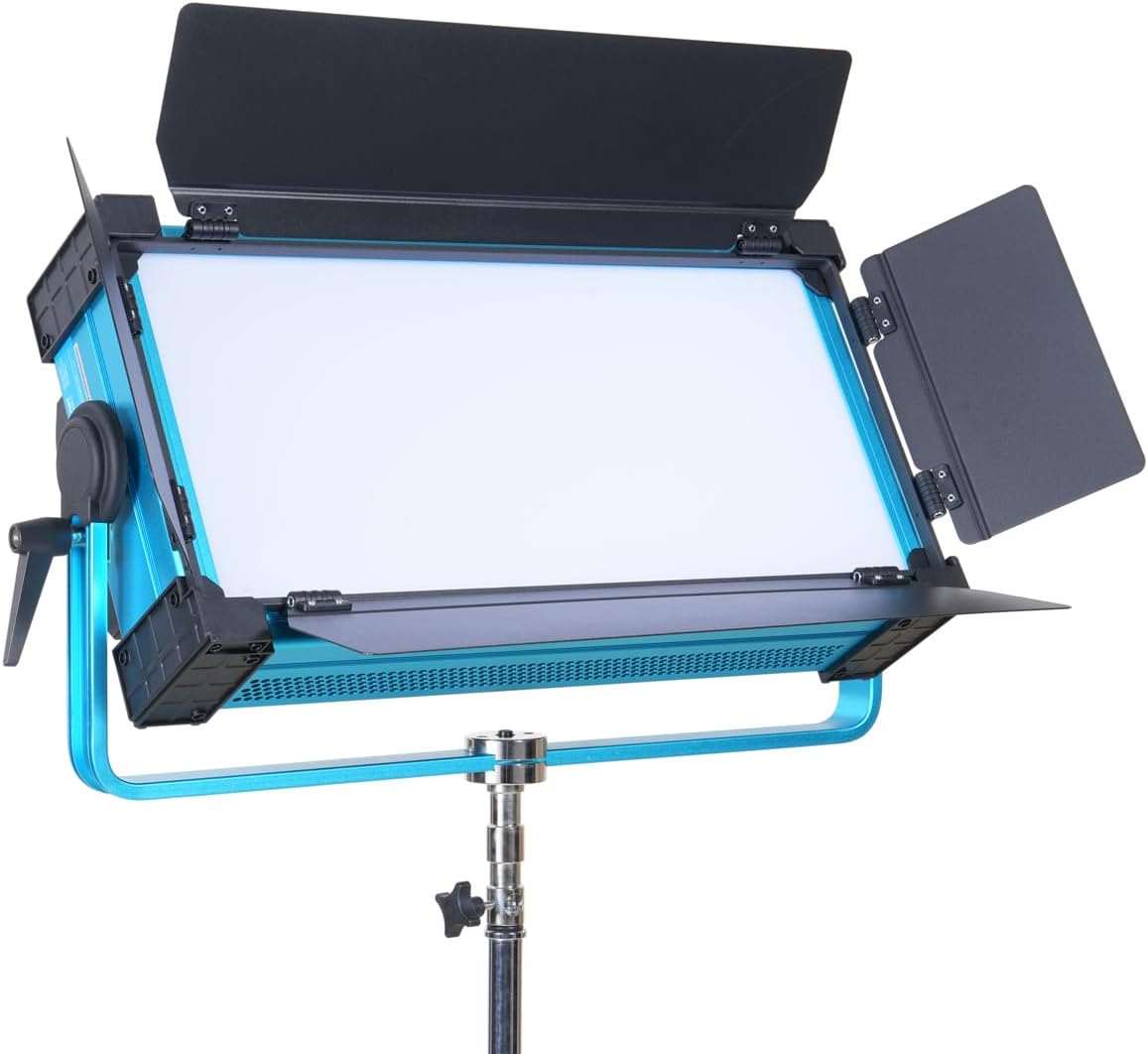
Figure 4.1: Front view of the Dracast Palette Series II LED4000 RGBW Soft Panel with its barn doors fully open, showcasing the light-emitting surface and the sturdy U-bracket yoke.

Figure 4.2: Front view of the LED4000 panel with its barn doors closed, illustrating the compact form factor when not in use or for focused light control.

Figure 4.3: Angled front view of the LED4000 panel without barn doors, providing a clear look at the soft light diffusion surface.
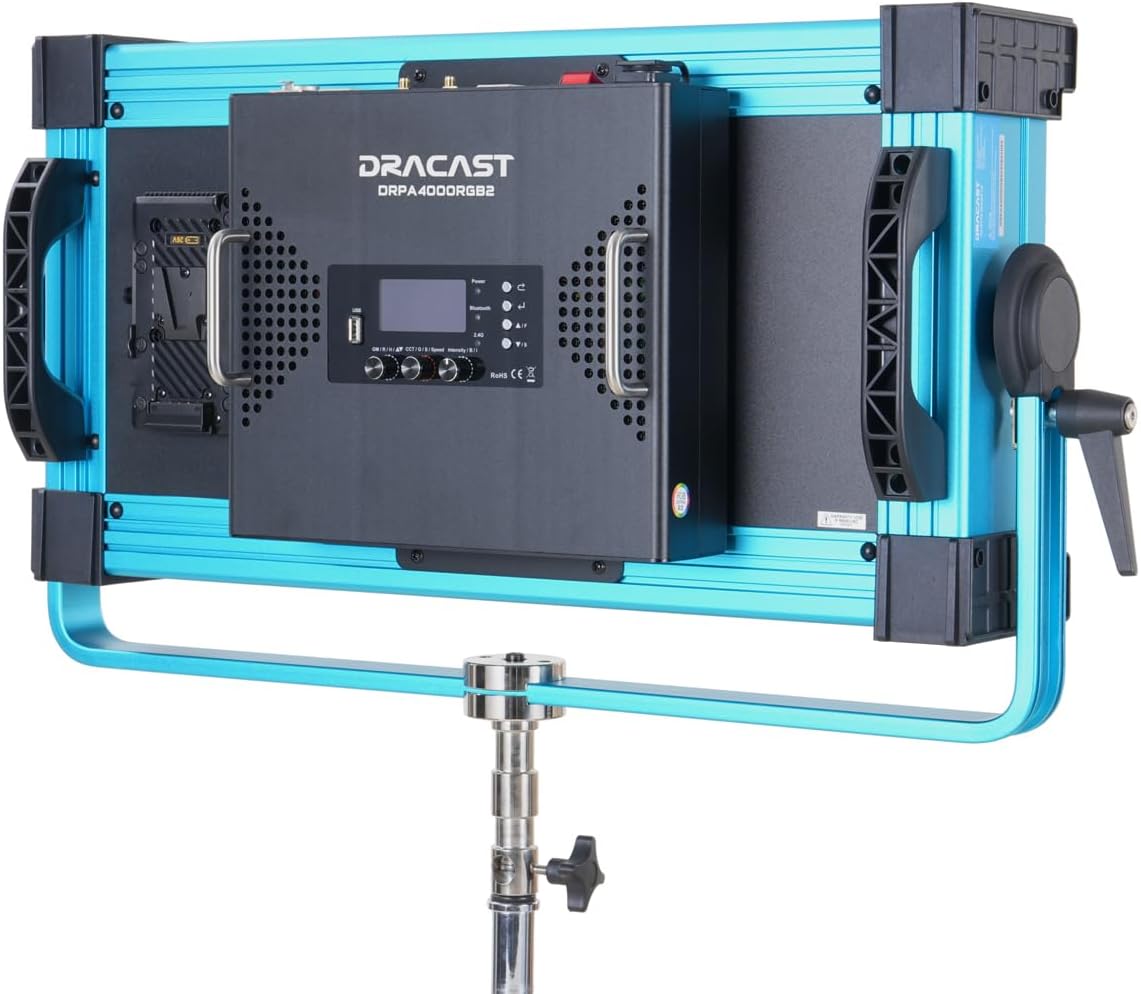
Figure 4.4: Rear view of the LED4000 panel, highlighting the integrated control panel with LCD display, adjustment knobs, and the V-mount battery plate for portable power solutions.

Figure 4.5: Side view of the LED4000 panel, illustrating the robust U-bracket yoke and the locking handle for precise angle adjustment and secure mounting.
4.6. Control Panel Layout
The rear control panel features an LCD display, navigation buttons, and rotary knobs for adjusting various settings. Specific functions include:
- LCD Display: Shows current settings, modes, and values.
- Mode Button: Cycles through CCT, HSI, RGB, Gel, and FX modes.
- Intensity Knob: Adjusts brightness (0-100%).
- Parameter Knobs: Adjust specific parameters depending on the selected mode (e.g., CCT, Hue, Saturation).
- DMX Ports: 5-pin DMX In/Out for wired DMX control.
- Power Input: For connecting the AC power adapter.
- V-Mount Plate: For attaching compatible V-mount batteries (sold separately).
5. Setup
5.1. Mounting the Panel
- Attach the U-bracket yoke to a compatible light stand or mounting hardware using the standard 5/8" receiver.
- Securely tighten the locking knob on the light stand to prevent accidental movement.
- Adjust the angle of the LED panel using the locking handles on the U-bracket, then tighten to secure the desired position.
5.2. Powering the Unit
The LED4000 can be powered via AC adapter or V-mount battery.
- AC Power: Connect the provided power cable to the power input port on the rear of the panel, then plug the other end into a suitable AC outlet.
- Battery Power: Attach a fully charged V-mount battery (not included) to the V-mount plate on the rear of the panel. Ensure it clicks securely into place.
Press the power button to turn the unit on. The LCD display will illuminate.
6. Operating Instructions
The Dracast Palette Series II LED4000 offers multiple operating modes and control options.
6.1. Onboard Control
Use the Mode button to cycle through the available lighting modes, and the Intensity/Parameter knobs to adjust settings.
- CCT Mode (Correlated Color Temperature): Adjusts white light from 2500K to 9999K. Use the dedicated knob for CCT and another for Green/Magenta shift.
- HSI Mode (Hue, Saturation, Intensity): Provides full control over color.
- Hue: Adjusts the color tone (0-360°).
- Saturation: Adjusts the purity or intensity of the color (0-100%).
- Intensity: Adjusts the overall brightness (0-100%).
- RGB Mode: Allows direct adjustment of Red, Green, and Blue LED levels.
- Gel Mode: Emulates various ROSCO and LEE lighting gels. Select from a library of pre-programmed gels.
- FX Mode (Lighting Effects): Access 21 preloaded cinematic lighting effects such as Lightning, Police Car, Screen Flicker, RGB Loop, and more. Use the parameter knob to select and adjust effect speed or intensity.
6.2. Bluetooth App Control
The Dracast Palette V2 App (available for iOS and Android) allows wireless control of the LED4000 panel.
- Download and install the "Dracast Palette V2" app from your device's app store.
- Ensure Bluetooth is enabled on your mobile device.
- Power on the LED4000 panel.
- Open the Dracast Palette V2 app and follow the on-screen instructions to connect to your light.
- Once connected, you can control brightness, color modes, FX, and gel selections remotely.
6.3. DMX Control (Wired and Wireless)
The LED4000 supports 5-pin DMX512 for integration into professional lighting setups.
- Wired DMX: Connect a DMX controller to the DMX IN port using a 5-pin DMX cable. Use the DMX OUT port to daisy-chain multiple units. Refer to the DMX chart in the appendix (if available, otherwise consult Dracast support) for channel assignments.
- Wireless DMX: The unit features built-in wireless DMX capabilities. Consult the Dracast documentation or support for pairing instructions with compatible wireless DMX transmitters.
7. Maintenance
Proper maintenance ensures the longevity and optimal performance of your LED panel.
- Cleaning: Use a soft, dry cloth to wipe the exterior of the unit. For stubborn dirt, a slightly damp cloth with mild detergent can be used, ensuring no liquid enters the unit. Do not use harsh chemicals or abrasive cleaners.
- Storage: When not in use, store the LED panel in its provided soft padded carry case (CC-38) in a cool, dry place, away from direct sunlight and extreme temperatures.
- Ventilation: Ensure the ventilation holes are free from dust and obstructions to prevent overheating.
8. Troubleshooting
If you encounter issues with your LED4000 panel, refer to the following common problems and solutions:
| Problem | Possible Cause | Solution |
|---|---|---|
| Unit does not power on. | No power supply; faulty cable; battery depleted. | Check power cable connection and outlet. Ensure battery is charged and properly seated. |
| Light output is inconsistent or flickering. | Loose connection; DMX signal issue; internal fault. | Check all cable connections. If using DMX, verify signal integrity. Restart the unit. |
| Cannot connect via Bluetooth app. | Bluetooth not enabled; app issue; unit not discoverable. | Ensure Bluetooth is on your device. Restart the app and the LED panel. Check app permissions. |
| Controls are unresponsive. | Temporary software glitch; DMX override. | Power cycle the unit. If using DMX, ensure DMX signal is not overriding local controls. |
If the problem persists after attempting these solutions, please contact Dracast customer support for assistance.
9. Specifications
| Model | DRPA4000RGB2 |
| Light Type | RGBW Soft Panel |
| Power Draw | 400W |
| LED Count | 1120 LEDs (560 RGB, 560 White) |
| CCT Range | 2500K – 9999K |
| Dimming | 16-bit |
| Control Modes | CCT, HSI, RGB, Gel, FX |
| Control Options | Onboard, Bluetooth (Dracast Palette V2 App), 5-pin DMX512 (Wired/Wireless) |
| Lighting Effects | 21 preloaded effects |
| Construction | All-metal housing |
| Product Dimensions | 22.6"L x 3.2"W x 19.8"H (57.4cm x 8.1cm x 50.3cm) |
| Weight | (Weight not specified in input) |
| UPC | 659675247267 |
10. Warranty and Support
For warranty information, please refer to the warranty card included with your product or visit the official Dracast website. For technical support, service, or inquiries, please contact Dracast customer service:
- Website: www.dracast.com
- Email: support@dracast.com
- Phone: (Contact information not provided, please refer to product packaging or website)
When contacting support, please have your product model (DRPA4000RGB2) and serial number ready.


