
Celonix ATOOLL1755141
Celonix H4M PortaPack + HackRF All-in-one Kit User Manual
Model: ATOOLL1755141
Introduction
The Celonix H4M PortaPack is a fully integrated, all-in-one portable Software Defined Radio (SDR) device. It combines the capabilities of the HackRF hardware with the advanced functionality of the pre-flashed MAYHEM firmware. Designed for versatility, the H4M allows for various radio frequency operations including receiving, transmitting, replaying, and scanning. Its robust design and comprehensive features make it suitable for a wide range of applications without requiring an external computer.
This manual provides essential information for setting up, operating, and maintaining your H4M PortaPack to ensure optimal performance and longevity.
Package Contents

Image: Overview of the Celonix H4M PortaPack kit, showing the main unit, multiple antennas for different frequency ranges, an LNA, and a USB cable.
Please verify that all items listed below are included in your package:
- 1x PortaPack H4M (HackRF Rev10 + PortaPack H4M)
- 1x MicroUSB Cable
- 1x 20dB 50MHz - 6GHz LNA (Low Noise Amplifier)
- 1x SMA Male/Male Cable
- 1x 2.4/5/5.8GHz Blade Antenna
- 1x GSM/3G/4G Antenna
- 1x 40MHz - 6GHz Telescopic Antenna
- 1x 700MHz - 2700MHz Antenna
Product Features

Image: Close-up front view of the H4M PortaPack, highlighting the matte screen and the redesigned navigation wheel.
- Matte Screen: Improved high-visibility screen for legibility in various lighting conditions, including outdoors.
- GPIO Ports: Expansion ports for connecting add-on accessories, shields, and sensors.
- Redesigned Power System: Features a unified power on/off switch, advanced battery management, fast charging via USB-C, and zero power leaks or battery drain.
- Internal / External Mic + Speaker Toggle: Integrated sliding switch for quick switching between internal and external microphone/headphone options.
- Redesigned Navigation Wheel: Low-profile navigation wheel with directional buttons for faster and more robust navigation.
- Integrated Microphone: On-board microphone enables full voice transceiver functionality.
Setup Guide
1. Initial Charging
Before first use, fully charge the H4M PortaPack using the provided MicroUSB cable. Connect the cable to the USB-C port on the device and to a standard USB power adapter (not included) or a computer USB port. The charging indicator on the device will provide status.
2. Antenna Connection
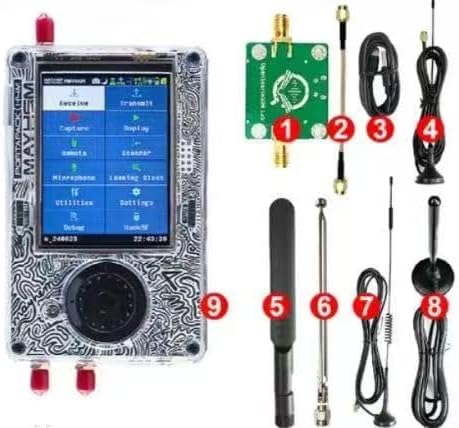
Image: The H4M PortaPack shown with various numbered accessories, illustrating where antennas and cables connect.
Select the appropriate antenna for your desired frequency range and application. Carefully screw the antenna onto the SMA connector(s) on the H4M PortaPack. Do not overtighten.
- For general use, the 40MHz - 6GHz Telescopic Antenna offers broad coverage.
- For specific cellular bands, use the GSM/3G/4G Antenna.
- For Wi-Fi/Bluetooth frequencies, use the 2.4/5/5.8GHz Blade Antenna.
- The 20dB 50MHz - 6GHz LNA can be connected in-line using the SMA Male/Male Cable to improve signal reception for weak signals.
3. Powering On/Off
Locate the unified power on/off switch on the device. Slide the switch to the 'ON' position to power on the PortaPack. To power off, slide the switch to the 'OFF' position.
Operating Instructions
Navigation
The H4M PortaPack features a redesigned navigation wheel and directional buttons for menu navigation. Use the wheel to scroll through options and the central button to select. Directional buttons can be used for fine-tuning or quick jumps within menus.
Firmware Overview (MAYHEM)
The device comes pre-flashed with the MAYHEM firmware, offering a wide array of functionalities:
- Receive: Listen to various radio signals.
- Transmit: Broadcast signals (ensure compliance with local regulations).
- Replay: Replay captured signals.
- Scan: Scan frequency ranges for activity.
- GPS-Spoofing: Simulate GPS signals (use responsibly and legally).
- Jamming: Interfere with signals (highly regulated, use with extreme caution and only where legally permitted).
- Key-Fob Tools: Analyze and interact with key fob signals.
- ADS-B/AIS: Receive aircraft and marine vessel tracking data.
- Bluetooth: Interact with Bluetooth signals.
- And many more advanced functions accessible through the menu system.
Audio Input/Output
Use the integrated sliding switch to toggle between the internal microphone and an external microphone/headphone jack. This allows for flexible audio input and output during transceiver operations.
Maintenance
Cleaning
Wipe the device with a soft, dry, lint-free cloth. Do not use abrasive cleaners, solvents, or aerosol sprays. Avoid getting moisture into any openings.
Storage
Store the H4M PortaPack in a cool, dry place away from direct sunlight and extreme temperatures. When storing for extended periods, ensure the battery is charged to approximately 50% to preserve battery health.
Firmware Updates
Periodically check for firmware updates for the MAYHEM software. Updates can provide new features, bug fixes, and performance improvements. Refer to the official MAYHEM firmware documentation or community resources for instructions on updating your device.
Troubleshooting
| Problem | Possible Cause | Solution |
|---|---|---|
| Device does not power on. | Battery is depleted. | Connect the device to a power source using the USB-C cable and allow it to charge for at least 30 minutes before attempting to power on again. |
| Poor signal reception/transmission. | Incorrect antenna for frequency; weak signal environment; antenna not securely connected. | Ensure the correct antenna is attached for the frequency range. Try using the LNA. Move to an area with better signal. Check antenna connection. |
| Screen is unreadable outdoors. | Direct sunlight or glare. | While the screen is matte, extreme direct sunlight can still affect visibility. Try to shade the screen or adjust your viewing angle. |
| Device freezes or becomes unresponsive. | Software glitch; excessive load. | Perform a hard reset by holding the power button for 10-15 seconds until the device powers off, then power it back on. If issues persist, consider a firmware re-flash (refer to MAYHEM documentation). |
Specifications
| Feature | Detail |
|---|---|
| Model Number | ATOOLL1755141 |
| Brand | Celonix |
| Dimensions (L x W x H) | 8.66 x 3.15 x 5.91 inches |
| Item Weight | 12.7 ounces |
| Frequency Range | 1MHz - 6GHz (HackRF Rev10 capabilities) |
| Display | 3.2 Inch TFT (Matte Finish) |
| Antenna Types Supported | Radio, Wi-Fi, Cellular (via SMA connectors) |
| Number of Channels | 20 (as per product listing) |
| Power Input | USB-C (for charging) |
| Manufacturer | Wnew |
| UPC | 635412729319 |
Warranty and Support
Specific warranty details for the Celonix H4M PortaPack are not provided in the product listing. For warranty inquiries, technical support, or service, please contact the seller or manufacturer directly through the platform where the product was purchased.
It is recommended to retain your proof of purchase for any warranty claims.
Ask a question about this manual
Ask about setup, troubleshooting, compatibility, parts, safety, or missing instructions. Manuals+ will review the question and use this page’s manual context to help answer it.