
1. Introduction
This manual provides essential information for the proper installation, operation, and maintenance of your RXCWWZQQ TP.MS3663.PB819 Three-in-One TV Motherboard. Please read these instructions carefully before use to ensure optimal performance and safety.
The TP.MS3663.PB819 is designed to replace damaged TV motherboards, restoring normal TV function, extending device life, and offering a cost-effective repair solution. It aims to reduce crashes or lagging, safeguarding the viewing experience.
2. Safety Information
- Professional Installation Recommended: Installation should only be performed by qualified technicians to prevent damage to the product or TV.
- Power Disconnection: Always disconnect the TV from the power supply before attempting any installation or maintenance.
- Electrostatic Discharge (ESD) Precautions: Wear an anti-static wrist strap and work on an anti-static mat to prevent damage to sensitive electronic components.
- Handle with Care: Avoid touching the components directly. Hold the board by its edges.
- Compatibility: Ensure this motherboard is compatible with your specific TV model before installation.
3. Package Contents
Verify that all items are present in the package:
- RXCWWZQQ TP.MS3663.PB819 Three-in-One TV Motherboard (1 unit)
- (No other accessories are typically included with a bare motherboard unless specified by the seller.)
4. Product Overview
The TP.MS3663.PB819 is a versatile TV motherboard integrating multiple functions. Below are images illustrating the board's layout and key identification marks.
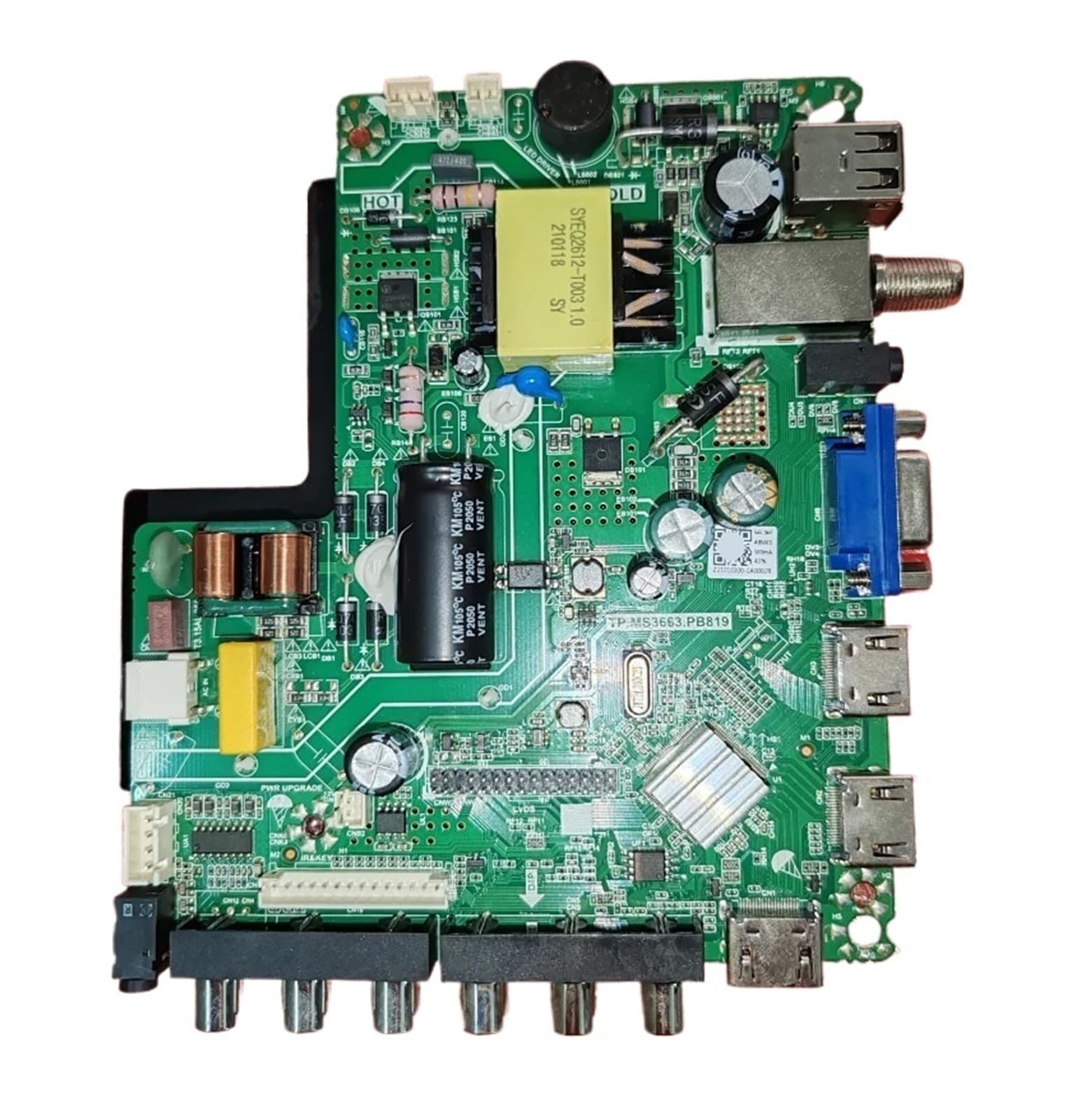
Figure 4.1: Overall view of the RXCWWZQQ TP.MS3663.PB819 TV Motherboard. This image displays the full board with its integrated circuits, capacitors, ports (HDMI, USB, VGA, antenna), and connectors.

Figure 4.2: Close-up of the model number TP.MS3663.PB819 printed on the circuit board, confirming the specific model of the motherboard.

Figure 4.3: Detailed view of a specific connector or component area, showing identification codes TWBZ-01-2101-0203 and R41-63LIT23E2000A1C. These codes may be relevant for compatibility or specific panel types.

Figure 4.4: Rear view of the motherboard, featuring a black protective cover over certain components, likely for heat dissipation or shielding. Additional connectors and circuitry are visible.

Figure 4.5: Close-up of a label indicating power specifications and a serial number (Z21010300-0A00028). The power specifications include voltage (64V-94V), wattage (48W3), and current (300mA), which are crucial for compatibility with the TV's power supply unit.
5. Setup and Installation
This section outlines the general steps for replacing a TV motherboard. Due to the complexity and potential risks, professional installation is strongly recommended.
- Preparation: Ensure the TV is unplugged from all power sources. Place the TV face down on a soft, clean surface to protect the screen.
- Access the Motherboard: Remove the back cover of the TV. This usually involves unscrewing multiple screws around the perimeter and sometimes in the center.
- Disconnect Cables: Carefully disconnect all cables connected to the old motherboard. This includes power cables, LVDS cable (to the display panel), speaker cables, IR sensor cable, button panel cable, and any other input/output cables. Note the orientation and connection points for reassembly.
- Remove Old Motherboard: Unscrew the mounting screws holding the old motherboard in place and carefully lift it out.
- Install New Motherboard: Position the new RXCWWZQQ TP.MS3663.PB819 motherboard in the TV chassis, aligning it with the screw holes. Secure it with the mounting screws.
- Reconnect Cables: Reconnect all cables to their corresponding ports on the new motherboard. Ensure all connections are firm and correctly oriented. Pay special attention to the LVDS cable, as incorrect connection can damage the panel.
- Initial Test: Before replacing the back cover, temporarily plug in the TV and power it on to verify basic functionality (e.g., power indicator, screen display, sound). If issues arise, immediately power off and recheck connections.
- Final Assembly: Once functionality is confirmed, unplug the TV, replace the back cover, and secure all screws.
6. Operating Instructions
After successful installation, the TV should operate as before. The motherboard itself does not require specific operating instructions beyond the standard use of your television.
- Power On/Off: Use the TV remote control or the TV's physical power button to turn the TV on or off.
- Input Selection: Use the "Input" or "Source" button on your remote to select the desired input (HDMI, AV, USB, VGA, TV tuner).
- Menu Navigation: Access the TV's on-screen display (OSD) menu to adjust picture settings, sound settings, channel scanning, and other TV functions.
- Firmware Updates: If available, firmware updates for the TV system (which includes the motherboard's software) should be performed according to the TV manufacturer's instructions.
7. Maintenance
The RXCWWZQQ TP.MS3663.PB819 motherboard is designed for long-term reliability and typically requires minimal maintenance.
- Cleaning: If the TV is opened for other repairs, gently clean any dust accumulation on the motherboard using compressed air or a soft brush. Ensure the TV is unplugged before cleaning.
- Ventilation: Ensure the TV's ventilation openings are not blocked to prevent overheating, which can stress electronic components.
- Environmental Conditions: Operate the TV within recommended temperature and humidity ranges to prolong the life of electronic components.
8. Troubleshooting
If you encounter issues after installing the new motherboard, consider the following:
| Problem | Possible Cause | Solution |
|---|---|---|
| TV does not power on. | Loose power cable connection, faulty power supply unit (PSU), or incorrect motherboard installation. | Check all power connections. Verify the PSU is functioning. Re-check motherboard installation. |
| No picture/display. | LVDS cable incorrectly connected, faulty display panel, or incorrect panel settings. | Ensure LVDS cable is securely and correctly connected. Verify panel compatibility. Access service menu to adjust panel settings if necessary (advanced users only). |
| No sound. | Speaker cables disconnected or faulty speakers. | Check speaker cable connections to the motherboard. Test with external speakers if possible. |
| Remote control not working. | IR sensor cable disconnected or faulty remote. | Ensure IR sensor cable is connected. Replace remote batteries. |
For persistent issues, consult a professional TV repair technician.
9. Specifications
| Feature | Detail |
|---|---|
| Brand | RXCWWZQQ |
| Model Number | TP.MS3663.PB819 |
| Type | Three-in-One TV Motherboard |
| Compatible Audio & Video Equipment Style | Display Equipment |
| Item Weight | 50 Grams |
| ASIN | B0F8R4W8X8 |
10. Warranty and Support
This product is typically covered by a limited warranty provided by the seller or manufacturer. Please refer to your purchase documentation for specific warranty terms and conditions.
For technical support or inquiries regarding this product, please contact the seller directly through the platform where the purchase was made. Provide your order number and a detailed description of the issue for efficient assistance.
Note: Unauthorized repair or improper installation may void the product warranty.