
1. Introduction
The VIHELM BLE-YC01 is a versatile 6-in-1 water quality testing device designed to measure pH, TDS, EC, ORP, and Temperature. It features Bluetooth connectivity for mobile app control, allowing for convenient data display, storage, and analysis. This manual provides detailed instructions for setting up, operating, maintaining, and troubleshooting your BLE-YC01 meter.
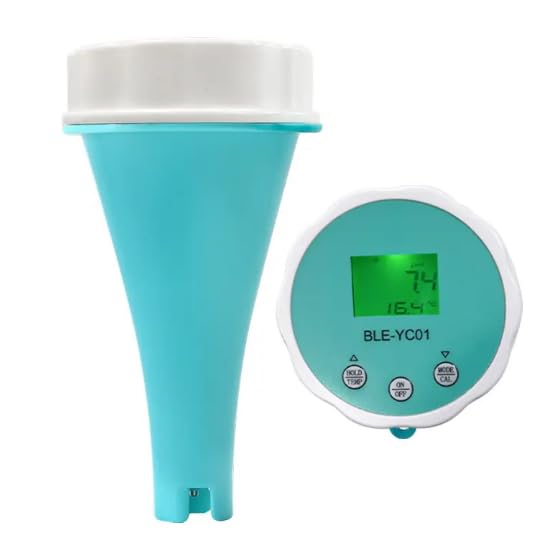
Image: The VIHELM BLE-YC01 water quality meter, consisting of a conical probe unit and a circular display unit, shown separately.
2. What's in the Box
- BLE-YC01 Water Quality Meter (1 unit)
3. Key Features
- 6-in-1 Measurement: pH, TDS, EC, ORP, Temperature, and Chlorine (calculated).
- Mobile App Control: Full display of readings, product parameter view, data storage, and calibration records via Bluetooth.
- Automatic Data Storage and Sharing: Data can be saved automatically or manually, exported to Excel, and shared.
- Customizable Alarms: Set upper and lower limits for pH and TDS/EC; values outside the range display in red.
- 5-Point Calibration: Supports 5-point calibration with two sets of calibration modes.
- IP67 Waterproof Rating: Certified for short-term immersion, preventing water penetration.
- Backlight Control: The mobile phone app can control the display backlight.
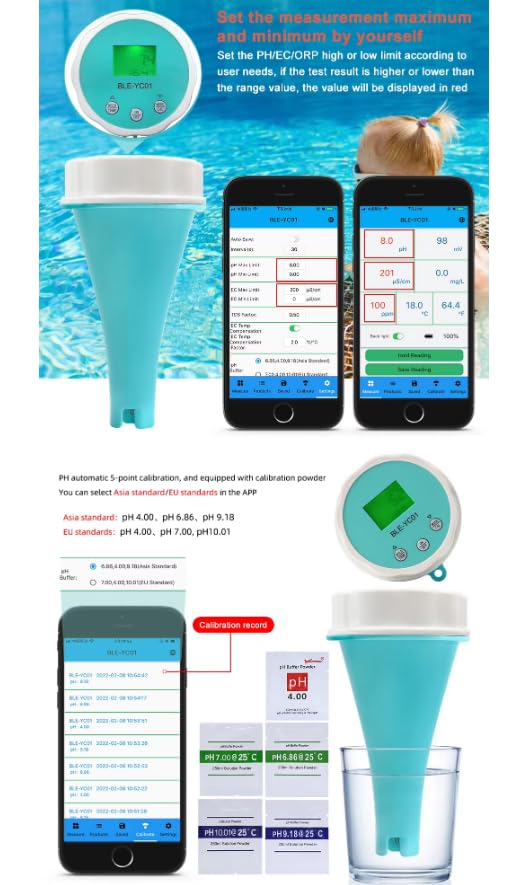
Image: A smartphone displaying the BLE-YC01 mobile application interface, showing real-time water quality readings and various control options.
4. Specifications
| Parameter | Range | Resolution | Accuracy |
|---|---|---|---|
| pH | 0.00~14.00pH | 0.01pH | ±0.05pH |
| Temperature | 0.1~60.0°C; 32.0~140.0°F | 0.1°C; 0.1°F | ±0.5°C |
| TDS | 0~9999ppm | 1ppm | ±2% F.S |
| EC | 0~10000uS/cm | 1uS/cm | ±2% F.S |
| Chlorine | 0.1~4.0mg/L | N/A | N/A |
| ORP | -1200~+1200mV | N/A | N/A |
Waterproof Rating: IP67 (International waterproof certification that prevents water penetration and is suitable for short-term immersion).
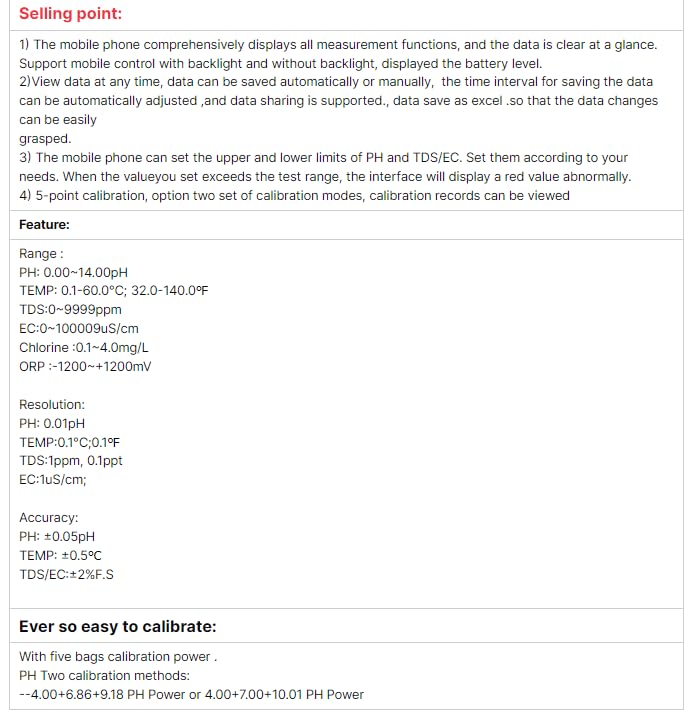
Image: A detailed table outlining the range, resolution, and accuracy for pH, Temperature, TDS, EC, Chlorine, and ORP measurements of the BLE-YC01 meter.
5. Setup
5.1 App Installation and Connection
- Scan the QR code provided in the product packaging or manual to download and install the official app.
- Ensure Bluetooth is enabled on your mobile phone.
- Press and hold the ON/OFF button on the meter to turn it on and activate Bluetooth.
- Open the app and follow the prompts to connect to the BLE-YC01 device.
5.2 Initial Use
- Ensure the rubber ring is securely in place on the probe unit.
- Do not remove the protection cover when there is water inside the probe unit.
- Immerse the electrode in the standard solution or the water to be tested.
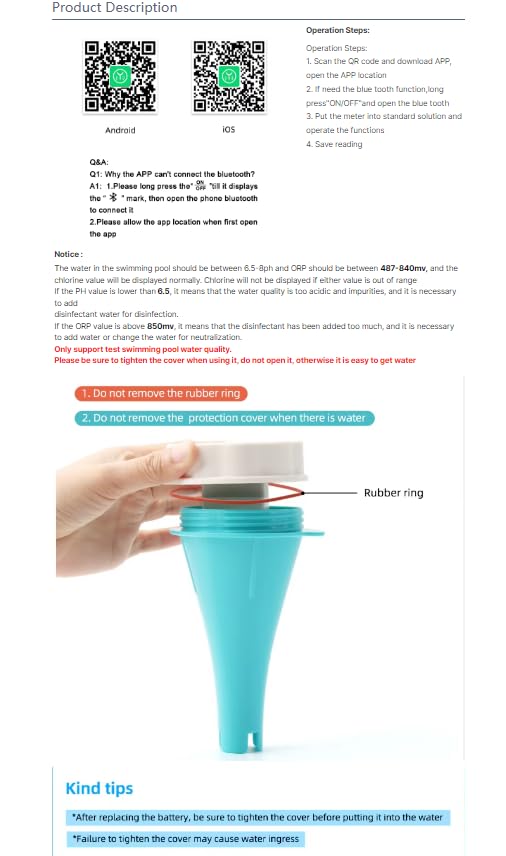
Image: A diagram showing QR codes for Android and iOS app downloads, along with basic operation steps and important notices regarding the rubber ring and protection cover.
6. Operation
6.1 Taking Measurements
Once connected to the app, immerse the meter's probe into the water sample. The app will display real-time measurements for pH, TDS, EC, ORP, and Temperature. The mobile phone comprehensively displays all measurement functions, and the data is clear at a glance.
6.2 App Functions
- Data Display: View current readings for all parameters.
- Data Storage: Data can be saved automatically or manually. The saved data can be exported to Excel and shared.
- Parameter View: Access detailed product parameter information.
- Function Setting: Adjust various settings, including setting upper and lower limits for pH and TDS/EC. If a value exceeds the set range, the interface will display a red warning.
- Calibration Record: View past calibration records.
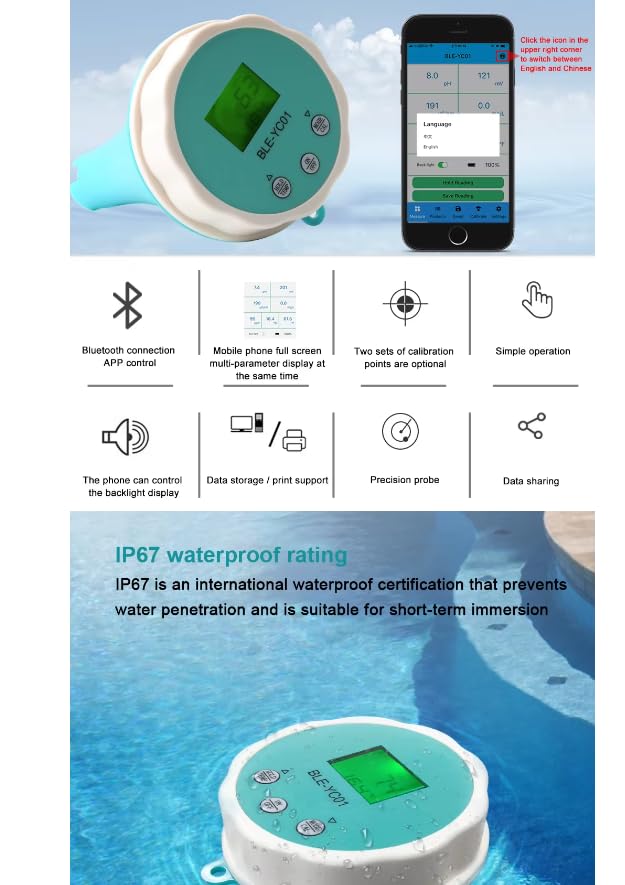
Image: A smartphone screen demonstrating the automatic and manual data saving features of the app, along with options to export data to Excel and share via various social media platforms.
7. Calibration
The BLE-YC01 supports 5-point automatic calibration and is equipped with calibration powder. You can select Asia standard/EU standards in the app.
7.1 pH Calibration Methods
- Asia Standard: pH 4.00, pH 6.86, pH 9.18
- EU Standards: pH 4.00, pH 7.00, pH 10.01
Follow the in-app instructions for the calibration process. Ensure you use the correct calibration solutions for accurate results.
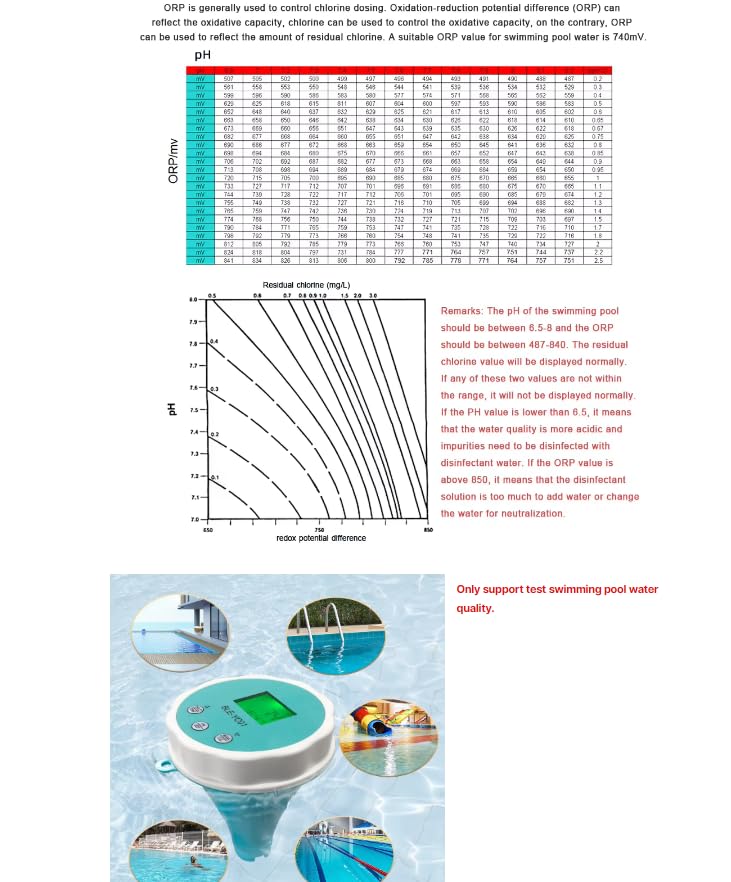
Image: A visual representation of the mobile app's calibration interface, showing options for selecting standard buffers and images of the meter being calibrated with pH 4.00, pH 6.86, and pH 9.18 solutions.
8. Maintenance
8.1 Battery Replacement
When the battery needs replacement, follow these steps:
- Open the battery compartment.
- Replace the old batteries with new ones.
- After replacing the battery, be sure to tighten the cover securely before putting it into the water. Failure to tighten the cover may cause water ingress and damage the device.

Image: A three-step visual guide showing how to open the meter for battery replacement, the importance of tightening the cover, and placing the meter back into water.
9. Troubleshooting
9.1 App Connection Issues
Q1: Why can't the app connect to Bluetooth?
- A1: Please long press the Bluetooth icon on the meter. If it displays the Bluetooth symbol, then open the phone's Bluetooth settings to connect.
- A2: Please allow the app location permission when first opening the app.
9.2 Water Ingress Prevention
- Do not remove the rubber ring from the probe unit.
- Do not remove the protection cover when there is water inside the probe unit.
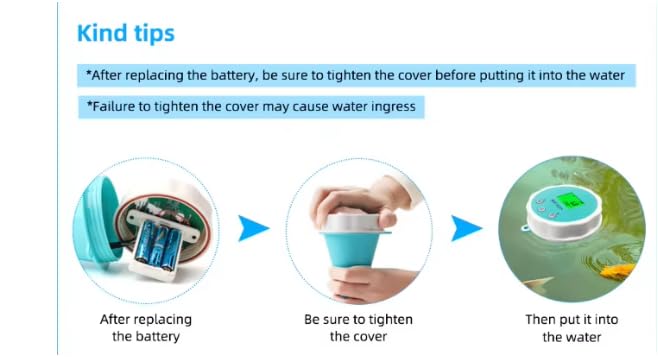
Image: A hand demonstrating the proper handling of the meter, highlighting the importance of the rubber ring for sealing.
10. Important Notes
- The water in swimming pools should typically be between 6.5-8.5 pH and ORP should be between 487-840mV. The chlorine value will be displayed normally.
- Chlorine will not be displayed if either value is out of range.
- If the pH value is lower than 6.5, it indicates that the water quality is too acidic and contains impurities, requiring disinfectant water for disinfection.
- If the ORP value is above 850mV, it means that the disinfectant has been added too much, and it is necessary to add water or change the water for neutralization.
- Only support test swimming pool water quality for chlorine and ORP measurements.
- Please be sure to tighten the cover when using it, otherwise it is easy for water to enter.
Image: A graph illustrating the relationship between pH, ORP, and residual chlorine levels, specifically for swimming pool water, along with a note to only test swimming pool water quality.
11. Warranty and Support
For warranty information or technical support, please refer to the product packaging or contact your retailer. Keep your purchase receipt for any warranty claims.