
Introduction
This manual provides comprehensive instructions for the installation, operation, and maintenance of your ninetom 12.3-inch Touchscreen Car Radio. This device is designed to upgrade your vehicle's infotainment system, offering advanced features like Apple CarPlay, Android Auto, and navigation capabilities while retaining original car functions.
Vehicle Compatibility
This car radio is specifically compatible with BMW 1-Series E81, E82, E87, E88 models manufactured between 2004 and 2008, provided they are equipped with the CCC system. It is not suitable for CIC systems. Please verify your vehicle's system type before installation.

Image: Visual guide to identify CCC system compatibility. Shows examples of NBT and CIC systems (marked with 'X') and the CCC system (marked with '✓') for correct fitment.
If you are unsure about your car's system, please consult a professional or contact customer support for assistance before proceeding with the purchase or installation.
Key Features
- 12.3-inch Touchscreen Display: High-resolution 1920 x 720 screen for clear visuals.
- Wireless/Wired Apple CarPlay & Android Auto: Seamless integration with your smartphone for navigation, calls, messages, and music.
- Mirror Link Function: Display your phone's screen directly on the car radio.
- Retains Original Car Functions: The upgrade screen preserves existing features such as the original car radio, amplifier function, factory joystick control, reverse camera, and manual gearbox controls. No software changes are made to the vehicle's control units.
- Built-in GPS Navigation: Supports various navigation software and preloaded maps.
- Bluetooth Connectivity: For music streaming and hands-free calling.
- Multi-language Settings: Supports multiple languages for user interface.
- One-button Switching: Easily switch between the original vehicle system and the new Linux system interface.

Image: Demonstrates how the new touchscreen integrates with and supports original BMW functions like the radio, joystick, steering wheel controls, and reverse camera.
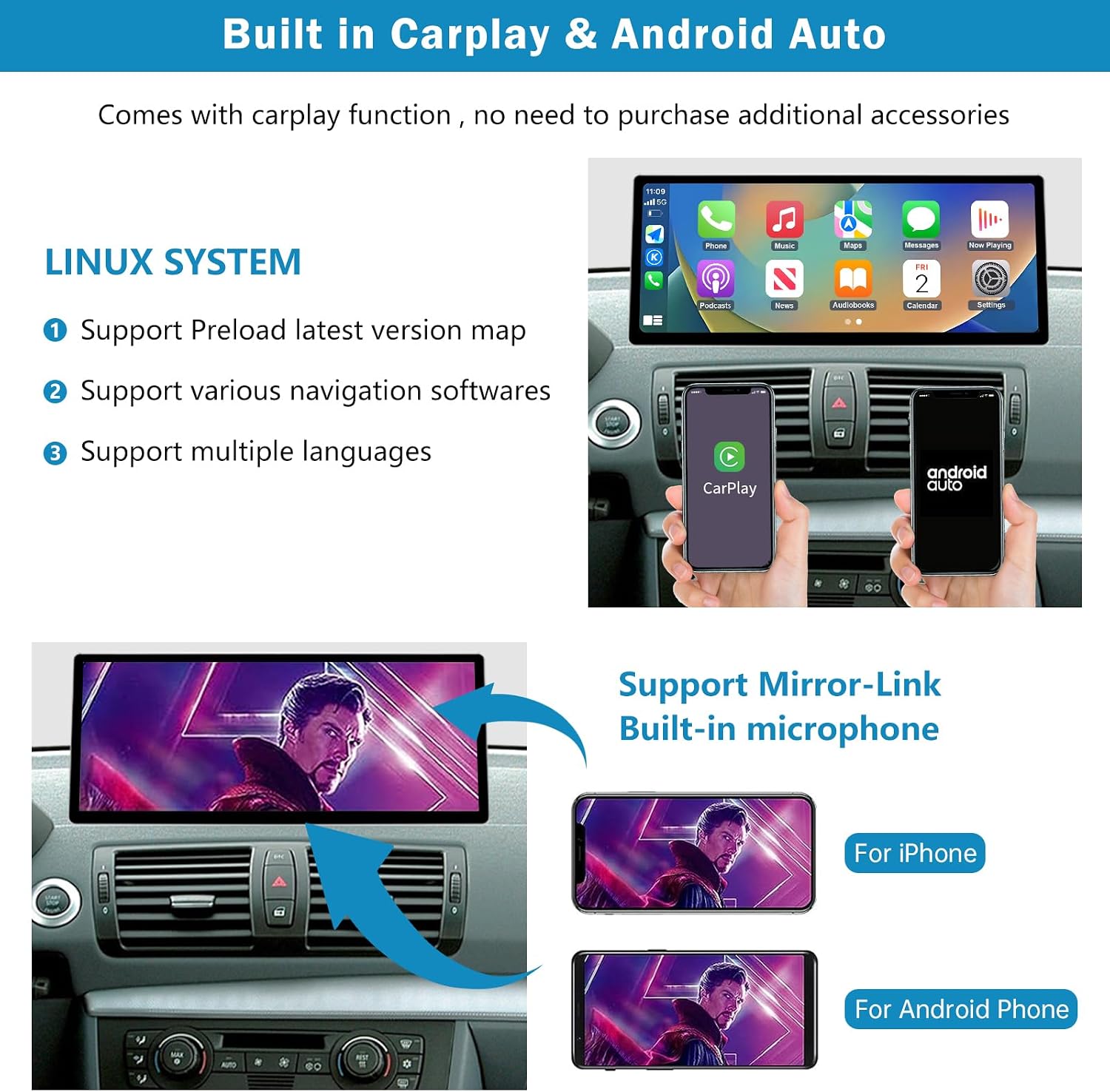
Image: Illustrates the built-in Apple CarPlay and Android Auto interfaces, along with Mirror-Link functionality for both iPhone and Android devices.
Product Contents
Before beginning installation, please ensure all components are present in the package:
- 1 x 12.3-inch Upgraded Car Radio Display
- 1 x Power Cable
- 1 x USB Cable
- 1 x AUX Cable
- 1 x Mounting Bracket (Note: Back bracket may vary depending on specific vehicle model)
- 1 x Installation Tool Kit
- 1 x Installation Guide (this manual)

Image: Displays the main unit (12.3-inch screen), power cable, USB cable, AUX cable, mounting bracket, and a set of installation tools.
Installation Guide
Installation of the ninetom 12.3-inch Touchscreen Car Radio is designed to be non-destructive, meaning no permanent damage to your vehicle's wiring or structure. It primarily involves removing the original car display and replacing it with the new unit.
General Installation Steps:
- Preparation: Ensure the vehicle's ignition is off and the battery is disconnected to prevent electrical issues.
- Remove Original Display: Carefully remove the original car radio/display unit using the provided installation tools. Retain all original screws and components.
- Connect Wiring: Connect the new power cable, USB cable, and AUX cable to the corresponding ports. Ensure all connections are secure.
- Mount New Display: Install the new 12.3-inch touchscreen display using the provided bracket and original screws.
- Test Functionality: Reconnect the battery and turn on the ignition. Test all functions of the new car radio, including touch response, audio, CarPlay/Android Auto, and original system switching.
- Final Assembly: Securely reassemble any removed trim pieces.

Image: Shows a side-by-side comparison of the car's dashboard before and after the installation of the 12.3-inch touchscreen, highlighting the visual upgrade.
For detailed, step-by-step instructions, refer to the specific installation diagrams that may be included with your product or seek professional installation.
Operating Your Car Radio
Switching Between Systems:
Your new ninetom car radio allows for seamless switching between the original BMW CCC system and the new Linux-based interface. This is typically done via a dedicated button or a touch control on the screen. The original car radio functions will operate independently when the original system is active.
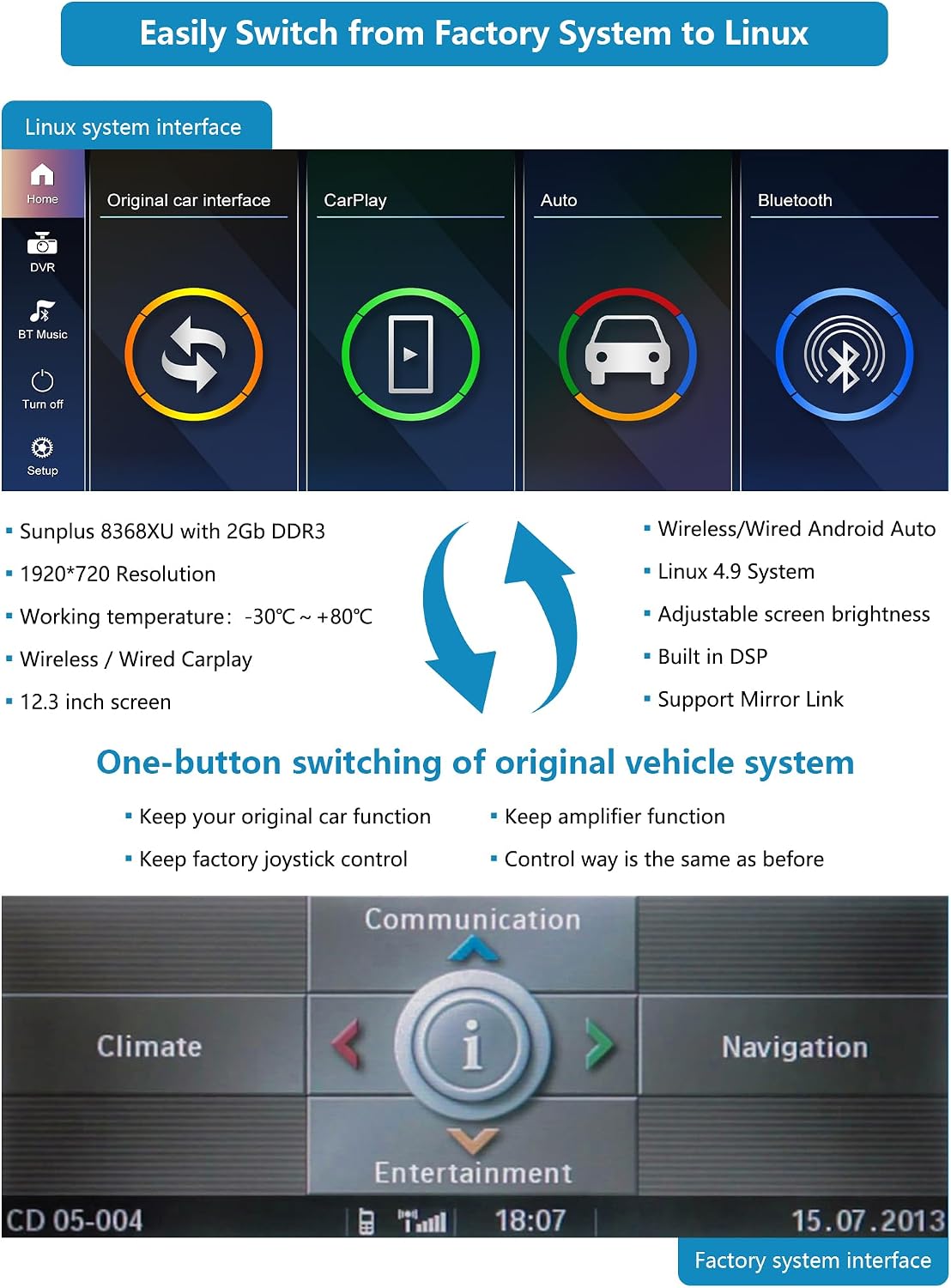
Image: Illustrates the Linux system interface with options for original car interface, CarPlay, Auto, and Bluetooth, and the factory system interface below, demonstrating the one-button switching capability.
Using Apple CarPlay / Android Auto:
- Connection: Connect your iPhone via a USB cable for wired CarPlay, or wirelessly via Bluetooth and Wi-Fi. For Android Auto, connect via USB or wirelessly (if supported by your phone and the unit).
- Access: Once connected, select the CarPlay or Android Auto icon on the main screen.
- Functions: Access navigation, make calls, send messages, play music, and use compatible apps directly from the touchscreen.
Navigation:
The unit supports various navigation applications. Ensure your preferred navigation app is installed on your connected smartphone (for CarPlay/Android Auto) or utilize the unit's built-in GPS capabilities.
Bluetooth:
- Pairing: Go to the Bluetooth settings on the car radio and your smartphone. Search for and select the car radio's Bluetooth name to pair.
- Functions: Once paired, you can make hands-free calls and stream audio from your device.
Maintenance
- Screen Cleaning: Use a soft, lint-free cloth slightly dampened with water or a screen-cleaning solution. Avoid harsh chemicals or abrasive materials that could damage the touchscreen.
- Software Updates: Periodically check the manufacturer's website or contact support for available software updates to ensure optimal performance and access to new features.
- General Care: Avoid exposing the unit to extreme temperatures, direct sunlight for prolonged periods, or excessive moisture.
Troubleshooting
| Problem | Possible Cause | Solution |
|---|---|---|
| No power/Unit does not turn on | Loose power connection, blown fuse, vehicle battery issue. | Check all power cable connections. Inspect vehicle fuses. Ensure vehicle battery is charged. |
| No sound | Volume too low, incorrect audio source selected, loose speaker connections. | Increase volume. Verify correct audio input (e.g., AUX, Bluetooth, CarPlay). Check speaker wiring. Note: Original car radio in Linux system may not work simultaneously with navigation audio. |
| CarPlay/Android Auto not connecting | Incorrect cable, phone settings, software glitch. | Use a certified USB cable. Ensure CarPlay/Android Auto is enabled on your phone. Restart phone and car radio. Check Bluetooth/Wi-Fi connections for wireless. |
| Poor microphone quality during calls | Microphone placement, interference. | Ensure the microphone is not obstructed. The microphone is located on the back of the device, which may affect call quality for some users. Consider an external microphone if call quality is consistently poor. |
| Touchscreen unresponsive | Temporary software issue, screen dirt. | Restart the unit. Clean the screen thoroughly. If the issue persists, contact support. |
Specifications
| Feature | Detail |
|---|---|
| Brand | ninetom |
| Model Name | RT-LN-CCC-12-1SDE |
| Screen Size | 12.3 inches |
| Screen Resolution | 1920 x 720 |
| Screen Type | Capacitive Touchscreen |
| Connectivity Technology | Bluetooth |
| Supported Navigation Systems | GPS |
| Audio Output Mode | Stereo |
| Item Weight | 2.2 Kilograms |
| Compatible Devices | Smartphone |
| Control Method | Touch |
| Operating Temperature | -30°C ~ +80°C |
| System | Linux 4.9 System |
| Processor/RAM | Sunplus 8368XU with 2GB DDR3 |
Warranty and Support
Your ninetom 12.3-inch Touchscreen Car Radio comes with a 1-year warranty from the date of purchase. This warranty covers manufacturing defects and ensures professional customer service and installation support.
For technical assistance, warranty claims, or any questions regarding your product, please contact ninetom customer service through your purchase platform or the official ninetom website.

