
1. Product Overview
The VECELO Full Size Bed Frame is designed to provide a comfortable and functional sleeping solution. It features a 2-tier storage headboard, an integrated charging station, and customizable RGB LED lighting. The frame is constructed with heavy-duty metal for stability and does not require a box spring.
- Modern Design: Upholstered headboard with diamond-pattern tufting.
- Integrated Charging Station: Includes 2 USB ports and 1 Type-C port.
- Ample Storage: 2-tier headboard shelves and 9.8-inch under-bed clearance.
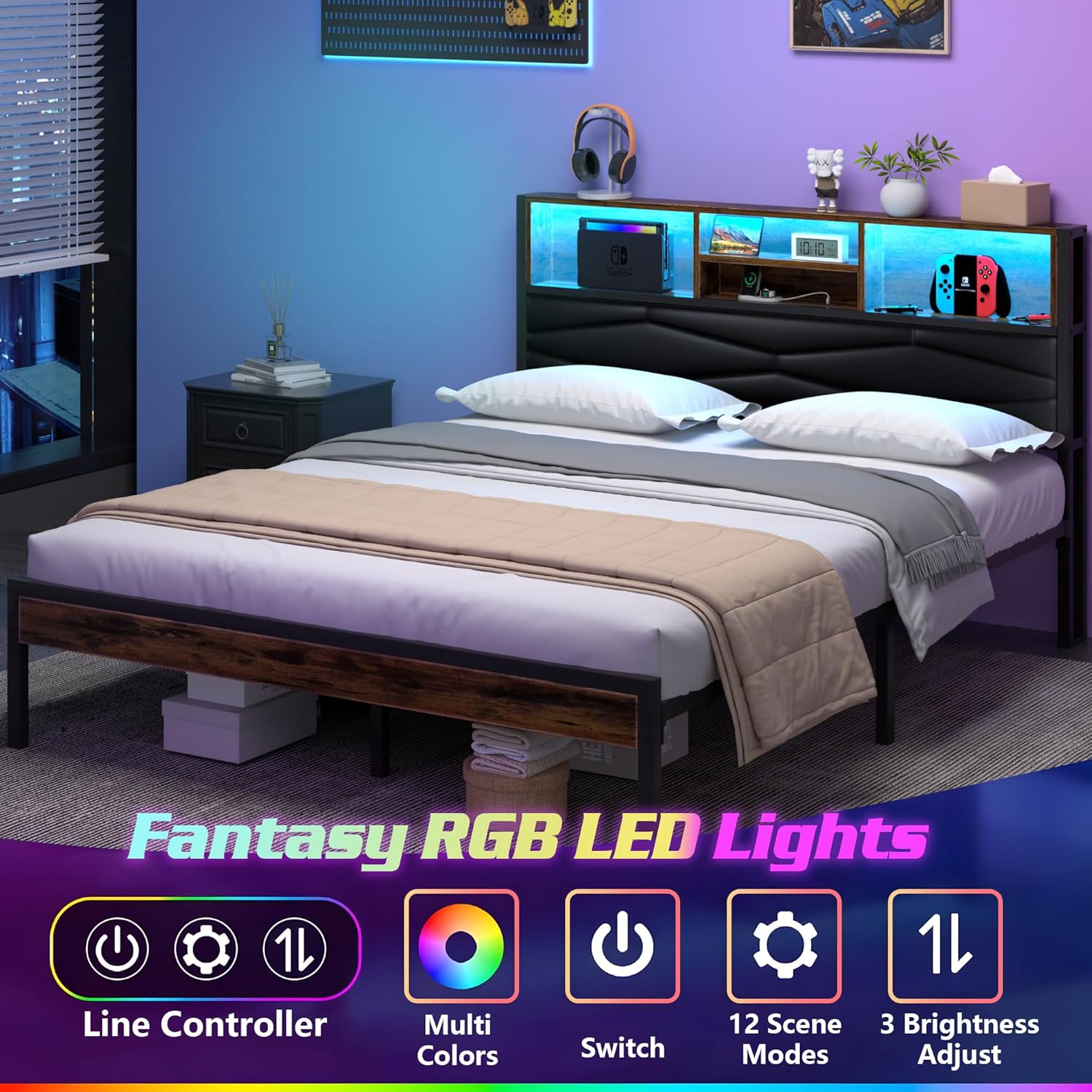
- RGB LED Lighting: Customizable colors, brightness, and modes via remote or app control.
- Sturdy Construction: Metal slats and legs support up to 750 lbs.

2. Safety Information
Please read and understand all safety instructions before assembly and use. Failure to follow these instructions may result in injury or product damage.
- Weight Capacity: Do not exceed the maximum weight capacity of 750 lbs for this bed frame. Exceeding this limit can compromise stability and safety.
- Regular Maintenance: Regularly check and re-tighten all screws and fasteners to ensure long-term stability and safety.
- Assembly: Ensure all hardware and parts are present and undamaged before beginning assembly. Do not use power tools for tightening screws unless explicitly instructed, as this may overtighten and damage components.
- Mattress Compatibility: This bed frame is designed for use without a box spring. We recommend a mattress thickness of 6 to 12 inches for optimal comfort and aesthetics.
- Electrical Safety: When using the charging station, ensure all devices and cables are in good condition. Avoid overloading the ports.
3. Setup and Assembly
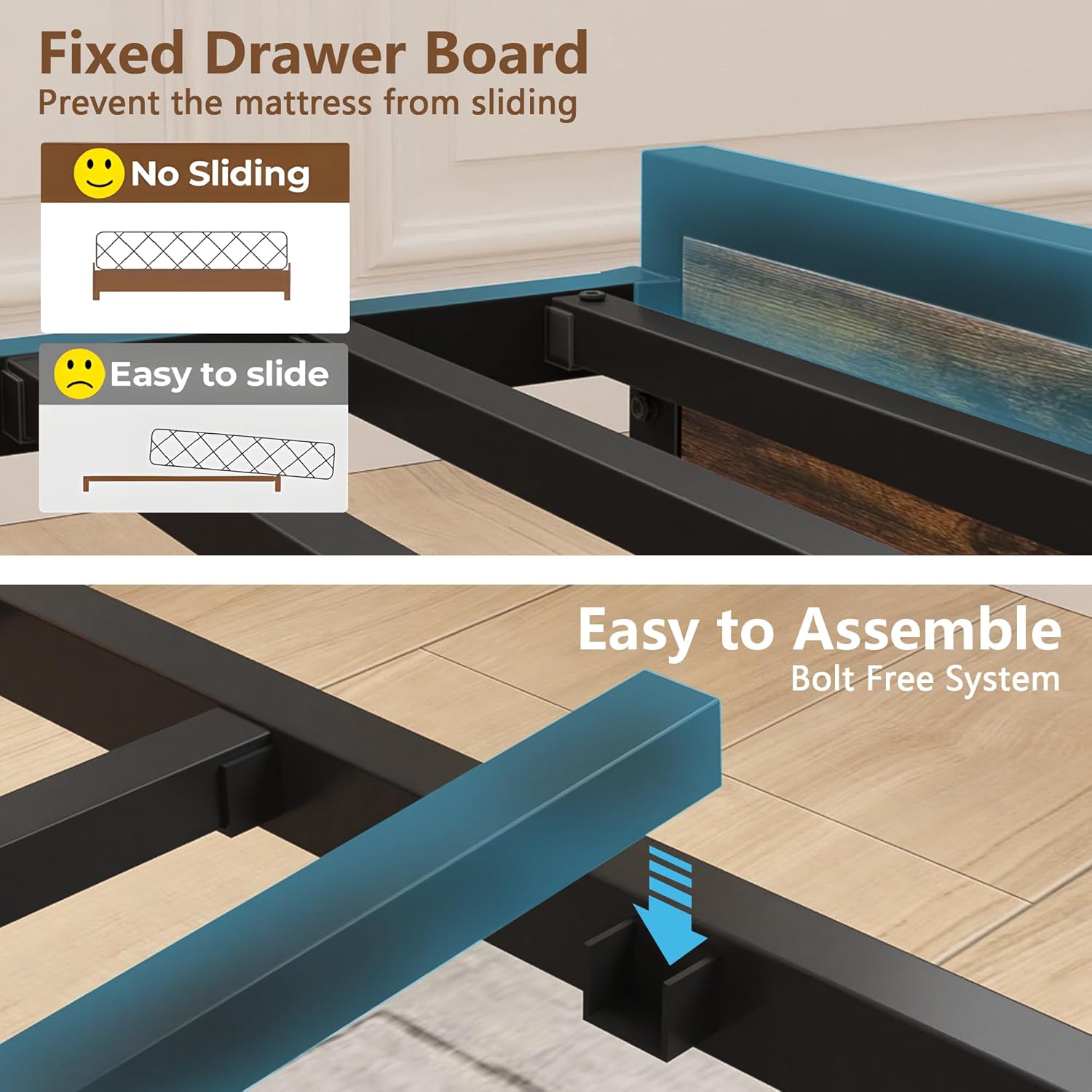
This bed frame features an easy-to-assemble, bolt-free system. It is recommended to assemble the bed frame with at least two people.
3.1 Included Components
Verify that all components listed below are present before starting assembly:
- 1 x VECELO Full Size Bed Frame (all frame parts, slats, headboard components)
- 1 x Instruction Manual
- 1 x Hardware Pack (screws, bolts, Allen wrench, etc.)
3.2 Assembly Steps
- Unpack and Identify Parts: Carefully unpack all components and lay them out on a clean, soft surface (e.g., a rug or blanket) to prevent scratches. Refer to the parts list in the separate assembly guide to identify each piece.
- Assemble Side Rails: Connect the side rails to the headboard and footboard using the provided hardware. Ensure all connections are secure but do not fully tighten screws until the entire frame is assembled.
- Install Center Support: Attach the center support beam(s) and legs to the frame. These are crucial for mattress support and overall stability.
- Place Slats: Position the metal slats across the frame. This model features a bolt-free system for easy slat installation. Ensure the fixed drawer board (anti-slide feature) is correctly oriented to prevent mattress movement.
- Assemble Headboard Storage: Attach the 2-tier storage shelves to the headboard. Integrate the charging station unit into its designated slot.
- Connect LED Lights: Install the RGB LED light strip along the designated area of the headboard. Connect it to the power source as per the separate LED light instructions.
- Final Tightening: Once all components are in place and aligned, fully tighten all screws and fasteners. Do not overtighten.

4. Operating Instructions
4.1 Charging Station
The integrated charging station provides convenient power access for your electronic devices.
- Power Connection: Ensure the bed frame's power cord is securely plugged into a functional wall outlet.
- USB Ports: Use the 2 USB ports (5V/2A) to charge smartphones, tablets, and other USB-powered devices.
- Type-C Port: Use the 1 Type-C port to charge compatible devices.
- AC Outlets: The two 125V/2A AC outlets can power small appliances or chargers.

4.2 RGB LED Lights
The RGB LED light strip offers customizable lighting to enhance your bedroom ambiance.
- Power On/Off: Use the included remote control or the mobile app to turn the LED lights on or off.
- Color Selection: Choose from a wide range of colors to match your mood or decor.
- Brightness Adjustment: Adjust the light intensity to your preference.
- Modes and Functions: Explore various lighting modes (e.g., static, dynamic, music sync) and timing functions through the remote or app.
- App Control: For app control, ensure Bluetooth is enabled on your mobile device and follow the instructions provided with the LED light kit to pair your device.
5. Maintenance
Proper maintenance ensures the longevity and continued performance of your VECELO bed frame.
- Cleaning: For the upholstered headboard, gently wipe with a damp cloth and mild soap if necessary. For metal and wood surfaces, use a soft, dry cloth. Avoid harsh chemicals or abrasive cleaners.
- Fastener Check: Periodically (e.g., every 3-6 months) inspect all screws, bolts, and connections. Re-tighten any loose fasteners to maintain structural integrity and prevent noise.
- Weight Distribution: Ensure weight is evenly distributed on the bed frame to prevent stress on specific areas.
- Electrical Components: Keep the charging station and LED light connections dry and free from dust. Do not attempt to repair electrical components yourself; contact qualified personnel if issues arise.
6. Troubleshooting
This section addresses common issues you might encounter with your bed frame.
6.1 Noise or Squeaking
- Loose Fasteners: Check all bolts and screws, especially at connection points, and tighten them securely.
- Uneven Surface: Ensure the bed frame is placed on a flat, level surface. Adjust leg levelers if present.
- Slat Movement: Verify that all metal slats are properly seated and secured.
6.2 LED Lights Not Working
- Power Connection: Check if the LED light strip is properly connected to its power source and if the power source is plugged into a working outlet.
- Remote Battery: Replace the battery in the remote control if it's not responding.
- App Connection: For app control, ensure Bluetooth is enabled on your device and the app is correctly paired with the LED lights.
6.3 Charging Station Not Functioning
- Power Supply: Confirm the bed frame's main power cord is plugged into a live electrical outlet.
- Device Compatibility: Ensure your device is compatible with the USB or Type-C port specifications (5V/2A).
- Cable Integrity: Try a different charging cable to rule out a faulty cable.
- Overload Protection: If multiple high-power devices are connected, the charging station might temporarily shut down due to overload protection. Disconnect some devices and try again.
7. Specifications
| Feature | Specification |
|---|---|
| Model Number | KHD-BS-F11-BRN |
| Size | Full |
| Product Dimensions (L x W x H) | 85.28" x 54.33" x 39.37" |
| Material | Metal, Wood, PU Leather (Headboard) |
| Color | Black |
| Maximum Weight Capacity | 750 lbs |
| Under-bed Clearance | 9.8 inches |
| Recommended Mattress Thickness | 6"-12" (No Box Spring Needed) |
| Charging Station Output | 2 x 125V/2A AC Outlets, 1 x 5V/2A USB Port, 1 x Type-C Port |
| Special Features | Charging Station, LED Lighting, Storage Headboard |
8. Warranty and Support
For warranty information, technical support, or assistance with parts, please contact VECELO customer service. Keep your purchase receipt and model number handy for faster service.
- Customer Service: Refer to your purchase documentation or the VECELO official website for contact details.
- Online Resources: Visit the VECELO brand store on Amazon for additional product information and FAQs: VECELO Store


