
Introduction
This manual provides detailed instructions for the installation, operation, and maintenance of your SIEDiNLAR Solar Barn Light. Designed for outdoor use, this light features solar power, motion sensing capabilities, and adjustable lighting modes to enhance your outdoor spaces.
The SIEDiNLAR Solar Barn Light is constructed from durable aluminum, ensuring resistance to rust and corrosion. It is waterproof (IP44 rated) and designed to withstand various weather conditions, from sun to rain and blizzards. The light includes three high-efficiency amorphous silicon solar panels for optimal charging.
Package Contents
Please verify that all components are present before beginning installation:
- Solar Barn Light Fixture (with integrated solar panels and motion sensor)
- Edison-style LED Bulb(s)
- Gooseneck Arm(s)
- Wall Base(s)
- Mounting Hardware (screws, nuts, anchors)
- Remote Control
- Instruction Manual

Image: The SIEDiNLAR Solar Barn Light. All listed components are included in the package.
Installation Guide
For optimal performance, select an installation location that receives direct sunlight for at least 6-8 hours daily to ensure the solar panels can fully charge the battery.
- Prepare the Mounting Bracket: Attach the threaded bolts and nuts to the wall bracket.
- Mount the Bracket: Drill holes at the chosen location and insert the provided anchors. Secure the wall bracket to the wall using screws.
- Assemble Gooseneck Arm: Secure the gooseneck arm to the wall base using the large nut provided.
- Attach Wall Base and Gooseneck: Connect the assembled wall base and gooseneck to the mounted bracket.
- Insert Solar Light into Gooseneck: Carefully insert the solar light fixture into the end of the gooseneck arm. Ensure the motion sensor is facing outwards for proper detection.
- Secure the Light Fixture: Use the black bolts and nuts to firmly secure the light fixture to the gooseneck arm.
- Install Bulb and Cover: Rotate the Edison-style LED bulb into the socket and attach the transparent cover.
- Activate for First Use: Press the "ON/OFF" switch located on the lamp body to activate the light for the first time. This step is necessary to enable remote control functionality.
Video: Step-by-step installation guide for the SIEDiNLAR Solar Barn Light.

Image: Product dimensions for installation planning.
Operating Your Solar Barn Light
Your SIEDiNLAR Solar Barn Light is equipped with a remote control for convenient operation and multiple lighting modes. Ensure the ON/OFF switch on the lamp body has been pressed once to enable remote control functionality.
Remote Control Functions:
- ON/OFF: Turns the light on or off.
- Warm Light (3000K): Selects warm white illumination.
- White Light (6000K): Selects cool white illumination.
- Mode 1 (Blue Indicator): Constant ON at nighttime. The light will always be on at 50% brightness without motion induction.
- Mode 2 (Red Indicator): Dim to Bright with motion at night. The light stays on at 30% brightness and brightens to 100% for 25 seconds when motion is detected. It returns to 30% dim light after no further motion.
- Mode 3 (Green Indicator): Off to Bright with motion at night. The light remains off and automatically turns on to 100% brightness for 25 seconds when people or other living objects are detected within the sensing area (16-22 feet range, 120-degree angle). It turns off if no further movement is detected.

Image: Remote control for selecting lighting modes and color temperatures.
Video: Demonstration of remote control functions and lighting modes.
Lighting Modes and Color Temperatures
The SIEDiNLAR Solar Barn Light offers versatile lighting options to suit various needs and preferences:
- Color Temperatures:
- Warm White (3000K): Provides a cozy and inviting ambiance.
- Cool White (6000K): Offers brighter, more functional illumination.
- Motion Sensor Modes:
- Mode 1 (Constant ON): Ideal for continuous ambient lighting throughout the night.
- Mode 2 (Dim to Bright): Energy-saving mode that provides low-level lighting and brightens upon motion detection.
- Mode 3 (Off to Bright): Maximizes energy savings by remaining off until motion is detected, then providing full brightness.
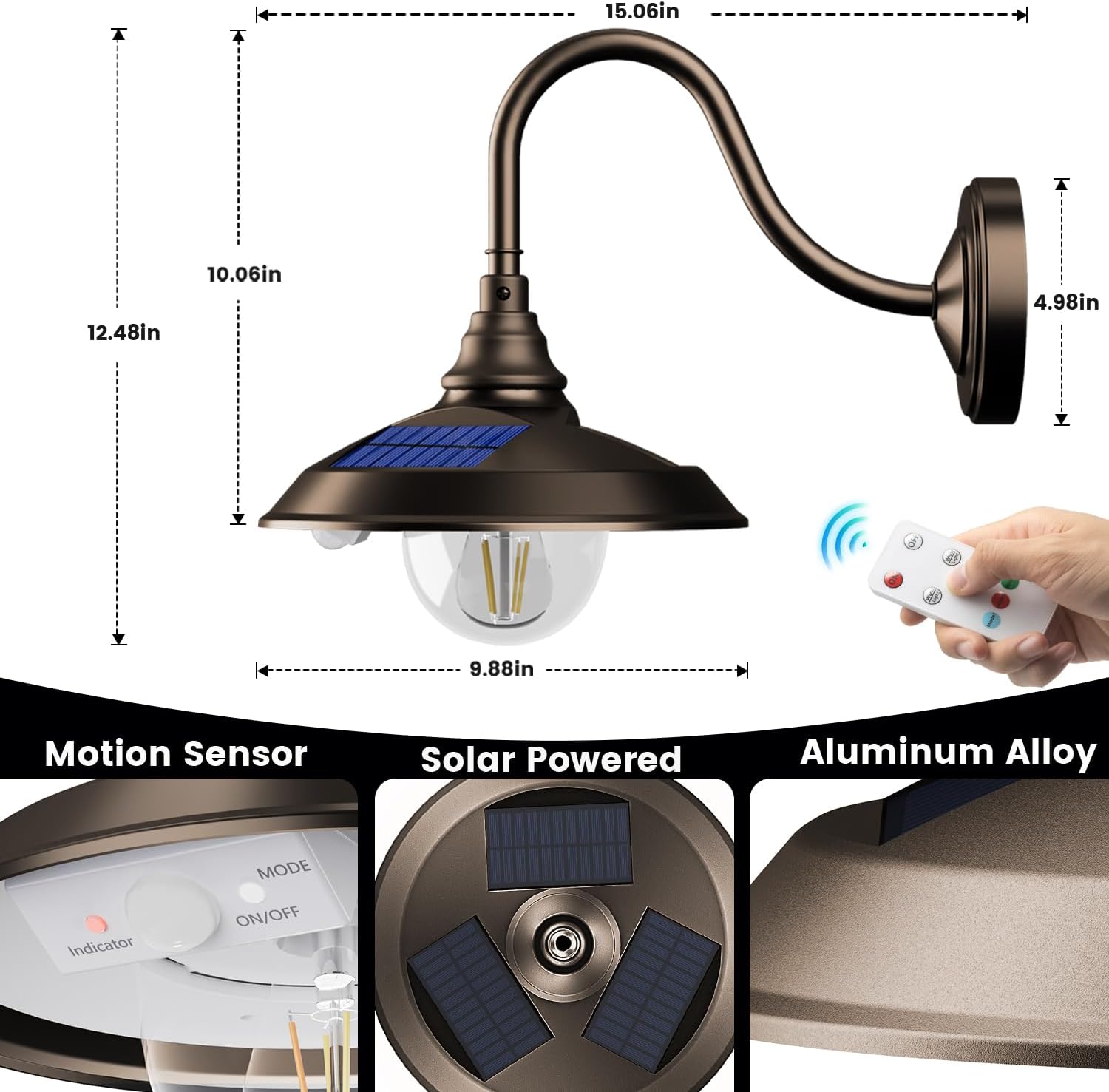
Image: Visual comparison of warm white and cool white light settings.

Image: Explanation of the three motion sensor modes with visual examples.
Maintenance
To ensure the longevity and optimal performance of your SIEDiNLAR Solar Barn Light, follow these maintenance guidelines:
- Clean Solar Panels: Regularly wipe the solar panels with a soft, damp cloth to remove dust, dirt, and debris. This ensures maximum sunlight absorption and charging efficiency.
- Inspect for Obstructions: Periodically check that no leaves, branches, or other objects are obstructing the solar panels or the motion sensor.
- Battery Care: The integrated battery is designed for long-term use. If the light's performance diminishes over time, ensure it is receiving adequate direct sunlight for charging.
- General Cleaning: Clean the light fixture and bulb cover with a mild soap solution and a soft cloth. Avoid abrasive cleaners that could damage the finish or transparent cover.
Troubleshooting
| Problem | Possible Cause | Solution |
|---|---|---|
| Light does not turn on at night. | Insufficient sunlight for charging. Battery not fully charged. ON/OFF switch not activated. | Ensure solar panels receive 6-8 hours of direct sunlight daily. Clean solar panels. Press the ON/OFF switch on the lamp body. |
| Light is dim or runs for a short duration. | Inadequate charging due to cloudy weather or obstruction. Battery degradation over time. | Relocate the light to a sunnier spot. Clean solar panels. Allow several sunny days for full charge. |
| Motion sensor not working or too sensitive/insensitive. | Sensor obstructed. Incorrect mode selected. Environmental factors (e.g., strong winds, small animals). | Clear any obstructions from the sensor. Use the remote control to cycle through modes and adjust sensitivity if available (check remote instructions). |
| Remote control not responding. | Battery in remote is dead. ON/OFF switch on lamp body not activated. Remote out of range. | Replace remote battery. Ensure lamp body switch is ON. Operate remote within 33 feet of the light. |
Product Specifications
- Brand: SIEDiNLAR
- Model Number: SD035Z-1PK
- Color: Dark Bronze
- Material: Aluminum
- Style: Retro
- Power Source: Solar Powered
- Light Source: LED (Edison-style bulbs)
- Color Temperature: Warm White (3000K), Cool White (6000K)
- Brightness: 100 Lumens (maximum)
- Motion Sensor Range: 16-22 feet
- Motion Sensor Angle: 120 degrees
- Control Method: Remote Control, Push Button
- Water Resistance Level: Waterproof (IP44)
- Item Dimensions (L x W x H): 15.06" x 9.88" x 12.48"
- Included Components: Bulb, Mounting Hardware, Remote Control
Warranty and Support
For any questions, concerns, or assistance with your SIEDiNLAR Solar Barn Light, please contact our customer support team. Refer to the contact information provided in your product packaging or visit the official SIEDiNLAR website for further details.
This product is designed for durability and performance. Please retain your purchase receipt for warranty claims.