
Introduction
This manual provides instructions for the VILTROX AF 85mm F1.4 Pro FE lens, designed for Sony E-Mount cameras. It covers essential information for proper setup, operation, maintenance, and troubleshooting to ensure optimal performance.
What's in the Box
Verify that all the following items are included in your package:
- VILTROX AF 85mm F1.4 Pro FE Lens
- Lens Hood
- Front Lens Cap
- Rear Lens Cap
- Lens Pouch
- Warranty Card
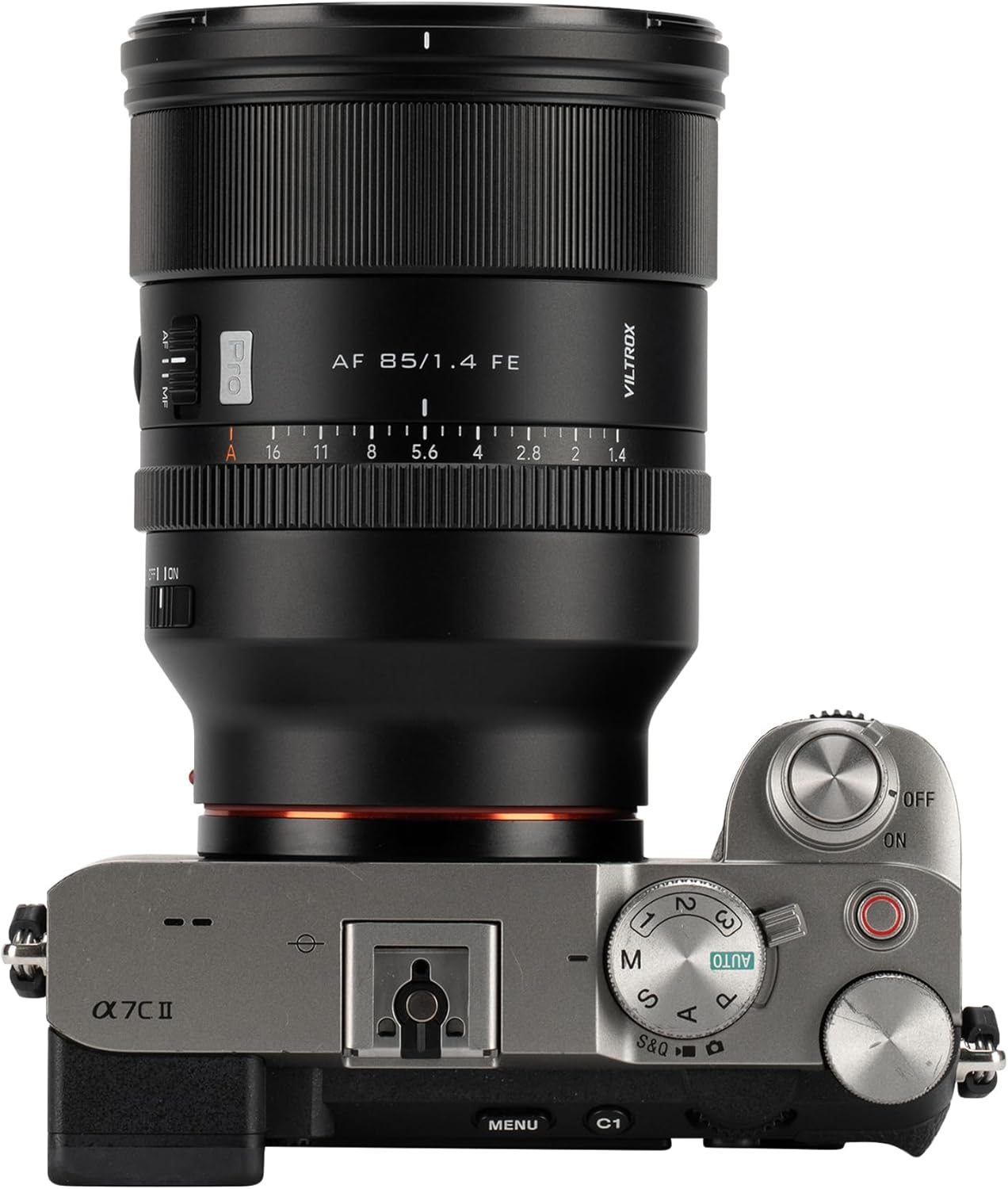
Key Features
- Exceptional Optical Design: Features an advanced 11-group, 15-element optical structure, including 3 ED, 1 ASPH, and 9 HR elements, ensuring extreme sharpness and minimal aberrations.
- MTF Performance: Delivers excellent center-to-edge sharpness and contrast, suitable for capturing high-level detail and clarity across the frame.
- Wide F/1.4 Aperture: Enables superior light-gathering ability for excellent low-light performance and precise depth of field control, producing smooth, dreamy bokeh.
- Quiet and Fast Autofocus (HyperVCM): Optimized for real-time subject tracking, even with moving subjects, ensuring sharp focus for both photography and videography.
- Durable Build and Reliability: Constructed with a metal alloy lens barrel, weather-resistant seals, and High-definition Nano Multi-layer Coating to withstand challenging outdoor shooting conditions.


Setup
- Attaching the Lens: Align the red dot on the lens barrel with the red dot on your Sony E-Mount camera's lens mount. Gently rotate the lens clockwise until it clicks securely into place.
- Removing the Lens: While holding down the lens release button on your camera body, rotate the lens counter-clockwise until it stops, then carefully remove it.
- Attaching the Lens Hood: Align the lens hood with the front of the lens and twist clockwise until it locks into position. This helps reduce flare and provides protection.

Operating the Lens
- Autofocus (AF) / Manual Focus (MF) Switch: Located on the side of the lens, this switch allows you to select between autofocus and manual focus modes. Ensure your camera is also set to the corresponding focus mode.
- Aperture Ring: The lens features an aperture ring for direct control over the aperture. The "CLICK OFF | ON" switch allows you to enable or disable click stops for smooth, silent aperture adjustments during video recording or for tactile feedback during photography.
- Firmware Updates: The lens is equipped with a USB-C port for firmware updates. Connect the lens to a computer using a USB-C cable and follow the instructions provided on the official VILTROX website to ensure your lens has the latest performance enhancements and compatibility.

Video: Demonstrates the VILTROX 85mm f1.4 Pro FE lens in action, highlighting its full-frame auto focus capabilities for Sony E-mount cameras.
Video: Showcases the dreamy aperture blur (bokeh) produced by the AF 85mm F1.4 Pro FE lens.
Video: Illustrates the AF 85mm F1.4 Pro lens paired with a DC-A1 stabilizer, demonstrating its use in a video production setup.
Maintenance
- Cleaning Lens Elements: Use a soft, lint-free microfiber cloth specifically designed for optics to gently wipe dust and smudges from the front and rear lens elements. For more persistent marks, apply a small amount of specialized lens cleaning solution to the cloth, not directly to the lens, and wipe in a circular motion. Avoid touching the glass with bare hands.
- Cleaning the Lens Body: Use a soft, dry cloth to wipe the exterior of the lens. Do not use harsh chemicals or solvents.
- Storage: When not in use, always attach both the front and rear lens caps to protect the glass elements. Store the lens in a dry, dust-free environment, ideally in the provided lens pouch, away from direct sunlight and extreme temperatures or humidity.

Troubleshooting
- Autofocus Not Working or Inconsistent: Ensure the AF/MF switch on the lens is set to 'AF' and your camera's focus mode is also set to autofocus. Check that the lens is securely mounted to the camera body. If issues persist, check the VILTROX website for available firmware updates for your lens model.
- Poor Image Quality: Verify that the lens elements are clean and free from dust or smudges. Ensure your camera settings (ISO, shutter speed, aperture) are appropriate for the lighting conditions and desired effect.
- Lens Not Recognized by Camera: Confirm the lens is correctly and firmly attached to the camera mount. Inspect the electronic contacts on both the lens and camera for any dirt or obstruction and clean them gently with a dry, lint-free cloth. Ensure both lens and camera firmware are up to date.
Specifications
| Brand | VILTROX |
| Model Number | AF 85mm F1.4 Pro FE |
| Focal Length | 85 Millimeter Fixed Focal Length |
| Maximum Aperture | f/1.4 |
| Lens Type | Standard |
| Compatible Mountings | Sony FE |
| Optical Structure | 11 groups, 15 elements (3 ED, 1 ASPH, 9 HR) |
| Autofocus Motor | HyperVCM |
| Product Dimensions | 4.27 x 3.33 x 3.33 inches |
| Item Weight | 1.76 pounds |
| ASIN | B0F8QLT3L9 |
Warranty and Support
This VILTROX lens comes with a manufacturer's warranty. For specific warranty details, technical support, or service inquiries, please refer to the warranty card included in your product packaging or visit the official VILTROX website for the most up-to-date information and contact options.


