
Introduction
Thank you for choosing the Redkey W15 Cleaning Brush Accessory. This manual provides essential information for the proper setup, operation, and maintenance of your new accessory. Please read these instructions carefully before use to ensure optimal performance and longevity of the product. Keep this manual for future reference.
Product Overview
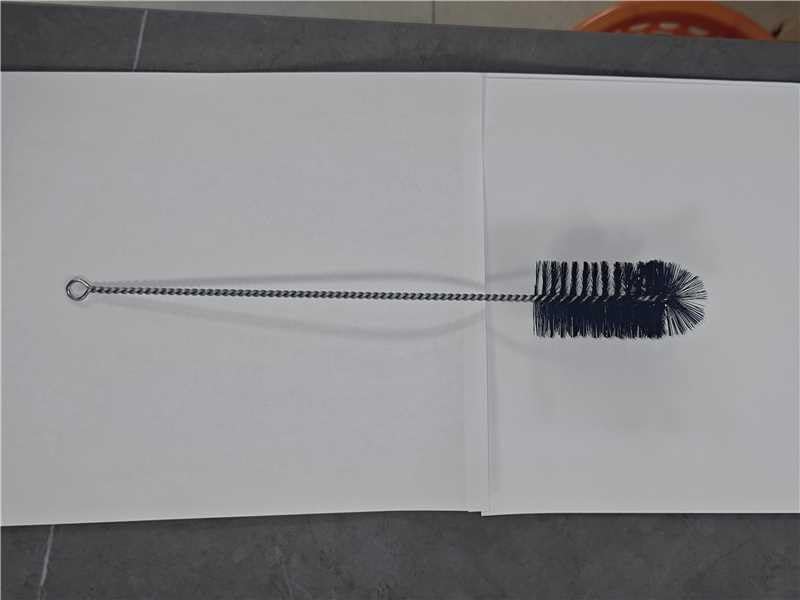
Image 1: Redkey W15 Cleaning Brush Accessory. This image displays the brush head, which is designed for effective cleaning with the Redkey W15 vacuum cleaner.
The Redkey W15 Cleaning Brush Accessory is designed to enhance the cleaning capabilities of your Redkey W15 wet and dry vacuum cleaner. It is a replacement or additional brush head that ensures thorough cleaning of various floor surfaces.
Setup
- Unpacking: Carefully remove the cleaning brush accessory from its packaging. Inspect for any damage during transit.
- Compatibility Check: Ensure this accessory is compatible with your Redkey W15 vacuum cleaner model.
- Installation:
- Turn off and unplug your Redkey W15 vacuum cleaner before installing or replacing any accessories.
- Locate the brush roller compartment on the main unit.
- If replacing an old brush, remove it according to your Redkey W15 vacuum's main manual.
- Align the new Redkey W15 Cleaning Brush Accessory with the designated slots in the compartment.
- Gently push until it clicks securely into place. Ensure it is firmly seated to prevent dislodging during operation.
Operating Instructions
Once the cleaning brush accessory is correctly installed, you can operate your Redkey W15 vacuum cleaner as usual. The brush will automatically engage with the cleaning functions of the main device.
- General Use: Use the Redkey W15 vacuum cleaner with this accessory for effective wet and dry cleaning on hard floors and low-pile carpets.
- Optimal Performance: For best results, ensure the water tanks of your Redkey W15 vacuum are filled correctly and the device is charged.
- Surface Considerations: While versatile, avoid using the brush on delicate surfaces that may be scratched or damaged by rotating bristles.
Maintenance
Regular maintenance of your cleaning brush accessory is crucial for maintaining cleaning performance and hygiene.
- After Each Use:
- Remove the brush accessory from the vacuum cleaner.
- Rinse the brush under running water to remove dirt, hair, and debris.
- Use a small brush or comb to dislodge any tangled hair or fibers from the bristles.
- Allow the brush to air dry completely before re-installing it or storing it. Do not expose to direct sunlight or high heat.
- Deep Cleaning (Monthly): For a more thorough clean, you may soak the brush in a mild detergent solution for a short period, then rinse thoroughly and air dry.
- Replacement: The cleaning brush is a consumable part. Its lifespan depends on usage frequency and cleaning conditions. Replace the brush when bristles show significant wear, become deformed, or cleaning performance noticeably declines.
Troubleshooting
If you encounter issues with your Redkey W15 Cleaning Brush Accessory, refer to the following common problems and solutions:
| Problem | Possible Cause | Solution |
|---|---|---|
| Brush not spinning or spinning slowly |
|
|
| Poor cleaning performance |
|
|
| Unpleasant odor from brush |
|
|
Specifications
- Brand: Redkey
- Model: W15-01 (Accessory)
- Part Number: 001
- Material: 1 piece (Brush unit)
- Item Weight: Approximately 30 g
- UPC: 765150876423
Warranty and Support
This cleaning brush accessory is typically covered under the warranty of the main Redkey W15 vacuum cleaner unit, or as a separate consumable item with specific terms. For detailed warranty information, please refer to the warranty card included with your original Redkey W15 vacuum cleaner or visit the official Redkey website.
If you require technical assistance, have questions about the product, or need to inquire about replacements, please contact Redkey customer support through their official channels. Contact information can usually be found on the Redkey website or in the main product manual.