
1. Product Overview
The ZWP GYKQ-78 is a direct replacement remote control designed for a range of Pioneer Diamante Air Conditioner models. This remote offers full functionality without the need for complex programming, providing a convenient solution for controlling your air conditioning unit.

Image 1.1: The ZWP GYKQ-78 replacement remote control, showcasing its ergonomic design and clear button layout.
Key Features:
- No Programming Required: Ready to use directly after battery installation.
- Durable Construction: Made from high-quality, wear-resistant ABS material for long-lasting use.
- Ergonomic Design: Comfortable to hold and operate.
- Wide Compatibility: Compatible with numerous Pioneer Diamante Air Conditioner models.
Compatible Air Conditioner Models:
- WYT020GLHI22M2
- WYT012GLFI19RL
- WYT009ALFI19RL
- WYT009GLFI19RL
- WYT012ALFI19RL
- WYT018GLFI19RL
- WYT024GLFI19RL
- WYT036GLFI19RL
- WYT009ALFI22RL
- WYT009GLFI22RL
- WYT024GLFI22RL
- WYT012GLFI22RL
- WYT012ALFI22RL
- WYT030GLHI22M3
2. Setup and Battery Installation
The ZWP GYKQ-78 remote control requires two AAA batteries (not included) for operation. No programming or pairing is necessary; simply install the batteries, and the remote is ready for use.
- Open the Battery Compartment: Locate the battery cover on the back of the remote control. Slide the cover downwards or press the latch and lift to open.
- Insert Batteries: Insert two new AAA batteries into the compartment, ensuring the positive (+) and negative (-) terminals align correctly with the markings inside the compartment.
- Close the Battery Compartment: Replace the battery cover by sliding it back into position until it clicks securely.

Image 2.1: Illustration showing the battery compartment and the requirement for two AAA batteries (not included).
Important: Ensure correct battery polarity. Remove batteries if the remote will not be used for an extended period to prevent leakage.
3. Operating Instructions
This section details the functions of the buttons on your ZWP GYKQ-78 remote control. The remote features an LED luminous display for clear visibility, even in low light conditions.

Image 3.1: The remote control's LED luminous display, which ensures buttons and screen are clearly visible without needing external light.
3.1 Button Functions
| Button | Function |
|---|---|
| POWER () | Turns the air conditioner ON or OFF. |
| MODE | Cycles through operating modes: Cool, Heat, Dry, Fan, Auto, Sleep, ECO. |
| TEMP () | Adjusts the desired temperature setting. |
| TURBO | Activates or deactivates the Turbo function for rapid cooling or heating. |
| FAN | Adjusts the fan speed (Low, Medium, High, Auto). |
| SWING | Controls the vertical louver swing function. |
| MUTE | Mutes or unmutes the air conditioner's operational sounds. |
| ECO | Activates or deactivates the energy-saving ECO mode. |
| TIMER | Sets the ON/OFF timer for the air conditioner. |
| SLEEP | Activates or deactivates the Sleep mode for comfortable nighttime operation. |
| I FEEL | Activates the "I Feel" function, which senses the temperature at the remote's location. |
| DISPLAY | Turns the air conditioner's display ON or OFF. |
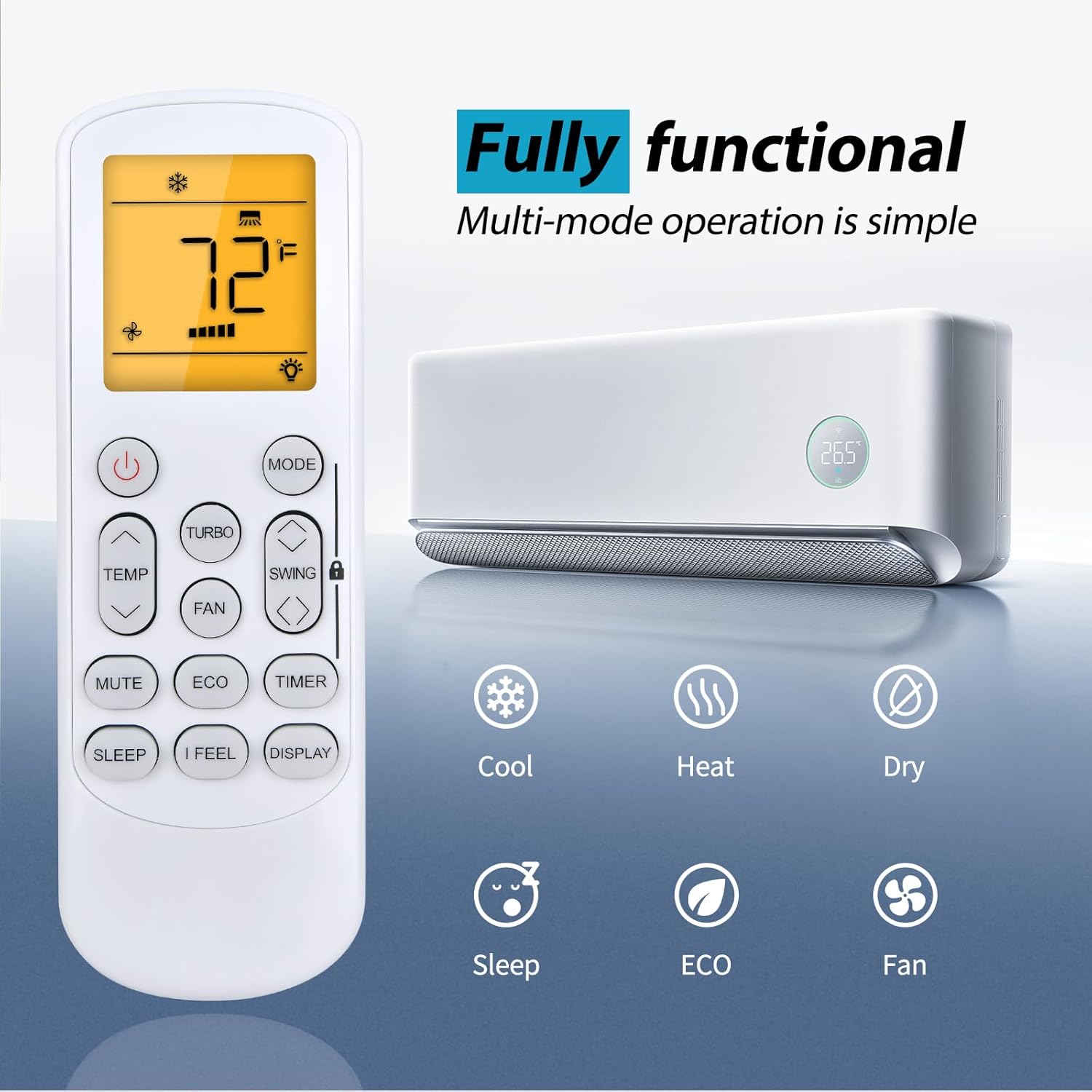
Image 3.2: The remote control displaying various functional modes such as Cool, Heat, Dry, Sleep, ECO, and Fan.
3.2 Remote Control Range
The ZWP GYKQ-78 remote control is designed for sensitive and precise control from a distance. It operates effectively up to 40 feet (approximately 12 meters) with a 180-degree multi-angle range, allowing flexible control within your room.

Image 3.3: Illustration demonstrating the remote control's effective operating range of up to 40 feet and 180-degree angle.
4. Maintenance
To ensure the longevity and optimal performance of your ZWP GYKQ-78 remote control, follow these maintenance guidelines:
- Cleaning: Wipe the remote control with a soft, dry cloth. Do not use liquid cleaners, abrasive materials, or chemical solvents, as these can damage the surface or internal components.
- Battery Replacement: Replace batteries promptly when the remote's performance degrades or the display becomes dim. Always replace both batteries at the same time with new ones of the same type (AAA).
- Storage: If the remote control will not be used for an extended period (e.g., more than one month), remove the batteries to prevent potential leakage and damage to the remote. Store the remote in a cool, dry place away from direct sunlight and extreme temperatures.
- Avoid Drops and Impacts: Protect the remote from physical shocks, as internal components can be sensitive to damage from drops.
5. Troubleshooting
If you encounter issues with your ZWP GYKQ-78 remote control, refer to the following common troubleshooting steps:
- Remote Not Responding:
- Check if the batteries are inserted correctly with the correct polarity (+/-).
- Replace old batteries with new AAA batteries.
- Ensure there are no obstructions between the remote control and the air conditioner's receiver.
- Confirm you are within the effective operating range (up to 40 feet).
- Display is Dim or Blank:
- This usually indicates low battery power. Replace the batteries.
- Air Conditioner Not Responding to Specific Functions:
- Ensure the remote is pointed directly at the air conditioner.
- Some functions may be specific to certain air conditioner models or operating modes. Refer to your air conditioner's manual for specific feature compatibility.
5.1 Advanced Reset Functions (Refer to original AC manual for full details)
The back of the remote control may contain small text indicating advanced reset or pairing functions. These are typically for specific air conditioner models or diagnostic purposes. For the GYKQ-78, the following combinations are noted:
- Pressing "FAN" and "MUTE" together for over 3 seconds.
- Pressing "SWING" and "SWING" together for over 3 seconds.
- Pressing "SLEEP" and "DISPLAY" together for over 3 seconds.
Note: These combinations are for reference. Consult your specific Pioneer Diamante Air Conditioner user manual for detailed instructions on their use and potential effects.

Image 5.1: Rear view of the remote control, showing product dimensions and small text detailing advanced button combinations for specific functions or resets.
6. Specifications
| Feature | Detail |
|---|---|
| Model Number | GYKQ-78 |
| Brand | ZWP |
| Compatible Devices | Pioneer Diamante Air Conditioners (various models) |
| Power Source | 2 x AAA Batteries (not included) |
| Color | Black |
| Special Feature | Ergonomic design |
| Max Number of Supported Devices | 1 |
| Item Weight | 2.24 ounces (approx. 63.5 grams) |
| Package Dimensions | 6.8 x 2.2 x 1.1 inches (approx. 17.3 x 5.6 x 2.8 cm) |
7. Warranty and Support
For any questions or concerns regarding your ZWP GYKQ-78 replacement remote control, please contact the seller directly. While specific warranty details are not provided in this manual, the manufacturer aims to ensure customer satisfaction.
If you experience any issues, please reach out to the seller before leaving feedback. They are committed to assisting you with resolution.