
Introduction
Thank you for choosing the KOFIRE XG2 Wireless Gaming Headset. This headset is designed to provide a superior audio experience across multiple platforms, including Xbox Series X|S|One, PC, PS5, PS4, Mac, and Nintendo Switch. Featuring 2.4GHz wireless, Bluetooth 5.4, and 3.5mm wired connectivity, 40MM dynamic drivers, a retractable noise-canceling microphone, and up to 40 hours of battery life, the XG2 ensures immersive gaming and clear communication. Please read this manual carefully to ensure proper use and maintenance of your headset.
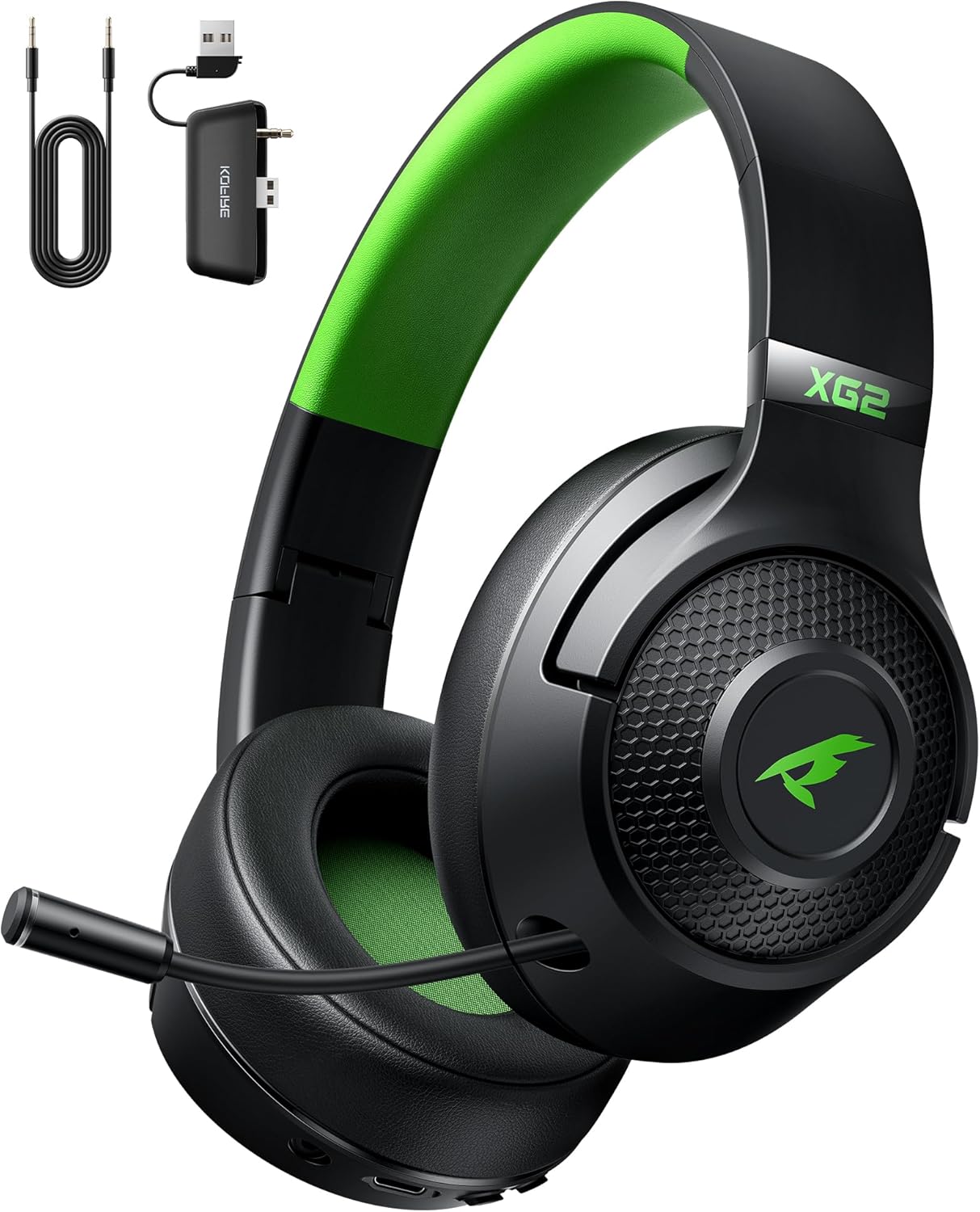
Image: The KOFIRE XG2 Wireless Gaming Headset in black and green, shown with its detachable microphone, 3.5mm audio cable, and 2.4GHz USB dongle.
Safety Information
- Avoid prolonged listening at high volume levels to prevent hearing damage.
- Do not expose the headset to extreme temperatures, humidity, or liquids.
- Keep the headset away from strong magnetic fields.
- Do not attempt to disassemble or modify the headset. This will void the warranty.
- Dispose of batteries and electronic components responsibly according to local regulations.
Package Contents
Ensure all items are present in your package:
- KOFIRE XG2 Wireless Gaming Headset
- 2.4GHz USB Dongle
- USB Charging Cable
- 3.5mm Audio Cable
- User Manual (this document)
Product Overview
Familiarize yourself with the various components and controls of your KOFIRE XG2 headset.
Headset Controls and Features:
- Power Button: Press and hold to power on/off.
- Volume Wheel: Adjusts headset volume.
- Microphone Mute Button: Toggles microphone mute on/off. Long press for 3 seconds to switch between 2.4GHz and Bluetooth modes.
- Retractable Microphone: Pull out to use, push in to store.
- USB-C Charging Port: For charging the headset.
- 3.5mm Audio Jack: For wired connection.
- LED Indicator: Displays power, charging, and connection status.
- Adjustable Headband: For a comfortable fit.
- Rotatable Ear Cups: For storage and portability.

Image: A detailed view of the headset's retractable microphone, highlighting its omni-directional pickup pattern and the mechanism for extending and retracting it.
Setup
1. Charging the Headset
Before first use, fully charge the headset. Connect the USB charging cable to the headset's USB-C port and the other end to a USB power source (e.g., computer USB port, USB wall adapter). The LED indicator will show charging status and turn off when fully charged. A full charge takes approximately 2 hours.

Image: An illustration of the headset's internal battery, emphasizing its 1000mAh capacity and highlighting the 40-hour battery life in Bluetooth mode and 35 hours in 2.4GHz dongle mode.
2. Connecting via 2.4GHz Wireless (Xbox Series X|S|One)
The 2.4GHz wireless mode is specifically designed for official Xbox controllers.
- Ensure your Xbox controller is powered on.
- Firmly insert the 2.4GHz USB dongle into the USB port at the bottom of your official Xbox controller until you hear a click and there is no gap.
- Power on your KOFIRE XG2 headset by pressing and holding the Power button.
- The headset will automatically pair with the dongle. The LED indicator will show a stable light once connected.
NOTE: The XBOX wireless mode is only applicable to the official XBOX controller.

Image: A visual guide demonstrating how to correctly insert the 2.4GHz dongle into an official Xbox controller for ultra-low latency connection.

Image: The KOFIRE XG2 headset positioned alongside an Xbox Series X console and controller, emphasizing its design for Xbox Series and its low latency performance.
3. Connecting via 2.4GHz Wireless (PC, PS5, PS4, Nintendo Switch)
For PC, PS5, PS4, and Nintendo Switch, the 2.4GHz dongle connects directly to the console/PC.
- Take the USB-A port out of the back of the 2.4GHz transmitter (dongle).
- Insert the USB-A port of the dongle into an available USB port on your PC, PS5, PS4, or Nintendo Switch dock.
- Power on your KOFIRE XG2 headset.
- Long-press the Microphone Mute button on the headset for 3 seconds to switch to "Dongle Mode" (if not already in it).
- The headset will automatically pair with the transmitter. The LED indicator on the headset will show a stable light once connected.
4. Connecting via Bluetooth 5.4 (Mobile Devices, Mac, Switch)
Use Bluetooth for connecting to mobile phones, tablets, Mac, and Nintendo Switch (in handheld mode).
- Power on your KOFIRE XG2 headset.
- Long-press the Microphone Mute button on the headset for 3 seconds to switch to "Bluetooth Mode". The LED indicator will flash rapidly, indicating pairing mode.
- On your device (phone, tablet, Mac, Switch), go to Bluetooth settings and search for "KOFIRE XG2".
- Select "KOFIRE XG2" to connect. The LED indicator on the headset will show a stable light once connected.
5. Connecting via 3.5mm Wired Mode
The headset can be used in wired mode even if the battery is depleted.
- Connect one end of the included 3.5mm audio cable to the 3.5mm audio jack on the headset.
- Connect the other end of the 3.5mm audio cable to the audio output port of your device (e.g., controller, PC, console).
- Note: In wired mode, the headset's power and wireless functions are bypassed. Microphone functionality may vary depending on the device's 3.5mm port capabilities.

Image: A comprehensive diagram illustrating the KOFIRE XG2 headset's compatibility with various platforms (Xbox, PC, PS5, Switch, mobile devices) across its 2.4GHz dongle and Bluetooth connection modes.
Operating Instructions
Power On/Off
- Power On: Press and hold the Power button for approximately 3 seconds until the LED indicator lights up.
- Power Off: Press and hold the Power button for approximately 3 seconds until the LED indicator turns off.
Volume Control
- Rotate the Volume Wheel up to increase volume.
- Rotate the Volume Wheel down to decrease volume.
Microphone Mute/Unmute
- Press the Microphone Mute Button once to mute the microphone. The LED indicator may change color or flash to indicate mute status.
- Press the Microphone Mute Button again to unmute the microphone.
Switching Wireless Modes
- To switch between 2.4GHz Dongle Mode and Bluetooth Mode, long-press the Microphone Mute Button for 3 seconds. The headset will announce the mode change or the LED indicator will change its pattern.
Retractable Microphone Usage
- To use the microphone, gently pull it out from the left ear cup until it extends fully.
- To store the microphone, gently push it back into the left ear cup until it is fully retracted.

Image: A user wearing the KOFIRE XG2 headset, visually representing the immersive 3D stereo sound experience provided by the 40MM dynamic drivers.
Maintenance
- Clean the headset regularly with a soft, dry cloth.
- Do not use abrasive cleaners or solvents.
- Store the headset in a cool, dry place when not in use.
- Avoid bending or twisting cables excessively.
Troubleshooting
| Problem | Possible Cause | Solution |
|---|---|---|
| Headset does not power on. | Low battery. | Charge the headset fully. |
| No sound in wireless mode. | Not paired; incorrect mode; volume too low. | Ensure headset is paired and in the correct mode (2.4GHz or Bluetooth). Check device volume and headset volume wheel. |
| Microphone not working. | Microphone muted; not fully extended; incorrect input device selected. | Press the Microphone Mute button to unmute. Ensure microphone is fully extended. Check audio settings on your device to ensure the headset microphone is selected as the input device. |
| Poor audio quality/disconnections. | Interference; out of range; low battery. | Move closer to the dongle/device. Avoid strong Wi-Fi signals or other 2.4GHz devices. Charge the headset. |
| 2.4GHz dongle not connecting to Xbox controller. | Dongle not firmly inserted; not an official Xbox controller. | Ensure the dongle is firmly inserted into the official Xbox controller until it clicks. This mode only supports official Xbox controllers. |
Specifications
| Feature | Detail |
|---|---|
| Model Name | XG2 |
| Connectivity Technology | 2.4GHz Wireless, Bluetooth 5.4, 3.5mm Wired |
| Driver Size | 40mm Dynamic Drivers |
| Impedance | 35 Ohm |
| Noise Control | Environmental Noise Cancellation (ENC) for Mic |
| Microphone Type | Retractable, Omnidirectional |
| Battery Life | Approx. 40 hours (Bluetooth mode, mic off), 30 hours (2.4GHz dongle mode) |
| Charging Time | Approx. 2 hours for full recharge |
| Weight | 9.5 ounces (approx. 269g) |
| Compatibility | Xbox Series X|S|One (official controller), PC, PS5, PS4, Mac, Nintendo Switch, Mobile Devices |
Warranty and Support
KOFIRE products come with a standard manufacturer's warranty. For specific warranty terms and conditions, please refer to the warranty card included with your product or visit the official KOFIRE website. If you encounter any issues or require technical assistance, please contact KOFIRE customer support through the following channels:
- Email: Refer to your product packaging or the KOFIRE official website for support email.
- Website: Visit the KOFIRE Store on Amazon
Please have your product model (XG2) and purchase information ready when contacting support.
