
Introduction
Thank you for choosing the Devoko Automatic Cat Litter Box. This intelligent, self-cleaning system is designed to provide a hygienic and convenient solution for cat owners. This manual provides essential information for the safe and efficient operation, setup, and maintenance of your device. Please read it thoroughly before use and retain it for future reference.
Safety Information
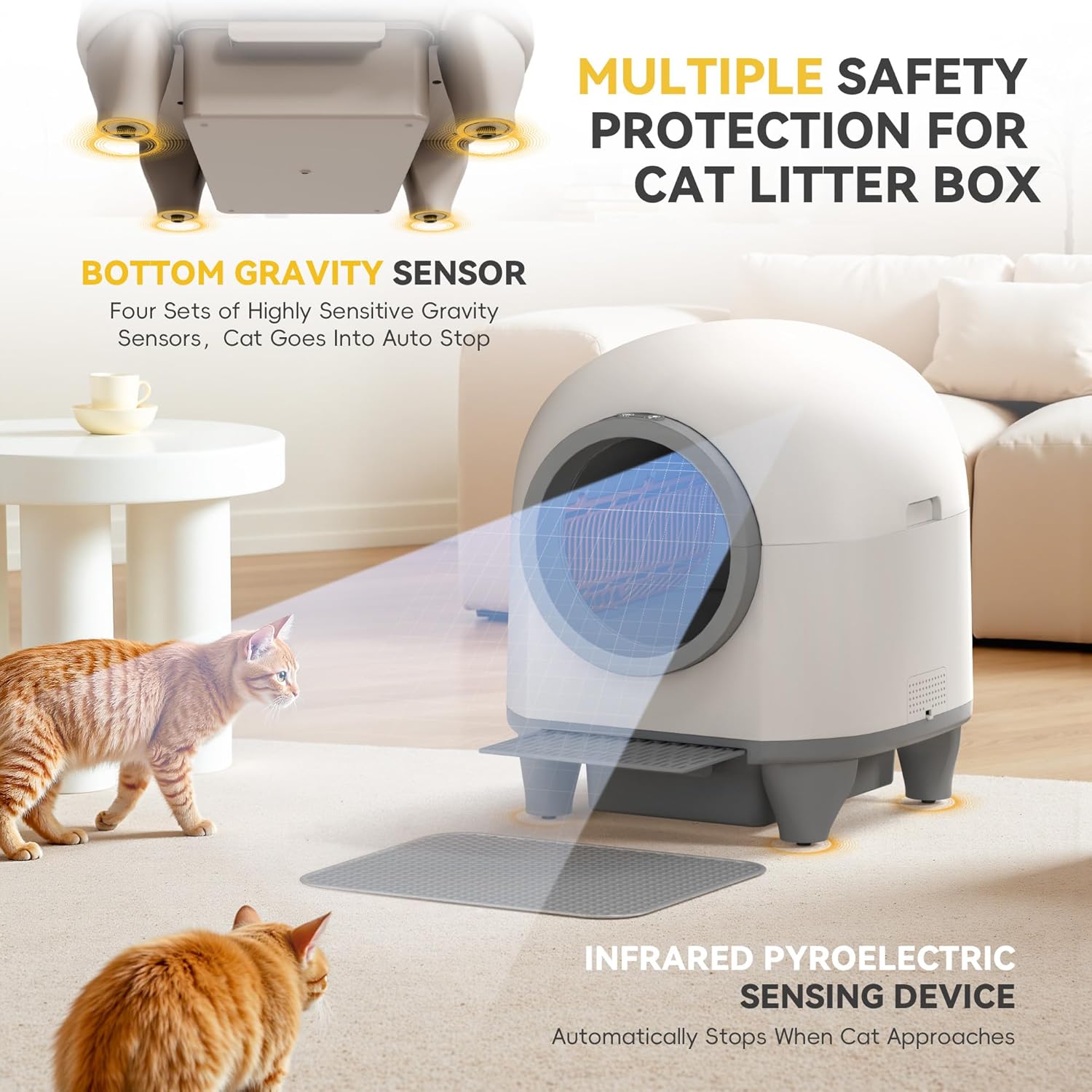
Your Devoko Automatic Cat Litter Box is equipped with multiple safety features to ensure the well-being of your pets. Adherence to these guidelines is crucial for safe operation.
- 9-Layer Safety Protection: The unit incorporates 4 infrared sensors, 4 weight sensors, and 1 motion radar for real-time monitoring.
- Automatic Stop Mechanism: The system will instantly pause operation if a cat approaches or enters the litter box during a cleaning cycle. This includes anti-pinch, auto-pause, and anomaly alerts.
- Radar Deactivation: The motion radar can be deactivated via the mobile application if desired.
- Weight Limit: Suitable for cats weighing between 1.5 kg and 10 kg (approximately 3.3 lbs to 22 lbs) and aged 3 months or older.
- Placement: Place the unit on a stable, level surface. Avoid placing it near water sources or in excessively humid environments.
- Power Supply: Use only the provided power adapter. Ensure the power cord is not damaged or pinched.
Product Overview
The Devoko Automatic Cat Litter Box is designed for ease of use and a clean environment. Key components include:
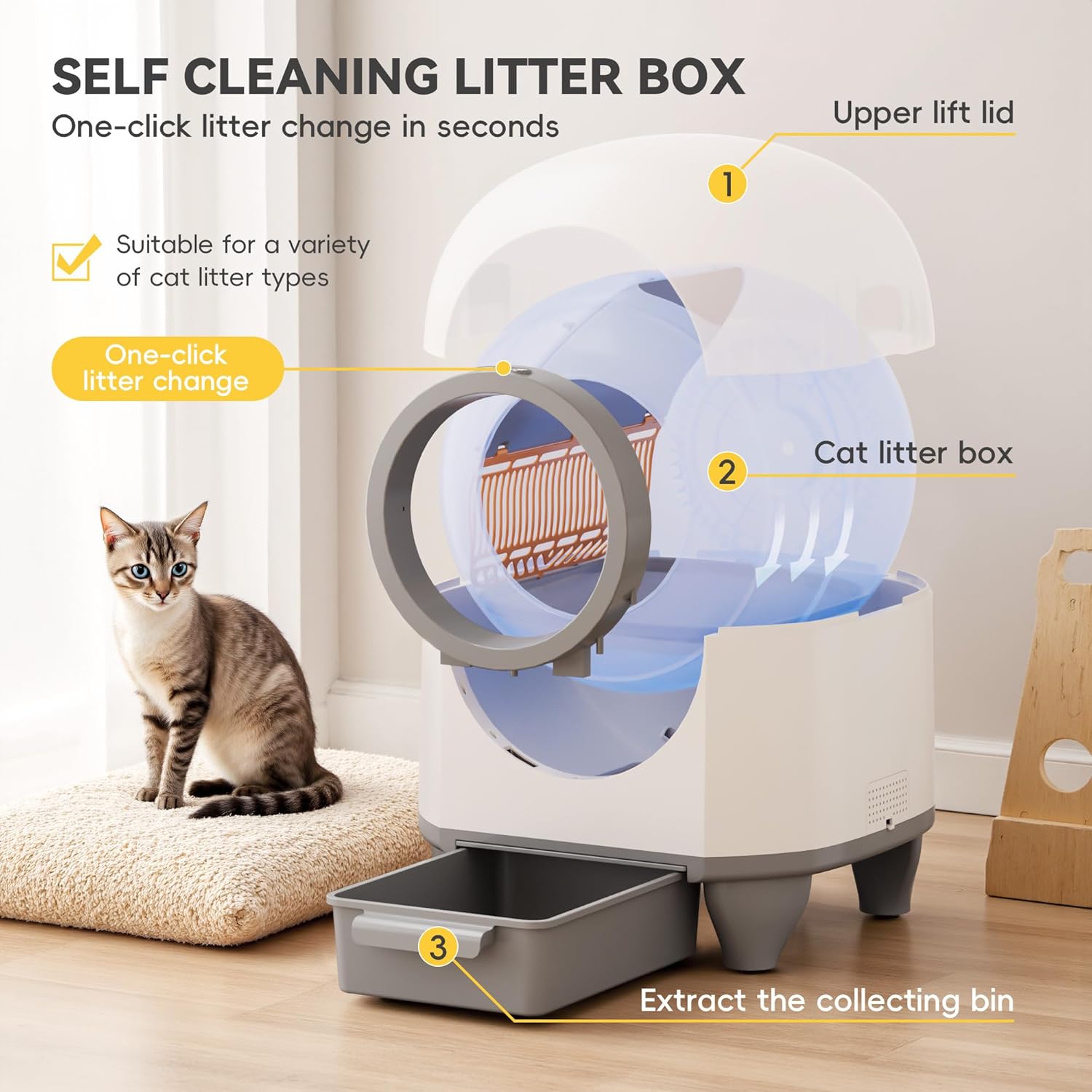
- Main Unit (housing the litter drum and motor)
- Waste Collection Bin (8.5 L capacity)
- Litter Drum (90 L capacity)
- Power Adapter
- Litter Mat (optional, for litter tracking)

Setup Instructions
Follow these steps to set up your Devoko Automatic Cat Litter Box:
- Unpack the Unit: Carefully remove all components from the packaging. Ensure all parts are present and undamaged.
- Place the Unit: Position the litter box on a firm, level surface in a suitable location, away from direct sunlight and heat sources.
- Install the Waste Bin: Slide the waste collection bin into its designated slot at the bottom front of the unit.
- Add Cat Litter: Open the top lid and pour clumping cat litter into the litter drum. Ensure the litter level is between the minimum and maximum fill lines. The unit is compatible with various types of clumping litter (excluding non-clumping litter).
- Connect Power: Plug the power adapter into the unit's power port, then connect it to a wall outlet. The unit will perform an initial calibration cycle.
- Download the App: Scan the QR code in the quick start guide or search for the 'Devoko Pet' app in your smartphone's app store (iOS/Android).
- Pair the Device: Follow the in-app instructions to pair your litter box with your smartphone. This typically involves creating an account, selecting your device, and connecting to your home Wi-Fi network.
Operating Instructions
The Devoko Automatic Cat Litter Box offers several operating modes and features for optimal convenience.
Cleaning Modes
- Automatic Mode: The unit detects when your cat has used the litter box and automatically initiates a cleaning cycle after a set delay (configurable via app).
- Scheduled Mode: Set specific times for cleaning cycles to occur daily or weekly via the mobile application.
- Manual Mode: Initiate a cleaning cycle at any time by pressing the button on the unit or through the mobile application.
App Control and Health Tracking
The 'Devoko Pet' app provides comprehensive control and monitoring capabilities:
- Remote Cleaning: Start or stop cleaning cycles from anywhere.
- Health Data Tracking: Monitor your cat's weight, bathroom duration, and frequency. This data can help you track your cat's health trends.
- Settings Adjustment: Customize delay times for automatic cleaning, activate/deactivate the motion radar, and manage other preferences.
- Night Mode: Enable silent night mode to pause cleaning during sleeping hours for undisturbed rest.


Maintenance
Regular maintenance ensures the longevity and hygienic operation of your Devoko Automatic Cat Litter Box.
- Emptying the Waste Bin: The 8.5 L waste bin should be emptied regularly, typically every 7-10 days for a single cat, or more frequently for multiple cats. Simply pull out the bin, dispose of the waste, and reinsert.
- Cleaning the Unit: The modular design allows for easy disassembly for thorough cleaning. Wipe down surfaces with a pet-safe cleaner. Avoid submerging electronic components in water.
- Litter Drum Cleaning: Periodically remove and clean the litter drum to prevent odor buildup and ensure smooth operation.
- Litter Type: Use only clumping cat litter. Non-clumping, crystal, or silica gel litters are not recommended as they may interfere with the cleaning mechanism.
- Odor Control: The integrated deodorizing system helps maintain a fresh environment. Replace deodorizer cartridges as needed.
Troubleshooting
If you encounter issues with your Devoko Automatic Cat Litter Box, refer to the following common problems and solutions:
| Problem | Possible Cause | Solution |
|---|---|---|
| Unit not turning on | Power cord disconnected; power outlet issue | Ensure power cord is securely plugged in. Test the outlet with another device. |
| Cleaning cycle not starting automatically | Sensors obstructed; cat still inside; app settings | Clean sensors. Ensure cat has exited. Check app for automatic mode activation and delay settings. |
| Odor persists | Waste bin full; unit needs cleaning; deodorizer needs replacement | Empty waste bin. Perform thorough cleaning. Replace deodorizer cartridge. |
| App connection issues | Wi-Fi signal weak; incorrect pairing | Ensure strong 2.4GHz Wi-Fi signal. Re-attempt pairing process as per app instructions. |
| Litter not clumping effectively | Incorrect litter type; insufficient litter depth | Use high-quality clumping cat litter. Ensure litter is filled to the recommended level. |
If the problem persists, please contact Devoko customer support for assistance.
Specifications
| Feature | Detail |
|---|---|
| Model Number | NYT-MSP-0515 |
| Dimensions (L x W x H) | 53 x 57.5 x 60 cm (20.8 x 22.6 x 23.6 inches) |
| Weight | 13.5 Kilograms (29.7 lbs) |
| Litter Drum Capacity | 90 Liters |
| Waste Bin Capacity | 8.5 Liters |
| Material | Plastic |
| Color | White |
| Suitable Cat Weight | 1.5 kg - 10 kg (3.3 lbs - 22 lbs) |
| Special Features | Self-cleaning, Odor Control, App Control, Large Capacity, 9 Safety Sensors |
| Connectivity | Wi-Fi (2.4GHz) for App Control |
Warranty and Support
Devoko products are manufactured to high-quality standards. For warranty information, please refer to the documentation included with your purchase or visit the official Devoko website. If you require technical assistance, have questions about operation, or need to report a defect, please contact Devoko customer support through the following channels:
- Online Support: Visit the Devoko official website for FAQs and support contact forms.
- Email Support: Refer to your product packaging or the Devoko website for the appropriate support email address.
- In-App Support: Some issues can be resolved directly through the 'Devoko Pet' application's support section.
Please have your model number (NYT-MSP-0515) and purchase information ready when contacting support.