
Introduction
This manual provides detailed instructions for the setup, operation, and maintenance of your ZWP HJH55 Replacement Remote Control. This remote is designed for use with various adjustable bed bases, ensuring comfortable and convenient control over your bed's positions. Please read this manual thoroughly before use to ensure proper functionality and to maximize your product experience.
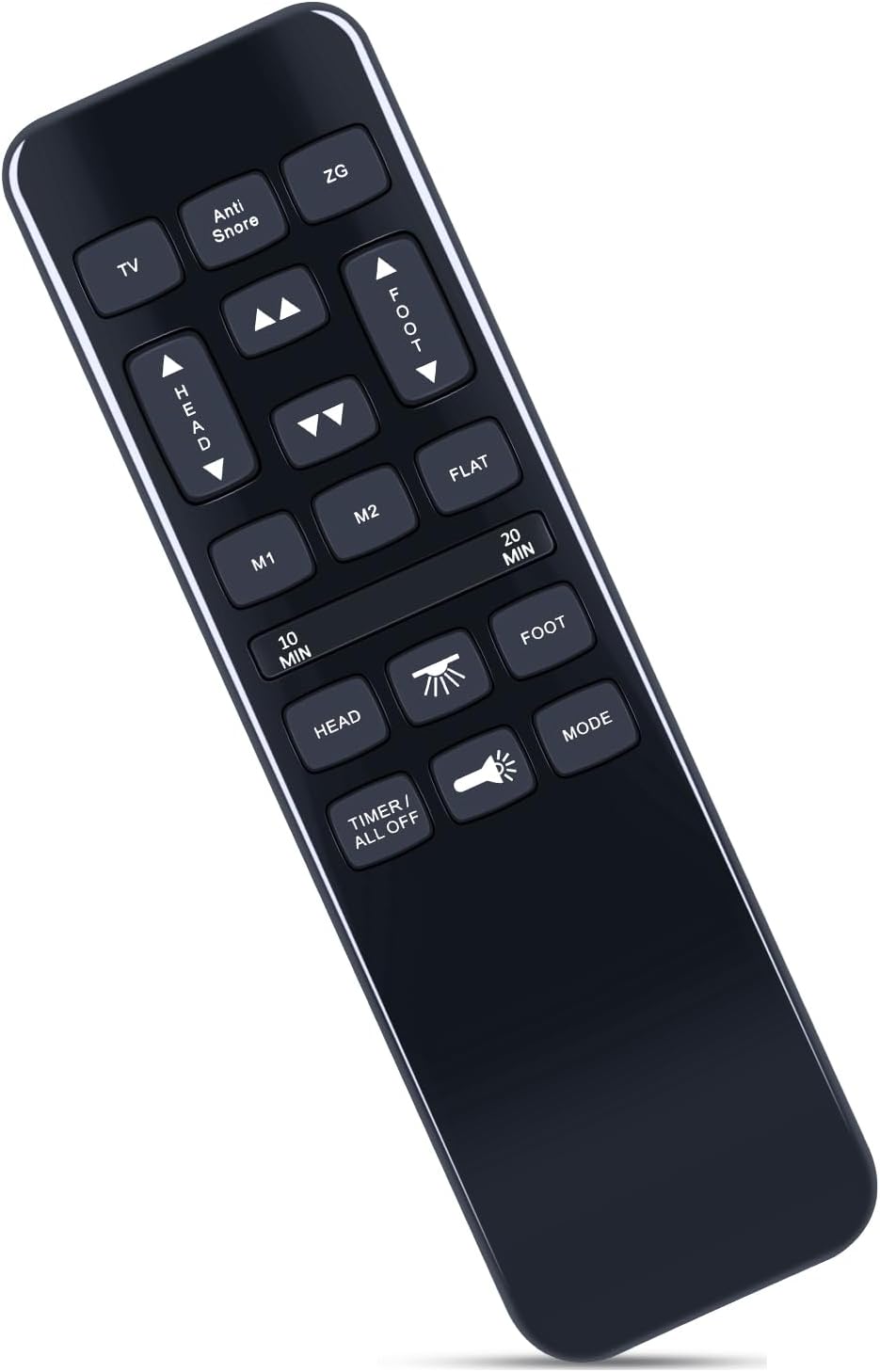
Image: The ZWP HJH55 Replacement Remote Control, a sleek black remote with clearly labeled buttons for various adjustable bed functions.
Setup
1. Battery Installation
The remote control requires three AAA batteries (not included). Follow these steps to install them:
- Locate the battery compartment cover on the back of the remote control.
- Slide the cover downwards to open the compartment.
- Insert three AAA batteries, ensuring the positive (+) and negative (-) terminals align correctly with the markings inside the compartment.
- Slide the battery compartment cover back into place until it clicks securely.

Image: Diagram showing the back of the remote control with the battery cover removed, illustrating the correct placement of three AAA batteries.
2. Pairing the Remote Control
Your ZWP HJH55 remote control needs to be paired with your adjustable bed base's control box to function. There are three primary pairing methods. If one method fails, please try another.
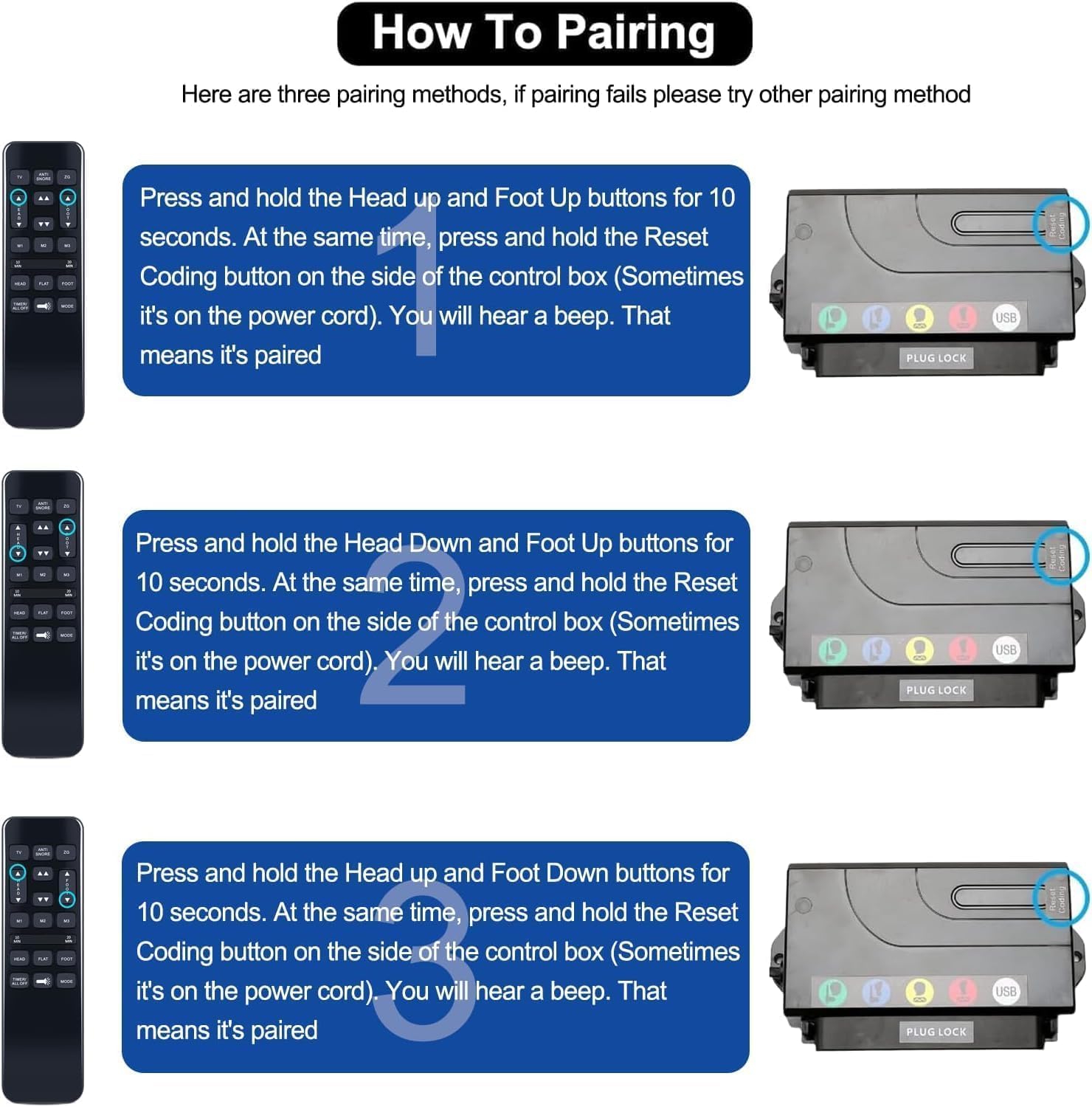
Image: Visual guide demonstrating the three pairing methods for the remote control, showing the remote and a control box with a "Reset Coding" button.
- Pairing Method 1:
- Press and hold the remote's "Head Down" and "Foot Up" buttons simultaneously for 10 seconds.
- Concurrently, press and hold the "Reset Coding" button on the side of your bed's control box (this button may sometimes be located on the power cord).
- You will hear a beep, indicating successful pairing.
- Pairing Method 2:
- Press and hold the remote's "Head Up" and "Foot Up" buttons simultaneously for 10 seconds.
- Concurrently, press and hold the "Reset Coding" button on the side of your bed's control box (this button may sometimes be located on the power cord).
- You will hear a beep, indicating successful pairing.
- Pairing Method 3:
- Press and hold the remote's "Head Up" and "Foot Down" buttons simultaneously for 10 seconds.
- Concurrently, press and hold the "Reset Coding" button on the side of your bed's control box (this button may sometimes be located on the power cord).
- You will hear a beep, indicating successful pairing.
Note: Ensure the bed base is powered on and within range of the remote control during the pairing process.
Operating Instructions
The ZWP HJH55 remote control provides intuitive control over your adjustable bed's functions. Familiarize yourself with the buttons and their corresponding actions:

Image: The remote control displayed alongside diagrams illustrating various adjustable bed positions, such as Zero Gravity, Elevision, Pregnancy Relaxation, Sleeping, Prevent Snoring, and Nursing Mode, with their respective head and foot angles.
| Button | Function |
|---|---|
| HEAD UP / HEAD DOWN | Adjusts the head section of the bed upwards or downwards. |
| FOOT UP / FOOT DOWN | Adjusts the foot section of the bed upwards or downwards. |
| FLAT | Returns the bed to a completely flat position. |
| ZG (Zero Gravity) | Activates the pre-programmed Zero Gravity position, which elevates the head and foot to relieve pressure. |
| Anti Snore | Adjusts the head section slightly to help reduce snoring. |
| TV | Activates a pre-programmed position ideal for watching television. |
| M1 / M2 | Memory buttons to save and recall your favorite bed positions. To save a position, adjust the bed to your desired setting, then press and hold M1 or M2 until the bed beeps or flashes. To recall, simply press M1 or M2. |
| 10 MIN / 20 MIN | Activates a massage timer for 10 or 20 minutes (if your bed base supports massage functions). |
| TIMER / ALL OFF | Turns off all active functions, including massage or light, and may reset timers. |
| Light | Controls any integrated under-bed lighting (if available on your bed base). |
| MODE | Cycles through different massage modes or intensity levels (if your bed base supports massage functions). |

Image: A hand holding the remote control, with an adjustable bed base in the background. Arrows indicate the head section can adjust from 0-60 degrees and the foot section from 0-45 degrees, demonstrating the range of motion.
Maintenance
- Cleaning: Wipe the remote control with a soft, dry cloth. Do not use liquid cleaners or abrasive materials, as they may damage the surface or internal components.
- Battery Replacement: Replace batteries when the remote's response becomes sluggish or stops working. Always replace all three AAA batteries at the same time with new ones.
- Storage: Store the remote control in a dry place, away from extreme temperatures and direct sunlight.
Troubleshooting
If you encounter issues with your ZWP HJH55 remote control, please refer to the following common solutions:
- Remote Not Responding:
- Check if the batteries are correctly installed and have sufficient charge. Replace them if necessary.
- Ensure there are no obstructions between the remote and the bed base's control box.
- Verify that the bed base is properly plugged into a working power outlet.
- Pairing Failure:
- Re-attempt the pairing process using all three methods described in the "Setup" section.
- Ensure you are pressing the "Reset Coding" button on the control box simultaneously with the remote buttons.
- Confirm the bed base is powered on during pairing.
- Intermittent Operation:
- Weak batteries can cause intermittent operation. Replace them.
- Ensure the remote is within effective range of the bed base.
If these steps do not resolve the issue, please contact customer support.
Specifications
- Model: HJH55
- Brand: ZWP
- Compatible Devices: Adjustable Bed Bases (Richmat HJH55, Wayfair Sleep NU203, Tech Bedtech BT-3000, TrueMotion 1000 TM1000, Ashley M9X842, iFlex 470, Mattress Firm 600 3000)
- Power Source: 3 x AAA Batteries (not included)
- Color: Black
- Special Feature: Ergonomic design
- Max Number of Supported Devices: 1
- Dimensions: Approximately 6.8 x 2.3 x 1 inches
- Weight: Approximately 2.08 ounces (without batteries)
Warranty Information
Specific warranty details for this replacement remote control are not provided in the product information. Please refer to the original purchase documentation or contact the seller directly for warranty inquiries.
Customer Support
For any questions or further assistance regarding your ZWP HJH55 Replacement Remote Control, please do not hesitate to contact the seller or manufacturer. Providing your product model and a detailed description of the issue will help expedite support.
"Any question, Please do not hesitate to contact us before leaving Feedback, We will help you resolve it, Thank you."