
DCHK HBT-03
DCHK Haribo HBT-03 Noise Cancelling Bluetooth Earphones User Manual
Model: HBT-03 | Brand: DCHK
Introduction
Thank you for choosing the DCHK Haribo HBT-03 Noise Cancelling Bluetooth Earphones. This manual provides essential information for the safe and efficient use of your new earphones. Please read it thoroughly before use and retain it for future reference.
Package Contents
Ensure all items are present in the package:
- Wireless Earphones (Left and Right)
- Charging Case with LCD Touch Screen
- Ear Cushions (S, M, L sizes)
- USB Charging Cable
- User Manual (this document)

Image: The package includes the wireless earphones, the charging case, three pairs of ear tips in sizes S (11.4mm), M (11.9mm), and L (13.0mm), and a USB charging cable.
Product Overview
The DCHK Haribo HBT-03 earphones feature a compact design with advanced audio capabilities.
- 13mm Dynamic Drivers: Deliver powerful bass and clear mid-high tones.
- Bluetooth 5.4: Ensures stable and efficient wireless connectivity.
- Active Noise Cancelling (ANC): Reduces ambient noise for an immersive listening experience.
- Ambient Sound Mode: Allows you to hear your surroundings while listening to audio.
- LCD Touch Screen Charging Case: Provides intuitive control over various functions.
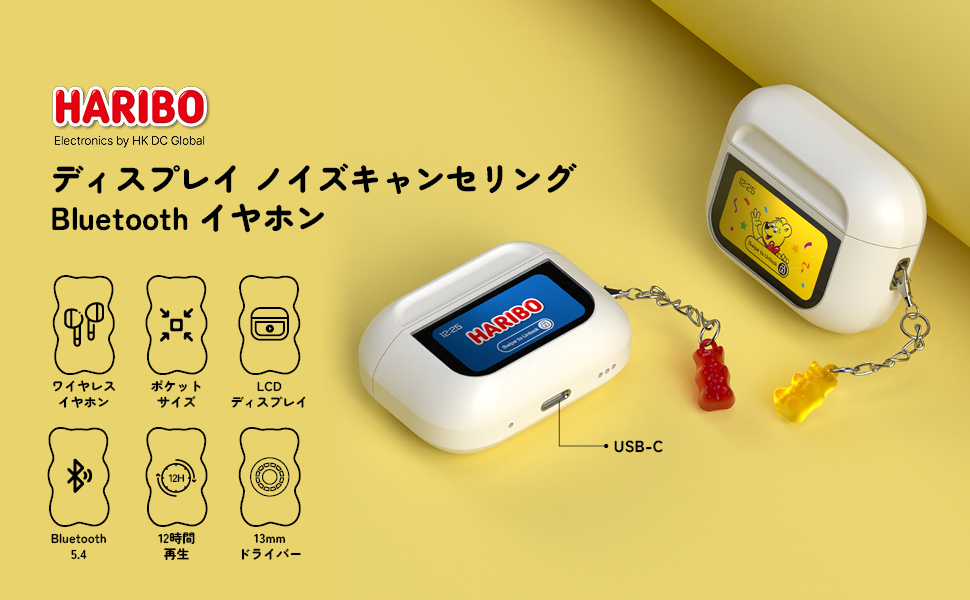
Image: An illustration of the Haribo HBT-03 earphones and their charging case, emphasizing key features such as wireless design, pocket-sized form factor, LCD display, Bluetooth 5.4 connectivity, up to 12 hours of playback, and 13mm dynamic drivers.
Setup
1. Initial Charging
Before first use, fully charge the earphones and charging case.
- Place the earphones into the charging case.
- Connect the USB charging cable to the charging port on the case and a power source.
- The LCD screen on the case will display the charging status. A full charge takes approximately 1.5 hours for the case.

Image: This graphic illustrates the charging and playback times: 1.5 hours for a full charge of the case, 5 hours of playback for the earphones alone, and up to 12 hours of total playback when used with the charging case.
2. Bluetooth Pairing
- Open the charging case. The earphones will automatically enter pairing mode.
- On your device (smartphone, tablet, etc.), enable Bluetooth.
- Search for available Bluetooth devices and select "HBT-03" from the list.
- Once connected, the LCD screen on the case may indicate successful pairing.
The earphones will automatically reconnect to the last paired device when taken out of the case, if Bluetooth is enabled on the device.

Image: This image highlights the benefits of Bluetooth 5.4 connectivity, including an enhanced communication range of 9.7 meters, high-quality audio transmission, optimized power consumption, and excellent connection stability.
Operating Instructions
Earphone Touch Controls
The earphones feature touch-sensitive areas for control. Specific functions may vary based on the number of taps or long presses.
- Play/Pause: Single tap on either earphone.
- Next Track: Double tap on the right earphone.
- Previous Track: Double tap on the left earphone.
- Answer/End Call: Single tap on either earphone.
- Reject Call: Long press on either earphone.
- Activate Voice Assistant: Triple tap on either earphone.
Charging Case LCD Touch Screen Functions
The full-color LCD touch screen on the charging case provides access to various settings and controls. Swipe left/right or tap icons to navigate.

Image: A comprehensive display of the various functions available on the charging case's LCD touch screen. These include battery level display, track control, volume adjustment, equalizer settings (Standard, Classic, Jazz, Rock, Pop), noise reduction/ambient sound mode switching, flashlight activation, screen lock, language selection, earphone locator, remote camera control, timer, power off, and factory reset options.
- Battery Level Display: Shows real-time battery status of both earphones and case.
- Music Playback Controls: Play, pause, skip tracks.
- Volume Adjustment: Control audio volume directly from the case.
- EQ Modes: Select from 5 preset equalizer modes (Standard, Classic, Jazz, Rock, Pop) to optimize sound for different genres.
- Noise Control Modes: Switch between Active Noise Cancelling (ANC) and Ambient Sound Mode.
- Screen Brightness Adjustment: Modify the display brightness.
- Language Switching: Change the display language.
- Earphone Search: Helps locate misplaced earphones.
- Flashlight: Built-in flashlight function.
- Timer: Set a countdown timer.
- Remote Camera Control: Use the case to trigger your phone's camera shutter.
- Wallpaper Change: Customize the screen background.
Maintenance
Cleaning
- Regularly clean the earphones and charging case with a soft, dry, lint-free cloth.
- Remove ear tips and clean them with mild soap and water, then dry thoroughly before reattaching.
- Do not use abrasive cleaners, alcohol, or chemical solvents.
Storage
- Store the earphones in their charging case when not in use to protect them and keep them charged.
- Avoid storing in extreme temperatures, high humidity, or dusty environments.
Troubleshooting
| Problem | Possible Cause | Solution |
|---|---|---|
| Earphones do not turn on. | Low battery. | Charge the earphones and case fully. |
| Cannot pair with device. | Bluetooth is off on device; earphones not in pairing mode; too far from device. | Ensure Bluetooth is on. Place earphones in case, close, then open to re-enter pairing mode. Move closer to device. |
| No sound or poor sound quality. | Volume too low; ear tips not properly fitted; dirty ear tips/grilles; connection issue. | Adjust volume. Try different ear tip sizes. Clean ear tips and grilles. Reconnect Bluetooth. |
| Touch controls unresponsive. | Dirty touch sensor; temporary software glitch. | Clean the touch sensor area. Restart earphones by placing them in the case and taking them out. |
| Charging case LCD screen is blank. | Low battery on case. | Charge the charging case. |
Specifications
| Feature | Detail |
|---|---|
| Model Name | HBT-03 |
| Brand | DCHK |
| Connectivity Technology | Wireless (Bluetooth 5.4) |
| Driver Size | 13mm Dynamic Driver |
| Noise Control | Active Noise Cancellation |
| Frequency Response | 20 KHz (Upper limit, typical range 20Hz-20kHz) |
| Impedance | 16 Ohm |
| Control Method | Touch (Earphones & Case LCD) |
| Water Resistance Level | IPX4 (Water resistant) |
| Earphone Playback Time | 6-8 hours (single charge) |
| Total Playback Time (with case) | Up to 12 hours |
| Case Charging Time | Approx. 1.5 hours |
| Material | Acrylonitrile Butadiene Styrene (ABS) |
| Package Dimensions | 11.2 x 7.6 x 3.2 cm |
| Weight | 100 g |
Warranty and Support
For warranty information and customer support, please refer to the contact details provided with your purchase or visit the official DCHK website. Keep your proof of purchase for warranty claims.
Ask a question about this manual
Ask about setup, troubleshooting, compatibility, parts, safety, or missing instructions. Manuals+ will review the question and use this page’s manual context to help answer it.