
Introduction
Thank you for choosing the LEEMC S12 Wireless Sports Earbuds. These earbuds are designed to provide a high-quality audio experience with features tailored for active lifestyles, including secure fit, noise cancellation, and water resistance. This manual will guide you through the setup, operation, and maintenance of your new earbuds.
What's in the Box
Please check the package contents to ensure all items are present:
- LEEMC S12 Wireless Sports Earbuds (Left and Right)
- Charging Case
- USB Charging Cable
- Eartips (S/M/L sizes, M pre-installed)
- User Manual
Product Overview
The LEEMC S12 earbuds feature an ergonomic design with ear hooks for a secure fit during physical activity. The charging case includes an LED power display to show battery status.

Image: LEEMC S12 Earbuds in their charging case, displaying battery levels on the LED screen.
Setup and First Use
1. Activate Earbuds Battery
Before first use, ensure the earbuds' battery is activated. If the earbuds have some charge upon arrival, use them until they shut off automatically, then fully charge to 100%. If they arrive with an empty battery, charge them to 100% before using.

Image: Visual guide for activating and fully charging the earbuds' battery before initial use.
2. Remove Protective Film
Remove any protective film from the charging contacts on the earbuds before placing them in the charging case. Failure to do so will prevent the earbuds from charging.

Image: Illustration demonstrating the removal of the protective film from the earbud charging contacts.
Pairing Your Earbuds
The LEEMC S12 earbuds offer quick and stable Bluetooth 5.4 connectivity.
- Open the charging case. The earbuds will automatically enter pairing mode.
- On your device (smartphone, tablet, laptop), enable Bluetooth.
- Search for available Bluetooth devices and select "S12" from the list.
- Once connected, you will hear a confirmation tone, and the earbuds will be ready for use.
Video: This video demonstrates the quick one-step pairing process of the LEEMC S12 Wireless Sports Earbuds with a mobile device, highlighting the Bluetooth 5.4 stable connection and Hi-Fi audio capabilities. It also shows the IPX7 water resistance and 50-hour battery life.

Image: The LEEMC S12 earbuds are compatible with a wide range of devices including phones, laptops, tablets, computers, TVs, and smartwatches.
Wearing the Earbuds
For optimal sound quality and a secure fit, choose the correct eartip size and adjust the ear hooks.
- Select Eartips: The earbuds come with three sizes (S/M/L). Try different sizes to find the most comfortable and secure fit. The medium size is pre-installed.
- Position Ear Hook: Place the ear hook over your ear.
- Insert Earbud: Gently insert the earbud into your ear canal.
- Rotate for Comfort: Rotate the earbud slightly to achieve a comfortable and stable angle.
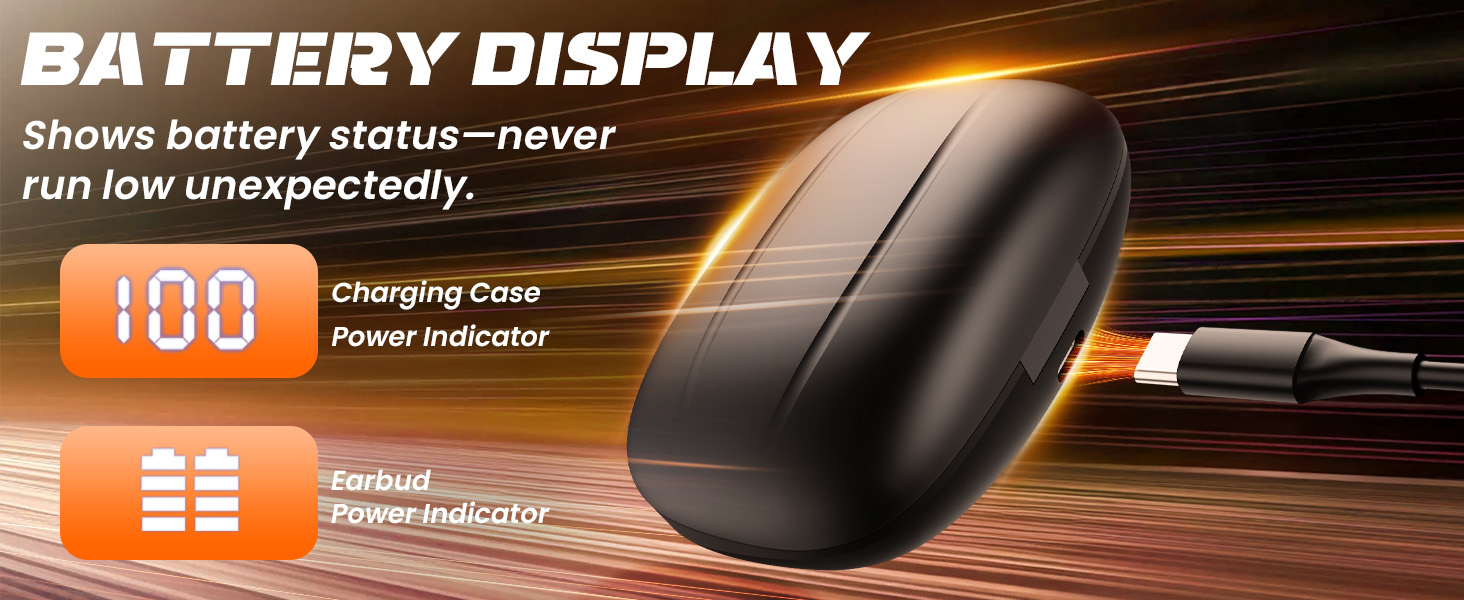
Image: This image illustrates the three included ear tip sizes (S, M, L) and shows various individuals wearing the LEEMC S12 earbuds securely during different activities, demonstrating their universal fit.

Image: Step-by-step diagram illustrating how to properly put on the LEEMC S12 earbuds for a comfortable and stable fit: 1. Put the ear hook on the ear. 2. Insert the earbud into the ear. 3. Rotate the earbud for a comfortable and stable angle.
Operating Controls
The LEEMC S12 earbuds feature intuitive button controls for easy management of your audio and calls.

Image: Detailed diagram of the single-touch gesture controls for the LEEMC S12 earbuds, including functions for play/pause, next/previous song, answer/hang up calls, reject incoming calls, and voice assistant activation.

Image: Diagram illustrating the physical button controls on the LEEMC S12 earbuds for managing media playback, calls, voice assistant, and volume adjustments.
Function Button (R/L Earbud)
- Single tap: Play/Pause music, Answer/Hang up call.
- Double tap: Next Song, Reject incoming calls.
- Triple tap: Previous Song.
- Press and hold 3 seconds: Activate Voice Assistant.
Volume Button
- '+' Button: Volume Up.
- '-' Button: Volume Down.
Charging
The LEEMC S12 earbuds provide up to 50 hours of total playtime with the charging case. The case features an LED display to indicate battery status.
Charging the Earbuds
Place the earbuds into the charging case. They will automatically begin charging. The LED display on the case will show the charging status.
Charging the Case
Connect the charging case to a power source using the provided USB charging cable. The LED display will show the charging progress. A full charge provides multiple recharges for the earbuds.
Image: The charging case features a digital display showing the battery percentage of the case and individual indicators for each earbud's power status.
Water Resistance (IPX7)
The LEEMC S12 earbuds are IPX7 waterproof, making them resistant to sweat and rain. This makes them suitable for workouts and outdoor activities.
Important Note:
- IPX7 rating means the earbuds can withstand immersion in water up to 1 meter for 30 minutes.
- They are not suitable for showering, swimming, or prolonged submersion in water.
- Ensure the earbuds are completely dry before placing them back in the charging case to prevent damage.
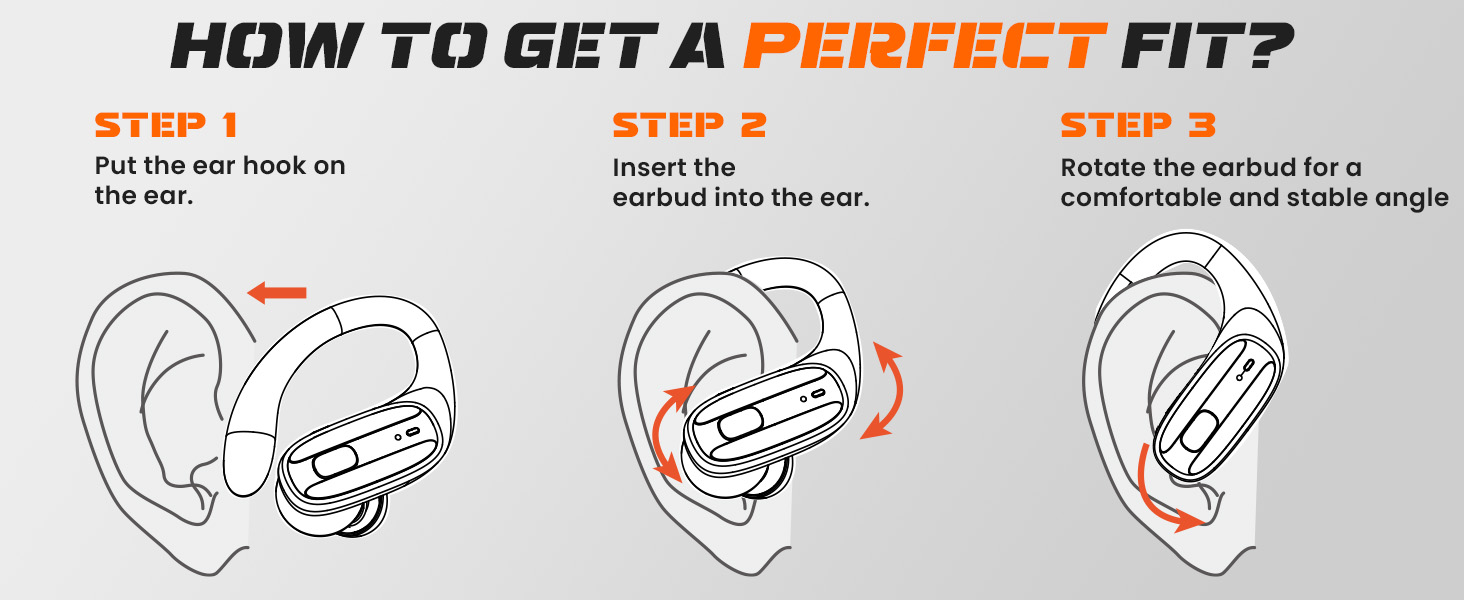
Image: The LEEMC S12 earbuds are shown with an IPX7 rating, indicating heavy sweat resistance. A warning icon clarifies they are not suitable for showering or swimming.
Troubleshooting
If you encounter any issues with your LEEMC S12 earbuds, please refer to the following common solutions:
| Problem | Possible Solution |
|---|---|
| Earbuds not pairing |
|
| Only one earbud working |
|
| Earbuds not charging |
|
| Poor sound quality / Weak bass |
|
| Background noise during calls |
|
Specifications
| Feature | Detail |
|---|---|
| Model Name | S12 |
| Connectivity Technology | Wireless (Bluetooth 5.4) |
| Bluetooth Range | Up to 11 meters (39 feet) |
| Battery Life (Earbuds) | Up to 15 hours (single charge) |
| Total Playtime (with Case) | Up to 50 hours |
| Water Resistance | IPX7 (Sweat and Rain Resistant) |
| Noise Cancellation | ENC (Environmental Noise Cancellation) for calls |
| Material | Silicone (ear hooks) |
| Included Components | Earbuds, Charging Case, USB Cable, Eartips (S/M/L), User Manual |
Safety Information
- Do not expose earbuds to extreme temperatures or direct sunlight.
- Avoid dropping or applying excessive force to the earbuds or charging case.
- Keep out of reach of children and pets.
- Do not attempt to disassemble or modify the product.
- Clean earbuds and charging contacts regularly with a soft, dry cloth.
- Avoid using the earbuds at high volume for extended periods to prevent hearing damage.
Warranty and Support
LEEMC products come with a standard manufacturer's warranty. For specific warranty details, please refer to the warranty card included in your package or contact LEEMC customer support.
If you have any questions or require assistance with your LEEMC S12 Wireless Sports Earbuds, please contact our customer support team through the retailer where you purchased the product or visit the official LEEMC website for contact information.