
ecoCalm 14-inch Solar Exhaust Fan Instruction Manual
Model: KP-SEF2504
Introduction
This manual provides detailed instructions for the installation, operation, and maintenance of your ecoCalm 14-inch Solar Exhaust Fan. This fan is designed to provide efficient ventilation for various outdoor structures such as greenhouses, attics, garages, and sheds, utilizing solar power with a battery backup and an adjustable thermostat for optimal temperature control.

Image: The ecoCalm 14-inch Solar Exhaust Fan shown installed in various environments including an attic, garage, shed, and greenhouse, demonstrating its versatility for ventilating different spaces.

Image: A visual representation of the ecoCalm solar exhaust fan's wide range of applications, including attics, greenhouses, workshops, garages, sheds, and barns, highlighting its adaptability for diverse ventilation needs.
Safety Information
Please read all safety warnings and instructions carefully before installation and operation to prevent injury or damage. Keep this manual for future reference.
- Electrical Safety: Ensure all electrical connections are secure and protected from moisture. Do not attempt to modify the wiring or components.
- Installation: Installation should be performed by individuals with adequate knowledge of electrical systems and building codes. Wear appropriate personal protective equipment (PPE).
- Moving Parts: Keep hands, hair, and loose clothing away from the fan blades during operation.
- Battery Handling: Do not expose the battery to extreme temperatures or puncture it. Dispose of batteries according to local regulations.
- Environmental Conditions: The fan is designed for outdoor use and is IP44 waterproof. However, avoid submerging the unit.
Package Contents
Verify that all components are present before beginning installation:

Image: A comprehensive view of all items included in the ecoCalm solar exhaust fan package, detailing the two 30W solar panels, the 14-inch exhaust fan unit, the solar power bank (battery box), connecting cables, the instruction manual, 3M stickers, and a screw set for installation.
- 2 x 30W Bifacial Solar Panels
- 1 x 14-inch Exhaust Fan Unit
- 1 x Solar Powerbank (Battery Box with Thermostat)
- Connecting Cables (14.8ft long)
- 1 x Instruction Manual
- 3M Stickers
- 1 x Screw Set for mounting
Setup and Installation
Follow these steps for proper installation of your solar exhaust fan:
1. Fan Unit Placement and Mounting
- Choose a suitable location on a window or wall for the fan unit. Ensure adequate clearance for airflow.
- Measure and cut an opening in the chosen surface that matches the fan's dimensions (refer to the dimensions diagram in the Specifications section).
- Secure the fan unit into the opening using the provided screw set. Ensure a tight seal to prevent air leakage.
2. Solar Panel Installation
The bifacial solar panels generate power from both sides, increasing efficiency. Position them for maximum sunlight exposure.
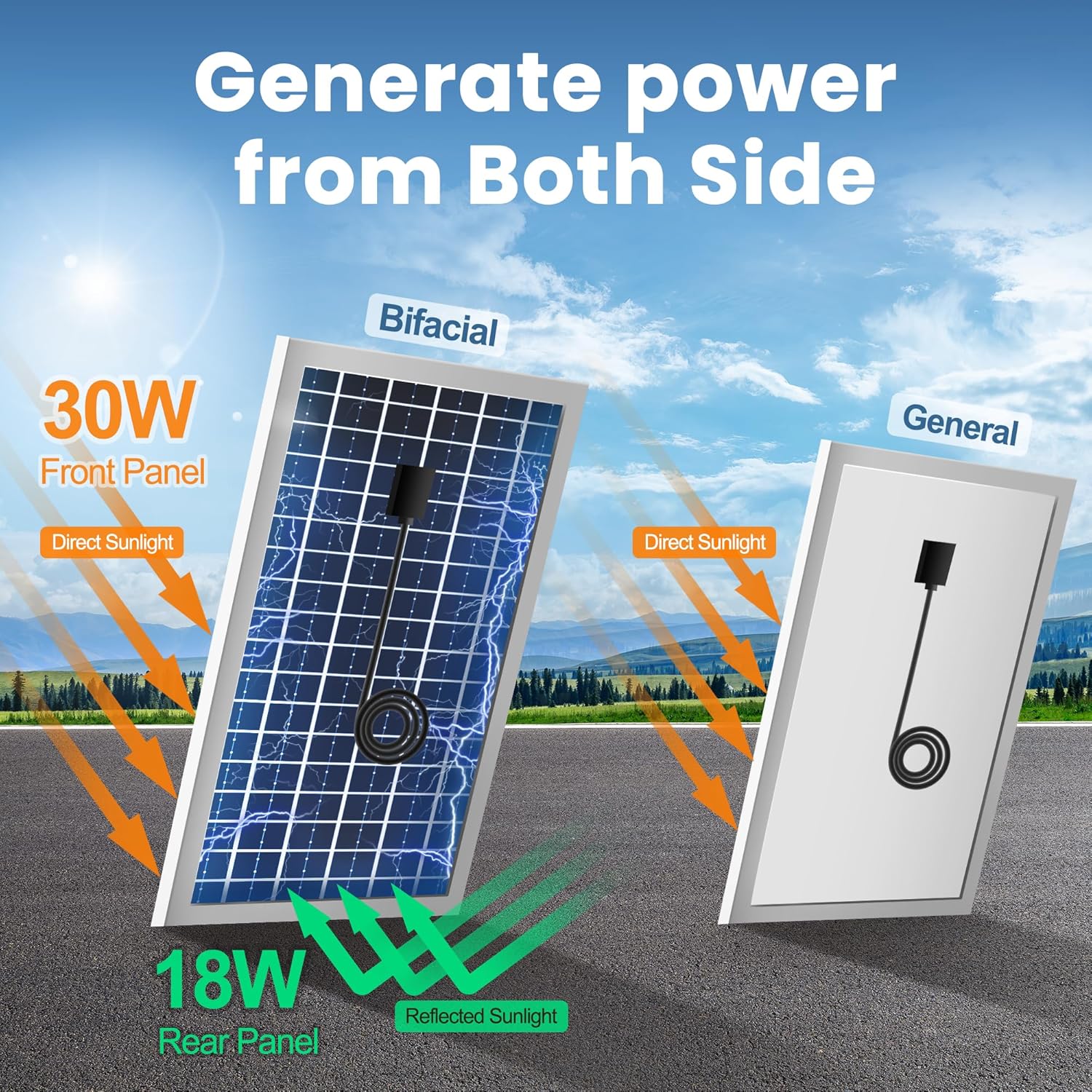
Image: A comparison between a bifacial solar panel and a general solar panel, showing how the bifacial design captures direct sunlight on the front and reflected sunlight on the rear, leading to higher power generation (e.g., 30W front, 18W rear).

Image: A diagram demonstrating the functionality of bifacial solar panels, showing how they capture both incident sunlight from the front and reflected sunlight from the rear, optimizing energy collection throughout the day from different angles (East and West).
- Mount the two solar panels in a location that receives direct sunlight for most of the day. Consider using the included brackets for optimal angling.
- Ensure the panels are securely fastened to withstand wind and weather conditions.
3. Connecting Components
- Connect the solar panels to the solar power bank (battery box) using the provided cables.
- Connect the fan unit to the solar power bank.
- Mount the solar power bank in a convenient, protected location, ideally indoors or in a shaded area to protect it from direct weather exposure.
Operating Instructions
Your ecoCalm solar exhaust fan features intelligent temperature control and battery backup for continuous operation.
1. Initial Power On and Display
Video: This video demonstrates the basic operation and temperature control settings of the ecoCalm solar exhaust fan's control unit. It shows how to power on/off, switch between Celsius and Fahrenheit, activate ECO mode, and set custom on/off temperatures (P1 and P2).
- Power On/Off: Press and hold the ON/OFF button for 2 seconds to turn the fan on or off. The display will show the current temperature.
- Temperature Unit Switch: Tap the °C/°F button to switch the temperature display between Celsius and Fahrenheit.
2. ECO Mode and Temperature Control Settings
The intelligent temperature control system allows the fan to operate automatically based on set temperatures.

Image: The control unit displaying temperature settings, with visual cues of hot air being exhausted and cooler air entering a greenhouse, illustrating the fan's temperature regulation function.

Image: A detailed diagram of the intelligent ventilation system's control panel, showing the digital temperature display, °C/°F switch, ECO temperature setting, ECO mode button, and ON/OFF button. It also illustrates a step-by-step guide for setting the ON (P1) and OFF (P2) temperatures.
- Activate ECO Mode: Tap the ECO button to activate smart temperature control. The fan will automatically turn on/off based on the set temperatures.
- Set ON Temperature (P1):
- Press and hold the ECO button until "P1" appears on the display.
- Use the + or - buttons to adjust your desired ON temperature. The temperature area will flash.
- Tap ECO to confirm the setting.
- Set OFF Temperature (P2):
- After setting P1, press and hold the ECO button again until "P2" appears.
- Use the + or - buttons to adjust your desired OFF temperature. The temperature area will flash.
- Tap ECO to confirm the setting.
3. Battery Operation
The integrated 5000mAh rechargeable battery provides power during periods of low sunlight or at night.
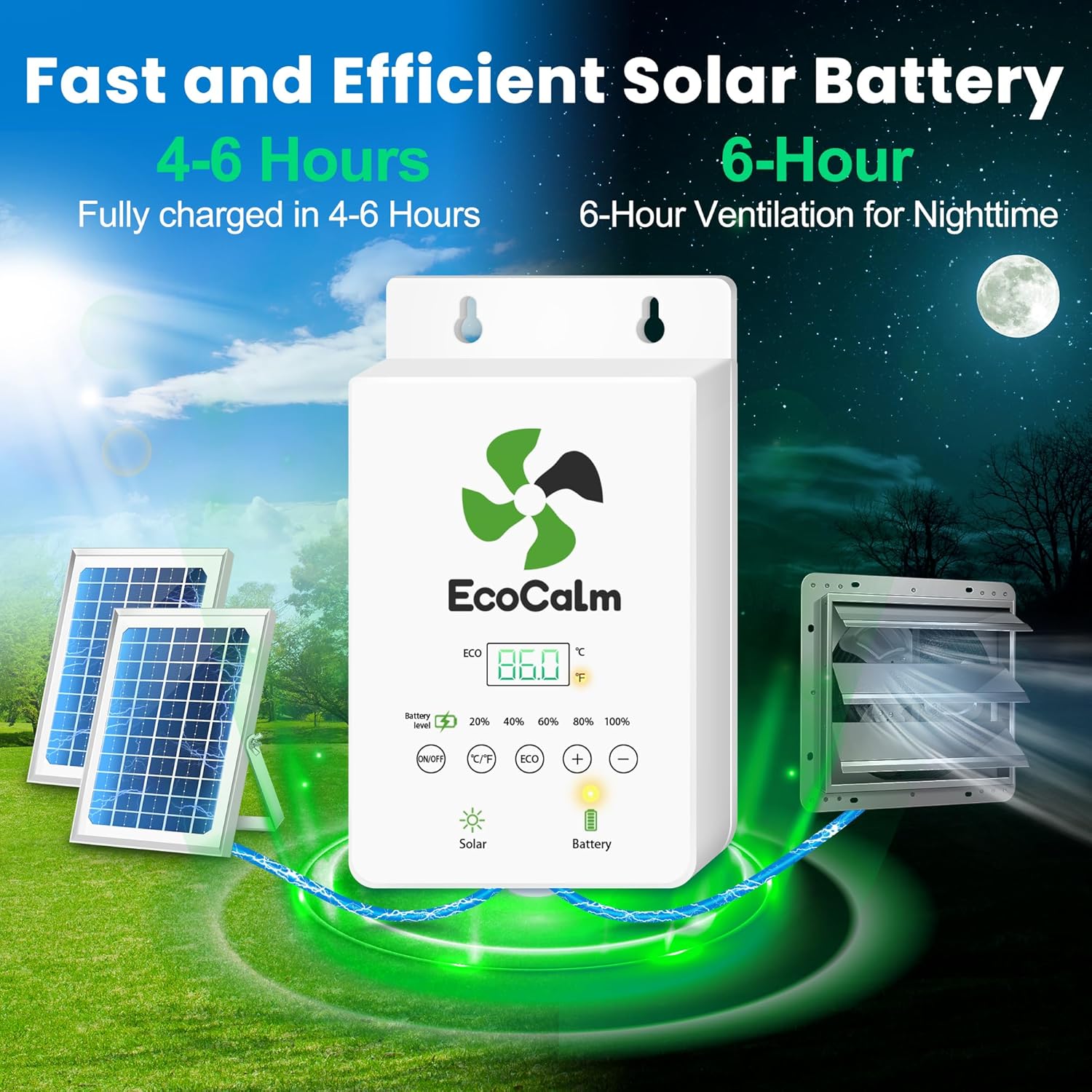
Image: An illustration depicting the solar panels charging the battery box, which then powers the exhaust fan. The image highlights that the battery fully charges in 4-6 hours and provides 6 hours of ventilation for nighttime use.

Image: A graphic showcasing key features of the solar fan's battery backup: a 5000mAh capacity, IP44 waterproof rating, CE certification, and the ability to fully charge in 6 hours, emphasizing its reliability and durability.
- The intelligent system automatically switches between solar power and battery power based on sunlight conditions.
- A fully charged battery provides approximately 6 hours of ventilation.
- The battery level indicator on the control box shows the remaining charge.
Maintenance
Regular maintenance ensures optimal performance and longevity of your ecoCalm solar exhaust fan.
- Cleaning Fan Blades: Periodically inspect and clean the fan blades to remove dust, dirt, or debris that may accumulate and reduce airflow. Use a soft cloth and mild detergent if necessary.
- Solar Panel Cleaning: Keep the solar panels clean from dirt, leaves, and snow to ensure maximum sunlight absorption. Use water and a soft brush or cloth.
- Inspect Wiring: Annually check all wiring connections for any signs of wear, damage, or loose connections.
- Ventilation Grille: Ensure the external ventilation grille is free from obstructions.
Troubleshooting
If you encounter issues with your ecoCalm solar exhaust fan, refer to the following common problems and solutions:
| Problem | Possible Cause | Solution |
|---|---|---|
| Fan not operating | No sunlight, low battery, loose connection, fan off. | Ensure solar panels are in direct sunlight. Check battery level. Verify all cables are securely connected. Press ON/OFF button to turn on. |
| Fan runs intermittently | Insufficient sunlight, ECO mode temperature settings. | Check solar panel exposure. Adjust ECO mode ON/OFF temperatures (P1/P2) to desired range. |
| Low airflow | Dirty fan blades, obstructed grille. | Clean fan blades and ensure the grille is clear of debris. |
| Thermostat display hard to read in sunlight | Direct sunlight glare on the display. | Consider repositioning the control box to a shaded area or adding a small visor if possible. |
Specifications

Image: A comprehensive diagram illustrating the dimensions of all major components of the ecoCalm solar exhaust fan system, including the solar panels (390x510mm), connecting cables (1.1m, 4.5m), the control box (90x170x45mm), and the fan unit (360x435x210mm), providing precise measurements for installation planning.
| Feature | Detail |
|---|---|
| Brand | ecoCalm |
| Model Name | Exhaust Fan (KP-SEF2504) |
| Size | 14 inches |
| Power Source | Solar Powered with Battery Backup |
| Solar Panels | 2 x 30W Bifacial Solar Panels |
| Battery | 5000mAh rechargeable battery (6 hours operation after full charge) |
| Air Flow Capacity | 825 Cubic Feet Per Minute (CFM) |
| Recommended Area | Up to 1800 ft³ |
| Special Features | Battery Operated, Adjustable Thermostat, Bifacial Solar Panels, Waterproof (IP44 fan blades) |
| Installation Type | Window or Wall Mount |
| Product Dimensions | 14 x 8 x 14 inches (Fan Unit) |
| Item Weight | 21.6 pounds |
| Material | Plastic |
Warranty and Support
For warranty information and customer support, please refer to the contact details provided with your purchase documentation or visit the official ecoCalm website. Keep your proof of purchase for any warranty claims.