
BaldrTherm E0575S
BaldrTherm E0575S IPX7 Waterproof Digital Kitchen Timer Instruction Manual
Model: E0575S
Introduction
Thank you for purchasing the BaldrTherm E0575S Digital Kitchen Timer. This timer is designed for versatile use in various environments, including kitchens, classrooms, and bathrooms, thanks to its IPX7 waterproof rating and user-friendly features. Please read this manual carefully to ensure proper use and optimal performance of your device.
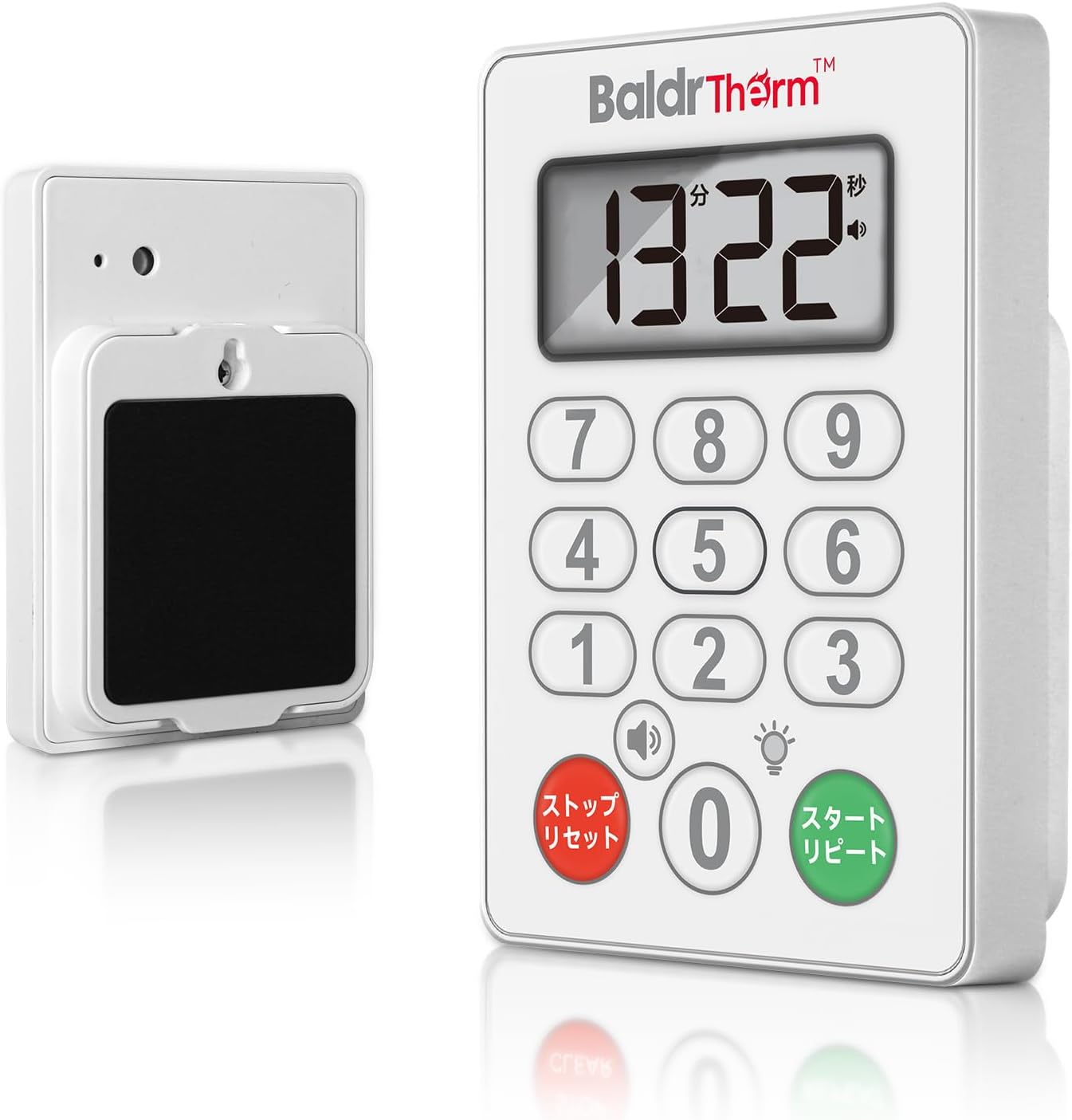
Image: Front and back view of the BaldrTherm E0575S Digital Kitchen Timer, showcasing its large display and compact design.
Setup
Battery Installation
- Locate the battery compartment on the back of the timer.
- Use the included screwdriver to open the battery compartment cover.
- Insert two AAA batteries (not included) according to the polarity markings (+/-) inside the compartment.
- Replace the battery compartment cover and secure it with the screw.

Image: Illustration of the battery compartment and the process of installing AAA batteries using the provided screwdriver.
Operating Instructions
Setting the Timer (Countdown)
- The timer features a 10-key keypad for intuitive time input.
- Enter the desired time in minutes and seconds using the number keys (e.g., for 1 minute 30 seconds, press '1', '3', '0'). The maximum setting is 99 minutes and 99 seconds.
- Press the START/REPEAT button (green button) to begin the countdown.
- To pause the countdown, press the STOP/RESET button (red button). Press START/REPEAT again to resume.
- To reset the timer to zero, press the STOP/RESET button twice.

Image: A hand pressing the number '5' on the 10-key keypad to set the countdown time on the BaldrTherm E0575S timer.
Repeat Function
After the alarm sounds and is stopped, pressing the START/REPEAT button will instantly recall the previously set time, making it convenient for repetitive tasks.

Image: A hand activating the repeat function on the BaldrTherm E0575S timer, showing the display reverting to the last set time.
Alarm Volume and Silent Mode
The timer offers three alarm volume settings: High, Low, and Silent. Press the speaker icon button to cycle through these options. In Silent Mode, a red LED light will flash when the timer reaches zero, providing a visual alert without sound. This is ideal for environments where audible alarms are not desired.

Image: The BaldrTherm E0575S timer displaying its three alarm settings: Soft (90db), Loud (75db), and Silent Mode with a flashing red light.
Features
- IPX7 Waterproof Rating: The timer is designed to withstand splashes and brief immersion, making it suitable for use in wet environments like kitchens and bathrooms.
- Versatile Mounting Options: Equipped with a strong magnet and a hook hole on the back, allowing for attachment to refrigerators, metal surfaces, or hanging on hooks.
- Large LCD Display: The clear, large-digit display ensures that the time is easily visible from a distance and suitable for all age groups.
- 10-Key Keypad: Provides quick and accurate time input for both short and long durations.
- Stylish and Functional Design: Its minimalist design blends seamlessly into various home and work environments.

Image: The BaldrTherm E0575S timer being wiped with a damp cloth, illustrating its IPX7 waterproof design for easy cleaning.

Image: The BaldrTherm E0575S timer shown mounted on a refrigerator and hanging from a hook, demonstrating its magnetic and wall-mount capabilities.
Maintenance
Due to its IPX7 waterproof rating, the BaldrTherm E0575S timer is easy to clean. Simply wipe the surface with a damp cloth. Avoid using abrasive cleaners or submerging the device for extended periods.
Troubleshooting
- Timer not turning on: Ensure batteries are correctly installed with the correct polarity and are not depleted. Replace batteries if necessary.
- Display is dim or blank: This indicates low battery power. Replace the AAA batteries.
- Alarm not sounding: Check the volume setting by pressing the speaker icon button. Ensure it is not set to Silent Mode if an audible alarm is desired.
- Timer does not have an ON/OFF switch or auto-off: The display remains active as long as batteries are installed. This design prioritizes immediate readiness. To conserve battery life when not in use for extended periods, remove the batteries.
Specifications
| Feature | Detail |
|---|---|
| Brand | BaldrTherm |
| Model Number | E0575S |
| Material | Plastic |
| Color | Gray |
| Product Dimensions (LxWxH) | 2.3 x 7.6 x 11.1 cm |
| Item Weight | 113 grams |
| Power Source | 2 x AAA Batteries (not included) |
| Waterproof Rating | IPX7 |
| Maximum Time Setting | 99 minutes 99 seconds |

Image: Detailed diagram showing the dimensions of the BaldrTherm E0575S timer (7.6cm width, 10cm height, 2cm thickness).
Warranty and Support
BaldrTherm provides a manufacturer's warranty of up to 12 months from the date of purchase. In the event of product defects, damage, or incorrect delivery, we offer a refund or free replacement. Our customer support team is committed to providing prompt and courteous assistance for any post-purchase inquiries. Please contact us through the retailer's platform for support.
Related documentsE0575S

Ask a question about this manual
Ask about setup, troubleshooting, compatibility, parts, safety, or missing instructions. Manuals+ will review the question and use this page’s manual context to help answer it.