
1. Important Safety Instructions
Please read all instructions carefully before using the Dynter DH251 Dehumidifier. Retain this manual for future reference.
- Ensure the power supply matches the voltage specified on the rating label.
- Do not immerse the appliance, power cord, or plug in water or other liquids.
- Always unplug the dehumidifier before cleaning, maintenance, or when not in use.
- Keep the appliance away from heat sources, direct sunlight, and flammable materials.
- Do not block the air inlet or outlet. Ensure adequate space around the unit for proper airflow.
- This appliance is for indoor use only.
- Do not allow children to operate the dehumidifier without supervision.
- If the power cord is damaged, it must be replaced by the manufacturer, its service agent, or similarly qualified persons to avoid a hazard.
2. Product Overview
The Dynter DH251 is a compact and efficient dehumidifier designed to reduce excess moisture in your living spaces. It features a user-friendly control panel and a large water tank for extended operation.
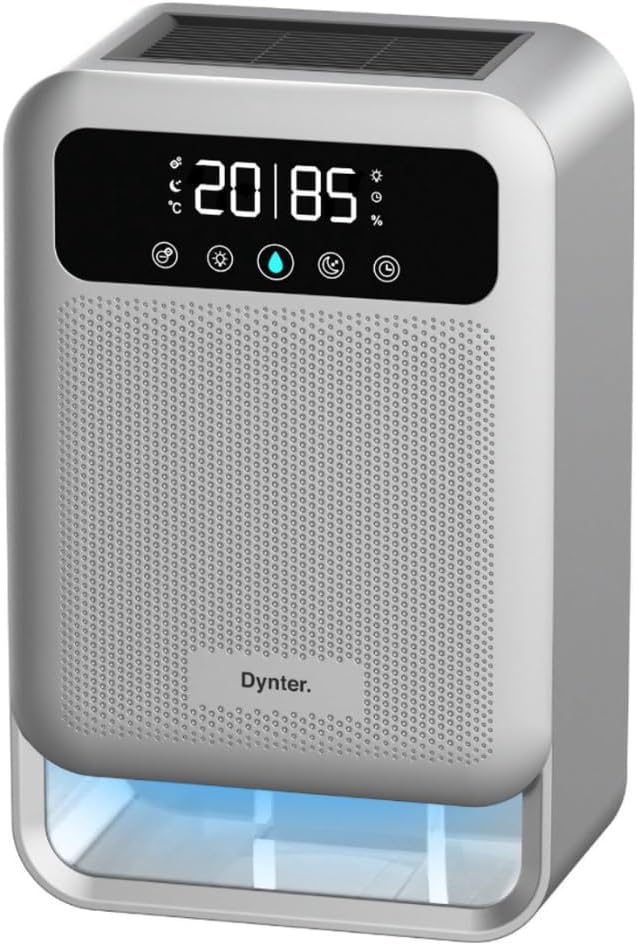
Front view of the Dynter DH251 Dehumidifier, showcasing its compact design and control panel.
Key components include the air inlet, air outlet, control panel, water tank, and power cord connection.

A close-up of the Dynter DH251 Dehumidifier highlighting its 3.8L water tank capacity, 900ml per day dehumidification, and built-in LED indicator.
3. Setup
Follow these steps to set up your Dynter DH251 Dehumidifier:
- Unpack the Unit: Carefully remove the dehumidifier from its packaging. Retain packaging materials for future storage or transport.
- Choose a Location: Place the dehumidifier on a flat, stable surface in the desired room. Ensure there is at least 20 cm (8 inches) of clear space around the air inlet and outlet for optimal performance. Avoid placing it near heat sources or in direct sunlight.
- Power Connection: Plug the power cord into a grounded electrical outlet.
- Initial Operation: The unit is now ready for operation.

An isometric diagram illustrating optimal placement of the Dynter DH251 Dehumidifier in different household areas such as the bedroom, living room, laundry room, and wardrobe.
4. Operating Instructions
4.1 Power On/Off
Press the power button on the control panel to turn the dehumidifier on or off. The unit will start operating in its default mode when turned on.
4.2 Setting the Timer
The timer function allows you to set the operating duration from 1 to 24 hours. Press the timer button repeatedly to select the desired operating time. The unit will automatically turn off once the set time has elapsed.
4.3 Sleep Mode
Activate sleep mode for quieter operation, ideal for nighttime use. In this mode, the fan speed is reduced, and display lights may dim to minimize disturbance. The Dynter DH251 operates below 40 dB, ensuring a peaceful environment.

The Dynter DH251 Dehumidifier operating quietly in a bedroom, emphasizing its low noise level (33dB) for undisturbed sleep.
4.4 Ionizer Function
The integrated ionizer helps to purify the air by reducing fine dust and allergens, improving overall air quality. This function operates alongside dehumidification.
4.5 Water Tank Full Indicator and Automatic Shut-off
When the 3.8-liter water tank is full, the dehumidifier will automatically shut off, and an LED indicator will illuminate to alert you. This prevents overflow and ensures safe operation.

A graphic illustrating the main functions of the Dynter DH251 Dehumidifier: dehumidification, sleep function, and timer, with automatic shut-off.
5. Maintenance
Regular maintenance ensures optimal performance and extends the lifespan of your dehumidifier.
5.1 Emptying the Water Tank
- When the water tank is full, the unit will stop operating and the indicator light will turn on.
- Carefully pull out the water tank from the front of the unit.
- Empty the collected water into a sink or drain.
- Rinse the tank with clean water if necessary. Do not use harsh detergents.
- Slide the empty water tank back into the dehumidifier until it clicks into place. The unit will resume operation.
5.2 Cleaning the Air Filter
The air filter should be cleaned regularly (e.g., every two weeks or as needed) to maintain efficiency.
- Turn off and unplug the dehumidifier.
- Locate and remove the air filter (refer to the product diagram for exact location).
- Gently clean the filter with a vacuum cleaner or wash it with warm, soapy water.
- Ensure the filter is completely dry before reinserting it into the unit.
5.3 Storage
If storing the dehumidifier for an extended period:
- Empty and clean the water tank.
- Clean the air filter.
- Ensure the unit is completely dry before storing.
- Store in a cool, dry place, preferably in its original packaging.
6. Troubleshooting
Refer to the table below for common issues and their solutions.
| Problem | Possible Cause | Solution |
|---|---|---|
| Dehumidifier does not turn on. | No power supply; Power button not pressed; Water tank full or incorrectly inserted. | Check power connection; Press power button; Empty and reinsert water tank correctly. |
| No water collected or low dehumidification. | Room humidity too low; Air filter clogged; Temperature too low; Air inlet/outlet blocked. | Dehumidifier may not be needed; Clean air filter; Ensure room temperature is above 5°C; Clear obstructions. |
| Unit is noisy. | Unit not on a flat surface; Air filter clogged. | Place on a flat, stable surface; Clean air filter. |
| Unpleasant odor. | Water tank needs cleaning; Air filter needs cleaning. | Clean water tank; Clean air filter. |
7. Specifications
Technical data for the Dynter DH251 Dehumidifier:
| Feature | Specification |
|---|---|
| Model | DH251 |
| Power | 80 W |
| Water Tank Capacity | 3.8 Liters |
| Dehumidification Capacity | Up to 900 ml/24 hours |
| Suitable Room Size | Up to 55 m² |
| Noise Level | <40 dB (typically 33 dB in sleep mode) |
| Dimensions (L x W x H) | 24 x 13.4 x 37 cm |
| Weight | 2.57 kg |
| Cable Length | 1.42 m |
| Color | Silver |

An image showing the dimensions (24cm x 37cm) and energy efficiency (0.96kW for 24 hours) of the Dynter DH251 Dehumidifier.

A visual comparison showing the effect of the Dynter DH251 Dehumidifier, reducing humidity from 80% to 40%, and its effectiveness in spaces up to 55m².
8. Warranty and Support
For warranty information or technical support, please refer to the contact details provided with your purchase documentation or visit the official Dynter website. Keep your proof of purchase for warranty claims.