
Important Safety Information
- Always supervise children when using the walker.
- Ensure all parts are securely assembled before use.
- Do not use on uneven surfaces, near stairs, or in areas with potential hazards.
- Regularly check for loose parts or damage. Discontinue use if any damage is found.
- This product is intended for children aged 10 months and up.
Package Contents
Verify that all components are present before beginning assembly.
- Wooden Baby Walker Frame
- Adjustable Handle
- Wheels with Speed Control
- Wooden Carrots (2)
- Wooden Shovel (1)
- Wooden Fruit Basket (1)
- Wooden Fruits (Apple, Pear)
- Assembly Hardware (Screws, Nuts, etc.)
- Instruction Manual

Figure 1: All included accessories for the ROBOTIME Wooden Baby Walker, such as wooden carrots, a shovel, and various fruit pieces.
Setup and Assembly
Follow these steps to assemble your ROBOTIME Wooden Baby Walker.
- Unpack Components: Carefully remove all parts from the packaging and verify against the package contents list.
- Attach Wheels: Secure the wheels to the main walker frame using the provided hardware. Ensure the speed control knobs are accessible.
- Install Handle: Insert the adjustable handle into the designated slots on the walker frame. Secure it at the desired height using the locking mechanisms.
- Attach Activity Panels: Fasten any separate activity panels or decorative elements to the sides and top of the walker as indicated in the diagrams.
- Final Check: Confirm all screws are tightened and all components are stable before allowing a child to use the walker.
Video 1: An overview of the ROBOTIME Wooden Baby Walker, demonstrating its assembly and various interactive features. This video provides visual guidance for setup and operation.
Operating Instructions
Adjustable Height Handle
The walker's handle can be adjusted to accommodate different heights, ensuring comfortable use as your child grows. To adjust, loosen the locking mechanisms on the handle supports, slide the handle to the desired height (between 16.5 and 19.3 inches), and re-tighten the locks.
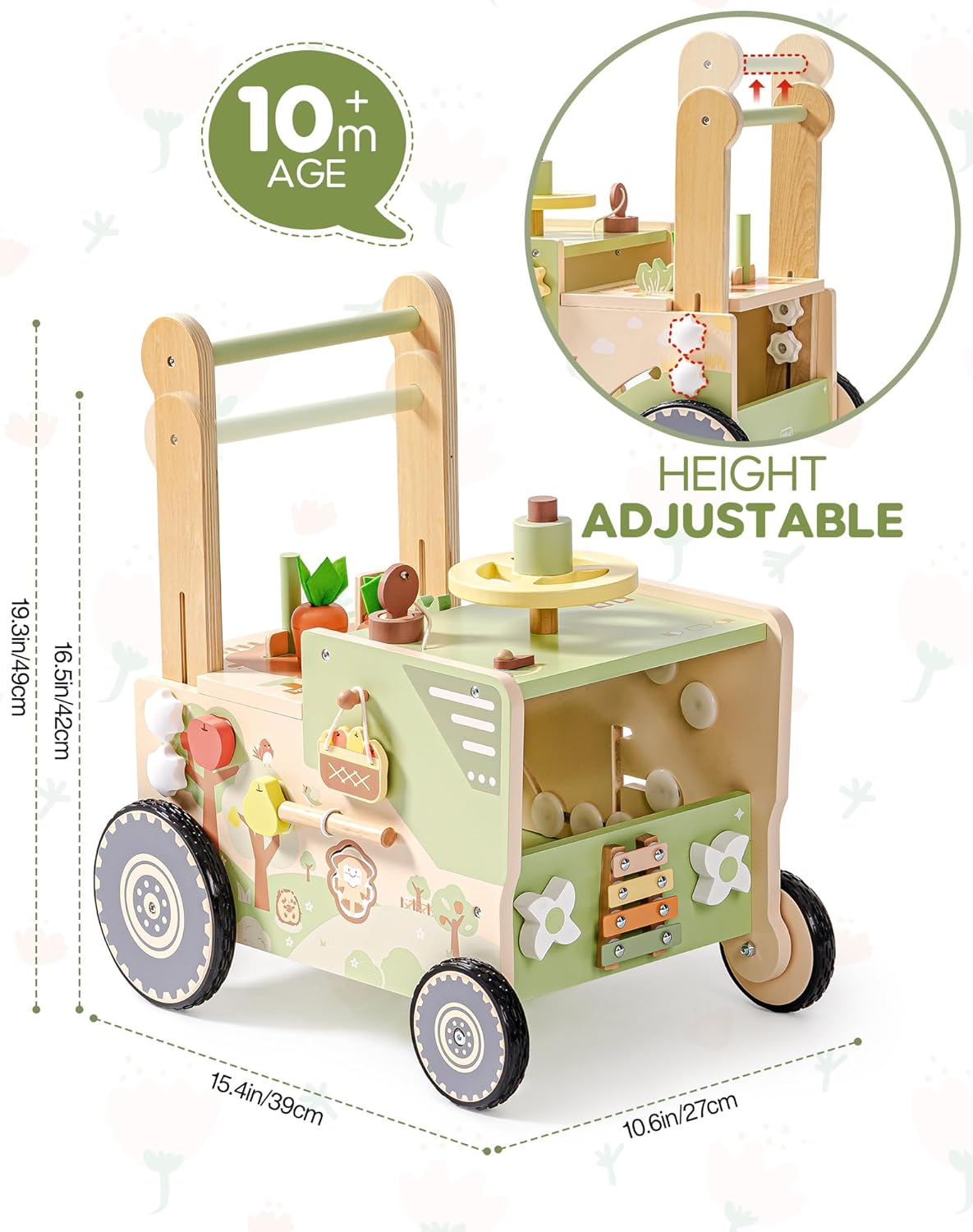
Figure 2: This image illustrates the dimensions of the walker and demonstrates the adjustable height feature of the handle, suitable for growing toddlers.
Speed Control for Wheels
The rear wheels feature adjustable resistance to control the walker's speed. This provides stability for babies just beginning to walk. Turn the knobs on the rear wheels to increase or decrease resistance. A higher resistance will slow the walker down, offering more support.

Figure 3: A close-up of the adjustable speed mechanism on the wheels and the height adjustment for the handle, allowing customization for the child's needs.
Interactive Farm-Themed Activities
The walker includes several engaging activities:
- Spinning Spiral Gears: Located on the side, these gears encourage fine motor skill development.
- Sliding Rails: Move the farm animal pieces along the rails.
- Rainbow Xylophone: Play musical notes with the included mallet.
- Spinning Windmill: Rotate the windmill for visual stimulation.
- Planting Game: Insert and remove the wooden carrots from their slots.
- Fruit Picking & Shape Matching: Match the wooden fruits (apple, pear) to their corresponding shapes on the side panel.
- Simulated Driving Game: The steering wheel and horn provide imaginative play.

Figure 4: This image focuses on the interactive elements of the walker, including spinning gears, a colorful xylophone, and a spinning windmill, designed for engaging play.

Figure 5: A view from above the walker, detailing the planting game with removable carrots and the fruit picking activity on the side panel.
Maintenance and Care
- Cleaning: Wipe the walker with a damp cloth and mild soap. Avoid harsh chemicals or abrasive cleaners. Dry thoroughly.
- Storage: Store in a dry place away from direct sunlight and extreme temperatures to prevent wood warping or fading.
- Inspection: Periodically check all screws and connections to ensure they are tight. Re-tighten if necessary.
Troubleshooting
| Issue | Possible Cause | Solution |
|---|---|---|
| Walker moves too fast/slow | Wheel resistance setting is incorrect. | Adjust the speed control knobs on the rear wheels to increase or decrease resistance. |
| Handle feels wobbly | Handle locking mechanisms are loose. | Ensure the handle is securely locked into place at the desired height. Tighten any adjustment knobs. |
| Activity pieces are stuck | Debris or misalignment. | Check for any obstructions. Ensure pieces are inserted correctly into their slots. |
Specifications
- Product Dimensions: 13.18 x 5.9 x 17.3 inches
- Item Weight: 12.17 pounds
- Model Number: WRP34
- Manufacturer Recommended Age: 10 months and up
- Material: Wood
Warranty and Support
For warranty information or customer support, please refer to the contact details provided with your purchase documentation or visit the official ROBOTIME website. Specific warranty terms may vary by region and retailer.