
Introduction
The TELESTAR TOP 500 is a versatile Hi-Fi tuner designed for comprehensive audio reception and streaming. It integrates Internet Radio, DAB+, and FM radio reception, along with Bluetooth audio streaming and USB recording capabilities. This manual provides detailed instructions for setting up, operating, and maintaining your device.
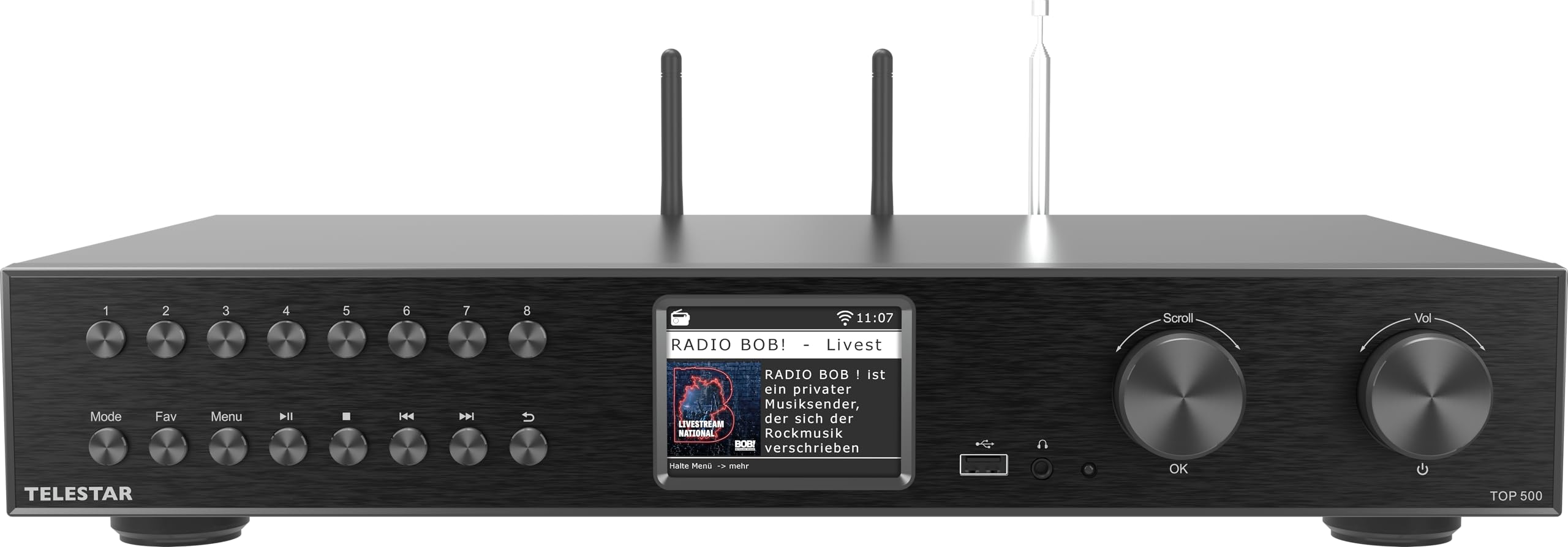
Front view of the TELESTAR TOP 500 Hi-Fi Tuner.
Important Safety Instructions
- Read all instructions carefully before use.
- Keep the manual for future reference.
- Do not expose the device to rain or moisture.
- Ensure proper ventilation; do not block ventilation openings.
- Use only attachments/accessories specified by the manufacturer.
- Disconnect the device during lightning storms or when unused for long periods.
- Refer all servicing to qualified service personnel.
Setup
1. Unboxing and Included Components
Carefully unpack the TELESTAR TOP 500 and check for all included components:
- TELESTAR TOP 500 Hi-Fi Tuner
- Power Adapter
- DAB+/FM Telescopic Antenna
- Remote Control (batteries included)
- User Manual

Image showing the TELESTAR TOP 500 and its included accessories.
2. Connecting Antennas and Cables
Connect the necessary antennas and cables to the rear panel of the device.
- DAB+/FM Antenna: Connect the telescopic antenna to the designated DAB+/FM antenna input.
- WLAN Antenna: Attach the WLAN antenna for Wi-Fi connectivity.
- Bluetooth Antenna: Attach the Bluetooth antenna for wireless audio connections.
- LAN Connection: For a stable internet connection, connect an Ethernet cable to the RJ45 port.
- Audio Output: Connect the device to your amplifier or active speakers using the optical, electrical digital audio outputs, or the analog audio output (RCA).

Rear panel of the TELESTAR TOP 500 showing all connection ports, including LAN, optical audio out, analog audio out, power switch, and antenna connections for Bluetooth, WLAN, and DAB+.
3. Power Connection
Connect the power adapter to the DC IN port on the rear panel and then plug it into a wall outlet. Use the power switch on the rear panel to turn the device on or off.
Operating Instructions
1. Front Panel Controls
The front panel features a color display, navigation buttons, and rotary knobs for easy control.

Front panel with navigation buttons, color display, and rotary knobs for navigation and volume control.
- Navigation Buttons: For quick and simple menu navigation.
- Color Display: A clear 3.2-inch (8.1 cm) display showing time, titles, and other important information.
- Rotary Knobs: Used for navigation within menus and adjusting the volume.
2. Remote Control
The included remote control provides full functionality for operating the TELESTAR TOP 500 from a distance.

The remote control for the TELESTAR TOP 500, featuring power, mode, EQ, navigation, volume, and preset buttons.
- Power Button: Turns the device on/off.
- Mode Button: Switches between different operating modes (Internet Radio, DAB+, FM, Bluetooth, USB).
- Navigation Cluster (OK, Arrows): For menu navigation and selection.
- Volume +/-: Adjusts the output volume.
- Numeric Buttons (1-8): For direct access to stored favorite stations.
- Playback Controls: Play, Pause, Skip tracks for USB and streaming.
- Record Button: Initiates USB recording.
3. Radio Reception (Internet, DAB+, FM)
The TELESTAR TOP 500 offers a wide range of radio reception options.
- Internet Radio: Access thousands of radio stations worldwide via LAN or WLAN connection. Navigate through genres, regions, or search for specific stations.
- DAB+ Radio: Enjoy crystal-clear digital radio reception. The device automatically scans for available DAB+ stations.
- FM Radio: Tune into traditional FM radio broadcasts.
- Saving Favorites: Store your preferred stations using the numeric buttons on the remote or through the device's menu.

Overview of key features including DAB+ reception, Internet Radio, Bluetooth, and USB recording.
4. Bluetooth Audio Streaming
The device supports both receiving and transmitting audio via Bluetooth.
- Receive Function: Stream music wirelessly from your smartphone or tablet to the TELESTAR TOP 500. Select Bluetooth mode on the device and pair it with your mobile device.
- Transmit Function: Send any radio station (Internet, DAB+, FM) or USB audio to Bluetooth headphones or speakers. Activate Bluetooth transmission mode and pair with your desired output device.

Illustration of Bluetooth audio streaming capabilities, including receiving from a smartphone and transmitting to wireless headphones or speakers.
5. USB Playback and Recording
The integrated USB 2.0 port allows for media playback and direct recording.
- USB Playback: Connect a USB flash drive to play your stored audio files.
- USB Recording: Record your favorite radio broadcasts directly to a USB storage device.
- Direct Recording: Start recording with a simple press of a button.
- Scheduled Recording: Program recordings based on date, time, and duration. Recordings can be set daily, once, on weekdays (Mon-Fri), or weekends (Sat-Sun).

Details on the USB recording function, highlighting direct and scheduled recording options.
6. Integrated Streaming Services
Access various music streaming services directly through the device without needing a smartphone.
- Supported providers include:
- Deezer
- Napster
- TIDAL
- qobuz
- Soundmachine
- Calm Radio
- HighResAudio

Information on integrated streaming services available directly on the device.
7. App Control
Control your TELESTAR TOP 500 conveniently via the Soundmate app on your smartphone or tablet.
- Fully controllable via app.
- Available for iOS and Android devices.
- No additional costs for the app.

Details on controlling the device using the Soundmate app for iOS and Android.
8. Hotel Mode
The device includes a Hotel Mode feature, which can be configured to restrict certain functions or set default settings, useful for hospitality environments. Refer to the advanced settings menu for Hotel Mode configuration.
Maintenance
Cleaning
To maintain the appearance and functionality of your TELESTAR TOP 500, follow these cleaning guidelines:
- Always disconnect the power cable before cleaning.
- Use a soft, dry cloth to wipe the exterior surfaces.
- Do not use liquid cleaners, aerosols, or abrasive cleaning agents, as they may damage the finish or internal components.
- Keep ventilation openings free of dust.
Troubleshooting
If you encounter issues with your TELESTAR TOP 500, please refer to the following common solutions before contacting support.
| Problem | Possible Cause | Solution |
|---|---|---|
| No power | Power cable not connected; Power switch off | Ensure power cable is securely connected. Turn on the power switch on the rear panel. |
| No sound | Volume too low; Incorrect audio output selected; Cables loose | Increase volume. Check audio cable connections to amplifier/speakers. Ensure correct input is selected on your amplifier. |
| Poor radio reception (DAB+/FM) | Antenna not properly connected or positioned | Extend and adjust the telescopic antenna for optimal signal. Try repositioning the device. |
| No Internet connection | WLAN/LAN issues; Incorrect network settings | Check WLAN antenna connection. Ensure LAN cable is connected. Verify Wi-Fi password and network settings in the device menu. Restart your router. |
| Bluetooth pairing issues | Device not in pairing mode; Out of range | Ensure the TELESTAR TOP 500 is in Bluetooth pairing mode. Keep devices within close range (approx. 10 meters). |
Specifications
| Brand | Telestar |
| Model | TOP 500 |
| Color | Black |
| Special Feature | Integrated Clock |
| Connectivity Technology | Bluetooth, Ethernet, USB, Wi-Fi |
| Product Dimensions | 43L x 28W x 8H cm |
| Tuner Technology | DAB+/DAB, FM/FM |
| Power Source | Corded Electric |
| Supported Radio Bands | DAB+/DAB, FM/FM |
| Included Components | Adapter, DAB+/FM Telescopic Antenna, User Manual, TELESTAR TOP 500, Remote Control (batteries included) |

Dimensions of the TELESTAR TOP 500: 43.0 cm (length) x 28.0 cm (width) x 8.3 cm (height).
Warranty and Support
For information regarding warranty terms and conditions, please refer to the warranty card included with your product or visit the official Telestar website.
If you require technical support or have further questions not covered in this manual, please contact Telestar customer service. Contact details can typically be found on the manufacturer's website or in the product packaging.