
1. Introduction
Thank you for choosing the Halitaa LED Queen Size Bed Frame with Charging Station. This manual provides detailed instructions for assembly, operation, maintenance, and troubleshooting to ensure safe and efficient use of your new bed frame. Please read this manual thoroughly before beginning assembly and retain it for future reference.
2. Safety Information
Important Safety Precautions:
- Be cautious of sharp edges during assembly and handling.
- Ensure all mounting clips and fasteners are securely tightened to prevent the frame from sliding or making noise.
- Do not exceed the maximum weight capacity of the bed frame (1000 lbs).
- Keep electrical components (LED lights, charging station) away from water or excessive moisture.
- Always unplug the charging station and LED lights before cleaning or performing maintenance.
3. Package Contents
Before assembly, verify that all components are present and undamaged. If any parts are missing or damaged, please contact customer support.
- Headboard components (including LED light strip and charging station)
- Side rails and footboard
- Metal slats and support legs
- Assembly hardware (screws, bolts, washers, Allen wrench)
- Remote control for LED lights
- Instruction Manual
4. Assembly Instructions
Assembly is required for this bed frame. Each part is marked with label letters for easy identification. Follow the step-by-step instructions provided in the included manual. It is recommended to assemble with two people.
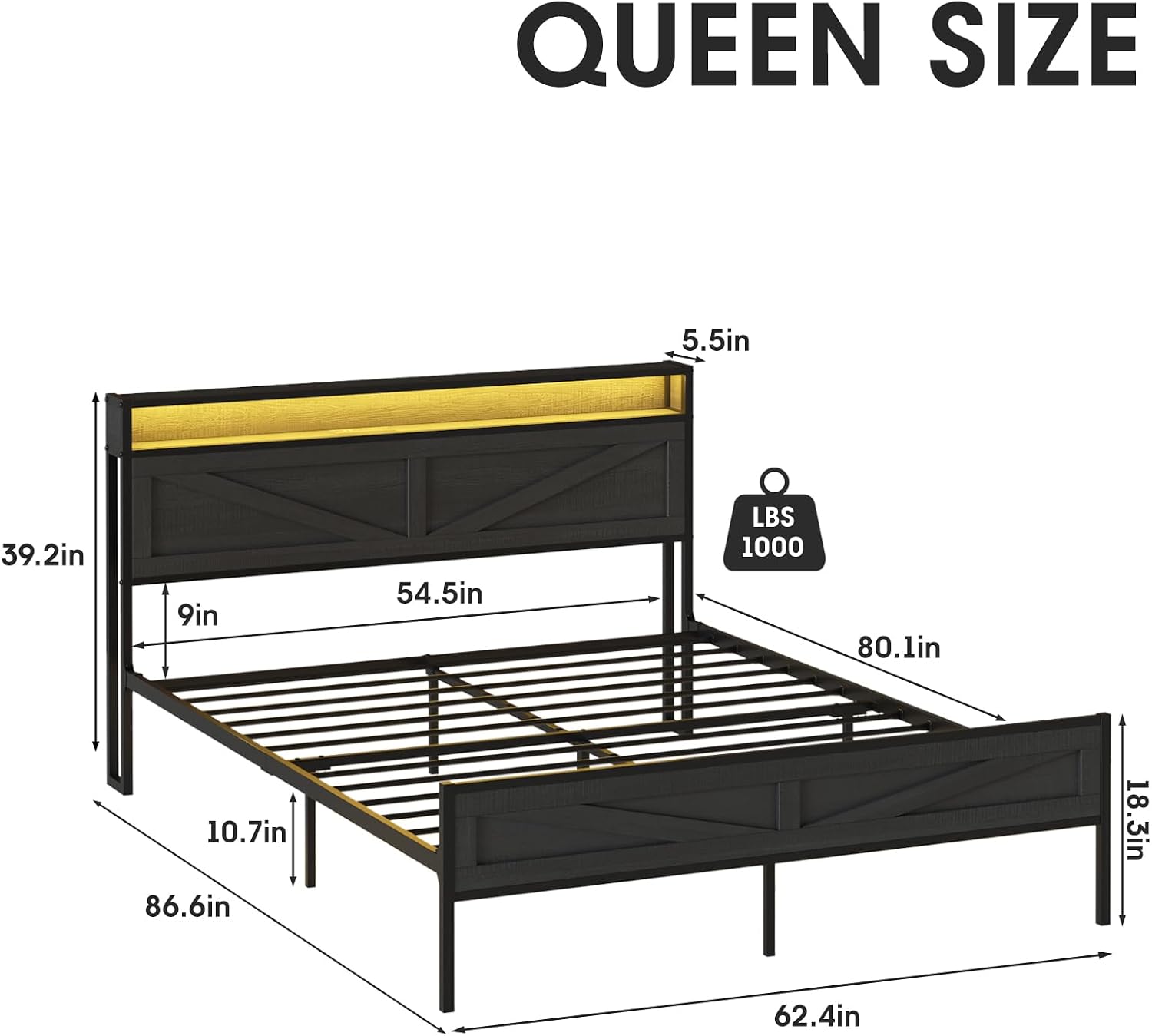
Figure 4.1: Queen Size Bed Frame Dimensions. Overall dimensions are 86.6 inches (L) x 62.4 inches (W) x 39.2 inches (H). The headboard is 39.2 inches high, and the footboard is 18.3 inches high. Under-bed clearance is 10.7 inches.
Assembly Tips:
- Carefully align the direction of the frame and headboard components as shown in the diagrams to avoid reassembly.
- When attaching the metal slats, ensure the plastic snap inserts are firmly secured into the holes. This step is crucial for preventing noise and ensuring stability.
- For the headboard LED light strip, begin the sticky application at the very edge of the board to ensure the entire strip fits without hanging down.

Figure 4.2: Detailed views of the bed frame's construction, highlighting the sturdy metal support, stable connections, noise-free design, and the integrated switch for the LED lights.
5. Operating Instructions
5.1 LED Lights
Your bed frame features integrated LED lights with 20 color options, including both action and static modes. You can adjust the speed and brightness of the lights.
- Control: Use the provided remote control or the integrated switch to operate the LED lights.
- Modes: Cycle through various static colors or dynamic lighting effects.
- Adjustment: Adjust brightness and speed of dynamic modes to create your desired bedroom atmosphere.

Figure 5.1: The smart RGB LED bed frame lights can be controlled via remote or app, offering over 6000 colors, dynamic modes, music sync, timing functions, and adjustable brightness.
5.2 Charging Station
The headboard includes a convenient charging station with 2 USB ports and 2 standard AC outlets.
- Power Connection: Ensure the bed frame's power cord is securely plugged into a wall outlet.
- USB Ports: Use the 5V/2A USB ports to charge mobile phones, tablets, and other USB-powered devices.
- AC Outlets: Use the 120V/12A AC outlets for lamps, laptops, or other small electronic appliances.
- Placement: The charging station is centrally located for easy access, allowing you to charge devices within reach.

Figure 5.2: The integrated charging station provides two AC outlets (120V/12A) and two USB ports (5V/2A) for convenient device charging. The LED lights do not occupy these sockets.
6. Product Features
6.1 Headboard Storage
The bed frame features a headboard with integrated storage space. This area is ideal for placing small items such as glasses, mobile phones, books, or decorative elements.

Figure 6.1: The headboard offers a convenient shelf for storing small items and displaying decor, enhancing bedroom organization.
6.2 Under-Bed Storage
Benefit from 10.7 inches (27.2 cm) of clearance under the bed, providing ample space for storing clothes, seasonal items, or other sundries in storage bins or containers.

Figure 6.2: The bed frame provides 10.7 inches of under-bed clearance, suitable for storing various items in bins or drawers.
7. Maintenance
- Cleaning: Wipe the metal and wood surfaces with a soft, damp cloth. Avoid harsh chemicals or abrasive cleaners that could damage the finish.
- Fasteners: Periodically check all bolts and screws to ensure they remain tight. Re-tighten as necessary to maintain stability and prevent noise.
- Electrical Components: Keep the charging station and LED lights free from dust. Do not attempt to repair electrical components yourself; contact qualified personnel if issues arise.
8. Troubleshooting
8.1 Bed Frame Noise
- Cause: Loose fasteners or improperly installed plastic snap inserts on the metal slats.
- Solution: Ensure all bolts and screws are tightened. Verify that the plastic snap inserts for each slat are fully engaged in their respective holes. These inserts are designed to dampen sound.
8.2 Missing or Damaged Parts
- Cause: Manufacturing error or shipping damage.
- Solution: Review the package contents list. If parts are missing or damaged, contact Halitaa customer support immediately for assistance.
8.3 LED Lights Not Functioning
- Cause: Loose connection, remote control battery dead, or power issue.
- Solution: Check that the LED light strip is properly connected to its power source. Ensure the bed frame's main power cord is plugged in. Replace remote control batteries if necessary.
9. Specifications
| Size | Queen |
| Special Feature | Lighted, USB Port |
| Color | Black |
| Product Dimensions | 86.6"L x 62.4"W x 39.2"H |
| Brand | Halitaa |
| Included Components | Headboard |
| Finish Type | Painted |
| Item Weight | 80 Pounds |
| Furniture Finish | Black |
| Age Range (Description) | Adult |
| Assembly Required | Yes |
| Form Factor | Standard Bed Frame |
| Manufacturer | Halitaa |
| Item model number | D8L241 |
| Date First Available | July 2, 2024 |
| Style | Country Rustic |
| Frame Material | Metal |
10. Warranty & Support
10.1 Limited Warranty
This Halitaa bed frame comes with a limited warranty. Please refer to the warranty card included in your package for specific terms, conditions, and duration of coverage. Retain your proof of purchase for warranty claims.
10.2 Customer Support
If you have any questions, require assistance with assembly, or encounter any issues with your product, please contact Halitaa customer support. Contact information can typically be found on the product packaging or the brand's official website.