
1. Introduction
This manual provides essential information for the safe and efficient operation, maintenance, and troubleshooting of your POXURIO 2450-Watt Dual Fuel Inverter Generator. Please read this manual thoroughly before operating the generator and keep it for future reference.
1.1 Safety Information
Always operate the generator in a well-ventilated area to prevent carbon monoxide poisoning. Keep children and pets away from the generator during operation. Ensure the generator is properly grounded before use. Do not operate the generator in rain or wet conditions. Always turn off the engine and allow it to cool before refueling.
2. Product Overview
The POXURIO 2450-Watt Dual Fuel Inverter Generator is designed for portable power needs, offering both gasoline and propane fuel options. It features a compact design and quiet operation.
2.1 Generator Components
The generator includes a fuel tank, engine, control panel, and various outlets. Key components are illustrated below:
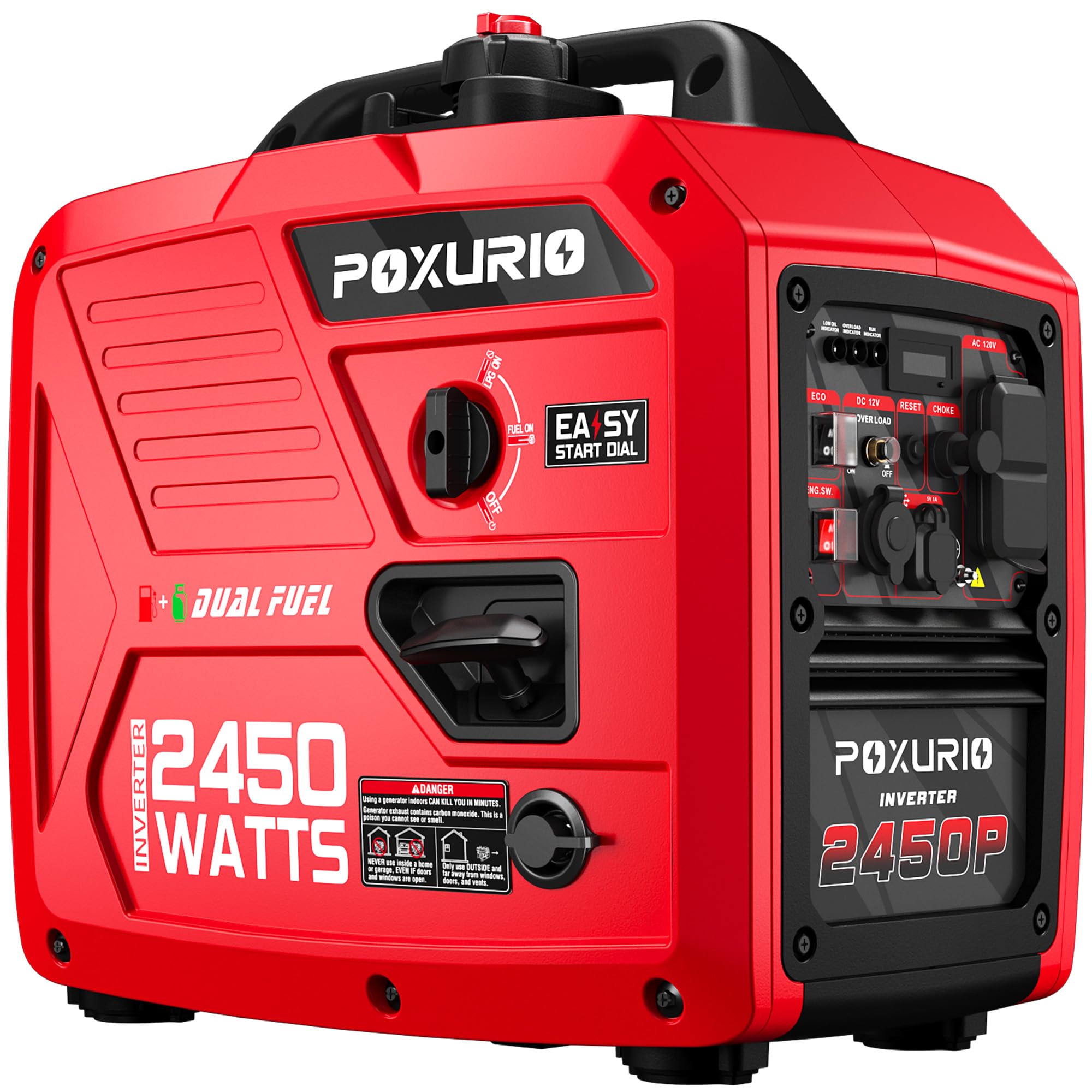
2.2 Control Panel
The control panel provides access to all operational controls and indicators:

- Low Oil Indicator: Illuminates when engine oil level is low.
- Overload Indicator: Illuminates when the generator is overloaded.
- Run Indicator: Illuminates when the generator is operating normally.
- Display Screen: Shows operational information.
- AC 120V Outlets: For connecting standard electrical devices.
- DC 12V Outlet: 12V DC outlet providing 8.3 amps.
- 5V DC USB Duplex: For charging USB-powered devices.
- Engine Switch: Controls engine power (ON/OFF).
- ECO Mode Switch: Engages economy mode for fuel efficiency.
- Reset Button: Resets the generator after an overload.
- Choke: Used for starting a cold engine.
3. Setup
3.1 Unboxing and Inspection
Carefully remove the generator from its packaging. Inspect for any shipping damage. Ensure all accessories are present.
3.2 Adding Engine Oil
The generator is shipped without engine oil. Before first use, add 0.35 liters of 10W-30 engine oil. Refer to the oil fill cap location on the generator. Do not overfill.
3.3 Adding Fuel
Your generator operates on either gasoline or propane.

- For Gasoline: Use unleaded gasoline with an octane rating of 87 or higher. Fill the fuel tank (6L capacity) carefully, avoiding spills. Do not fill above the red indicator in the tank.
- For Propane (LPG): Connect a standard propane tank to the generator's propane inlet using the provided regulator and hose. Ensure all connections are secure.
3.4 Grounding the Generator
For safety, always ground the generator before operation. Connect a grounding wire from the generator's grounding terminal to an appropriate ground source, such as a ground rod.
3.5 Setup Demonstration Video
Video 1: Official video demonstrating the features and basic operation of the POXURIO Inverter Generator, including initial setup steps.
4. Operating the Generator
4.1 Starting the Engine (Gasoline)
- Ensure the generator is on a level surface and properly grounded.
- Turn the fuel cap vent to the 'ON' position.
- Set the fuel selector switch to 'GASOLINE'.
- Move the choke lever to the 'CHOKE' position (for cold starts).
- Turn the engine switch to 'ON'.
- Pull the recoil starter handle firmly until the engine starts.
- Once the engine starts, gradually move the choke lever to the 'RUN' position.

4.2 Starting the Engine (Propane)
- Ensure the generator is on a level surface and properly grounded.
- Connect the propane tank and open the tank valve.
- Set the fuel selector switch to 'PROPANE'.
- Move the choke lever to the 'CHOKE' position (for cold starts).
- Turn the engine switch to 'ON'.
- Pull the recoil starter handle firmly until the engine starts.
- Once the engine starts, gradually move the choke lever to the 'RUN' position.
4.3 Connecting Electrical Devices
Once the generator is running stably, you can connect your electrical devices to the appropriate AC or DC outlets. Ensure the total wattage of connected devices does not exceed the generator's running wattage.
4.4 ECO Mode
Engage the ECO mode switch for reduced engine speed and improved fuel efficiency when operating at lower loads. The engine speed will automatically adjust to match the load demand.
4.5 Stopping the Engine
- Disconnect all electrical loads from the generator.
- Allow the generator to run for a few minutes without load to cool down.
- Turn the engine switch to 'OFF'.
- If using propane, close the propane tank valve. If using gasoline, turn the fuel cap vent to the 'OFF' position for storage.
4.6 Parallel Operation
For increased power output, two compatible POXURIO inverter generators can be connected in parallel using a parallel kit (sold separately).

4.7 Operation Demonstration Video
Video 2: Official video showcasing the capabilities and various wattage options of POXURIO Inverter Generators, including operational aspects.
5. Maintenance
Regular maintenance ensures the longevity and reliable performance of your generator.
5.1 Engine Oil Change
Change the engine oil after the first 20 hours of operation, then every 100 hours or every 6 months, whichever comes first. Use 10W-30 engine oil.
5.2 Air Filter Cleaning
Inspect and clean the air filter every 50 hours or every 3 months. Clean with warm, soapy water, rinse thoroughly, and allow to dry completely before reinstallation.
5.3 Spark Plug Inspection
Inspect the spark plug every 100 hours or every 6 months. Clean or replace if necessary. Ensure the gap is set correctly according to specifications.
5.4 Fuel System Maintenance
If storing the generator for an extended period (over 30 days), drain the gasoline from the fuel tank and carburetor, or use a fuel stabilizer. For propane, simply disconnect the tank.
5.5 Cleaning
Keep the generator clean and free of dirt and debris. Use a damp cloth to wipe down exterior surfaces. Do not use a pressure washer.
6. Troubleshooting
| Problem | Possible Cause | Solution |
|---|---|---|
| Engine will not start | No fuel / Low oil / Choke incorrect / Engine switch OFF | Add fuel / Add oil / Adjust choke / Turn engine switch ON |
| No power output | Overload / Circuit breaker tripped / ECO mode engaged with high load | Reduce load, press reset / Reset circuit breaker / Disengage ECO mode |
| Engine runs, then stops | Low oil / Out of fuel / Clogged fuel filter | Add oil / Refuel / Clean or replace fuel filter |
| Overload indicator on | Too many devices connected / Short circuit | Reduce load / Check devices for short circuits, press reset |
7. Specifications
| Feature | Specification |
|---|---|
| Brand | POXURIO |
| Model Name | KF100337US-05HSD-001 |
| Wattage (Starting) | 2450 Watts |
| Wattage (Running) | 2450 Watts |
| Fuel Type | Dual Fuel (Gasoline/Propane) |
| Fuel Tank Volume | 6 Liters (1.6 Gallons) |
| Runtime (25% load) | Up to 14 hours |
| Noise Level (7m, 25% load) | 59 dB |
| Voltage | 120 Volts |
| Frequency | 60 Hz |
| Item Weight | 43 Pounds |
| Item Dimensions (L x W x H) | 19.3" x 11.8" x 19.3" |
| Engine Oil Capacity | 0.35 Liters |
| Engine Oil Type | 10W-30 |
7.1 Low Noise Operation
The generator is designed for quiet operation, producing approximately 59 decibels at 25% load, making it suitable for various environments.

8. Warranty Information
POXURIO products are covered by a manufacturer's warranty. Please refer to the warranty card included with your product for specific terms, conditions, and duration. Keep your proof of purchase for warranty claims.
9. Support
For technical assistance, parts, or service, please contact POXURIO customer support. Contact information can typically be found on the product packaging or the official POXURIO website.