
1. Introduction
This manual provides essential instructions for the safe and efficient operation, setup, and maintenance of your WARCAT Self-Cleaning Automatic Litter Box. Please read this manual thoroughly before using the product and retain it for future reference.

The WARCAT Self-Cleaning Automatic Litter Box, designed for convenience and pet comfort.
2. Safety Information
The WARCAT Automatic Litter Box is equipped with a comprehensive multi-sensor safety system to prioritize your cat's well-being. This system includes:
- Dual Infrared Sensors: Detect body temperature.
- Two Sets of Motion Sensing Radars: Track real-time movement.
- Two Hall Sensing Radars: Monitor mechanical interaction.
- Four Gravity Sensors: Sense weight distribution.
If a cat approaches or enters the litter box, this multi-level detection network will immediately suspend any ongoing cleaning cycle. The system remains inactive until the cat has safely exited, preventing potential risks during operation.
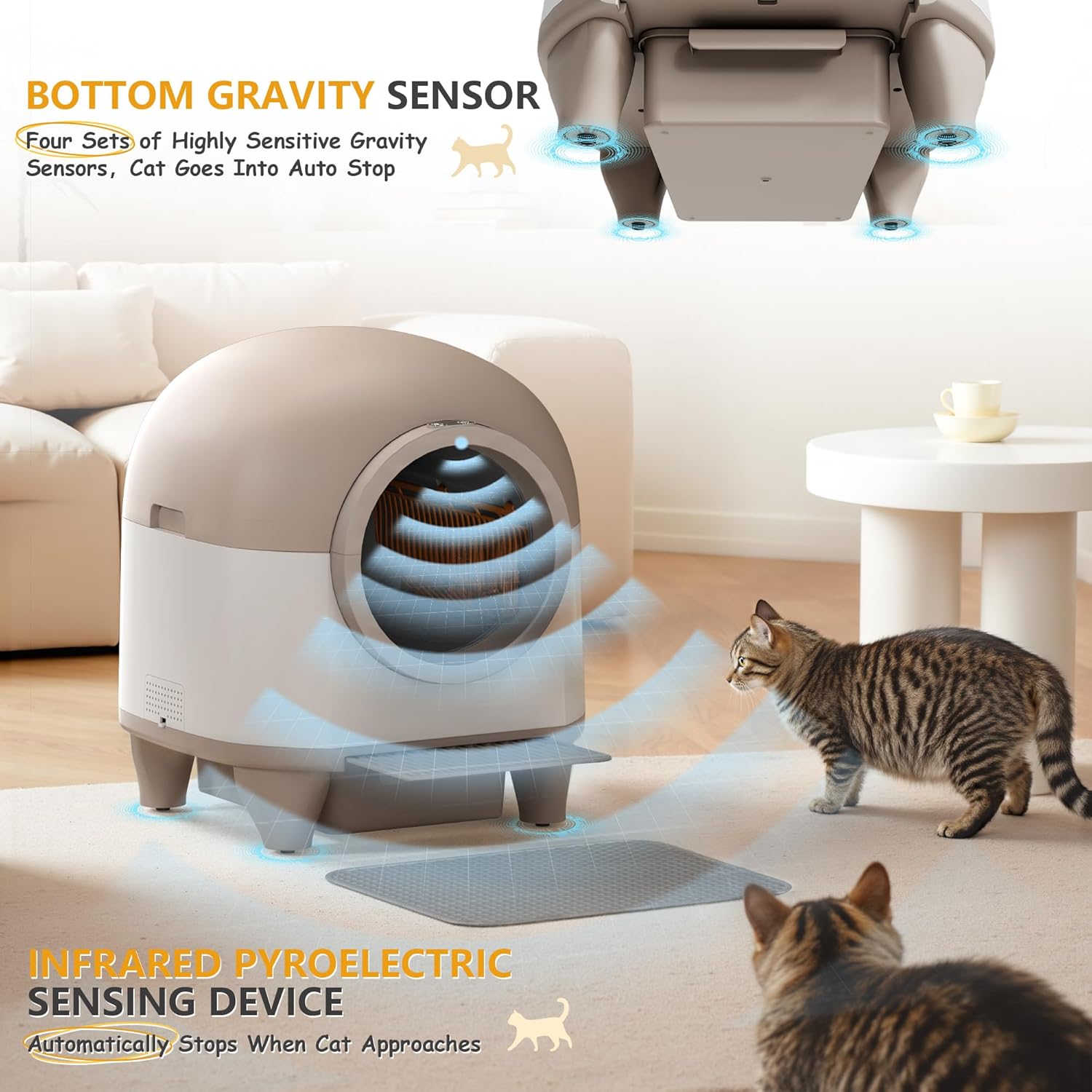
The litter box incorporates multiple safety sensors, including bottom gravity sensors and infrared detection, to ensure the cleaning cycle pauses when a cat is nearby.
3. Package Contents
Upon unpacking, please verify that all the following components are included:
- 1 x WARCAT Self-Cleaning Automatic Litter Box
- 1 x Protective Pad
- 1 x Power Adapter
- 1 x Fragrant Gel (fresh smell)
- 1 x Roll of Garbage Bags
- 1 x Product Manual (this document)
4. Setup
4.1 Initial Assembly
The WARCAT litter box comes largely pre-assembled. Minimal setup is required to prepare it for use.
- Place the litter box on a flat, stable surface.
- Ensure the waste collecting bin is correctly inserted into its designated slot at the bottom of the unit.
- Install the protective pad in front of the litter box entrance.

The WARCAT litter box features an easy-to-assemble design with a removable upper lid and waste collecting bin for straightforward setup and maintenance.
4.2 Adding Litter
Open the upper lid and pour clumping cat litter into the drum. It is recommended to use lightweight clumping cat litter for optimal performance. Do not overfill the drum; refer to the internal fill line for the appropriate level.
4.3 Power Connection
Connect the power adapter to the litter box and then plug it into a standard electrical outlet. The unit will perform an initial calibration cycle.
4.4 App Connectivity
Download the WARCAT app from your smartphone's app store. Follow the in-app instructions to connect your litter box via 2.4G WiFi. This enables remote control and monitoring features.
5. Operating Instructions
5.1 Automatic Cleaning Cycle
After your cat uses the litter box and exits, the unit will automatically initiate a cleaning cycle after a preset delay. The internal drum rotates to sift clean litter from waste, depositing the waste into the sealed collecting bin below.
5.2 Odor Control
The litter box features an airtight cover for the waste bin to contain odors. A scented gel can be placed within the unit to infuse a fresh aroma. A 72-hour continuous purification cycle further assists in maintaining a clean-smelling environment.
5.3 Ultra-Quiet Operation
The WARCAT litter box is designed for quiet operation, typically producing less than 35dB of noise during its cleaning cycles. This ensures minimal disruption to your household.

The WARCAT litter box operates at a low noise level, typically below 35dB, ensuring minimal disturbance in your home.
5.4 Smart App Control
The WARCAT app provides seamless control and monitoring capabilities:
- Schedule Cleanings: Set custom cleaning schedules.
- Track Cat Habits: Monitor visit frequency, time spent, and weight fluctuations.
- Real-time Data: Receive updates on your pet's routines to help identify early health changes.

Manage and monitor the litter box remotely using the dedicated WARCAT app, which provides scheduling and cat habit tracking features.
6. Maintenance
6.1 Emptying the Waste Drawer
The 10-liter waste drawer can hold waste for up to 10 days for a single cat. To empty, simply pull out the drawer, tie off the garbage bag, and replace it with a new one. The unit is compatible with any garbage bag with a diameter of 17.7 inches or larger.
6.2 Deep Cleaning
For a thorough cleaning, the litter box can be easily disassembled. Remove the upper lift lid and the internal drum. The drum can be rinsed with water. Important: Ensure the base unit, which contains electronic components, remains dry. Do not submerge the base in water or spray it directly.

For thorough cleaning, the litter box can be easily disassembled. The drum can be rinsed with water, while the base should be kept dry.
6.3 Litter Change
The unit supports a "one-click litter change" function, which can be initiated via the control panel or the app to empty the old litter into the waste drawer, facilitating a complete litter replacement.
7. Troubleshooting
If you encounter issues with your WARCAT Self-Cleaning Automatic Litter Box, please refer to the following common solutions:
- Unit Not Cycling / Flashing Yellow Light:
- Ensure the unit is placed on a completely flat and stable surface.
- Verify that the waste drawer is correctly inserted and not full.
- Check that the litter level is not above the maximum fill line. Overfilling, especially with heavy litter, can impede rotation.
- Confirm there are no obstructions preventing the drum from rotating freely.
- If the issue persists, power cycle the unit by unplugging it for 30 seconds and then plugging it back in.
- App Connectivity Issues:
- Ensure your smartphone is connected to a 2.4GHz Wi-Fi network during setup. The device does not support 5GHz Wi-Fi.
- Restart your router and the litter box.
- Ensure the litter box is within range of your Wi-Fi router.
- Odor Persistence:
- Ensure the waste drawer is emptied regularly.
- Replace the scented gel as needed.
- Perform a deep clean of the unit, paying attention to all removable parts.
For further assistance, please contact WARCAT customer support.
8. Specifications
| Model Name | Self Cleaning Litter Box, Automatic Cat Litter Box Self Cleaning Supporting 2.4GHz Wi-Fi for Multiple Cats |
| Model Number | W25-0769-0514 |
| Brand | WARCAT |
| Product Dimensions (L x W x H) | 18.9" x 18.9" x 22.1" |
| Item Weight | 26 Pounds |
| Drum Capacity | 90 Liters |
| Waste Drawer Capacity | 10 Liters |
| Material | Plastic |
| Target Audience | Cats (2.2 to 24.2 lbs) |
| Connectivity | 2.4GHz Wi-Fi |
9. Warranty and Support
9.1 Product Warranty
The WARCAT Self-Cleaning Automatic Litter Box comes with a 1-year warranty from the date of purchase. This warranty covers manufacturing defects under normal use. Please retain your proof of purchase for warranty claims.
9.2 Customer Support
For technical assistance, troubleshooting not covered in this manual, or warranty inquiries, please contact WARCAT customer support through the official website or the contact information provided with your purchase.