1. Introduction
This manual provides detailed instructions for the setup, operation, and maintenance of your Hama HiFi-Tuner DIT2105. This device is a versatile digital and internet radio tuner designed for audio reception via FM, DAB/DAB+, and internet radio. It also features Bluetooth receiver (RX) and transmitter (TX) capabilities, allowing for flexible audio streaming.
2. Product Overview
2.1 Key Features
- Digital and Internet Radio: Receive audio signals via FM, DAB/DAB+, and internet radio.
- Bluetooth Receiver (RX): Stream music from your smartphone, tablet, or laptop to the tuner.
- Bluetooth Transmitter (TX): Transmit audio from the tuner to compatible Bluetooth devices like headphones or speakers.
- Station Presets: Store up to 30 DAB+/DAB and FM stations for quick access.
- Streaming Services: Compatible with Spotify Connect and Amazon Music for access to thousands of songs and existing playlists.
- USB Type-A Port: For charging devices and playing media from external storage (e.g., USB stick, MP3 player).
- 2.8" Colour Display: Provides clear operation and visual information.
- External Antenna Connection: F-connector for optimizing reception with various antennas.
- OKTIV App Support: Control the device, save favourites, and select music/podcasts/radio directly from your smartphone or tablet.
2.2 Front Panel Controls and Display
The front panel features a clear 2.8" colour display and various controls for easy navigation and operation.

Image 2.2.1: Front view of the Hama HiFi-Tuner DIT2105, showing the central 2.8-inch colour display, large rotary knobs for volume and navigation, and various buttons for preset, mode, alarm, EQ, menu, info, and back functions. An AUX IN port and a USB port are also visible.

Image 2.2.2: Angled front view of the Hama HiFi-Tuner DIT2105, highlighting the sleek black design and the accessible front panel controls.
2.3 Rear Panel Connections
The rear panel provides all necessary connections for power, antennas, and audio output.

Image 2.3.1: Rear panel of the Hama HiFi-Tuner DIT2105, showing connections for Bluetooth antenna, DAB/FM antenna, optical out, coaxial out, L/R line out, WiFi antenna, and AC power input.

Image 2.3.2: Example of connection cables, including RCA audio cables, a 3.5mm audio cable, and a power cable, typically used with the Hama HiFi-Tuner DIT2105.
3. Setup
3.1 Unpacking and Placement
- Carefully remove the tuner from its packaging.
- Place the tuner on a stable, flat surface, ensuring adequate ventilation around the unit.
- Keep the unit away from direct sunlight, heat sources, and moisture.
3.2 Antenna Connection
- DAB/FM Antenna: Connect the supplied DAB/FM antenna to the "DAB/FM ANTENNA" F-connector on the rear panel. For optimal reception, consider using an external antenna.
- WiFi Antenna: Connect the supplied WiFi antenna to the "WIFI ANTENNA" connector on the rear panel for internet radio and app control functionality.
- Bluetooth Antenna: Connect the supplied Bluetooth antenna to the "BLUETOOTH ANTENNA" connector on the rear panel for Bluetooth RX/TX functionality.
3.3 Audio Output Connection
Connect the tuner to your amplifier or active speakers using one of the following methods:
- Analog Output (RCA): Connect the "LINE OUT L" and "LINE OUT R" RCA jacks on the tuner to the corresponding analog input on your amplifier.
- Digital Optical Output: Connect an optical cable from the "OPTICAL OUT" port on the tuner to an optical input on your amplifier or DAC.
- Digital Coaxial Output: Connect a coaxial cable from the "COAXIAL OUT" port on the tuner to a coaxial input on your amplifier or DAC.
3.4 Power Connection
- Connect the power cable to the "AC IN 100-240V~ 50/60Hz" port on the rear panel.
- Plug the other end of the power cable into a suitable wall outlet.
- The unit uses 2 AAA batteries (included) for the remote control.
4. Operating Instructions
4.1 Initial Power On and Setup Wizard
- Press the power button on the front panel or remote control to turn on the tuner.
- The first time you power on, a setup wizard will guide you through language selection, network connection, and time/date settings. Follow the on-screen instructions.
4.2 Mode Selection
Use the "mode" button on the front panel or remote control to switch between different operating modes:
- DAB/DAB+ Radio: For digital radio broadcasts.
- FM Radio: For analog FM radio broadcasts.
- Internet Radio: For streaming radio stations over the internet.
- Bluetooth RX: To receive audio from a Bluetooth device.
- Bluetooth TX: To transmit audio to a Bluetooth device.
- USB Playback: To play audio files from a connected USB storage device.
- AUX In: To play audio from an external device connected to the front AUX IN port.
4.3 DAB/DAB+ and FM Radio
- Select DAB or FM mode.
- The tuner will automatically scan for available stations (DAB) or allow manual tuning (FM).
- Use the navigation knob to browse stations.
- Press the "preset" button to save or recall favourite stations (up to 30 for DAB/DAB+ and FM combined).
4.4 Internet Radio
- Ensure the tuner is connected to your WiFi network.
- Select Internet Radio mode.
- Browse stations by genre, location, or search.
- Save favourite internet radio stations to presets.
4.5 Bluetooth Functionality (RX/TX)
- Bluetooth RX (Receiver):
- Select Bluetooth RX mode.
- Enable Bluetooth on your smartphone/tablet/laptop.
- Search for "Hama DIT2105" (or similar) in your device's Bluetooth settings and pair.
- Once connected, audio from your device will play through the tuner's output.
- Bluetooth TX (Transmitter):
- Select Bluetooth TX mode.
- Put your Bluetooth headphones or speaker into pairing mode.
- The tuner will search for and connect to nearby Bluetooth audio devices.
- Once connected, audio from the tuner (e.g., radio, USB) will be transmitted to your Bluetooth device.
4.6 USB Playback
- Insert a USB storage device (e.g., USB stick, MP3 player) into the front USB Type-A port.
- Select USB Playback mode.
- Use the navigation controls to browse and select audio files.
4.7 App Control (OKTIV App)
- Download the OKTIV app from your device's app store.
- Ensure your smartphone/tablet and the tuner are connected to the same WiFi network.
- Open the OKTIV app and follow the instructions to connect to your Hama DIT2105.
- The app allows you to control the tuner, manage presets, and browse music/podcasts/radio.
5. Maintenance
- Cleaning: Disconnect the power before cleaning. Use a soft, dry cloth to wipe the surface of the tuner. Do not use liquid cleaners or abrasive materials.
- Ventilation: Ensure the ventilation openings are not blocked to prevent overheating.
- Storage: If storing the unit for an extended period, disconnect it from power and store it in a cool, dry place.
6. Troubleshooting
| Problem | Possible Cause | Solution |
|---|---|---|
| No power | Power cable not connected; power outlet faulty. | Check power cable connection; try a different outlet. |
| No sound | Volume too low; incorrect input selected on amplifier; audio cables not connected properly. | Increase volume; select correct input on amplifier; check audio cable connections. |
| Poor DAB/FM reception | Antenna not connected or positioned poorly; weak signal. | Ensure antenna is securely connected; reposition antenna; consider an external antenna. |
| Internet radio not working | No WiFi connection; incorrect WiFi password; router issue. | Check WiFi antenna connection; verify WiFi password; restart router and tuner. |
| Bluetooth pairing failed | Device not in pairing mode; too far from tuner; interference. | Ensure both devices are in pairing mode; move devices closer; restart Bluetooth on both devices. |
7. Specifications
| Feature | Detail |
|---|---|
| Model Number | DIT2105 |
| Brand | Hama |
| Colour | Black |
| Connectivity Technology | Bluetooth, Wi-Fi, USB, Optical, Coaxial, RCA |
| Tuner Technology | DAB+, FM, Internet Radio |
| Special Features | DAB+/Internet Radio/Bluetooth® RX/TX, App Control (OKTIV), USB Playback |
| Compatible Devices | Smartphone, Tablet, Laptop, PC, Speaker, Headphone, MP3 Player, USB Stick |
| Display | 2.8" Colour Display |
| Power Source | AC 100-240V~ 50/60Hz |
| Item Weight | 3560 Grams |
| Dimensions (Approx.) | 43 cm (Width) x 30 cm (Depth) x 7 cm (Height) |
| Included Components | Tuner unit, Power cable, Bluetooth antenna, DAB/FM antenna, WiFi antenna, Remote control (with 2 AAA batteries) |
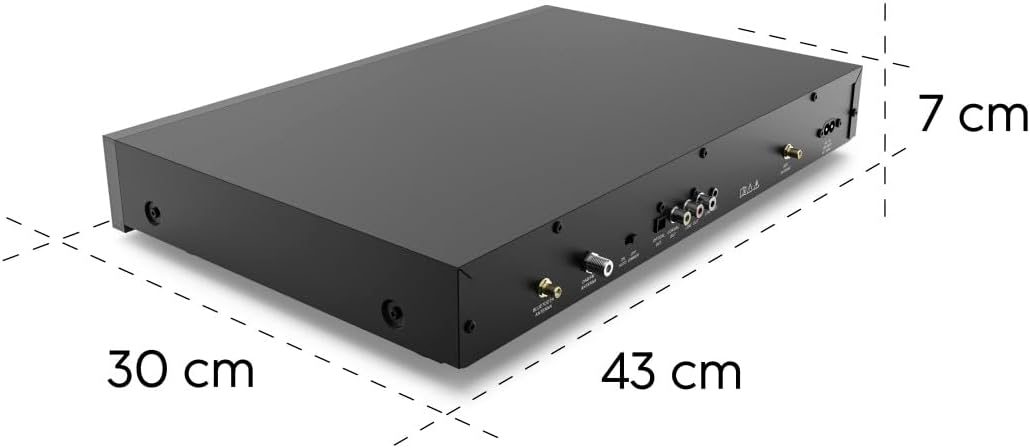
Image 7.1: Approximate dimensions of the Hama HiFi-Tuner DIT2105: 43 cm width, 30 cm depth, and 7 cm height.
8. Warranty and Support
For warranty information and technical support, please refer to the documentation provided with your purchase or visit the official Hama website.
- Manufacturer: Hama
- Website: www.hama.com (Please check for your regional support page)


