
InMotion ANC True Wireless Earbuds
InMotion ANC True Wireless Earbuds User Manual
Model: ANC True Wireless Earbuds
Brand: InMotion
1. Introduction
Thank you for choosing the InMotion ANC True Wireless Earbuds. This manual provides essential information for setting up, operating, and maintaining your earbuds to ensure optimal performance and longevity. Please read this manual thoroughly before use.
These earbuds feature Active Noise Cancelling (ANC) for an immersive audio experience, true wireless connectivity for freedom of movement, and intuitive touch controls. They are designed for comfort with suction tips and offer up to 6 hours of use on a single charge.
Safety Information
- Do not expose the earbuds or charging case to extreme temperatures, humidity, or liquids.
- Avoid dropping or subjecting the device to strong impacts.
- Do not attempt to disassemble or modify the earbuds or charging case.
- Keep out of reach of children.
- Use only the provided charging cable or a certified equivalent.
2. What's in the Box
Verify that all items are present in your package:
- InMotion ANC True Wireless Earbuds (Left and Right)
- Charging Carry Case
- USB-C Charging Cable
- User Manual (this document)

Image: The InMotion ANC True Wireless Earbuds resting inside their open charging case, showcasing the sleek design and charging indicators.
3. Setup
3.1 Charging the Earbuds and Case
Before first use, fully charge the earbuds and the charging case.
- Place the earbuds into the charging case, ensuring they are correctly seated.
- Connect the USB-C charging cable to the charging port on the case and the other end to a USB power source (e.g., wall adapter, computer USB port).
- The indicator lights on the case will show charging status. Once fully charged, the lights will indicate completion or turn off.
A full charge provides up to 6 hours of earbud use. The charging case provides multiple additional charges.
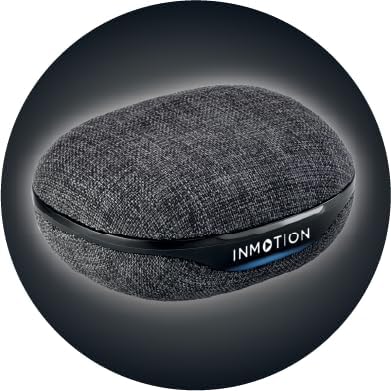
Image: Front view of the InMotion ANC True Wireless Earbuds charging case, highlighting the charging port and indicator lights.
3.2 Pairing with Your Device (One-Step Pairing)
The InMotion ANC True Wireless Earbuds feature one-step pairing for quick and easy connection.
- Ensure the earbuds are charged and inside the charging case.
- Open the lid of the charging case. The earbuds will automatically enter pairing mode.
- On your device (smartphone, tablet, laptop), go to Bluetooth settings and turn Bluetooth on.
- Search for "InMotion ANC Earbuds" (or similar name) in the list of available devices.
- Select the earbuds to connect. Once connected, you will hear an audible confirmation, and the indicator lights on the earbuds may change.
The earbuds will automatically reconnect to the last paired device when removed from the case, if Bluetooth is enabled on the device.
4. Operating Instructions
4.1 Touch Controls
The earbuds are equipped with intuitive touch controls on each earbud. Specific functions may vary slightly by device, but common controls include:
- Play/Pause: Single tap on either earbud.
- Next Track: Double tap on the right earbud.
- Previous Track: Double tap on the left earbud.
- Answer/End Call: Single tap on either earbud during an incoming call.
- Reject Call: Press and hold on either earbud during an incoming call.
- Activate Voice Assistant: Triple tap on either earbud.
- Toggle ANC/Transparency Mode: Press and hold on either earbud (duration may vary, refer to specific product details if available).

Image: Side view of a single InMotion ANC True Wireless Earbud, illustrating its ergonomic design and the touch-sensitive area.
4.2 Active Noise Cancelling (ANC)
The Active Noise Cancelling feature reduces ambient noise, allowing for a more immersive listening experience. To activate or deactivate ANC, use the designated touch control gesture (typically a press and hold). Some models may also feature a Transparency Mode, which allows you to hear your surroundings while still enjoying your audio.
5. Maintenance
Proper maintenance ensures the longevity and performance of your InMotion ANC True Wireless Earbuds.
5.1 Cleaning
- Gently wipe the earbuds and charging case with a soft, dry, lint-free cloth.
- Do not use abrasive cleaners, alcohol, or chemical solvents.
- Carefully remove any earwax or debris from the ear tips and speaker mesh using a small, soft brush or cotton swab.
5.2 Storage
When not in use, store the earbuds in their charging case to protect them from dust, dirt, and damage. Store the case in a cool, dry place away from direct sunlight and extreme temperatures.

Image: Back view of the InMotion ANC True Wireless Earbuds charging case, showing its compact and portable design.
6. Troubleshooting
If you encounter issues with your earbuds, try the following solutions:
| Problem | Solution |
|---|---|
| Earbuds not pairing/connecting. |
|
| No sound from one or both earbuds. |
|
| Charging case not charging. |
|
| ANC not working effectively. |
|
7. Specifications
| Feature | Detail |
|---|---|
| Model Name | ANC True Wireless Earbuds |
| Noise Control | Adaptive Noise Cancellation |
| Connectivity Technology | Wireless (Bluetooth) |
| Included Components | Charging carry case |
| Compatible Devices | Laptops, Smartphone, Tablets |
| Control Method | Touch |
| Audio Driver Type | Dynamic Driver |
| Special Feature | Call Answering |
| Manufacturer | InMotion |
| Item Weight | 3.2 ounces |
| Color | Black |
| Ear Placement | In Ear |
| Form Factor | In Ear |
| Impedance | 16 Ohm |
| Battery Life (Earbuds) | Up to 6 hours |
| Charging Time | Approx. 1.5 hours (for earbuds and case) |
8. Warranty and Support
InMotion products are manufactured with high-quality standards. For warranty information and customer support, please refer to the warranty card included with your product or visit the official InMotion website. You can also contact InMotion customer service through their Amazon store page:
Visit the InMotion Store on Amazon
InMotion is committed to providing excellent customer service and support for their products.
Ask a question about this manual
Ask about setup, troubleshooting, compatibility, parts, safety, or missing instructions. Manuals+ will review the question and use this page’s manual context to help answer it.