
1. Introduction and Overview
This manual provides detailed instructions for the safe and proper installation, operation, and maintenance of your Brookstone Tilt Wall Mount, Model BKS-720-909. This wall mount is designed to securely hold most flat and curved televisions ranging from 36 to 70 inches, with a maximum weight capacity of 77 lbs (35 kg).
The mount features a low-profile design, positioning your TV approximately 0.81 inches from the wall, and offers a tilt adjustment range of 0° to -8° to optimize viewing angles and reduce glare.

Figure 1: Front view of the Brookstone Tilt Wall Mount, showing the main wall plate and two vertical TV brackets.

Figure 2: Lifestyle image illustrating the low-profile design of the Brookstone Tilt Wall Mount, showing the TV positioned 0.81 inches from the wall.
2. Safety Information
WARNING: Read all instructions before installation. If you do not understand these instructions or have doubts about the safety of the installation, consult a qualified installer.
- Do not exceed the maximum weight capacity of 77 lbs (35 kg). Exceeding this limit may result in serious injury or property damage.
- Ensure the mounting surface (wall) can safely support the combined weight of the mount and the television.
- This product is intended for indoor use only.
- Use only the hardware provided or specified by the manufacturer.
- Always have at least two people assist with the installation of large or heavy televisions.
- Verify that there are no hidden electrical wires, water pipes, or gas lines in the wall where you intend to drill.
- Tighten all screws firmly but do not overtighten. Overtightening can damage the screws or the mounting surface.
3. Package Contents
Carefully unpack the box and ensure all components are present and undamaged. If any parts are missing or defective, contact customer support.
- Wall Plate Assembly (x1)
- TV Brackets (x2)
- Hardware Kit (various screws, washers, spacers, wall anchors)
- Bubble Level (x1)
- Instruction Manual (x1)
4. Setup and Installation
4.1 Pre-Installation Checks
- TV Compatibility: Verify your TV's weight is within 77 lbs (35 kg) and its VESA mounting pattern (distance between screw holes on the back of the TV) is between 200x200mm and 400x400mm.
- Wall Type: This mount is suitable for solid concrete walls, brick walls, or wood stud walls. Do NOT install on drywall alone.
- Tools Required (Not Included): Pencil, stud finder, drill, drill bits (wood/concrete), Phillips head screwdriver, socket wrench, measuring tape.
4.2 Attaching TV Brackets to TV
- Lay your TV face down on a soft, clean surface to prevent scratches.
- Identify the VESA mounting holes on the back of your TV.
- Select the appropriate screws (M4, M6, or M8) and spacers from the hardware kit that fit your TV's mounting holes.
- Attach the two TV brackets to the back of your TV using the selected screws and spacers. Ensure the brackets are centered and the hooks face upwards.
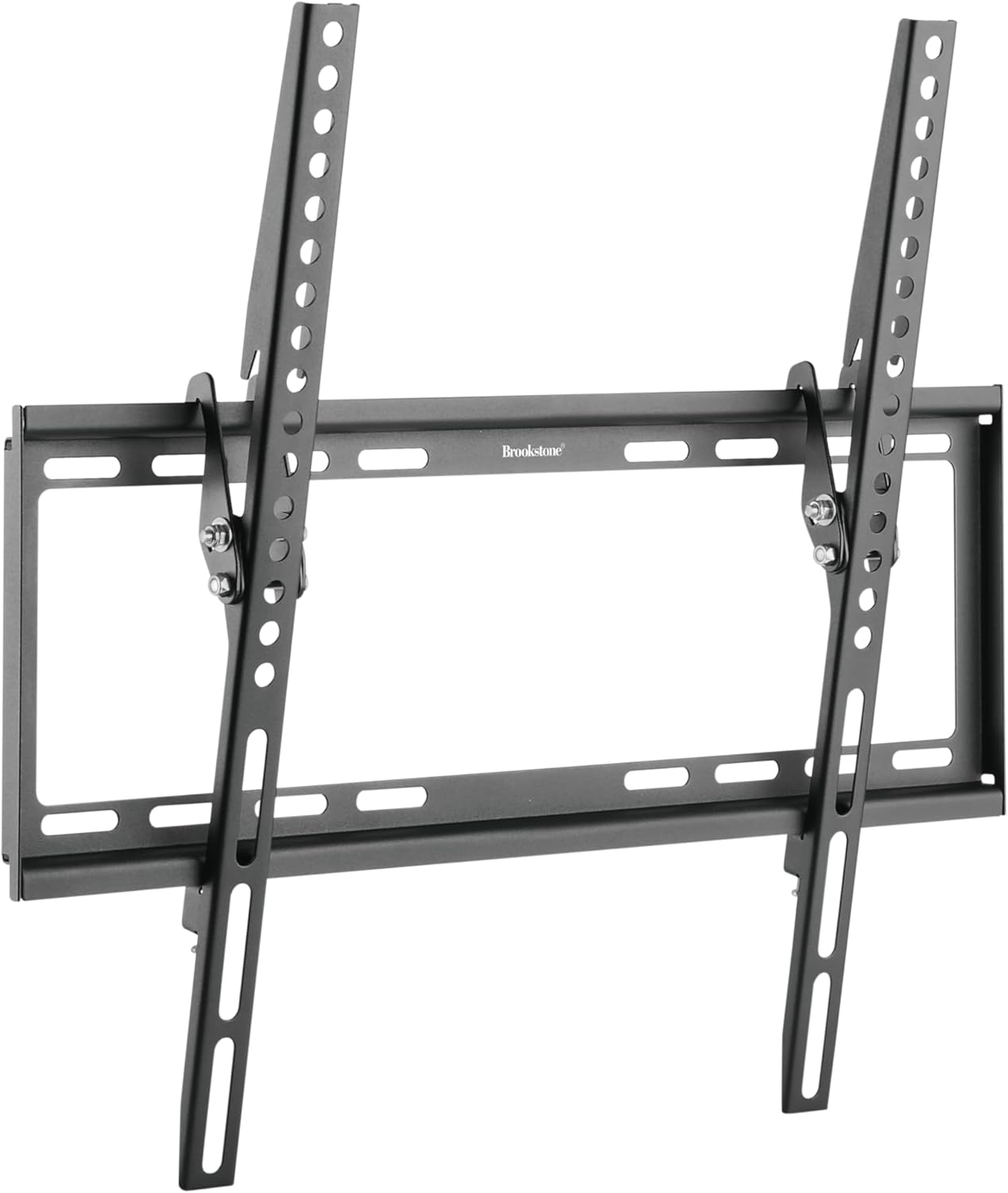
Figure 3: Angled view of the mount, demonstrating the tilt mechanism on the TV brackets.
4.3 Mounting the Wall Plate to the Wall
- Determine Mounting Location: Decide on the desired height for your TV. Use a pencil to mark the center of the desired TV position.
- Locate Studs (for wood stud walls): Use a stud finder to locate the center of two adjacent wood studs. Mark their centers. The wall plate must be mounted to at least two studs.
- Position Wall Plate: Hold the wall plate against the wall at the desired height, ensuring it is level using the provided bubble level. Mark the drilling points through the holes on the wall plate.
- Drill Pilot Holes:
- For Wood Studs: Drill pilot holes using a 7/32 inch (5.5mm) drill bit to a depth of 2.2 inches (55mm).
- For Concrete/Brick Walls: Drill pilot holes using a 3/8 inch (10mm) drill bit to a depth of 2.4 inches (60mm). Insert concrete anchors into the holes until they are flush with the wall.
- Secure Wall Plate: Attach the wall plate to the wall using the lag bolts and washers. Tighten all bolts firmly with a socket wrench.

Figure 4: The Brookstone Tilt Wall Mount installed on a wall, ready for a TV.
4.4 Hanging the TV
- With assistance, carefully lift the TV with the attached brackets.
- Hook the TV brackets onto the top edge of the wall plate.
- Gently lower the TV until the brackets are fully seated on the wall plate.
- Locate the safety screws or locking mechanisms on the bottom of the TV brackets. Tighten these to secure the TV to the wall plate and prevent accidental dislodging.
5. Operating Instructions
5.1 Tilt Adjustment
The Brookstone Tilt Wall Mount allows for a tilt adjustment from 0° to -8° to achieve optimal viewing angles and reduce glare.
- To adjust the tilt, gently push or pull the bottom of the TV to the desired angle. The friction-based mechanism will hold the TV in place.
- Ensure the TV is stable after adjustment.

Figure 5: Lifestyle image showing a TV mounted with the Brookstone Tilt Wall Mount, demonstrating the 0° to -8° tilt adjustment for glare reduction.
6. Maintenance
- Cleaning: Use a soft, dry cloth to clean the mount. Avoid abrasive cleaners or solvents.
- Periodic Checks: Periodically check all screws and bolts to ensure they remain tight and secure. Do not overtighten.
- Damage Inspection: Inspect the mount for any signs of damage or wear. If damage is observed, discontinue use and contact customer support.
7. Troubleshooting
- TV is not level: Ensure the wall plate was installed level. If not, remove the TV, loosen the wall plate bolts slightly, adjust with a level, and re-tighten.
- TV does not tilt smoothly: Check for any obstructions behind the TV. Ensure the tilt mechanism is free of debris.
- Mount feels unstable: Immediately remove the TV. Re-check all mounting bolts on the wall plate and TV brackets for proper tightness. Ensure the wall type is appropriate and anchors (if used) are correctly installed. Do not re-hang the TV until stability is confirmed.
- Missing parts: Refer to the Package Contents section. If parts are missing, contact Brookstone customer support.
8. Specifications
| Feature | Specification |
|---|---|
| Brand | Brookstone |
| Model Number | BKS-720-909 |
| Compatible TV Sizes | 36″ – 70″ |
| Weight Capacity | 77 lbs (35 kg) |
| VESA Compatibility | 200x200mm to 400x400mm |
| Tilt Angle | 0° to -8° |
| Profile from Wall | 0.81″ (20.5mm) |
| Material | Stainless Steel |
| Color | Black |
| Item Weight | 4 pounds |
| Product Dimensions | 12 x 9 x 2 inches |
| UPC | 850060744686 |
9. Warranty and Support
Brookstone products are designed for quality and reliability. For warranty information, technical support, or to inquire about replacement parts, please refer to the warranty card included with your purchase or visit the official Brookstone website. Please have your model number (BKS-720-909) and proof of purchase ready when contacting support.