
1. Introduction
Thank you for choosing the TELESTAR TOP 250 DAB+/Internet Radio. This manual provides essential information for setting up, operating, and maintaining your device. Please read it thoroughly before use to ensure proper functionality and safety.
2. Safety Information
Always follow basic safety precautions when using this product to reduce the risk of fire, electric shock, and injury.
- Do not expose the device to rain or moisture.
- Do not open the casing; refer all servicing to qualified personnel.
- Ensure proper ventilation around the unit.
- Use only the provided power adapter.
- Keep the device away from heat sources and direct sunlight.
3. Package Contents
Carefully unpack the box and ensure all items are present:
- TELESTAR TOP 250 Unit
- External Power Adapter DC 15 Volt / 1.5 A
- Screw-on Telescopic Antenna
- Remote Control with Battery (CR2025)
- User Manual (this document)

Image: Contents of the TELESTAR TOP 250 package, including the radio unit, remote control, power adapter, and antenna.
4. Product Overview
4.1 Front Panel
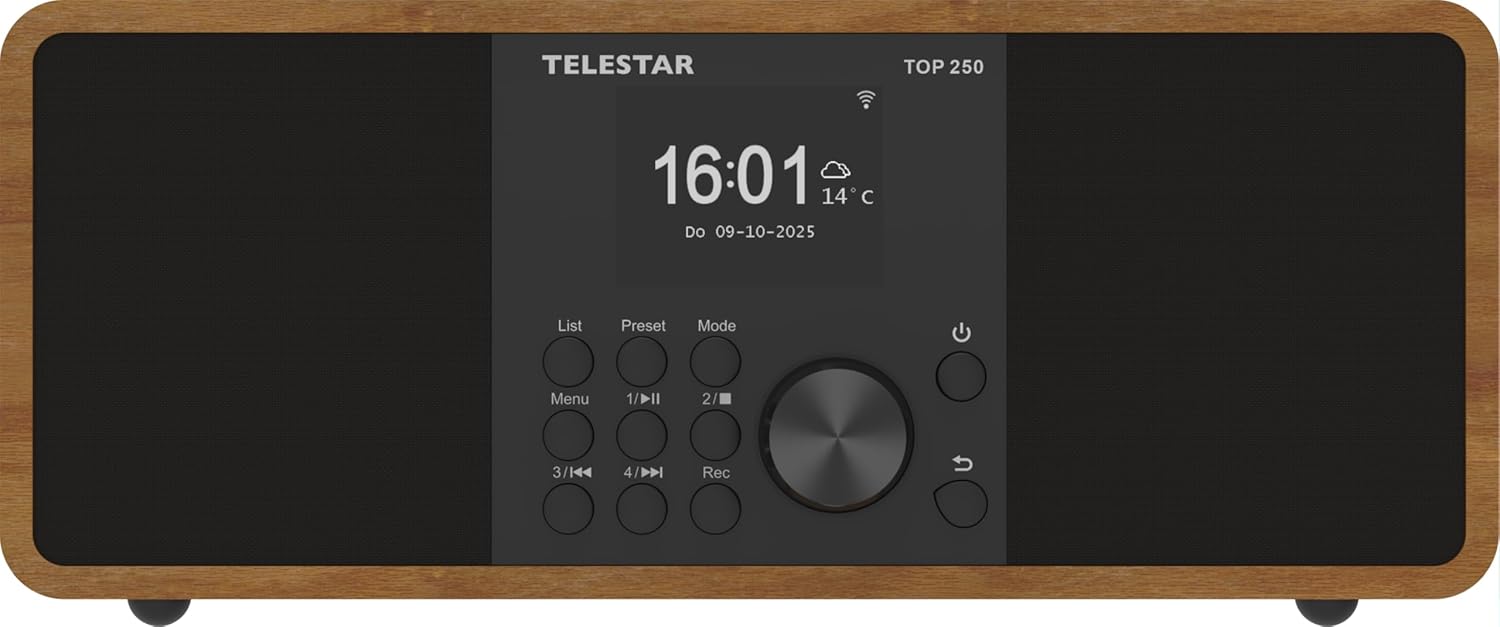
Image: Front view of the TELESTAR TOP 250, highlighting the central display, navigation knob, and various control buttons.
- Display: Large 6.1 cm illuminated color display for information and menu navigation.
- Control Knob: Used for volume adjustment and menu navigation.
- Direct Selection Buttons (1-4): For quick access to favorite stations or functions.
- Menu Button: Accesses the main menu.
- Mode Button: Switches between different operating modes (DAB+, FM, Internet Radio, Bluetooth, USB).
- Power Button: Turns the unit on/off or puts it into standby.
4.2 Rear Panel
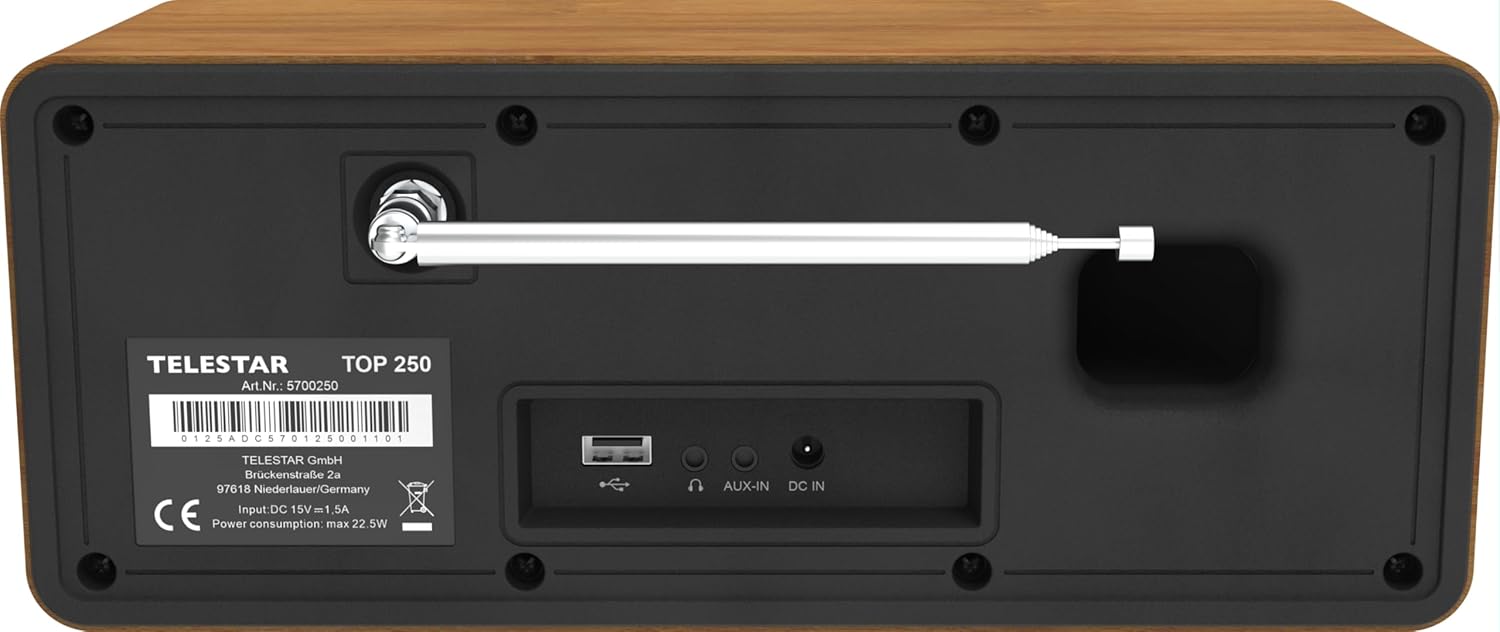
Image: Rear panel of the TELESTAR TOP 250, detailing the screw-on antenna connector, USB 2.0 port, 3.5mm AUX-in, headphone jack, and DC power input.
- Antenna Connector: For the screw-on telescopic antenna.
- USB 2.0 Port: For USB media playback and recording.
- AUX-in (3.5 mm): Connect external audio devices.
- Headphone Jack: For private listening.
- DC IN: Power input for the external power adapter.
4.3 Remote Control

Image: The remote control for the TELESTAR TOP 250, showing buttons for power, mode selection, equalizer, volume control, navigation, direct presets, and recording.
The remote control allows convenient operation of all functions from a distance. Ensure the CR2025 battery is correctly inserted.
5. Setup
5.1 Connecting Power
- Connect the external power adapter to the DC IN port on the rear of the unit.
- Plug the power adapter into a suitable wall outlet.
5.2 Connecting the Antenna
Screw the telescopic antenna firmly into the antenna connector on the rear panel. Extend the antenna for optimal reception of DAB+ and FM signals.
5.3 Initial Setup
- Press the Power button to turn on the unit.
- The display will guide you through the initial setup process, including language selection and network configuration.
- For Internet Radio, select your Wi-Fi network and enter the password.
- The radio will automatically scan for available DAB+ and FM stations.
6. Operating Instructions
6.1 DAB+ Radio
Select DAB+ mode using the Mode button. The radio will automatically scan for and list available DAB+ stations. Use the control knob or navigation buttons to browse and select stations.
6.2 FM Radio
Select FM mode using the Mode button. Use the control knob to tune to stations or perform an auto-scan for available FM frequencies.
6.3 Internet Radio
Select Internet Radio mode. Ensure the device is connected to a Wi-Fi network. You can browse stations by genre, location, or search for specific stations. The device supports thousands of internet radio stations worldwide.
6.4 Bluetooth Audio Streaming
The TELESTAR TOP 250 supports both Bluetooth reception and transmission.
- Receive Function: Pair your smartphone or other Bluetooth device with the TOP 250 to stream audio wirelessly to the radio's speakers.
- Send Function: Transmit the currently playing radio station (DAB+, FM, Internet Radio) via Bluetooth to your wireless headphones or external Bluetooth speakers.
6.5 USB Playback and Recording
Insert a USB memory stick into the USB 2.0 port on the rear panel.
- USB Playback: The radio can play audio files stored on the USB stick. Navigate through your files using the control knob and display.
- USB Recording: Record radio broadcasts directly to the USB stick. You can initiate direct recording or program recordings for specific times and durations.
6.6 Alarm Clock and Sleep Timer
- Alarm Clock: Set up to 5 programmable alarms. Choose to wake up to various sounds, DAB+, FM, or Internet Radio. Alarms can be set for once, daily, weekdays, or weekends.
- Sleep Timer: Set a timer for the radio to automatically turn off after a specified period.
6.7 Night Mode
The night mode function allows you to dim or turn off the display illumination for a set period, preventing disturbance during sleep. This function can be individually adjusted for standby and operation modes.
6.8 App Control
Control your TELESTAR TOP 250 using the dedicated Soundmate app, available for iOS and Android devices. The app provides full control over the radio's functions without additional cost.
6.9 Emergency Alarm System (ASA)
The integrated ASA emergency alarm system allows the radio to automatically transmit official alert messages in case of catastrophes. The device will activate from standby mode, and alerts may also be sent via SMS (multilingual).
7. Maintenance
- Cleaning: Use a soft, dry cloth to clean the unit. Do not use abrasive cleaners or solvents.
- Antenna: Handle the telescopic antenna carefully to avoid damage.
- Software Updates: Periodically check for software updates through the system settings to ensure optimal performance and new features.
8. Troubleshooting
| Problem | Possible Cause | Solution |
|---|---|---|
| No power | Power adapter not connected; outlet not working. | Check power connections; try a different outlet. |
| Poor DAB+/FM reception | Antenna not extended or positioned correctly; weak signal. | Extend and adjust the telescopic antenna; try repositioning the radio. |
| Internet Radio not connecting | Incorrect Wi-Fi password; weak Wi-Fi signal; router issue. | Verify Wi-Fi password; move radio closer to router; restart router. |
| Bluetooth pairing issues | Device not in pairing mode; too far from radio. | Ensure both devices are in pairing mode; bring devices closer. |
| No sound | Volume too low; mute activated; incorrect source selected. | Increase volume; check mute status; select correct input source. |
9. Specifications

Image: Product dimensions of the TELESTAR TOP 250.
| Feature | Detail |
|---|---|
| Manufacturer | TELESTAR |
| Model Number | 5701250 |
| Product Dimensions (L x W x H) | 27.6 x 13 x 11.8 cm |
| Weight | 1.44 kg |
| Color | Wood |
| Connectivity Technology | Aux, Bluetooth, Wi-Fi |
| Tuner Technology | DAB+, Internet Radio, FM |
| Power Source | Corded Electric (DC 15V / 1.5A) |
| Audio Output | 2 x 10 Watt (20 W total) Stereo |
| Special Features | Integrated Clock, USB Recording, USB Media Player, Emergency Alarm System (ASA), Alarm Clock, Sleep Timer, Night Mode, App Control |
| Display | 6.1 cm illuminated color display with dimmer |
10. Warranty and Support
For warranty information and technical support, please refer to the official TELESTAR website or contact your local dealer. Keep your purchase receipt as proof of purchase.
Manufacturer: TELESTAR GmbH
Website: www.telestar.de


