
1. Introduction
This manual provides essential information for the safe and efficient installation, operation, and maintenance of the Jadeshay AT4-1500X Variable Frequency Drive (VFD). Please read this manual thoroughly before using the product to ensure proper functionality and to prevent damage or injury.
Product Overview
The Jadeshay AT4-1500X is a Variable Frequency Drive designed to convert single-phase 220V input to three-phase 380V output, suitable for 1.5KW motors. It enables stepless speed regulation, optimizes motor power, and contributes to energy saving by reducing power grid voltage fluctuations. The VFD features a unique control method for high torque, precision, and a wide speed regulation range.

Figure 1: Jadeshay VFD Inverter Converter. This image highlights the device's super cost-effective nature, independent air duct design, excellent stability, large low-frequency torque, and one-key macro function.
Key Features
- Motor Speed Regulation: Adjusts motor power for stepless speed control and energy saving.
- Stable Performance: Unique control method ensures high torque, precision, and wide speed regulation.
- Efficient Heat Dissipation: Features a thickened heat sink and an integrated single fan to manage heat effectively.
- Low Noise Operation: Optimized PWM control technology and electromagnetic compatibility minimize noise and interference.
- Detachable Panel: The control panel is detachable for flexible installation and operation.
2. Safety Information
Always observe the following safety precautions to prevent personal injury or damage to the equipment. Improper operation can lead to electric shock, fire, or other hazards.
- Ensure the power supply is disconnected before installation, wiring, or maintenance.
- Only qualified personnel should perform installation and wiring.
- Do not operate the VFD with wet hands.
- Ensure proper grounding to prevent electric shock.
- Do not touch internal components immediately after power-off, as residual voltage may be present.
- Install the VFD in a well-ventilated area, away from direct sunlight, high temperatures, humidity, and corrosive gases.
- The VFD provides multiple protection functions, including overload, overheat, overvoltage, undervoltage, load drop, overcurrent, low phase, ground, short circuit, and stall protection. However, these do not substitute for proper installation and safe operating practices.

Figure 2: Multiple Protection Features. This image illustrates the various protection mechanisms integrated into the VFD, such as overload, overheat, overvoltage, undervoltage, load drop, overcurrent, low phase, ground, short circuit, and stall protection.
3. Setup and Installation
Package Contents
Verify that all items are present in the package:
- 1 x Jadeshay AT4-1500X VFD Inverter (with English panel)
- 1 x Instruction Manual (English)
Physical Dimensions
The VFD has a compact design. Refer to the image below for approximate dimensions.

Figure 3: Product Dimensions. The image shows the VFD's approximate dimensions, with a height of 18cm and a width of 13cm. The panel is detachable.
Mounting and Wiring
Mount the VFD securely in a location that allows for adequate ventilation and access for wiring. Ensure the environment meets the operating conditions specified in this manual.

Figure 4: Disassembled and Installed States. This image displays the VFD with its cover removed, revealing the wiring terminals (disassembled state), and the VFD fully assembled (installed status). Proper wiring to the terminals is essential for operation.
Connect the single-phase 220V input power to the designated terminals and the three-phase 380V output to your 1.5KW motor. Refer to the wiring diagram provided with the product packaging for detailed connection instructions. Ensure all connections are tight and secure.
4. Operating Instructions
Control Panel Overview
The VFD features an intuitive control panel for easy operation. Familiarize yourself with the buttons and display before use.

Figure 5: Operation Interface. This image labels the various components of the VFD's control panel, including status indicators, monitor display, forward/reverse button, shift button, program button, function/data button, up/down selection keys, speed knob, run key, reset button, and stop button.
- Monitor Display: Shows real-time operational data such as frequency, voltage, and current.
- Status Indication: LEDs for Power, Run, Stop, FWD (Forward), REV (Reverse), and r/min (RPM).
- Speed Knob: Used to adjust the motor speed.
- RUN Key: Starts the motor.
- STOP/RESET Key: Stops the motor or resets errors.
- FWD/REV Key: Changes the motor's rotation direction.
- DISP Key: Cycles through display parameters.
- PROG Key: Enters programming mode.
- FUNC/DATA Key: Accesses function parameters or confirms data entry.
- Up/Down Selection Keys: Navigates through menus and adjusts parameter values.
Adjusting Motor Speed
The motor speed can be adjusted using the speed knob on the control panel.
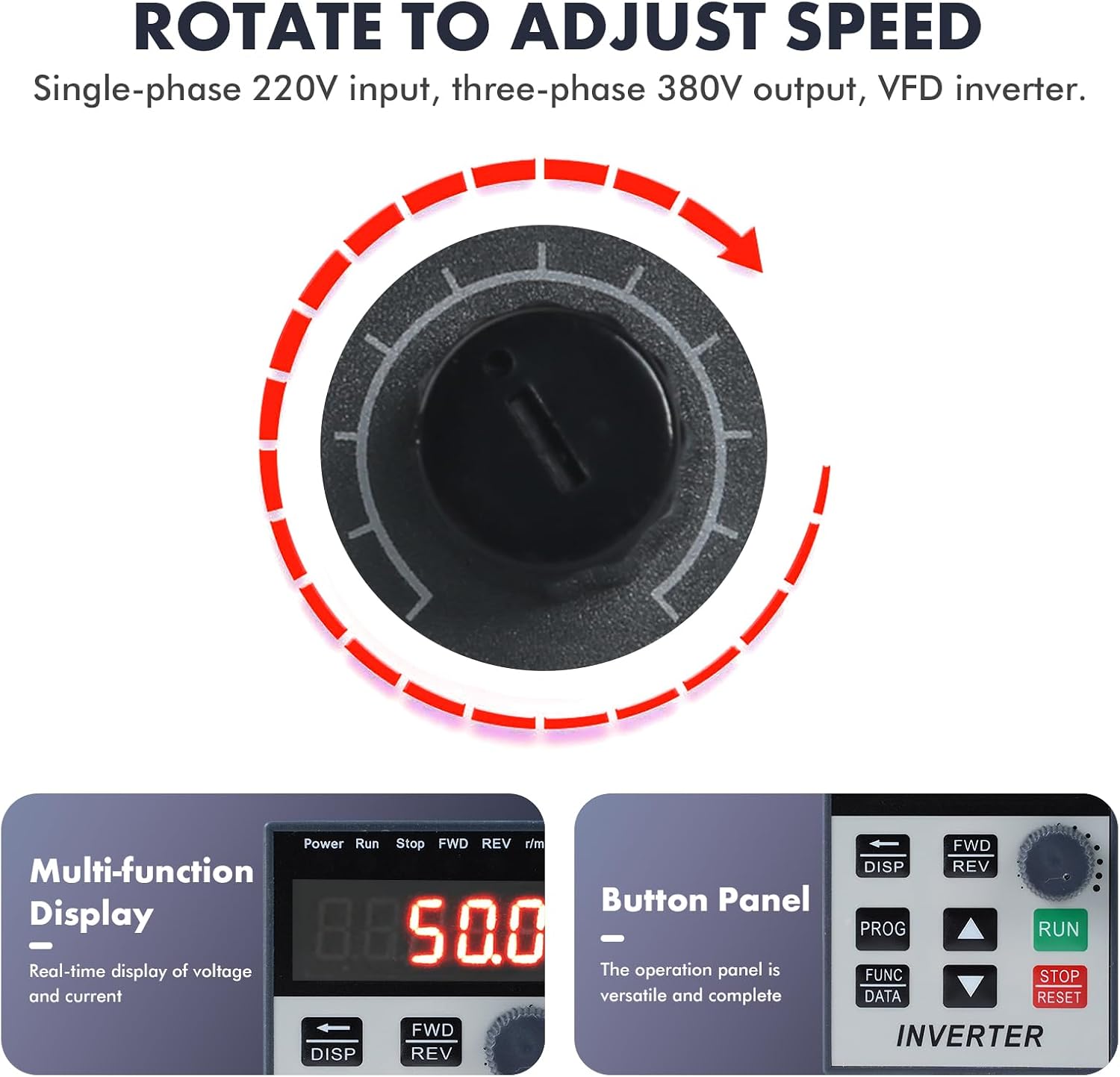
Figure 6: Rotate to Adjust Speed. This image highlights the speed knob, indicating that rotating it allows for adjustment of the motor's operating speed. The display shows real-time voltage and current.
- Ensure the VFD is powered on and the motor is in a stopped state or running at a safe speed.
- Rotate the Speed Knob clockwise to increase the motor speed or counter-clockwise to decrease it.
- Observe the monitor display for real-time feedback on the adjusted frequency/speed.
- Press the RUN key to start the motor at the set speed, or the STOP/RESET key to stop it.
5. Maintenance
Regular maintenance ensures the longevity and optimal performance of your VFD.
- Cleaning: Periodically clean the exterior of the VFD with a soft, dry cloth. Do not use liquid cleaners or solvents. Ensure ventilation openings are free from dust and debris.
- Ventilation: Ensure the VFD's cooling fan and heat sink are not obstructed. Proper airflow is crucial for heat dissipation. The thickened heat sink and integrated single fan are designed for efficient cooling.
- Connections: Periodically check all wiring connections for tightness. Loose connections can lead to poor performance or damage.
- Environment: Maintain the operating environment within specified temperature and humidity ranges. Avoid exposure to corrosive substances.
6. Troubleshooting
If you encounter issues with your VFD, consider the following basic troubleshooting steps. For complex problems, consult a qualified technician.
- No Power: Check the input power supply and all power connections. Ensure the VFD is properly connected to a single-phase 220V source.
- Motor Not Running: Verify that the RUN key has been pressed. Check motor connections and ensure the motor is not overloaded. Review the display for any error codes.
- Incorrect Speed: Ensure the speed knob is adjusted correctly. Check if any speed limits are set in the VFD's parameters (refer to the full programming manual if available).
- Overload/Overheat Error: Reduce the motor load or check for obstructions. Ensure adequate ventilation around the VFD.
- Unusual Noise: Check for loose connections or mechanical issues with the motor or VFD. The VFD is designed for low noise operation, so unusual sounds may indicate a problem.
The VFD's display may show error codes. Refer to the detailed programming manual for a list of error codes and their corresponding solutions.
7. Specifications
| Parameter | Value |
|---|---|
| Product Series | AT4-1500X |
| Material | ABS plastic shell |
| Rated Input Voltage | Single-phase 220V |
| Rated Output Voltage | Three-phase 380V |
| Rated Current | 8A |
| Rated Power | 1.5KW |
| Factory Frequency | 50/60Hz |
| Control Mode | V/F open loop |
| Output Voltage Mode | PWM control |
| Power Supply Voltage | Low voltage |
| Item Weight | 3.26 pounds (1480 Grams) |
| Package Dimensions | 8.46 x 7.68 x 6.42 inches |
8. Applications
The Jadeshay AT4-1500X VFD is suitable for a wide range of industrial applications requiring motor speed control, including but not limited to:

Figure 7: Typical Applications. This image displays various equipment types that can benefit from the VFD's speed control, including motors, water pumps, fans, general pumps, conveyor belts, and compressors.
- Fans
- Pumps (Water Pumps, General Pumps)
- CNC Machine Tools
- Ball Mills
- Injection Moulding Machines
- Crushers
- Conveyor Belts
- Textile Equipment
- Compressors
9. Warranty and Support
For information regarding warranty coverage, technical support, or service, please refer to the documentation provided at the time of purchase or contact your vendor. You may also visit the official Jadeshay website for further assistance.