
1. Introduction
Thank you for choosing the RHM S8 Karaoke Machine. This manual provides essential information for the safe and efficient operation of your device. Please read it thoroughly before use and retain it for future reference.
2. Product Overview
Key Features
- Superior Sound Quality: Handcrafted wooden cabinet with dual 5.25-inch subwoofers and 1.5-inch tweeters for rich, deep, and clear audio.
- Advanced Vocal Control: Independent Treble, Mid, and Bass knobs, plus Pro-Echo for professional-grade vocal adjustments.
- Wireless Microphones: Includes two wireless microphones for instant duets. Supports up to three microphones (one wired microphone input available).
- Extended Playtime: Up to 8 hours of cordless operation on a single charge, ideal for indoor and outdoor use.
- True Wireless Stereo (TWS): Connect two S8 units for an immersive stereo sound experience.
- Multiple Connectivity Options: Supports Bluetooth 5.0, AUX-in, USB, TF Card, and PC connections.
- Portable Design: Features a heavy-duty shoulder strap for easy transport and a vintage brown leather finish.
What's in the Box
- RHM S8 Karaoke Machine
- 2 Wireless Microphones
- Power Adapter
- Audio Cable
- User Manual

Image: Contents of the RHM S8 Karaoke Machine package, including the speaker, two wireless microphones, power adapter, audio cable, and user manual.
3. Setup
3.1 Initial Charging
Before first use, fully charge the karaoke machine using the provided power adapter. The battery indicator on the control panel will show charging status.
3.2 Power On/Off
Locate the ON/OFF toggle switch on the control panel. Flip the switch to 'ON' to power on the device. Flip to 'OFF' to power off.
3.3 Wireless Microphone Pairing
The two wireless microphones included are pre-paired with the S8 karaoke machine. Simply power on the microphones, and they should automatically connect. If re-pairing is needed, refer to the microphone's individual instructions.

Image: Close-up of the RHM S8 wireless microphones, showing the LED display screen and mental mesh cover.
4. Operating Instructions
4.1 Switch Input Mode
The RHM S8 supports four input modes: Bluetooth, AUX, USB, and TF Card. Press the 'MODE/TWS' button on the control panel to cycle through the available input modes. The corresponding indicator light will illuminate.

Image: Detailed view of the RHM S8 control panel, highlighting the 'MODE/TWS' button and various adjustment knobs.
4.2 Bluetooth Function
- Switch the power to ON. The device will automatically enter Bluetooth mode, and the Bluetooth indicator will light up and flash.
- On your device (smartphone, tablet, laptop, TV), search for "S-8" in the Bluetooth settings and connect. The Bluetooth indicator light will stop flashing after successful pairing.
- Play music on your device.
- To disconnect or change to another Bluetooth device, long press the 'MODE/TWS' button for 3 seconds.

Image: The RHM S8 Karaoke Machine connected via Bluetooth to a smartphone, illustrating wireless connectivity.
4.3 True Wireless Stereo (TWS) Pairing
To connect two RHM S8 units for TWS stereo sound:
- Ensure both S8 units are powered on and in Bluetooth mode.
- On one S8 unit (this will be the master speaker), long press the 'MODE/TWS' button until you hear a pairing tone.
- The two speakers will automatically connect. Once connected, the master speaker's Bluetooth indicator will flash slowly, and the slave speaker's indicator will be solid.
- Connect your device to the master S8 unit via Bluetooth as described in section 4.2.

Image: Two RHM S8 Karaoke Machines wirelessly connected for True Wireless Stereo (TWS) mode, enhancing sound distribution.
4.4 AUX Function
Insert the 3.5mm audio cable into the "AUX IN" port on the rear panel of the speaker. The AUX indicator will light up. Connect the other end of the cable to your audio device. Play music on your device.
4.5 USB Function
Insert a USB flash drive (up to 32GB, FAT32 format) into the "USB" port on the rear panel. The device will automatically switch to USB mode, and the USB indicator will light up. Music files (MP3 format) will play automatically.
4.6 TF Card Function
Insert a TF card (up to 32GB, FAT32 format) into the "TF Card" slot on the rear panel. The device will automatically switch to TF mode, and the TF indicator will light up. Music files (MP3 format) will play automatically.
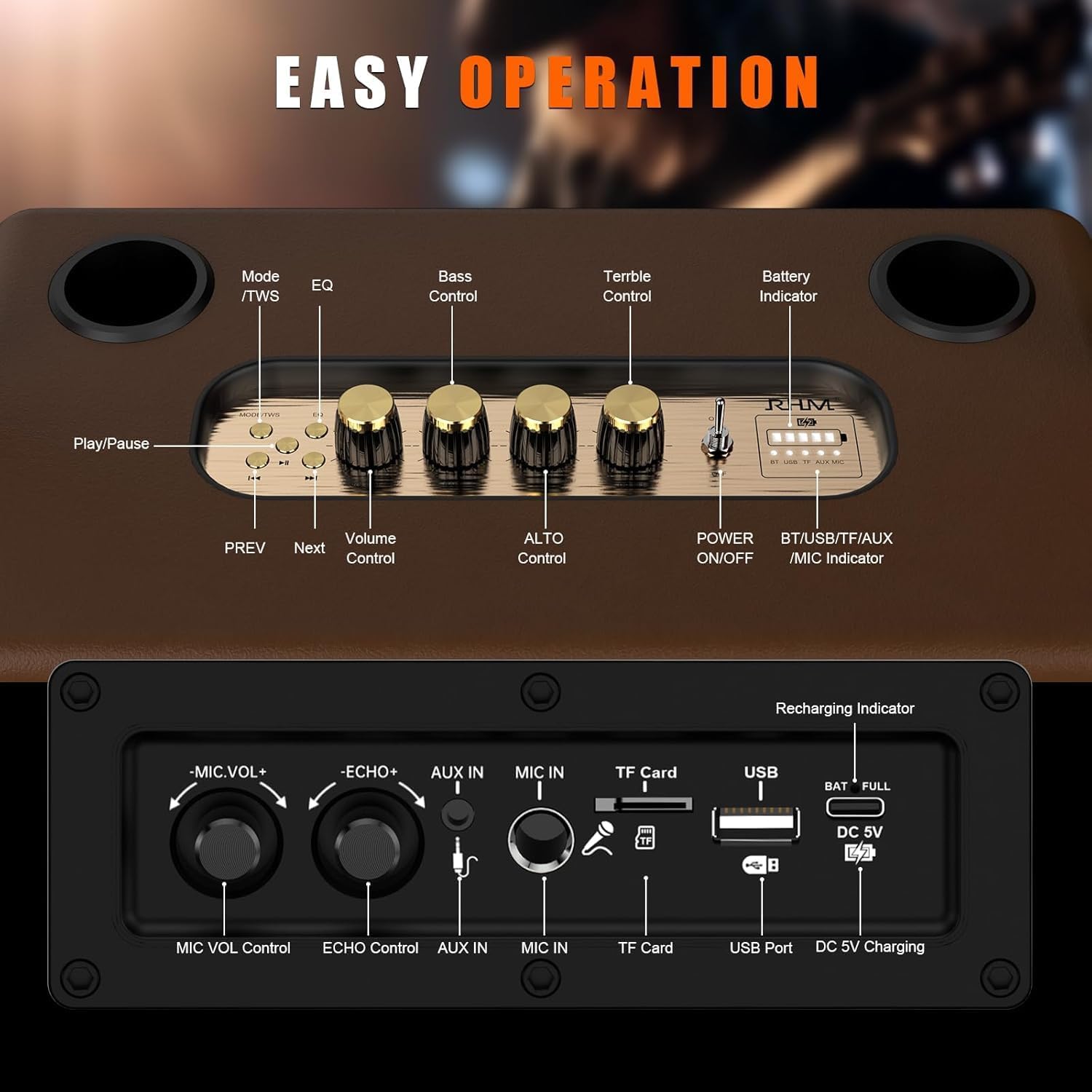
Image: The rear panel of the RHM S8 Karaoke Machine, showing ports for AUX IN, USB, TF Card, and DC 5V charging.
4.7 Microphone Usage and Sound Adjustment
Use the 'MIC VOL Control' knob on the rear panel to adjust the microphone volume. The 'ECHO Control' knob adjusts the echo effect for vocals. On the main control panel, use the 'VOLUME' knob for overall speaker volume. The 'BASS', 'ALTO', and 'TREBLE' knobs allow you to fine-tune the sound output to your preference.
Image: A comprehensive view of the RHM S8 Karaoke Machine's top control panel with volume, bass, alto, and treble knobs, and the rear panel with microphone volume and echo controls, along with various input ports.
5. Maintenance
- Clean the device with a soft, dry cloth. Do not use abrasive cleaners or solvents.
- Keep the device away from water, moisture, and direct heat sources.
- Store the device in a cool, dry place when not in use.
- To prolong battery life, charge the speaker at least once every 30-45 days, even if not in regular use.
6. Troubleshooting
| Problem | Possible Cause | Solution |
|---|---|---|
| No power | Battery is depleted; Power switch is OFF. | Charge the device; Flip the power switch to ON. |
| No sound | Volume is too low; Incorrect input mode; Device not connected properly. | Increase volume; Switch to correct input mode (Bluetooth, AUX, USB, TF); Reconnect device. |
| Microphone not working | Microphone battery low; Microphone not paired; Microphone volume too low. | Replace microphone batteries; Re-pair microphones; Increase MIC VOL. |
| Bluetooth pairing failed | Device too far; Bluetooth not enabled on source device; Speaker already connected to another device. | Ensure devices are close; Enable Bluetooth on source device; Long press 'MODE/TWS' to disconnect previous Bluetooth connection. |
| TWS pairing failed | Incorrect pairing procedure; Speakers too far apart. | Follow TWS pairing steps carefully; Ensure speakers are within range. |
7. Specifications
| Feature | Detail |
|---|---|
| Model Number | S8 |
| Brand | RHM |
| Item Weight | 13.87 pounds |
| Product Dimensions | 14.96 x 9.84 x 8.07 inches |
| Compatible Devices | Guitar, MP3 Player, Microphone, Smartphone, Tablet |
| Connector Type | 3.5 mm Jack/USB |
| Speaker Count | 1 (with TWS for stereo pairing) |
| Battery Type | Lithium Ion (3 x 12V batteries included) |
| Power Source | Battery Powered |
| Special Feature | Support 3 mics |
| Color | Gold |
| Recommended Uses | Home parties, indoor and outdoor entertainment |

Image: An exploded view of the RHM S8 speaker, illustrating its internal components including dual 5.25-inch subwoofers and 1.5-inch tweeters, emphasizing its 50W powerful stereo sound and internal wooden structure.
8. Warranty and Support
For warranty information and technical support, please refer to the warranty card included in your package or visit the official RHM website. Keep your purchase receipt as proof of purchase for any warranty claims.


